
- NewspaperUsing the Theme Translations with WPML
- NewspaperHow to Install Newspaper via FTP
- NewspaperHow to Install Newspaper via WordPress
 Anamaria
 Hello,
This issue is strange. I don’t think that this issue is related to the WPML plugin.
Also, what version of WordPress, theme, WPML, and PHP do you have?
You can check our documentation here https://forum.tagdiv.com/using-theme-translations-together-wpml/
You need to translate the English (original language) the template for each language in part – https://i.imgur.com/CDmeHCf.png you should have them for each language cloud template – https://i.imgur.com/4agmUtg.png
A much simpler and faster alternative is to duplicate the cloud template you want to use in another language, edit it and select the desired language – https://i.imgur.com/z1CqgBo.png (edit the name) – https://i.imgur.com/dPX8ROs.png – https://i.imgur.com/Lc81IgP.png This method needs to be used to translate all cloud templates.
The pages are created with tagDiv Composer which is a page builder, when WPML is used it cannot translate everything that was built with the page builder and must be edited for each language separately. Please open the page in the editor and click on translate – https://i.imgur.com/TXH6y1c.png. After, if you duplicate the template, you can edit it to change the logo, menu, and whatever you want.
When you make the corrections, make sure you are on the page with the language you are editing, and if you use the cache, or object cache, please clear it.
Please check this topic https://forum.tagdiv.com/topic/missing-strings-on-wpml/
Thank you!
 Yohanndev83
Hello,
I am experiencing an issue using the builder when creating pages in English.
Historically, the site has used www. and en. and has been functioning with WPML for over 10 years.
Regarding the .htaccess file and server settings (SOP/CORS, etc.), everything was functional until the introduction of the new theme with the td-composer builder.
Here is the first error that blocks the entire builder:
Uncaught SecurityError: Failed to read a named property 'tdcSidebar' from 'Window': Blocked a frame with origin "https://en.foobar.com" from accessing a cross-origin frame.

    at Object.resize (tagdiv_theme.min.js?ver=12.6.6:227:443)

    at tagdiv_theme.min.js?ver=12.6.6:230:134

    at dispatch (jquery.min.js?ver=3.7.1:2:40035)

    at jquery.min.js?ver=3.7.1:2:38006
I am in a difficult situation because, while trying to find a solution, I am compromising the security settings that were previously working fine.
Have you encountered this problem before? How can it be resolved?
Did you implement additional security measures in the plugin that are preventing all my attempts from working?
Thank you for your assistance.
Best regards,
Yohann
 Bettina
 Hello!
I recommend GTranslate plugin because it is a fast solution. Another solution could be WPML, but it takes a little more time to implement: https://forum.tagdiv.com/using-theme-translations-together-wpml/
I do not recommend using the Event Calendar because the theme conflicts. Also please note that we don’t offer support for untested plugins. For the moment, we do not have an event plugin tested with our theme, but you can try one of those: https://bloggingwizard.com/best-wordpress-event-calendar-plugins/
I recommend you to build CPTs.
Full documentation here:
– https://forum.tagdiv.com/introduction-cpt-acf-newspaper-theme/
– https://forum.tagdiv.com/custom-post-type-support/
A shortcode can be inserted by using the element called “Column text” or “Text with title”. For example, in the step3 here: https://forum.tagdiv.com/add-cryptocurrency-price-ticker-widget/
“Column text” and “text with title” elements have a button called “edit content” and if you click on that button, the WP Editor will open, and you can add some text/code/shortcode there. Close the WP Editor from X, save the changes from Composer and view the page to see the changes.
You can use a plugin and add the shortcode how I mentioned above. Or a script can be added with the raw HTML in the cloud templates. For example, https://www.w3schools.com/howto/howto_js_countdown.asp, add this code to a raw HTML element.
Thank you!
Bettina Hello!
Unfortunately, it is like that with WPML. You have to translate and create the templates manually for each language. Try to use other faster methods from the links above.
Thank you!
 Hamet
Hamet Hi, I followed your explanation link for WPML, but it still doesn’t work. I’ve activated everything but tagdiv elements like titles, text blocks, buttons are not detected and then translated, I had to do it manually for the 2 languages and it’s taking forever. Please help me solve this problem.
Yohanndev83Hi, I have finished preparing the template on a duplicated development site: dev.foobar.com.
Now, I am looking to import everything ( theme/page/template) to http://www.foobar.com.
I have tried the following steps:
Using the import/export feature from the theme control panel.
Using WordPress import/export on “Cloud Templates”.
Using WordPress import/export on Pages (selecting a specific date to only include the latest changes).
It’s not working. The issue seems to come from WPML because:
The links between translated homepage and mobile homepage are missing.
Some modules are also affected.
Additionally, I need to manually reassign some header templates to make them “global” again.
I also tried exporting the SQL database by extracting all wp_posts and wp_postmeta related to [“page”, “tdb_templates”]. I also considered the IDs generated in wp_icl_translations.
However, this made things even worse!
I need to deploy to production before the end of the year, and this is the first time I am struggling so much with this theme. This is not my first time dealing with WPML either.
Can you help me?
 Calin
Calin Hi,
That is indeed a message from the theme (is referring to this part -> https://i.imgur.com/0HUaXVJ.png – https://forum.tagdiv.com/using-theme-translations-together-wpml/). Unfortunately, the only way to remove it is to comment out the code you found.
Thank you for your understanding!
 kappe79
Hi,
since I installed WPML Plugin in admin panel I get the following notice:
‘WPML Plugin is active! When the plugin is active, the *.po – *.mo files are used instead of Theme Panel Translation.’
https://www.seedstm.com/repository/notice.jpg
It’s impossible to dismiss it. At first I thought to a problem from WPML plugin. but now I noticed the following function from the file:
/wp-content/plugins/td-composer/legacy/common/wp_booster/td_translate.php
(Newsmag 1.5 – line 25)
If I comment the function, the notice disappear but I guess it’s not the best solution.
What do you think about it?
Is there something wrong in Tag-div plugin?
Thank you,
Enzo
 andreibalici
 I followed the documentation to the letter, however this doesn’t appear to be working.
First of all, there is no option on the Cloud Templates page to add a translation version, like the screenshots here: https://forum.tagdiv.com/using-theme-translations-together-wpml/ (3rd screenshot is not what I see).
I managed to create different versions of Cloud Templates in different languages by duplicating them, and then moving them to their respective langugage.
For example, I have a “Romanian Header” and an “English Header”. Nevertheless, I cannot set the English Header to be global when the site is in english. If I set the Engligh Header to be global, then the Romanian version will have the Enlish header and vice versa.
Bettina andreibaliciI am trying to translate each and every one of my Cloud Templates (including Header/Footer templates).
These are the steps I am following:
You should be able to follow this documentation to have different images per header. Make sure you have followed these steps:
1. I have set Cloud Templates as translatable in WPML -> Settings -> Post Types
2. I translated the Template by copying all fields, as explained in the documentation.
3. I edited the translation using tagDiv.
4. Once the translated template is saved, I go to theme settings, select a secondary language using the admin language bar at the top, and select your translated header.
However, doing this results in the header being changed in all languages. It doesn’t seem to preserve different headers for different languages.
the documentation link I shared contains some helpful screenshots.
Bettina Hello!
All about translations, check these guides:
– https://forum.tagdiv.com/loading-translations/
– https://forum.tagdiv.com/customize-a-translation/
– https://forum.tagdiv.com/using-theme-translations-together-wpml/
You can also use the gTranslate plugin.
Thank you!
HametHi, please help me with WPML translations, how can I translate my pages?
Anamaria Hello,
1. You need to edit the page assigned in the modal popup and set the logo there.
2. The author and date can be globally enabled/disable using the theme panel settings for blocks/module https://i.imgur.com/lY6CY9e.png
3. You need to translate the English (original language) the template for each language in part – https://i.imgur.com/CDmeHCf.png you should have them for each language cloud template – https://i.imgur.com/4agmUtg.png
A much simpler and faster alternative is to duplicate the cloud template you want to use in another language, edit it and select the desired language – https://i.imgur.com/z1CqgBo.png (edit the name) – https://i.imgur.com/dPX8ROs.png – https://i.imgur.com/Lc81IgP.png This method needs to be used to translate all cloud templates.
The pages are created with tagDiv Composer which is a page builder, when WPML is used it cannot translate everything that was built with the page builder and must be edited for each language separately. Please open the page in the editor and click on translate – https://i.imgur.com/TXH6y1c.png. After, if you duplicate the template, you can edit it to change the logo, menu, and whatever you want.
When you make the corrections, make sure you are on the page with the language you are editing, and if you use the cache, or object cache, please clear it.
Please check this topic https://forum.tagdiv.com/topic/missing-strings-on-wpml/
Thank you!
 diderino
Hi,
how to add the site logo (image 1)
how to hide the author on the entire site (image 2)
the translation plugin (WPML paid version) is not working


 Anamaria
 ello,
We recommend WPML plugin for translations: https://forum.tagdiv.com/using-theme-translations-together-wpml/
You need to translate the English (original language) the template for each language in part – https://i.imgur.com/CDmeHCf.png you should have them for each language cloud template – https://i.imgur.com/4agmUtg.png
A much simpler and faster alternative is to duplicate the cloud template you want to use in another language, edit it and select the desired language – https://i.imgur.com/z1CqgBo.png (edit the name) – https://i.imgur.com/dPX8ROs.png – https://i.imgur.com/Lc81IgP.png This method needs to be used to translate all cloud templates.
The pages are created with tagDiv Composer which is a page builder, when WPML is used it cannot translate everything that was built with the page builder and must be edited for each language separately. Please open the page in the editor and click on translate – https://i.imgur.com/TXH6y1c.png. After, if you duplicate the template, you can edit it to change the logo, menu, and whatever you want.
When you make the corrections, make sure you are on the page with the language you are editing, and if you use the cache, or object cache, please clear it.
Please check this topic https://forum.tagdiv.com/topic/missing-strings-on-wpml/
Thank you!
 lorandd
Hello,
I’ve configured WPML for multilanguage support as I saw it in the documentation that this is supported in the tagDiv themes.
I’ve configured EN(default) and RO languages
the EN version is accessible with the direct domain and the RO version with domain/ro
All the posts/pages are working ok so if I’m on the RO version and click a link the correct RO version of the link is loaded, but this doesn’t work correctly for the pages like myacocunt, register,etc
so if I’m on the RO language and want to go to my account page it goes to the my account of the EN version
I would have expected to go to domain/ro/my-account instead of domain/my-account
Is this a bug or a configuration problem?
Can you please advise?
Thanks,
Lorand
 kibiribi
 Thanks for your comment – it helps for post – https://prostobzor.com/uk/garmin-8-braclety-dovgyna/
But in this case, I need to fix the menu – acc. to this page –
But it doesn’t work for Template menu header
I’ve added lang. switcher to menu – it doesnt show in the header –
screenshot – 
Do you have Tagdiv step-by-step instruction how to add WPML switcher to the Header menu?
Anamaria Hello,
You can add the shortcode with the switcher https://wpml.org/documentation/support/wpml-coding-api/shortcodes/ -> https://wpml.org/documentation/getting-started-guide/language-setup/language-switcher-options/
Thank you!
kibiribiHi, colleagues!
Could you advise how to add WPML language switcher to the NewsPaper Template?
Do you have step-by-step manual how to do it?
I’ve got 3 languages in WPML.
site – https://prostobzor.com/uk/
I’m talking about this header layout – 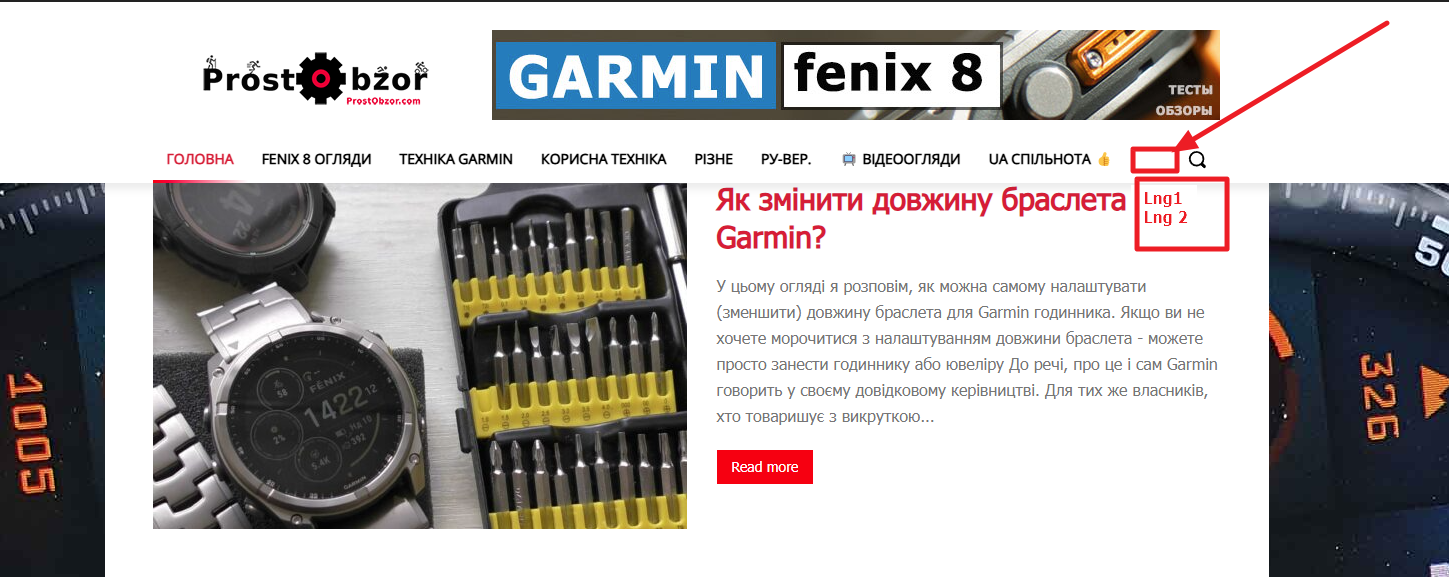
 alexieb
 Hello,
We have all of these requirements.
I feel there’s an issue with WPML accordingly to what we were doing when the website crashed.
alexiebHello,
This message appeared after I edited our headers templates (duplicate the template in default languages, rename, edit, duplicate for translation in 3 additional languages, translate in all languages, save) :
”
Internal Server Error
The server encountered an internal error or misconfiguration and was unable to complete your request.
Please contact the server administrator at [MY EMAIL ADDRESS] to inform them of the time this error occurred, and the actions you performed just before this error.
More information about this error may be available in the server error log.
Additionally, a 500 Internal Server Error error was encountered while trying to use an ErrorDocument to handle the request.
”
This is the second time this happen while editing and mostly duplicating and translating our templates. The first time it fixed itself after like 2 days of simply waiting (we can’t do anything on server). But the fact that it happened a second time is VERY annoying.
How can we fix that? Can it come from WPML even if we followed the procedure you share to translate templates?
Best,
Anamaria Hello,
You need to have a cloud template for each language.
Please try the follow steps:
You need to translate the English (original language) the template for each language in part – https://i.imgur.com/CDmeHCf.png you should have them for each language cloud template – https://i.imgur.com/4agmUtg.png
A much simpler and faster alternative is to duplicate the cloud template you want to use in another language, edit it and select the desired language – https://i.imgur.com/z1CqgBo.png (edit the name) – https://i.imgur.com/dPX8ROs.png – https://i.imgur.com/Lc81IgP.png This method needs to be used to translate all cloud templates.
The pages are created with tagDiv Composer which is a page builder, when WPML is used it cannot translate everything that was built with the page builder and must be edited for each language separately. Please open the page in the editor and click on translate – https://i.imgur.com/TXH6y1c.png. After, if you duplicate the template, you can edit it to change the logo, menu, and whatever you want.
When you make the corrections, make sure you are on the page with the language you are editing, and if you use the cache, or object cache, please clear it.
Please check this topic https://forum.tagdiv.com/topic/missing-strings-on-wpml/
Thank you!
loranddHello,
I have configured my site with newspaper theme and configured menus and everything was working ok. The other day I have enabled WPML plugin to have multilanguage support. Now I wanted to edit something in the header and I noticed that when editing the homepage with tagdiv composer the header looks strange and I can’t edit it anymore as I have this message:
Can you advise why this has change and what can I do to revert or see the same header in the editor as on the page. The footer is also gone in edit mode.
Thanks
alexieb Also, you mean that: Once I’ve duplicated all my templates, I can translate my articles “normally” like always with WPML? And so it works for all component like homepage, menu, category page etc.?
But how can you explain that by now there is this error message while we didn’t start translating anything? We simply set up WPML but didn’t start translations.



