
 Vlad S
 Hello !
Please make sure you upload the pictures in full size as you can see here: https://www.screencast.com/t/zDtp4DlEHuLe
Thank you !
Vlad S Hello !
You will have to upload the images in the sizes specific to the blocks. Some blocks have square formats so you will have to edit your images to be the right sizes. Also please make sure you upload the pictures in full size as you can see here: https://www.screencast.com/t/zDtp4DlEHuLe
Thank you !
Vlad S Hello !
As you can see here this white space comes from your google ads iframe: https://www.screencast.com/t/r42CGMO9iF7
We can offer a css to hide it if you want but we suggest fixing it since the ads may be a source of income for any website.
Thank you !
Vlad S Hello !
First please make sure that you have installed the Newspaper theme properly. You can find all the steps here: https://forum.tagdiv.com/install-via-wordpress/
A common issue for that error is due to the Newspaper Theme requirements not being completed. Here is a guide wich will help you setup your wordpress in order to work perfectly with our theme: https://forum.tagdiv.com/requirements-for-newspaper/
Let me know if this was helpfull !
Thank you !
Vlad S Hello !
You can activate the Newspaper theme on your new domain after you deactivate the actual one. You also can use the Import / Export option from Theme Panel: https://forum.tagdiv.com/import-export-theme-settings/
Thank you !
Vlad S Hello !
Please contact us via email at contact@tagdiv.com and provide admin login, as well as cPanel or FTP if possible. We will take a look. Include a link to this topic in the email. Also please leave the mailchimp in.
Thank you !
Vlad S Hello !
That option does not comes from Newspaper Theme.
Unfortunately the calendars plugin have not been tested with Newspaper Theme and we cannot offer support for it due to our support policy: https://forum.tagdiv.com/newspaper-theme-support/
We are sorry for the inconvenience !
Thank you !
Vlad S Hello !
The Single post templates are from Posts For categories you will have to add a Category Template from the cloud library. Please find out more about it here: https://forum.tagdiv.com/cloud-library-category-templates/
Thank you !
Vlad S Hello !
In order to remove blocks on your page you have to edit the homepage using the tagDiv Composer, after that simply click and drag the blocks / elements you want to the delete button as you can see here: https://www.screencast.com/t/8n4UK0YDy
Thank you !
Vlad S Hello !
We recommend using only one page builder. Using 2 or more may cause conflicts. If you are trying to use 2 plugins we do recommend having a backup of your website first.
We are sorry for the inconvenience !
Thank you !
Vlad S Hello !
We recommend using only one page builder. Using 2 or more may cause conflicts. If you are trying to use 2 plugins we do recommend having a backup of your website first.
We are sorry for the inconvenience !
Thank you !
Vlad S Hello !
In order to change the sticky header you will have to select it from here in the tagDiv Composer: https://www.screencast.com/t/NDzmin4utU4b
Thank you !
Vlad S Hello !
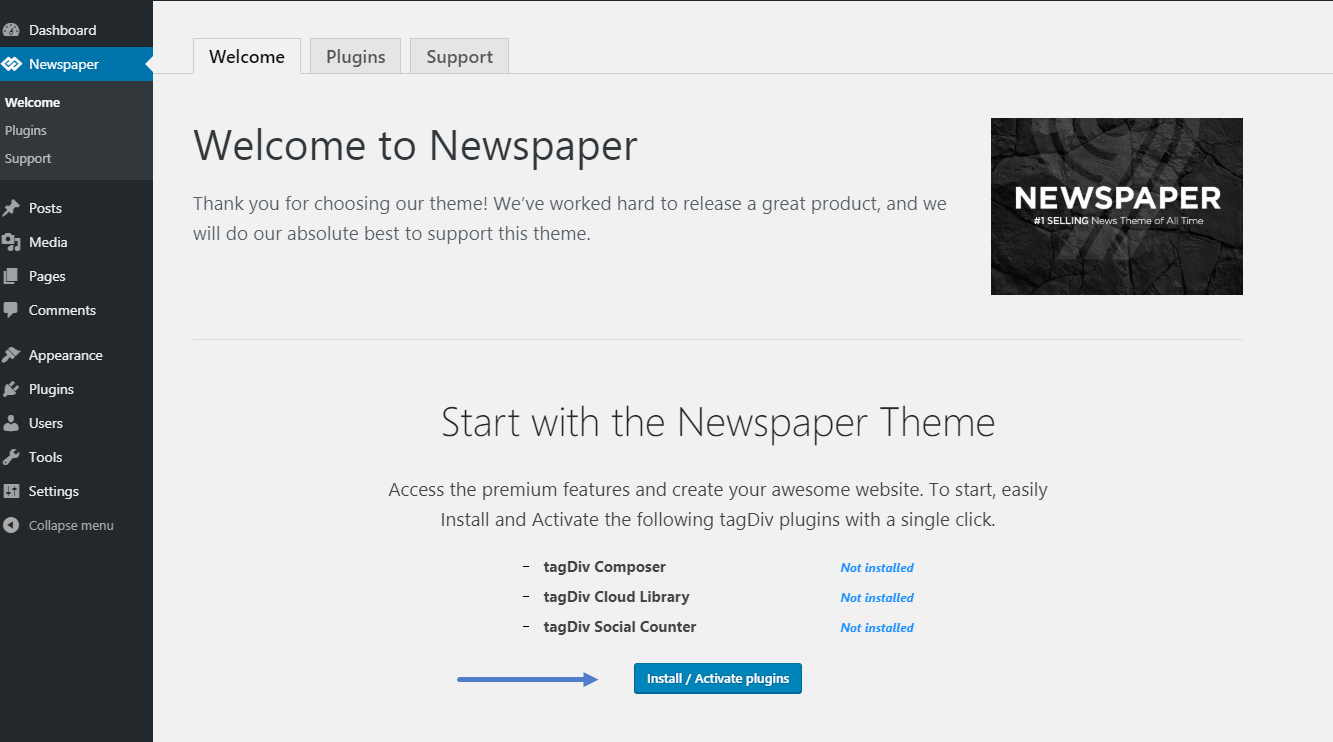
The only required plugins to have a perfect and functional Newspaper theme are the ones on your welcome screen:
Thank you !
Vlad S Hello !
Please contact us via email at contact@tagdiv.com and provide admin login, as well as cPanel or FTP if possible. We will take a look. Include a link to this topic in the email. Also please leave the mailchimp in.
Thank you !
Vlad S Hello !
Please contact us via email at contact@tagdiv.com and provide admin login, as well as cPanel or FTP if possible. We will take a look. Include a link to this topic in the email. Also please leave the mailchimp in.
Thank you !
Vlad S Hello !
This is up to you, the ideal would be a medium – normal size like (800×600) or something close so you could achieve page speed and also have quality on your page.
Also please make sure you upload the image in the fullsize: https://www.screencast.com/t/zDtp4DlEHuLe
Thank you !
Vlad S Hello !
I’m not sure I quite understand what are you saying. You want to have Demos in Cloud library ?
Thank you !
Vlad S Hello !
Please make sure that you do not have a plugin conflict, please deactivate ALL plugins except tagDiv Composer, also if you are using child theme or cache plugin, deactivate them, clear all cache and try again.
Thank you !
Vlad S Hello !
The designs do not match because you are using the mobile theme. The Mobile theme was specially designed for optimization on mobile devices. Unfortunately on mobile theme you cannot do much changes of design. If you want to have the same design as on desktop mode you can achieve that by simply disabling the mobile theme.
Unfortunately you cannot have the design you want. If you disable the mobile theme you will have the same layout as on desktop.
Find out more about the Mobile theme here: https://forum.tagdiv.com/the-mobile-theme/
Thank you !
Vlad S Hello !
I have inspected your menu and everything looks in order on all browsers. Can you tell me what are the exact elements that are missing: https://www.screencast.com/t/Iy3wPF1lYP
Thank you !
Vlad S Hello !
In order to edit your column and row you will have to use the tagDiv Composer and hover over the block and you will see this option: https://www.screencast.com/t/DzpMJZlC After that you can see this CSS options.
Thank you !
Vlad S Hello !
Please contact us via email at contact@tagdiv.com and provide admin login, as well as cPanel or FTP if possible. We will take a look. Include a link to this topic in the email. Also please leave the mailchimp in.
Thank you !
Vlad S Hello !
Please provide a link to your website so we can inspect !
Thank you !
Vlad S Hello !
We are sorry for your inconvenience !
It is mandatory to delete all what was left from the older tagdiv theme and plugin version before intalling this update. Overwriting the files would cause a lot of problems and maybe you’ve missed something while deleting the old files. Have you checked the plugins to be deleted too ? If you are certain that you have installed the updates correctly by deleting all of the older versions and made a clean install from scratch please contact us via email at contact@tagdiv.com and provide admin login, as well as cPanel or FTP if possible. We will take a look. Include a link to this topic in the email.
Also take a look at our documentation about installing the theme and plugins: https://tagdiv.com/how-to-install-plugins-and-update-plugins/ ; https://tagdiv.com/how-to-install-newspaper-theme/
Thank you !
Vlad S Hello !
Please try insert it with a Text with title element and see what the result is.
Let me know if this was helpfull !
Thank you !
