
- ApiPractical example – How to add a new Block and Module
- Apitd_api_top_bar_template::delete
- Apitd_api_top_bar_template::update_key
- Apitd_api_top_bar_template::update
- Apitd_api_top_bar_template::add
- Apitd_api_single_template::delete
- Apitd_api_single_template::update_key
- Apitd_api_single_template::update
- Apitd_api_single_template::add
- Apitd_api_footer_template::delete
- Apitd_api_footer_template::update_key
- Apitd_api_footer_template::update
- Apitd_api_footer_template::add
- Apitd_api_smart_list::delete
- Apitd_api_smart_list::update_key
- Apitd_api_smart_list::update
- Apitd_api_smart_list::add
- Apitd_api_thumb::delete
- Apitd_api_thumb::update_key
- Apitd_api_thumb::update
 shamim_arafat_rocky
Hi, I want to hide specific category name (i’e “Lead News, Top News etc) from “Single Post Categories” element/content.
For example; I can choose multiple categories for a news. suppose I’ve chosen, Top News & International for a post. I want to show only “International” (category name) not the “Top News” (Category name). (in single post template). How can I do that?
 nwnuyhs
 Thank you very much for your patience, when I deactivate the Mobile Theme plugin, my mobile site works fine.
The ways you recommended is a bit complicated, so I decided not to use AMP for now.
Thank you very much
 Anamaria
 Hello,
The background image can be blurry when the image is smaller and need to be stretched or when you have set a smaller thumb for that image, make sure that you set the full size for the image that you have set as background, for example-> https://i.imgur.com/OknhKDS.jpg
Thank you!
 Bettina
 Hello @mulcas!
Yes, that’s true, it’s frustrating. We hope to fix this as soon as possible, so this feature can be very helpful.
For example, if you have the same template for all your categories, then you need to modify the font in page title just once, so the changes will be applied on all your categories.
Thank you for understanding!
 Destinationtheworld
I have changed to a prebuilt website, the Travel Memories PRO. I’m currently trying to set up the menu and only some categories are working.
EG: Destinations
– Asia
– Middle East
– Europe
Then Europe is not working while the other two works and shows the related articles.
Another example:
I tried another way:
Destinations
– country
– country
– country
Some of the countries are working while others are not.
I have checked all post settings, and they all look similar to me.
What can have gone wrong here?
Bettina Hello @stephanwhelan!
If you’ll use Mobile theme plugin, then you can not edit the pages with TagDiv Composer.
You have only some settings for this layout, which you can find in Theme panel -> Mobile Theme. The same thing for AMP plugin too. It comes with its own templates/design for page, post, category, etc so your current templates from the desktop theme will get converted to the mobile theme layout. For more details, please take a look here: https://forum.tagdiv.com/the-mobile-theme/ and https://forum.tagdiv.com/mobile-theme-introduction/
Thank you!
nwnuyhs Does anyone know how to fix it? As soon as I install the mobile theme plugin and AMP plugin, this problem appears
 cfasencio
Hi my site displays way different on mobile phones, i’ve used the tools available on wordpress and my theme to change it but it doesn’t work. When i try to preview how the site will look on mobile through my desktop (by using the responsiveness of my browser for example) it displays fine, as it should.
Here is how it displays mobile on my desktop (correct or intended way)
https://imgur.com/u6X4LwW
https://imgur.com/tvqeSRj
Here is how it looks on mobile phones (not correctly), nav menu is empty and colored wrong, header is grey, footer is on the wrong place, areas of the front page not showing.
https://imgur.com/nsY6O7S
https://imgur.com/j0gaWnl
 stephanwhelan
Hi there – is there any way to customise the Mobile Theme delivered via Plugin/AMP? Want to add a few elements if possible?
 knthdgd
Hi.
I use the archive cloud template for all my category-pages, which is great.
But is it possible to “customize” a single category page?
Example: I want to hide “author”-meta on all category pages except at one category page.
Is that possible?
Anamaria Hello,
Unfortunately, I didn’t see the error, but I found these topics with the same issue, please check them
-> https://wporg.ibadboy.net/support/topic/css-syntax-error-tag-style-amp-custom-disallowed-min-moz-device-pixel-ratio-2/
-> https://wordpress.org/support/topic/amp-css-syntax-error-in-tag-style-amp-custom-2/
Thank you!
 ltweb
ltwebI am receiving a CSS syntax error in tag ‘style amp-custom’ from Google Search Console:”min–moz-device-pixel-ratio” multimedia content function not allowed.
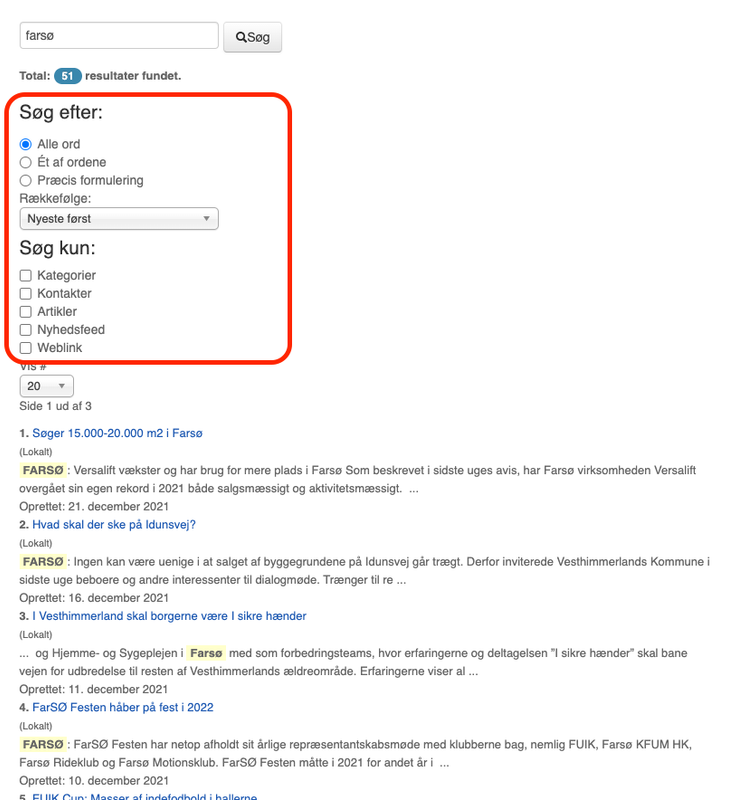
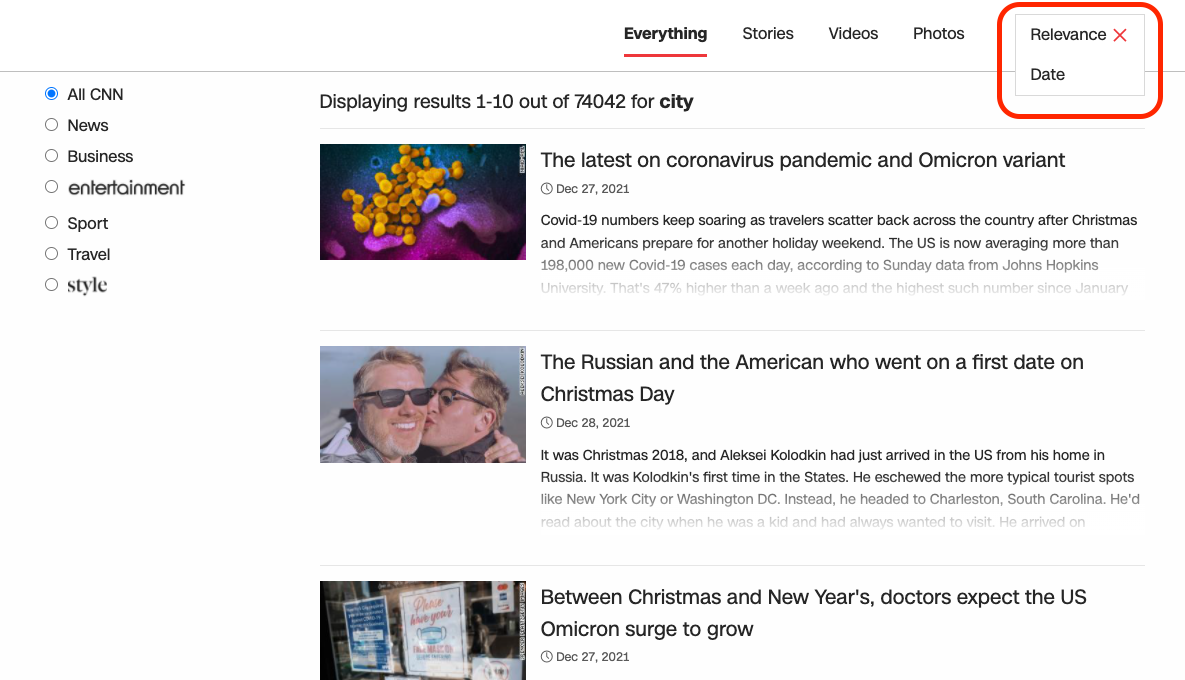
knthdgd Hi Bettina.
Thank you, but I think you misunderstood me.
I don’t mean setting af backend loop, but let the user themself choose a loop.
Here an example from my customers old website:
Here an example from CNN:
Anamaria Hello,
Please make sure you have the tagDiv plugins activated, like tagDiv Composer, tagDiv Cloud Library and clear all cache.
Please provide an example, of what you want to have, maybe this can be achieved with custom work.
Our theme doesn’t have an option to check the IP of the users to show different texts.
Thank you!
-
This reply was modified 4 years by Anamaria.
 obiuno
Please kindly advise should there are any known issues between the Newspaper Theme & Facet WP plugin or else please kindly advise how I could include a facet shortcode in one page on my News Portal
 tnec_in
 There are only three options available, welcome, plugin & support. Can’t find any option to downgrade it
Bettina Hello!
You can place a sidebar very easy using our builder the tagdiv Composer plugin.
For example, you can add the sidebar from tagdiv Composer. Steps:
1. Add 1 row
2. Split into 2 columns( 2/3 + 1/3 )
3. You can add whatever you want into the second column and consider it a sidebar.
Take a look here in this video for example where I build 6 columns: https://www.screencast.com/t/mZ2c5XamTFN
You can add different elements in the columns, build it after your own design and set a width on every row or inner row in percentage or pixels. Stretch row is for a fullwidth row, then you can use the stretch row like this: https://www.screencast.com/t/bsbB5P97A
We recommend to use cloud/PRO templates in order to have the possibility to edit them with the TagDiv Composer which contains a lot of functions and features, please check our tutorial here: https://forum.tagdiv.com/tagdiv-composer-tutorial/
Documentation here:
– https://forum.tagdiv.com/cloud-library-templates/
– https://forum.tagdiv.com/design-post-pages-using-cloud-library-templates/
– https://forum.tagdiv.com/cloud-library-category-templates/
Check also our video tutorials here: https://www.youtube.com/c/tagdivThemes/videos
Hope that helps you!
Thank you!
 thecitylane
Hi
I’m trying to update the primary category for some of my pages. For posts, I can see the section no problem, but I don’t get that section appearing on pages. How is this done? For example I want all of these pages to show “City Guides” as the primary category.
https://thecitylane.com/city-guides/
Thanks
Paul
 LPH
LPH TagDiv Composer just isn’t saving options in the Thumb section.
I’m going to call it a bug and not use the prebuilt theme.
As a suggestion, tagdiv composer should recognize a prebuilt theme and set all of the proper image options. I shouldn’t have to manually go in and try to save.
After all, when AMP is installed then all the proper image sizes are enabled in that same block settings area and they are enabled by default.
FWIW, in the options table, td_011_settings has the options for the thumbnail sizes.
Just a suggestion. But I’m done for now. It’s too frustrating. TagDiv Composer isn’t ready for usage. Worse, I’m stuck now because I upgraded to 11.4 and feel stupid not to have verified such an important task.
OK. I’ve ranted enough. Have a good day.
 sasel57
Hello, i am just reading on the recent update and i must say i amazed. it make redundant so many other plugins !!!! Before i update to the new version i would like to know one behavior: What happens when a user has more than one membership? Let’s say i limit the membership A to posts of category A. Membership B to posts of category B,Membership C to posts of category C and so on…
When a user has A & B memberships is he able to see posts from both categories?
If i put all posts of all categories in one page (via post loop or flex box) will posts of category C be hiddden so he sees only A and B?
How does it work?
Thanks
 fatih-2
 No luck. Consol shows nothing. However this latest update really caused JS and CSS conflicts all over the cloud templates
Now only instructions section doesnt save. This plugin really need to be updated.
apart from tagdiv plugins, we have
Yoast
WPML
Contact form
Amp
aksimet
Hide login.
Anamaria Hello,
In order to avoid misunderstandings, then please provide more information about your issues, screenshots or a video with an example.
Also, please let me know what version of the theme you have, also, please check our channel https://www.youtube.com/channel/UCOT1RiNysIPCTPSnVZskwtQ, you can find more videos that can help you and documentation https://forum.tagdiv.com/newspaper-theme-documentation/
A solution for sending a screenshot/video is this:
Download, capture, send: https://www.techsmith.com/jing-tool.html
After making the screenshot, you will have a link, paste it here.
Thank you!
Anamaria Hello,
To create a sidebar please check this article https://forum.tagdiv.com/sidebars-tutorial/
Also, for example, to have different sidebars in every category, you need to have a different template for each category.
If you want the same style of your categories, then you can duplicate a template/layout for every category to have a different template, make the specific changes and assign it to that category.
Check this topic: https://forum.tagdiv.com/topic/different-logo-in-categorypage/ ;
Thank you!
Anamaria Hello,
To create a sidebar please check this article https://forum.tagdiv.com/sidebars-tutorial/
Also, for example, to have different sidebars in every category, you need to have a different template for each category.
If you want the same style of your categories, then you can duplicate a template/layout for every category to have a different template, make the specific changes and assign it to that category.
Check this topic: https://forum.tagdiv.com/topic/different-logo-in-categorypage/ ;
Thank you!
 Calin
Calin Hi dimitrisv,
Yes, using security modules on host can block the wpeditor, in our guide we provide as example the ModSecurity -> https://forum.tagdiv.com/general-options-may-interfere-newspaper-theme/ this can interfere with wp editor or worst with tagDiv Composer.
Thank you!

