
- NewspaperWP Rocket and Newspaper Theme: Optimization Guide
- TutorialsFrom WPBakery to tagDiv Composer
- TutorialsOffset Feature
- TutorialsWhat is Ajax preloading?
 Anamaria
 Hello,
So, you can create a page where you can use those elements https://i.imgur.com/nGDWjhZ.png and for example this form content will update the bio of the user and this element to save the information https://i.imgur.com/FtC2O6i.png You need after to add the page id here -> https://i.imgur.com/9iku0ER.png -> https://cloud.tagdiv.com/#/single/page/Pages/2411
Thank you!
 Arturo
 Hi Anamaria,
My website is https://www.elcineenlasombra.com/
For example, on https://www.elcineenlasombra.com/mejores-peliculas-epicas/ we have this problem: 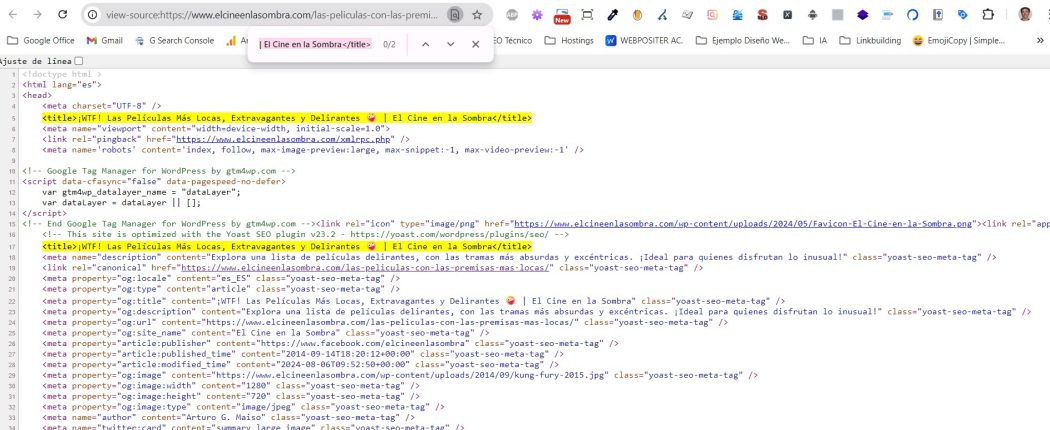
Anamaria Hello,
Please let me know what filter you use for category templates.
For each category, on the flex block there is a special filter for the current category, which dynamically displays the posts from that category within each category.
The Posts Loop automatically filters the posts depending on the cloud template you set (for example, on the category page, there will be posted posts from that category) https://forum.tagdiv.com/posts-loop/
If there is an offset set, please check the block with “No posts” and delete it. Leave it empty with no space or value: https://app.screencast.com/Gh9jDf6t0XtLS
You can find the documentation here: https://forum.tagdiv.com/offset-feature/
Thank you!
 yoeldian
Hi, please help.
It shows this:
“There has been a critical error on this website.
Learn more about troubleshooting WordPress.”
when I open a single product page.
But I can open it when I log in to wp-admin.
This means all product pages are only visible only to me, not to others.
Here’s the sample:
https://petanisayur.com/shop/
https://petanisayur.com/product/tomat/
Please help…
Anamaria Hello,
You can disable the mobile theme on the pages here -> https://i.imgur.com/d3kTBRf.png
Using our theme you can choose from 3 mobile versions
-> mobile responsive => https://www.screencast.com/t/oJ2ShOp47
-> mobile theme plugin => https://forum.tagdiv.com/the-mobile-theme/
-> mobile page => https://tagdiv.com/newspaper-10-3-7-update-brings-customizable-and-fast-mobile-pages/
If you created the mobile pages with tagDiv Composer, then when you install the Mobile Theme plugin, your pages will be overwritten by the plugin (the mobile theme comes with its templates for page, post, category, etc so your current templates from the desktop theme will get converted to the mobile theme layout, the page content is made without builders in mobile editor => https://www.screencast.com/t/xbgZG8kH also, the options that are provided to edit the mobile theme version are limited (this keeps the things simple)).
This is a video about Responsive Newspaper Theme, AMP & Mobile Theme, Mobile Pages & Templates -> https://www.youtube.com/watch?v=SpGkOnJeNZY
So, the mobile responsive is what you see then that you select the viewport on phone => https://www.screencast.com/t/matV17hH, so some settings may apply for each viewport(where is the border blue), and others are not(where the border is black).
The mobile page has the mobile templates from Cloud Library => https://www.screencast.com/t/YCcZ8rL8
Mobile responsive version of the theme and the mobile page editor can be edit with tagDiv Composer, the mobile theme plugin not.
For example, you can have the mobile theme plugin activate and use the mobile page/mobile responsive version for the homepage/pages, but for the categories pages/404 page you can’t use the mobile page/mobile responsive version if you have the mobile theme plugin activate.
So, if you want to design the pages with tagDiv Composer, you can use the mobile page or mobile responsive version.
Thank you!
Anamaria Hello,
Using our theme you can choose from 3 mobile versions
-> mobile responsive => https://www.screencast.com/t/oJ2ShOp47
-> mobile theme plugin => https://forum.tagdiv.com/the-mobile-theme/
-> mobile page => https://tagdiv.com/newspaper-10-3-7-update-brings-customizable-and-fast-mobile-pages/
If you created the mobile pages with tagDiv Composer, then when you install the Mobile Theme plugin, your pages will be overwritten by the plugin (the mobile theme comes with its templates for page, post, category, etc so your current templates from the desktop theme will get converted to the mobile theme layout, the page content is made without builders in mobile editor => https://www.screencast.com/t/xbgZG8kH also, the options that are provided to edit the mobile theme version are limited (this keeps the things simple)).
This is a video about Responsive Newspaper Theme, AMP & Mobile Theme, Mobile Pages & Templates -> https://www.youtube.com/watch?v=SpGkOnJeNZY
So, the mobile responsive is what you see then that you select the viewport on phone => https://www.screencast.com/t/matV17hH, so some settings may apply for each viewport(where is the border blue), and others are not(where the border is black).
The mobile page has the mobile templates from Cloud Library => https://www.screencast.com/t/YCcZ8rL8
Mobile responsive version of the theme and the mobile page editor can be edit with tagDiv Composer, the mobile theme plugin not.
For example, you can have the mobile theme plugin activate and use the mobile page/mobile responsive version for the homepage/pages, but for the categories pages/404 page you can’t use the mobile page/mobile responsive version if you have the mobile theme plugin activate.
So, if you want to design the pages with tagDiv Composer, you can use the mobile page or mobile responsive version.
Better deactivate the mobile theme plugin and see the results, and assign the mobile page for page, like this => https://www.screencast.com/t/lektAhyjd
Also, clear your cache.
Thank you!
 JillCooper
 Thanks so much for this information. I am using version 1 and do not have the Mobile Theme or AMP plugin installed. It’s still reverting back to an unsaved version. Any other ideas? Thanks so much!
 FBM
FBMHi,
is there a way to display the custom label in a CloudTemplate für CPTs?
You can for example show/hide the custom label in the flex block 1 as a feauture, but I couldn’t find a shortcode that adds the element in the posts Cloud Template.
Thank you!
 seamie1990
Hello, when I post one of my posts to my Facebook page, I get an error saying “403 Forbidden”
Why is this happening? It just started in recent days.
Example of post here: https://topic.ie/poetry-evening-to-take-place-on-23-august/
 Bettina
 Hello Zdenko!
You can increase the PHP, WordPress and the theme version.
Make sure you use the same global header on the homepage as in the single template and not a default header that can not be edited with the tagdiv Composer.
We have 3 options available for mobile versions that you can use:
1. Responsive version: A responsive version of your website looks similar to the desktop version. TagDiv Composer is used to edit the page. Click on the mobile viewport: https://www.screencast.com/t/XDQJedlggSB. There, you can see your mobile version and edit or adjust the elements to look better.
2. Mobile pages: https://tagdiv.com/newspaper-10-3-7-update-brings-customizable-and-fast-mobile-pages
3. Mobile theme plugin: The Mobile Theme is a performance-optimized theme included in the main Newspaper theme that only loads on mobile devices. It comes with its own templates and designs for pages, posts, categories, etc., so your current templates from the desktop theme will get converted to the mobile theme layout. Please see https://forum.tagdiv.com/the-mobile-theme/ and https://forum.tagdiv.com/mobile-theme-introduction/ for more information.
A full explanation is here: https://www.youtube.com/watch?v=SpGkOnJeNZY
If you need to use mobile version 1 or 2, then you need to uninstall the Mobile Theme plugin and AMP.
Thank you!
Bettina Hello!
We have 3 options available for mobile versions that you can use:
1. Responsive version: A responsive version of your website looks similar to the desktop version. TagDiv Composer is used to edit the page. Click on the mobile viewport: https://www.screencast.com/t/XDQJedlggSB. There, you can see your mobile version and edit or adjust the elements to look better.
2. Mobile pages: https://tagdiv.com/newspaper-10-3-7-update-brings-customizable-and-fast-mobile-pages
3. Mobile theme plugin: The Mobile Theme is a performance-optimized theme included in the main Newspaper theme that only loads on mobile devices. It comes with its own templates and designs for pages, posts, categories, etc., so your current templates from the desktop theme will get converted to the mobile theme layout. Please see https://forum.tagdiv.com/the-mobile-theme/ and https://forum.tagdiv.com/mobile-theme-introduction/ for more information.
A full explanation is here: https://www.youtube.com/watch?v=SpGkOnJeNZY
If you need to use mobile version 1 or 2, then you need to uninstall the Mobile Theme plugin and AMP.
Thank you!
Anamaria If the AdSense code needs to be set between head tags, this can be set in our theme in Theme Panel -> Analytics/Js Codes. Example: https://prnt.sc/1tju9qf -> https://prnt.sc/10jk7fq
Thank you!
Anamaria Hello,
You have the mobile theme plugin activated; please disable it.
Using our theme you can choose from 3 mobile versions
-> mobile responsive => https://www.screencast.com/t/oJ2ShOp47
-> mobile theme plugin => https://forum.tagdiv.com/the-mobile-theme/
-> mobile page => https://tagdiv.com/newspaper-10-3-7-update-brings-customizable-and-fast-mobile-pages/
If you created the mobile pages with tagDiv Composer, then when you install the Mobile Theme plugin, your pages will be overwritten by the plugin (the mobile theme comes with its templates for page, post, category, etc so your current templates from the desktop theme will get converted to the mobile theme layout, the page content is made without builders in mobile editor => https://www.screencast.com/t/xbgZG8kH also, the options that are provided to edit the mobile theme version are limited (this keeps the things simple)).
This is a video about Responsive Newspaper Theme, AMP & Mobile Theme, Mobile Pages & Templates -> https://www.youtube.com/watch?v=SpGkOnJeNZY
So, the mobile responsive is what you see then that you select the viewport on phone => https://www.screencast.com/t/matV17hH, so some settings may apply for each viewport(where is the border blue), and others are not(where the border is black).
The mobile page has the mobile templates from Cloud Library => https://www.screencast.com/t/YCcZ8rL8
Mobile responsive version of the theme and the mobile page editor can be edit with tagDiv Composer, the mobile theme plugin not.
For example, you can have the mobile theme plugin activate and use the mobile page/mobile responsive version for the homepage/pages, but for the categories pages/404 page you can’t use the mobile page/mobile responsive version if you have the mobile theme plugin activate.
So, if you want to design the pages with tagDiv Composer, you can use the mobile page or mobile responsive version.
Thank you!
 SEQU3R
Hello. I have a problem with newspaper. The site doesn’t look alike on view on pc when editing homepage. It looks like it is loading from site defaults, from newspaper theme and the tagdiv doesn’t change anything on mobile. I don’t use JetPack, so this isn’t a problem.
Plugins I use:
– All in one seo
– AMP
– Classic editor
– Elementor
– Essential addons for elementor
– EWWW Image optimizer
– Copy and delete posts
– max mega menu
– nitropack
– premium addons for elementor
– royal elementor addons
– simple local avatars
– sitekit google
– snippet shortcodes
– tagdiv cloud library
– tagdiv composer
– tagdiv mobile theme
– tagdiv newsletter
– tagdiv opt-in builder
– tagdiv shop
– tagdiv social counter
– tagdiv standard pack
– wp statistics
– translatepress
– wpcode lite
– wpdatatables
I tried to on/off NitroPack, but still this didn’t worked.
URL of the site: https://superiongg.pl
 Tommycreative
 Good morning, thank you for your support.
On desktop the problem seems not to have reoccurred, while on mobile some pages are still not displaying correctly, with the mobile theme setting I built.
In addition there are also a couple of display issues:
Within the article, where there is a gallery, the second photo in the gallery never displays:
https://prnt.sc/8A-rpSYjO5yl
In the main menu on desktop, I entered the megamenu display but for the sports and accessories section, but again there is a display problem. A part of the menu is displayed with a white stripe at the top (for example in sports the word Dakar is also at the top):
https://prnt.sc/CpoktJxRngTx
Is it possible to fix these display problems please?
Thank you very much.
Thomas
Anamaria Hello,
You can use the flex blocks and set on them what category of posts you want to show, and then this block will display the same posts for all categories; if you set the special filter for the current category, which dynamically displays the posts from that category within each category https://forum.tagdiv.com/flex-block-settings-guide/
The Posts Loop automatically filters the posts depending on the cloud template you set (for example, on the category page, there will be posted posts from that category) https://forum.tagdiv.com/posts-loop/
Thank you!
 dxx26379
Hello,
the URLs from our authors (for example: https://www.behoerden-spiegel.de/author/paul-schubert/) are redirected to the main page, if you are not logged in. When you are logged in the authors URL are working. I checked the plugins and disabled Yoast, but this was not the error. Do you have an idea?
Thanks
Dennis
 nguyenxuan
Hello i am using header cali.
And the plugin Schema Pro (by Brainstorm Force) sticks stars on posts.
However, on the mobile, when entering any article, for example: https://locphatland.com/son-tien-view/
You click on the menu icon, stars appear below the search bar (I’ve never seen this before with a regular menu and header). How to turn off this display, without turning off the display of post stars?
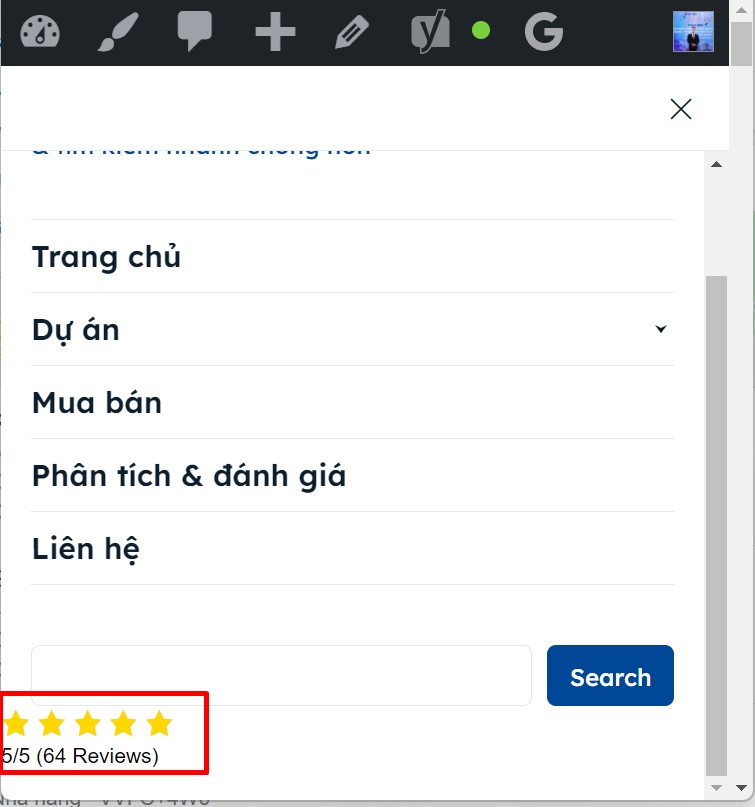
Thanks in advance 🙂
 Man Kam
 my theme & php:
newspaper v12.6.6 / wordpress 6.6.1
[System Status]
PHP Version 8.3.9
WP Memory Limit 512 MB
PHP Execution Time 300
PHP Max Input Vars 10000
server : AWS server
-
This reply was modified 2 years by
Man Kam.
Man KamDear suport team, I get the system msg from server, for high CPU usage from theme & tagdiv
[msg 1]
Osama Hilal Zafar August 06, 2024 10:53
Hi Km,
Most of the call seems to be at save_css json call

Which we believe may have caused the issue. There has been a reported vulnerability of the same call https://wpscan.com/vulnerability/e6d8216d-ace4-48ba-afca-74da0dc5abb5/
In case if the same path is no longer being utilized, it can be blocked via htaccesss an example would be
RewriteEngine On
RewriteCond %{REQUEST_URI} ^/wp-json/tdw/save_css
RewriteRule ^(.*)$ – [F,L]
If you have any doubts on this, please do reach out.
Anamaria Hi,
I don’t recommend to using amp, because it is deprecated -> https://developer.bigcommerce.com/docs/storefront/wordpress/platform-integration/enabling-amp
Please check the console when you hit the save button and see if there is an error. With right-click -> inspect -> console -> select the error in the tab network -> preview, you can see the cause and check the suggestion from here https://forum.tagdiv.com/topic/newspaper-theme-panel-settings-are-not-being-saved/ -> https://community.godaddy.com/s/question/0D58W00007ggvUDSAY/403-forbidden-error-not-sure-why
Thank you!
 deadsloop
 Hi there,
I also can update mobile theme to AMP, it keeps loading while im trying to save
Anamaria Hi,
Please provide some screenshots.
Using our theme you can choose from 3 mobile versions
-> mobile responsive => https://www.screencast.com/t/oJ2ShOp47
-> mobile theme plugin => https://forum.tagdiv.com/the-mobile-theme/
-> mobile page => https://tagdiv.com/newspaper-10-3-7-update-brings-customizable-and-fast-mobile-pages/
If you created the mobile pages with tagDiv Composer, then when you install the Mobile Theme plugin, your pages will be overwritten by the plugin (the mobile theme comes with its templates for page, post, category, etc so your current templates from the desktop theme will get converted to the mobile theme layout, the page content is made without builders in mobile editor => https://www.screencast.com/t/xbgZG8kH also, the options that are provided to edit the mobile theme version are limited (this keeps the things simple)).
This is a video about Responsive Newspaper Theme, AMP & Mobile Theme, Mobile Pages & Templates -> https://www.youtube.com/watch?v=SpGkOnJeNZY
So, the mobile responsive is what you see then that you select the viewport on phone => https://www.screencast.com/t/matV17hH, so some settings may apply for each viewport(where is the border blue), and others are not(where the border is black).
The mobile page has the mobile templates from Cloud Library => https://www.screencast.com/t/YCcZ8rL8
Mobile responsive version of the theme and the mobile page editor can be edit with tagDiv Composer, the mobile theme plugin not.
For example, you can have the mobile theme plugin activate and use the mobile page/mobile responsive version for the homepage/pages, but for the categories pages/404 page you can’t use the mobile page/mobile responsive version if you have the mobile theme plugin activate.
So, if you want to design the pages with tagDiv Composer, you can use the mobile page or mobile responsive version.
Better deactivate the mobile theme plugin and see the results, and assign the mobile page for page, like this => https://www.screencast.com/t/lektAhyjd
Also, clear your cache.
Thank you!
 don_poky
Hi,
I have developed a website on my local machine with the theme and now I have migrated on cloud, on a domain. After moving it online, the tagComposer is not working fine, it throws 900+ errors shown in console and i do not know what is that issue. I cannot attach the log file so sharing a snippet of it.
js_files_for_wrapper.min.js?ver=72f925014dc5642945728092f057897e:99 Uncaught TypeError: Cannot read properties of undefined (reading 'contents')

    at Object.setLiveIframeCss (js_files_for_wrapper.min.js?ver=72f925014dc5642945728092f057897e:99:159)

    at Object.showHelper (js_files_for_wrapper.min.js?ver=72f925014dc5642945728092f057897e:94:482)

    at HTMLDocument.<anonymous> (js_files_for_wrapper.min.js?ver=72f925014dc5642945728092f057897e:82:532)

    at HTMLDocument.dispatch (load-scripts.php?c=1&load%5Bchunk_0%5D=jquery-core,jquery-migrate,wp-hooks,utils&ver=6.6.1:2:40035)

    at v.handle (load-scripts.php?c=1&load%5Bchunk_0%5D=jquery-core,jquery-migrate,wp-hooks,utils&ver=6.6.1:2:38006)

setLiveIframeCss @ js_files_for_wrapper.min.js?ver=72f925014dc5642945728092f057897e:99

showHelper @ js_files_for_wrapper.min.js?ver=72f925014dc5642945728092f057897e:94

(anonymous) @ js_files_for_wrapper.min.js?ver=72f925014dc5642945728092f057897e:82

dispatch @ load-scripts.php?c=1&load%5Bchunk_0%5D=jquery-core,jquery-migrate,wp-hooks,utils&ver=6.6.1:2

v.handle @ load-scripts.php?c=1&load%5Bchunk_0%5D=jquery-core,jquery-migrate,wp-hooks,utils&ver=6.6.1:2

js_files_for_wrapper.min.js?ver=72f925014dc5642945728092f057897e:99 Uncaught TypeError: Cannot read properties of undefined (reading 'contents')

    at Object.setLiveIframeCss (js_files_for_wrapper.min.js?ver=72f925014dc5642945728092f057897e:99:159)

    at Object.showHelper (js_files_for_wrapper.min.js?ver=72f925014dc5642945728092f057897e:94:482)

    at HTMLDocument.<anonymous> (js_files_for_wrapper.min.js?ver=72f925014dc5642945728092f057897e:82:532)

    at HTMLDocument.dispatch (load-scripts.php?c=1&load%5Bchunk_0%5D=jquery-core,jquery-migrate,wp-hooks,utils&ver=6.6.1:2:40035)
I am not using any Cache or minify now (disabled to fix this).
Thanks.
 emailwie
website: https://africanewswire.net
hi there,
When I’m trying to update Newspaper theme from Dashboard > Newspaper > Updates
it redirect me to this page https://africanewswire.net/wp-admin/update-core.php?action=do-theme-upgrade&update_theme=Newspaper
see attachment:https://snipboard.io/Xmuy0b.jpg
and returns “All theme and plugins up to date”.
but it is not updated actually.
In my last ticked one of supporter told to deactivate another plugins except tagdiv.
I did it but not resolve.
what is the issue ?



