- TutorialsFrom WPBakery to tagDiv Composer
- NewsmagHow to update the WPBakery plugin
- NewspaperHow to update the WPBakery Page Builder plugin
- TutorialsHow to Update the WPBakery Page Builder plugin
- NewspapertagDiv Composer Tutorial
- NewspaperWhat’s Included in the Newspaper Theme Package
- Apitd_api_block::update
 geopal
I have a multisite installation with newspaper theme.
I use one newspaper child theme for each one of the two sites I have.
Following the steps on https://forum.tagdiv.com/update-the-visual-composer-plugin-wpbakery/, from network admin I tried to deactivate Visual Composer.
When I hit “deactivate” whole site went white.
I now cannot enter the network admin and I cannot see the front-end too.
I deleted the plugin files from the server with ftp, but I cannot still view the site. Is there a solution to this?
 orlando
Hi,
problems with WPBakery Visual Composer ver 4.4.2,
I disabled all plugins before, but when I go to update the new version, the system slows down everything and then exits error 501/505.
how come this problem, so do not conflict with the plugin,
Use a personal server for this system.
Tell me what to do ??
I await your solution about
 Lucian
 Hi,
Connect via FTP an delete the plugin’s folder: http://screencast.com/t/nYdSwwrzUhkK then try to install the plugin according to this guide: https://forum.tagdiv.com/update-the-visual-composer-plugin-wpbakery/
Thanks
 Alin [tagDiv]
 Hi,
Visual Composer is updated in this theme version. Please make sure that you remove the VC plugin then use this guide: https://forum.tagdiv.com/how-to-update-visual-composer-plugin-wpbakery/ and install the plugin from the /plugins folder that was provided within your theme files.
If you updated the plugin you should have version 4.4.2 and also VC is tested with the theme.
The problem with Ad box is not related to Visual Composer. We have renamed some shortcodes to improve the performance. So just edit your page and change to the Classic View and find td_ad_box and replace td_block_ad_box: http://screencast.com/t/Da8k0HHtSD
Or add a new “Ad box” block instead of the block that doesn’t work anymore.
Hope this helps and sorry for inconvenience!
Thanks!
-
This reply was modified 11 years by Alin [tagDiv].
Alin [tagDiv] Hi,
Please make sure that you remove the VC plugin then use this guide: https://forum.tagdiv.com/how-to-update-visual-composer-plugin-wpbakery/ and install the plugin from the /plugins folder that was provided within your theme files.
Thanks!
Alin [tagDiv] Hi,
Please use this installation guide and use the FTP method to upload theme files: https://forum.tagdiv.com/how-to-update-theme/ To add plugins please use this guide and do the same for each plugin, upload and install it from the /plugins folder that was provided together with the theme files: https://forum.tagdiv.com/how-to-update-visual-composer-plugin-wpbakery/
Thanks!
Lucian Hi,
Thanks Chris!
@WriterChicky Have you managed to solve this as I have checked your site and seems that the view counter works now, both on your homepage and posts too. Please note though that I have tested this by downloading the page every time to avoid cache because as Christopher noted above the post counter doesn’t work with cache.
The ajax post view option was added from version 4.2 of the theme: http://screencast.com/t/h7anh3o2 so if you are not using a theme version newer than 4.2 and want to use the counter and cache also I suggest you update your theme to the latest version then activate the option from theme panel > post settings: http://screencast.com/t/dEasrZOoB then check again.
Use this guide to update the theme and the FTP method: https://forum.tagdiv.com/how-to-update-the-theme/
Use this guide to update the VC plugin: https://forum.tagdiv.com/update-the-visual-composer-plugin-wpbakery/
Thanks
 markangus
 I am having a similar issue as enoxus. I have my licence key from my my NewsMag purchase, but when I enter this on the update plug in page for WPBakery Visual Composer, I am told that it is not valid. Is there any advice you could give? Thanks.
 coudreau
 Yes I use the last version ; I ask to WPbakery to make test and here is their answer :
Hi rudy,
I switched over to a default theme like twenty fifteen at your end and activated the woo-commerce plugin: http://awesomescreenshot.com/0004aplvf7 and you can see that admin does not crash. So, as mentioned previously the issue seems to be arising from the theme. Kindly check.
Thank you,
Best regards
Rudy
 enoxus
 Hello Support,
I just purchased Newsmag today. After I activated the theme, the plug-in WPBakery Visual Composer requires an update: http://www.screencast.com/t/TIvOsnesLD2 . I followed the instructions that mentioned on top of this thread, but I couldn’t manage to update it. Inside the setting of VC it requires its license key, which was not included with my purchase: http://www.screencast.com/t/YLsrRiR5ti . Could you help me to fix this?
Regards,
lex
-
This reply was modified 11 years by
enoxus. Reason: Image link was broken
Lucian Hi,
Have you also updated WordPress also? If not please do so then following this guide connect via FTP and remove the VC plugin’s folder then install it as instructed here: https://forum.tagdiv.com/update-the-visual-composer-plugin-wpbakery/
Also try this without plugins active, empty cache and purge files if you are using CDN host.
Please let me know how it goes!
Thanks
Lucian Hi,
Please make sure that you use this installation guide and use the FTP method to upload theme files: https://forum.tagdiv.com/installation/
Then activate it and check your site without any plugins installed to see if it works. To add plugins please use this guide and do the same for each plugin, upload and install it from the /plugins folder: https://forum.tagdiv.com/update-the-visual-composer-plugin-wpbakery/
Please let me know how it goes!
Thanks
 melvinneo
 Hey,
I tried updating the plugin but I got the following error:
===========================================================================================================
Plugin could not be activated because it triggered a fatal error.
Fatal error: Cannot redeclare wpb_getImageBySize() (previously declared in /home/daily/public_html/main/wp-content/themes/PilatesDaily/wpbakery/js_composer/composer/lib/helpers.php:15) in /home/daily/public_html/main/wp-content/plugins/js_composer/include/helpers/helpers.php on line 67
===========================================================================================================
When the above message appeared, I tried installing via the FTP way, same error message. So both ways of WP dashboard and FTP didn’t work. Please advise. Thanks.
coudreau Hi,
I bought the Visual composer Standalone plugin cause it’s seems to be a problem witj Woocommerce…
I would like to install the last update but each time I activate the plugin, the admi page is still balnk ?!
Here is the answer from WPBAKERY :
Hi rudy,
The issue is because there is an inbuilt version of visual composer (or the related code) present in your theme which is overriding the standalone plugin version and hence causing the issue. You will have to get rid of it. I would advise you to do so with the help of theme author, otherwise you might loose the extra elements added by him. Once this is done, you can install the standalone plugin and it will work fine. Kindly check.
Thank you,
Best regards
Rudy
Lucian Hi,
I’m not sure what causes this that is why it would help to inspect the site so I can figure out what is wrong.
The slider breaks like that when the style sheet of the page is altered like width of it.
I suggest you also remove the Visual Composer plugins then install it from the plugins folder that was provided with the theme files when you’ve downloaded it from themeforest and make sure that you install and use the 4.3.5 version of the plugin.
Use this guide to update the VC plugin: https://forum.tagdiv.com/update-the-visual-composer-plugin-wpbakery/
You can also check the demo via IE and compare it with your case: http://demo.tagdiv.com/newspaper/
Let me know if you still have this issue afterwards and how it goes!
Thanks
-
This reply was modified 11 years by Lucian.
Lucian Hi,
Not sure how your site was designed before so I’m not aware of what colors/layouts/fonts that have changed. I have noticed though that some additional classes and css have been added by the VC plugin.
Please make sure that you remove the VC plugin then use this guide: https://forum.tagdiv.com/update-the-visual-composer-plugin-wpbakery/ and install the plugin from the /plugins folder that was provided within your theme files.
Let me know if you have this issues afterwards.
Thanks
 simchris
 You can ignore the notice as noted in the theme docs
https://forum.tagdiv.com/update-the-visual-composer-plugin-wpbakery/
How to Update Visual Composer plugin (WPBakery)
•The theme includes a license for this plugin so you don’t have to buy it.
•You don’t have to activate the plugin license, it’s already activated.
•You can’t update the plugin directly from the it’s producer.
•You don’t have to worry about the plugin update warnings.
 arnieswap
 @kronos Thanks a lot. I tried and it looks as expected. The problem with this method is that it inserts short-codes in the post bodies and if we decide on changing themes in future, there will be a lot of ugly shortcodes visible to users (due to the WP Bakery Visual Composer) So a theme template will be a preferred solution. We burned ourselves before by depending too much on plugin based feature. That said your suggestion does help a lot.
-
This reply was modified 11 years by
arnieswap.
Alin [tagDiv] Hi,
You also need to update the VC plugin. Please use this guide to update the Visual Composer plugin and upload the plugin from the /plugins folder which was provided with the theme files and use the FTP method to do it: https://forum.tagdiv.com/update-the-visual-composer-plugin-wpbakery/
The VC version tested and included within the Newspaper theme files is version 4.3.5.
The theme was tested using the latest version of WordPress (4.1) and the VC plugin also so you can also update WordPress to the latest version without worries.
Thanks!
-
This reply was modified 11 years by Lucian.
Alin [tagDiv] Hi,
You don’t need to update Visual Composer plugin, because we will provide updates on a regular basis, after we test the plugin for theme compatibility we include it in the latest theme update, inside the ../plugins folder: https://forum.tagdiv.com/how-to-update-visual-composer-plugin-wpbakery/
Also please read here: https://forum.tagdiv.com/topic/how-to-update-visual-composer-2/
Thanks!
 Gary73
Purchased the theme, and when I try to update the WP Bakery plugin, I get this:
http://www.screencast.com/t/GhpMvPsldx
No idea what activation code I need. It’s included with the theme, so not bought separately.
Lucian Hi,
I have checked yours site and also noticed the slow functionality of search feature and that it’s also not working. I’m not sure about this as this should work fine as I have also tested this and found no issues with it.
Please also make sure you update your VC plugin, you are now using the 4.3.4 version and the version we have included with the latest theme version(4.6.1) is 4.3.5.
I also suggest to check this without any plugins active, leaving just the Visual Composer plugin active, as this could happen due to other plugins which you use.
Please use this guide to update the Visual Composer plugin and upload the plugin from the /plugins folder which was provided with the theme files: https://forum.tagdiv.com/update-the-visual-composer-plugin-wpbakery/
There is no option to disable search only if you edit this file an remove it’s code like this:
* http://screencast.com/t/B7a7kAoA4EQ
* http://screencast.com/t/x9yeu6aN2UrC
Regarding the rev slider issues please make sure that you remove the current plugin that you have and install it from the plugins folder of the theme files.
Also noticed that you are not using MySQL but Microsoft SQL which I’m not sure that is compatible with revolution slider plugins and send this error. Have you used this plugin before on this host?
Please let me know how it goes!
Thanks
simchris Yes, you don’t need the update for anything yet … the updated version of Visual Composer has bugs and not fully stable.
A new version tested to work with the theme will be included with next theme update.
As noted in second post on this thread, current version tested compatible with the theme is 4.3.5.
The bundled version is only updated when the theme is updated. You cannot update it separately, nor would you want to as it might break the theme custom modules 🙂
SEE STICKY TOPIC TOP OF FORUM FRONT PAGE:
https://forum.tagdiv.com/topic/how-to-update-visual-composer-2/
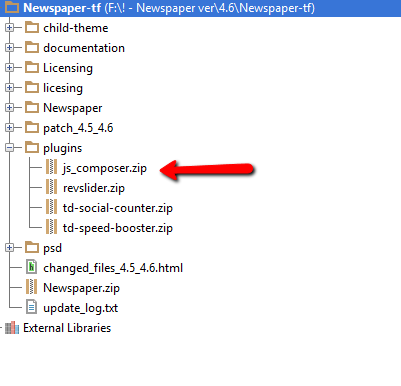
The Visual Composer plugin that comes with the theme is licensed to the theme, the license specifies that only we can provide the updates and you don’t have to buy it or register it. We provide updates on a regular basis, after we test the plugin for theme compatibility the plugin is included in the latest theme update, inside the Plugins folder:
https://forum.tagdiv.com/wp-content/uploads/2015/01/visualc_newspaper.png
Here is guide on how to update the plugin – https://forum.tagdiv.com/update-the-visual-composer-plugin-wpbakery/
Emil G.
 hoops
hoops hi! thanks for the reply!
by the way, i updated my WPBakery Visual Composer – followed your instructions here, but when i checked the plugins –> 
did i miss anything?
Lucian Hi,
I have also tested your site and found that the div container for related articles is added just no posts are loaded: http://screencast.com/t/wwbxWdYc
This means that after your posts go trough the query filers there aren’t any posts left to display and no post is loaded or the code is broken.
Either way I suggest you download and update your theme to the latest version which is 4.6.1 then check again. To update your theme please make sure that you make a backup of your current theme installation then use the FTP method from this guide: https://forum.tagdiv.com/how-to-update-the-theme/ and also update the VC plugin within the /plugins folder following this guide: https://forum.tagdiv.com/update-the-visual-composer-plugin-wpbakery/
Please let me know if you still have this issue afterwards.
Thanks