
- NewsmagBlock settings tutorial
- NewsmagCategory tag on modules/blocks
- NewsmagtagDiv Composer Tutorial
- NewsmagWeather Widget
- NewsmagExchange widget
- NewsmagInstagram widget
- NewsmagHow to use the Visual Composer plugin
- NewsmagIntroduction
- NewsmagFooter templates
- NewsmagCustom ad spots
- NewsmagLoading image effects
- NewsmagSmart sidebar
- NewsmagFeatured images
- NewsmagGeneral settings
- Newsmag7 days post sorting
- NewsmagTheme thumbs
- NewsmagExcerpts introduction
- NewsmagTheme colors introduction
- NewsmagtagDiv slider gallery
- NewsmagVideo playlist
 Bogdan B.
 Hello,
Our theme has something similar but it does not feature a double clicking action. the read more button is present on the block directly: http://demo.tagdiv.com/newspaper/block-20/
I cannot recommend any such plugin as we have not tested any with the functionality you describe.
Thank you!
 Catalin
 Hello crazydiver,
Unfortunately, our theme does not have any such an option that allows you to display the post views counts only for certain posts, sorry! If you want to do this, you should use a bit of CSS code. You can use the following method: ->hide the post view count for entire website and then, using the post ID, you should show it on frontend, like this -> https://www.screencast.com/t/s1C9H39Epteg
The code is ->
.td-post-views{

display:none;

}

.postid-185 .td-post-views{

display:block!important

}
Thanks for your understanding!
 ashishmahajan1
Hi,
I have installed tagdiv speed booster plugin and I wanted to move the render blocking js and css to footer.
I made following modification based on suggestions listed at https://forum.tagdiv.com/how-to-make-the-site-faster/” :
File: /wp-content/plugins/td-speed-booster/td-speed-booster.php
For JS files i have added following code in js_mover function:
$this->move_js_to_footer(‘addtoany’);
$this->move_js_to_footer(‘apsl-frontend-js’);
And for CSS files, added following in css_mover function:
$this->move_style_to_footer_queue(‘popup-maker-site’);
$this->move_style_to_footer_queue(‘contact-form-7’);
$this->move_style_to_footer_queue(‘cf7-style-responsive-style’);
$this->move_style_to_footer_queue(‘cf7-style-frontend-style’);
Screenshot for js changes at:
https://postimg.org/image/n0vrtuvo1/
And for css changes at:
https://postimg.org/image/r067tjcnd/
But, the scripts were not moved to footer as confirmed by view-source of page and by page insights.
We are using CDN to serve these scripts, is that causing the problem?
Here is the screenshot of our view-source showing these scripts:
https://postimg.org/image/kf2wvervj/
Regards
 piero
pieroHello,
We bought your template and we are satisfied.
It would be really helpful to have the Block 22 of Theme Newspaper, also in Newsmag – News Magazine Newspaper.
Block 22 have the external image title, positioned above, this is a excellent readability.
Have you to up grade?
Thank you
 juliusuk
 Hi Bogdan,
thanks for the reply. This is however not the issue. My grids will resize lage enough images so that grey bars will appear either below or to the right, if the given image has wrong aspect ratios. Example:
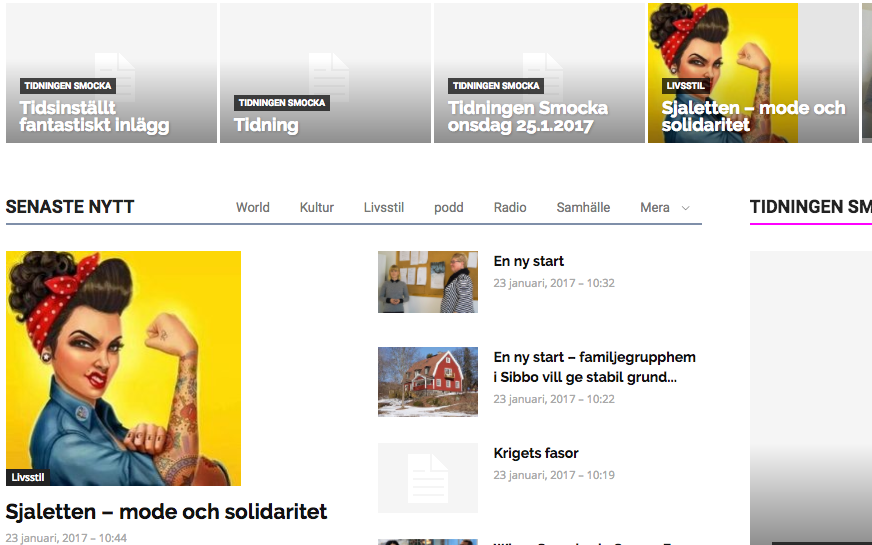
This square image is larger than either of these two module boxes in which it is showed here. It will fill proportionally any grid box or module/block image area to full height, but leave white space or grey area next to it since the boxes are of different aspect ratio. Vice-versa, any picture which fills the full width but not the height due to its aspect ratio, fills width 100% with image and leaves a grey area below – instead of cropping it to left & right, and filling the height to make the box look nice.
Can this behaviour be changed anywhere in the settings? I.e. So images fill either width/height to fully cover module/block box area and cropping things out, rather than just filling either and leaving grey bars?
– Julius
 ipcs
ipcs Hi,
I want to decrease spacing between the title and Author name/date in Block 9. Secondly, I also want to remove the dashed line. Please help!
Thanks!
Bogdan B. hello,
This happens because your site does not use thumbnails at all. Pleas make sure the thumbnails are active in your theme panel: https://www.screencast.com/t/vFzvVcSvd
And then use this guide to fix the images: https://forum.tagdiv.com/thumbnails-fix-strange-looking-images-on-blocks/
If you still have torubel with the thumbs, please contact us via email at contact@tagdiv.com and provide wp-admin so we can login and investigate. Please also include a link to this topic.
Thank you!
 dennis
 Am trying to change the dashed line below the title on block nine through; BLOCK 9 settings – design options but does not reflect.
Bogdan B. Hello,
I have tested this on my end but could not see any issue. i get no duplicate content using the exact same block and filters.
please disable all plugins except visual composer, clear cache and reset cdn files if you use it. Please also check any custom code you might have added to the theme panel or the theme files. If you use a child theme, please switch to the main theme to make sure it does not affect the proper functionality of the theme.
Thank you!
 Simion C.
 Hi,
Add this code in Theme panel->Custom Css
.td_block_9 .td-module-meta-info {

display: none;

}
Result – https://www.screencast.com/t/ANTUjEOX9
You can use any of the available widget elements from Visual composer on your homepage or in the sidebar, if you would provide more details I may be able to help you if you are having problems.
Thanks
 Edward
 1. You can use different types of Quotes as in live example shown: http://demo.tagdiv.com/newspaper/blockquotes-pullquotes/
Quotes – This option lets you set up your quotes with style. There are 8 types of formatting options to make your quotes eye-caching: https://forum.tagdiv.com/post-formats-for-tinymce/
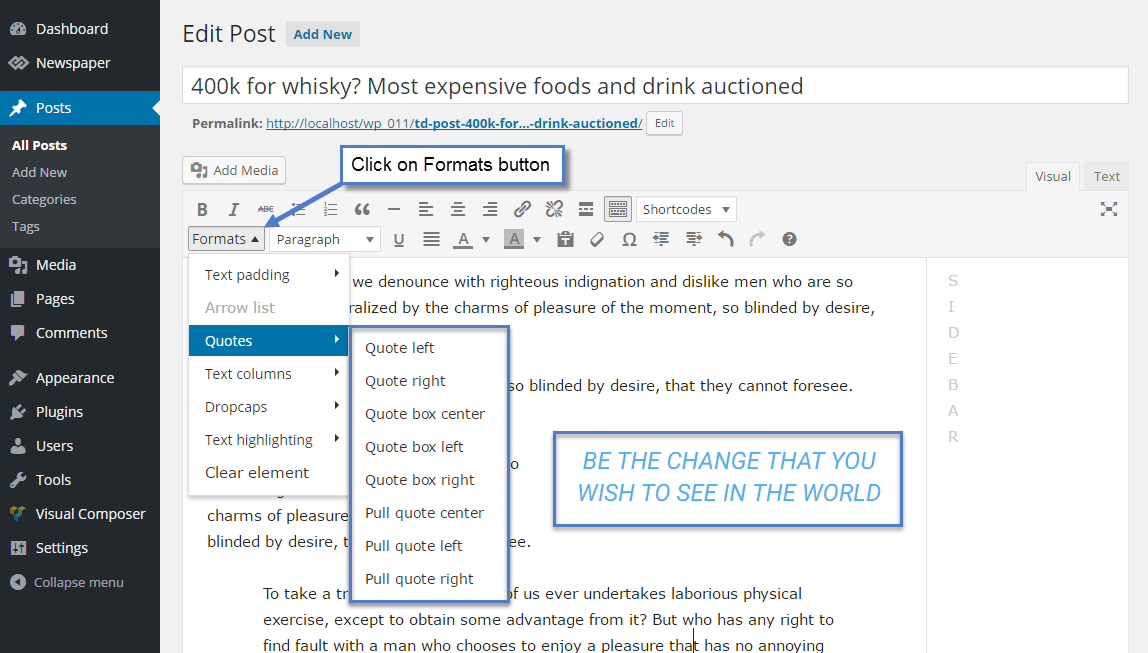
2. To change font settings in Quotes here:

Catalin Hello vish,
Here is talking about Big Grid 6/styloe 7 as you can see here -> https://www.screencast.com/t/V0YfHr82R4EP If you want to use this type of block, you should add it from your backend, using the Visual Composer, like this -> https://www.screencast.com/t/4E1Vz2MPYaY For more information about Block Settings, please consult here -> https://forum.tagdiv.com/block-settings-guide/
Thanks for your understanding!
Bogdan B. Hello,
On the mobile theme, no visual composer blocks will work at all. The mobile theme does not use visual composer so any at all block will not be rendered. This guide describes this information: https://forum.tagdiv.com/the-mobile-theme/
Thank you!
 g2wp
g2wpHi i try to input video playlist on my page but does not work… I follow this documentation https://forum.tagdiv.com/video-playlist-2/
Youtube Video Playlist appears blank
my page is http://www.g2wp.com.br
[td_block_video_youtube playlist_title=”Videos” playlist_yt=”jRLe0cVT-N8&t=2s, U3I5b2pi2dE, -UftV8dQxos, D2GNiRV-Qvg, i-RFcgFZBwE, U3I5b2pi2dE, UCliT0ADtWQ” playlist_auto_play=”0″]
 Goodfella
So somehow the design of my custom block. Attached is a link to images of how they look now, i would like to get them back to the default look.
Thank you
 fguyaux
Hi,
You can see the website here: https://the.chronicleproject.com/ ( Note that the top right image is a random image using another plugin. )
User: thechronicles2 Password: chroni
and also in the staging area where there is no caching: http://thechronicles2.staging.wpengine.com/
Most of the blocks are put at random posts except the blocks news and tributes to sangha.
The posts stay always the same. I first thought that it was wp-engine caching, so I copied the website to the staging area, which is not cached. Same thing.
In the staging area, I disabled all plugins except VC composer and it stil does not work.
Am I missing any settings ?
Thank you for your support,
Francoise
 triowebdev
I am having the same problem as this ticket and no answer is posted on it…
https://forum.tagdiv.com/topic/latest-post-duplicating-first-9-items/
I am using “Block 4”.
I have limit post number set to “10”
There is no offset
I have sorting set to “Latest”
I have pagination set to “Load More button”
When the page loads I have posts listed in this order. (assume the numbers are the post ids)
1, 2, 3, 4, 5, 6, 7, 8, 9, 10
When I click on “Load More”, the posts load in this order (assume the numbers are the post ids)
6, 7, 11, 8, 9, 12, 13, 10, 14, 15
I would have expected it to load 11-20. It also seems odd because the posts don’t appear to have any obvious order other than 5 posts are duplicated and 5 are new.
 simex74
Hello there;
I use instagram block shortcode for the post, it works on desktop browser without any problem, but on mobile theme it shows shortcode text. Here is the sample code,
[vc_row][vc_column][td_block_instagram instagram_id="someidhere" instagram_header="off"
instagram_images_per_row="2" instagram_number_of_rows="5" tdc_css=""][/vc_column][/vc_row]
Any suggestions?
 mayaguez
 Thanks Bogdan!
I deleted the “sticky code” from all blocks and set all blocks to 5 posts,and the gap went away! I’m getting the hang of this! Thanks!
As for the “sticky sidebars ads” what is your opinion? Do you like them? Do you think it adds to the site and user experience? Do you see them being used in other sites? Will appreciate your input! Thanks
Bogdan B. Hello,
If the blocks have the same filtering then the same posts will be shown in blocks. Please either use the unique articles option: https://forum.tagdiv.com/unique-articles/ or use offsets: https://forum.tagdiv.com/block-settings-guide/
Thank you!
Bogdan B
Catalin Hello Trigger56,
Unfortunately, I do not exactly understand what you mean, regarding on ‘featured’ posts, sorry! If you are referring to this Block -> https://www.screencast.com/t/ewkeQNCpZXH notice that our demo uses the Big Grid 1/Style 4 to display the posts at the top. If is not what you mean, please provide more details about your problems and also, provide some useful screenshots so I can identify where is it and also, so I will be able to provide a more accurate response.
Thanks for the message!
Bogdan B. Hello,
Unfortunately only you can do it as it is pretty time consuming from the front end to inspect each element using the browser inspector to see exactly which block is used and which modules are used across the whole site. The best way to do this is get a pen and paper and write down all the blocks you use on your site and all the modules you see in the theme panel under template settings and category settings. Go through the whole theme paenl and write down each module and go through all pages abd write down the blocks used.
Create a list of the used elements and then check this list to see exactly which module is used on which block:
https://www.screencast.com/t/MHSm6wyns0 The module is the base element in our theme so once you reduce the block into modules then yopu can create the final list of exactly what modules are used for the entire site.
Note that there are modules on posts as well on galleries if you have any set up.
Then you can check this list and remove the ones that are not used: https://www.screencast.com/t/J2x9aAP2vp
It is recommended not to use very different modules in different places as youy will increase the number of thumbs used and the load on your server.
I know it;s not an easy thing to do , but a necessary step if you want to reduce the images created by the theme.
Thank you!
Bogdan B.  munvik
 Thanks for reply. I did it.
Further, I am using block 7 on sidebar for displaying latest post on post pages but the issue is that it also show post that is already open. e.g. If I am viewing post 1, then block 7 in sidebar should not show post 1 and If I am viewing post 2, then block 7 in sidebar should not show post 2 and so on.
Bogdan B. Hello,
The 2 sticky ads are like so because you have the smart sidebar class set on the row in visual composer: https://www.screencast.com/t/PqgTovr0XFa6
Please read this guide to learn how to set or remove the sticky sidebar: https://forum.tagdiv.com/smart-sidebar-2/
As for the ad boxes and the gap, you use separate rows on the sidebar so your sidebar is split in 3. That mens that the sidebar element will wait for the other sto show up with all content before showing the next row. You have the row set to shoe on the left the block most popular with 5 posts and on the right, the ad box with 2 ads.
It simply waits for the row to finish before showing the next row with content: https://www.screencast.com/t/DcUIkoVkcxR
If you want a continous sidebar and no gap between elements, add it on the same row and there will be no more gaps.
Thank you!
