
- NewspaperFlex Block Builder and Flex Loop Builder
- NewspaperHow to use the Flex Blocks cache option
- NewspaperHow to edit modules for Flex Block X
- NewspaperHow to insert a block inside the content of a post
- NewspaperFlex Block Settings Guide
- NewspaperMeta Info on Modules and Blocks
- NewspaperTheme modules and blocks
- NewspaperThumbnails – Fix strange looking images on blocks
- NewspaperBlock settings tutorial
- NewspaperCategory Tag on Modules/blocks
- NewspaperWP Rocket and Newspaper Theme: Optimization Guide
- NewspaperSearch setup for custom post type
- NewspapertagDiv Opt-In Builder – Emails
- NewspaperBookmark – Save For Later
- NewspaperModules Builder in Newspaper Theme
- NewspaperFilters and sorting for taxonomies
- NewspaperUser review system
- NewspaperWooCommerce: Happy “Add to Favorites!”
- NewspaperLockers
- NewspaperLeads
 chauffeur
 Hi Bogdan,
Right, but does it seem logical to you that all the darkened banners but this one continue to the right edge? Anyway, can I change that?
Regarding to the other matter I mentionned in the same left box, the uper part of some title letters come over the picture. I understand that this problem wouldn’t occur with a two lines title. However, if you look at the lower right corner block, whose title is three lines long too, the problem doesn’t occur. What about that?
Thanks
 simchris
 Sorry to butt in, but in my experience this is exactly why I don’t use child themes as they may change over time with major updates and kind of defeats the purpose.
You might consider modifying the “main” theme for customizations, and simply keep track of the files/folder and ‘snippets’ (e.g., line xxx, block of code) in text files, so you can replicate that after an update.
This is what I do, and proves more “consistent” and limits site failure and debugging due to the main/child being out of sync.
With all the functional changes to WP of the past year, this has proven to be even more true.
Sorry, editorial over 🙂
 Alin [tagDiv]
 Hi,
Do not confuse the modules with blocks. The modules are used to create blocks. Like you can see in that section where you enable the category on modules, Module 15 is not used on any of tagdiv blocks – http://screencast.com/t/j72gQJuAf It can be used only on loop(Latest Articles, archive, tags, category…templates). So when you enable the category tag on module 15 and you use this module on a category for example – http://screencast.com/t/si6Pms4E here will appear the category tag – http://screencast.com/t/NsEC0ikgZph
If you want to activate ajax filter for a specific block please check documentation – https://forum.tagdiv.com/block-settings-tutorial/ Also this topic may help – https://forum.tagdiv.com/topic/new-to-newspaper-few-questions/#post-63976
Regarding your second post please provide more details about your block settings and please read documentation!
Thanks!
-
This reply was modified 11 years by Alin [tagDiv].
 Bogdan B.
 Hi Patrick,
The category tag has to be enabled on modules. Each module has it’s own enable button.
1) Enable the category tags on modules:
http://screencast.com/t/vuzc13XPnxK
result: http://screencast.com/t/LiZWwTWpCe
2) If you want to hide the category title on specific blocks there is no option from the theme panel to do that but there is a workaround. You can add an extra class to the row in which the block is placed :http://screencast.com/t/PrldZnw3 and then use this custom CSS to hide the category title on the blocks that have this class set to them:
.hide-category-title .td-post-category{

display:none;

}
result: http://screencast.com/t/hJj0mVAviFEW (removed tags from the middle block)
Thank you!
 jerryd
 there is another one about the category, I created a new block by cloning block1 (created by newspage demo) in vc, but no matter what changes I made on its filter settings (select a specific category instead of all categories by default), it still displayed all categories. is there any special settings I need to take care of?
Bogdan B. Hello diotali,
You can achieve this by choosing one of the 2 post styles containing a top ad: http://screencast.com/t/dYozcI9O
Result: http://screencast.com/t/H6ZtUcnf6
Other post types will display an article top ad but only after the featured image.
If you do not want to use the 2 post types, you will need to do a bit of modification to the core files.
Use this code:
<?php echo do_shortcode('[td_block_ad_box spot_id="custom_ad_1"]');?>
And you have to place it in the post template you want to use: http://screencast.com/t/e5QwytfYiXu
Every post template has a corresponding file. single.php is the default template. Single template 1 is template 1, single 2 is template 2 etc.
I hope this helps.
Thanks.
jerrydI have enabled the module 15 on theme panel to have categories displayed on, but they didn’t show up on this module. are only few modules capable to display category as menu on the top of block? but m from what I can see at the theme panel -> block settings, it seems that all modules are capable to display categories as menu.
the category not showing up pic.twitter.com/82M54QXGm6
— Jerry Ding (@ArchangelKiller) October 14, 2015
 luckydog01420
Hi, on my homepage my first grid at the top is the “Big grid” which has the bigger picture on the left, and four little picture grids on the right. The four little picture grids on the right are blank and they are not filling in with pictures. For the life of me I cannot figure out how to fix it. It is working fine on all my category pages, but not on the homepage. I had someone set the theme layout up for me and they had some grid title tags that I did not want, so I edited some of this type of looking code off the front page on the backend editor, since that was the only way I found to get rid of the tag things I did not want there. Here is a snippet of the code that I altered [vc_row][vc_column][td_block_trending_now] In this example if I did not like the word “trending now” being above my grid block, I took the whole line of shortcode out. Not sure if this is why. But right now, I just want the top big grid to work properly with what I have on the homepage. Here is my site if someone can take a look http://www.viralbuzzme.com you will see all the category pages the top big grid is working the way it should by filling in all the picture grids, but only the homepage is not working that way. Please help!!
Thanks,
Steve Richard
 Patrick
 Sorry wrong explanation.
I understood how selecting posts and categories within a block, you can see the website to verify : http://www.mondafrique.info
Because in the first block, we have 5 posts from different category, I would liked to show on screen the name of the category for the user to know the post’s category.
I know that it is possible to select ‘show category’ from the theme panel but it is not good for me because :
1. in block1, category’s name will be seen only for the main post (on the left) but not on others (smaller on the right)
2. select that option ‘show category’ will show the category in every block1 and I don’t want that because the others block1, from the home page, are dedicated to one category only.
My 2 questions are :
1. is it possible to show category’s name on posts right sided
2. is it possible to show category’s name in a specific block1 and not others ?
hope it’s clear, thanks
Patrick
jerrydI didn’t install the social counter plugin as now I don’t need it. So I have also removed [td_block_social_counter custom_title="STAY CONNECTED" facebook="tagDiv" twitter="envato" youtube="envato"]this short code. after I done that, the padding between adblock and td_block was also gone. how can I fix it?
the gap are gone pic.twitter.com/JT0JwBq3Ag
— Jerry Ding (@ArchangelKiller) October 14, 2015
Bogdan B. Hello Patrick,
I’m not sure i understand your request.
Blocks are made to display posts not categories, however, you can chose the category from which the posts are displayed from block settings: https://forum.tagdiv.com/block-settings-tutorial/
You need to get the category ID: http://screencast.com/t/vTzH6F9sUz9o and place it in the filter box: http://screencast.com/t/iptMt3HRlDi.
You can also filter categories by slug: http://screencast.com/t/nb3VQG0g
This way you can control which category gets to be displayed on every block.
If this is not what you mean, provide more details please.
Thank you!
PatrickSorry I meant block1 instead of block9 in the home page
Thanks
PatrickHello over there,
I am using Newspaper 6 and very happy of the possibilities to set it up, but I have a few requests, if you can help me.
We use several block9 in the home page, the first one is an highlight of stories from different categories and the next 4 are block dedicated to a single category.
First, is it possible to show category in the first block but not in others ?
Secondly, even if I select ‘show category’ in the theme panel, it will show category in the main story but not in the side posts on the right, is it possible to show categories in all posts ?
We have chosen to have latest posts at the bottom of the page, is it possible to show category in that block (for the same reason, posts come from different category)
our website : http://www.mondafrique.info
block with different category stories : A la une
Thanks
Patrick
Alin [tagDiv] Hi,
You can try this custom css in Theme Panel > Custom Css for block 3 on mobile device – http://screencast.com/t/gkkb90eDx8g7
@media(max-width: 767px) {

.home .td_block_3 .td_module_1 {

padding-bottom: 10px;

}

}
Thanks!
Alin [tagDiv] Hi,
You can use this custom css in Theme Panel > Custom Css to hide it – http://screencast.com/t/XwgkJQbSkm
.td_block_related_posts .td-next-prev-wrap {

display: none;

}
Thanks!
 Andrei L.
 Hi
You can display posts from a custom post type in slide block, by inserting its name in Slide Settings: http://screencast.com/t/zTgdHxnQJ
Thanks!
Alin [tagDiv] Hi,
Do you refer to the sort order on blocks? It should work the same like in version 4, if this is what you mean.
In version 4 – http://screencast.com/t/QZd9aGvZ0AR
In version 6 – http://screencast.com/t/e0Gr9alCO
Thanks!
Alin [tagDiv] Hi,
If you add categories ids to the multiple categories spot(like in your screenshot) only the articles from from those categories will be displayed on your block(s). The categories beside the blocks title can be added or removed from Ajax Filter from blocks settings, just set “No drop down ajax filter” if you want to remove them – http://screencast.com/t/4yRyeZVg6bFe
Please check our documentation – https://forum.tagdiv.com/block-settings-tutorial/ and also we have some video tutorials on youtube that may help – https://www.youtube.com/channel/UCOT1RiNysIPCTPSnVZskwtQ
Thanks!
 George
I’m using block 3 in ViralBae.com and found a 6th element is not displayed
Please refer screenshot:
http://www.screencast.com/t/JBmMoqvrvIF
Please advice.
Bogdan B. Hi,
This can happen when loading the font file (which contains those icons) from another host/url. I have checked your browser’s console and you have some errors – http://screencast.com/t/rmymkQquIbS
The solution would be to load them from the same url as the site or try this solution – http://webmasters.stackexchange.com/questions/71630/font-blocked-from-loading-by-cross-origin-resource-sharing-policy-no-access-co
If the problem is still there, you can also try to disable all your plugins except visual composer and see if it’s not a conflicting plugin.
Thanks!
 ntoulios88
 as you can see there is no edit option on the blocks!! 🙁
 chatchat
Hello,
Hot to put comments just after articles, ads, tags, share,
and before the similar articles block ?
Thanks
 Msegura909
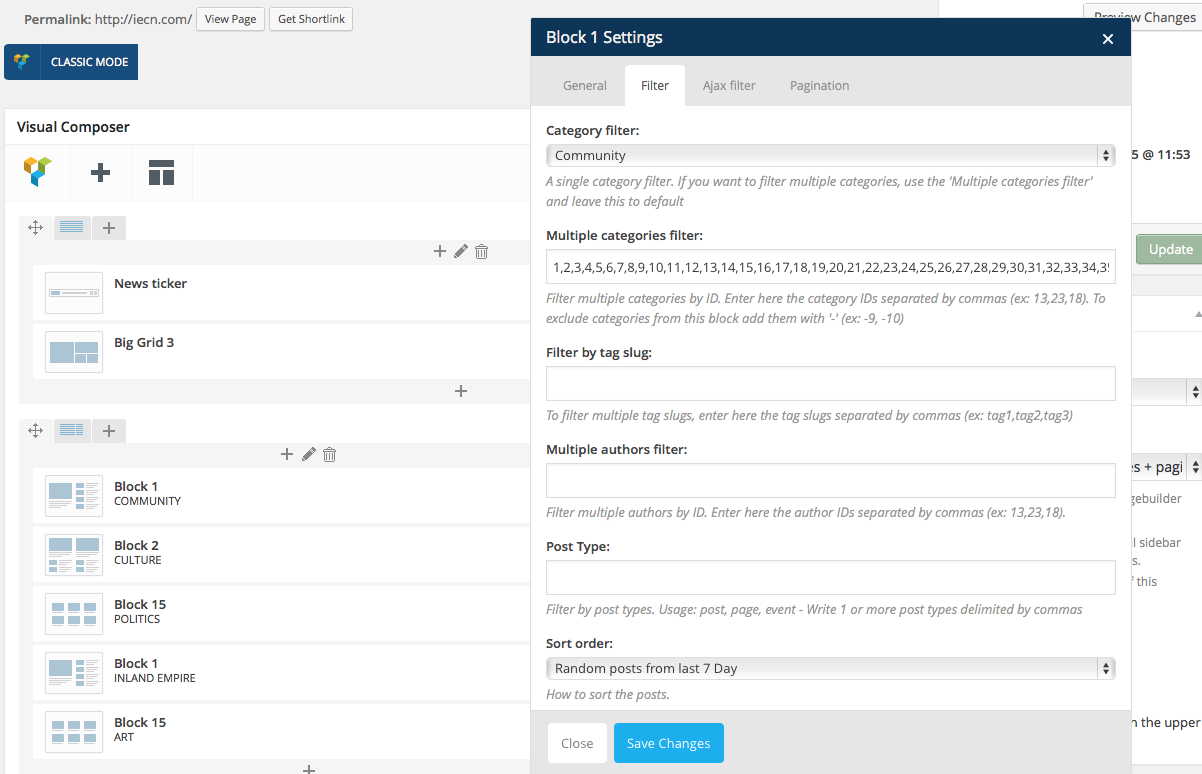
I can’t seem to find the right way to get rid of the categories next to the block titles. I tried excluding them in the settings (multiple category filter), Yet nothing happened. 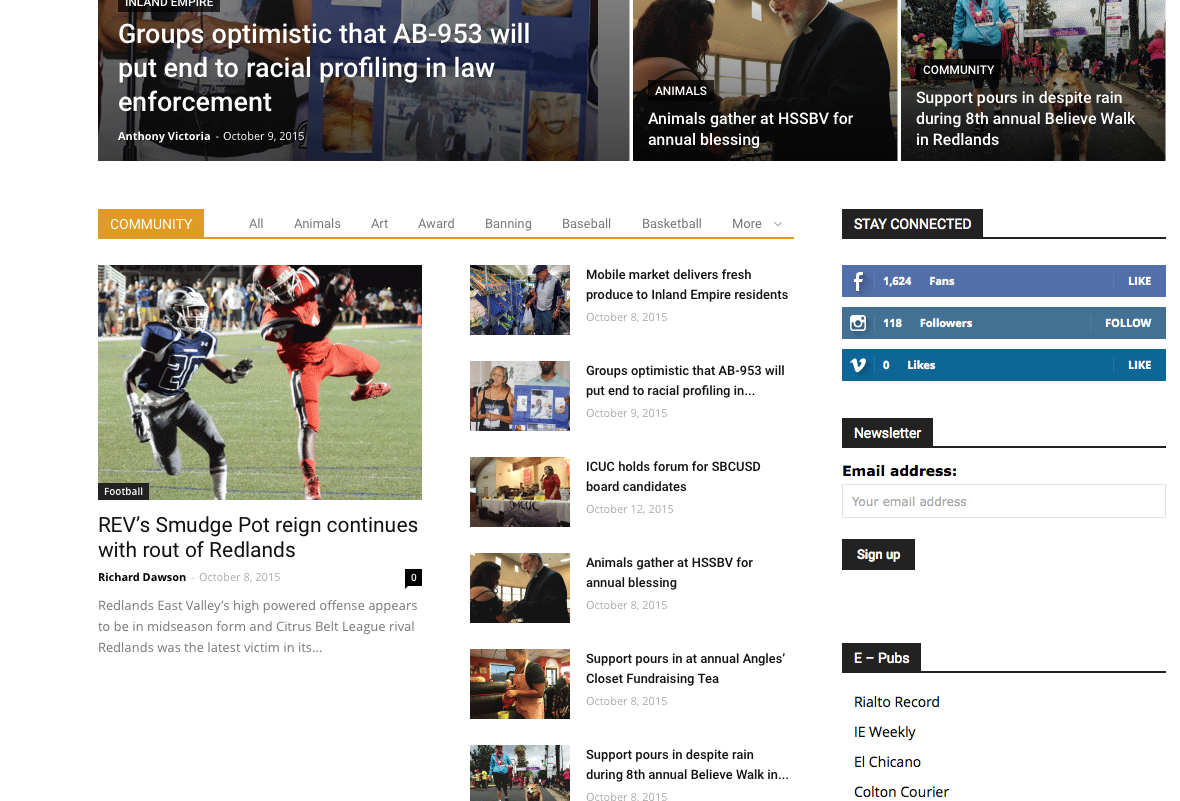
simchris I think what I did was add a CSS to add padding to the top of the div where the ad is loaded. I don’t have the CSS handy for that, but TagDiv can provide if you don’t know how to sort that on your own using something like the Chrome/Console to see the div class for the ad block in header.
chauffeur Hi Bogdan,
Thanks, that’s much better.
It leads me to another question regarding to big-grid-3. Please check the following picture on the left part: https://dl.dropboxusercontent.com/u/11438257/13-10-2015%2017-28-27.jpg
1) The letters of the first line stick on the main picture. That’s strange, since there should be some empty space above the first line, as in the three other parts of the block.
2) The darkened banner under the text doesn’t reach the end of the dedicated space. Here again, unlike the other parts.
Are those bugs?
Thanks

