
- NewspaperFlex Block Builder and Flex Loop Builder
- NewspaperHow to use the Flex Blocks cache option
- NewspaperHow to edit modules for Flex Block X
- NewspaperHow to insert a block inside the content of a post
- NewspaperFlex Block Settings Guide
- NewspaperMeta Info on Modules and Blocks
- NewspaperTheme modules and blocks
- NewspaperThumbnails – Fix strange looking images on blocks
- NewspaperBlock settings tutorial
- NewspaperCategory Tag on Modules/blocks
- NewspaperWP Rocket and Newspaper Theme: Optimization Guide
- NewspaperSearch setup for custom post type
- NewspapertagDiv Opt-In Builder – Emails
- NewspaperBookmark – Save For Later
- NewspaperModules Builder in Newspaper Theme
- NewspaperFilters and sorting for taxonomies
- NewspaperUser review system
- NewspaperWooCommerce: Happy “Add to Favorites!”
- NewspaperLockers
- NewspaperLeads
 Calin
Calin Hi,
What you can try for the problem from that block is to use an flex element that has option for width and height and set some fix size normally this should improved the situation -> https://i.imgur.com/l6xP5pd.png also I do not think that 0.007 CLS from menu has a big impact, but I’m agree that is better if it can be remove.
Hope that the coming theme update to solved as many CLS problems.
Thank you!
 marcorroma
 Hi, thanks for the answer.
This is not exactly what I want.
I would like to create a post block with 1 main post, and this I know how.
And I wish there are posts related to the main post in this post block, like in the screenshot I sent you.
This method is widely used in news sites, when there are multiple posts that talk about the same topic, to avoid having multiple similar posts on the same page.
 Simion C.
 Hi,
I see you are pointing to the category tag of the posts, in the screenshots. The tag that will represent the posts in blocks will be the primary category of the post https://forum.tagdiv.com/primary-category/
If you do not set a primary category for a post, the theme will display the first one alphabetically. Or if the post has only one category, that will be primary.
So basically if you want a specific category tag to represent a post in blocks, grids, other modules, you can use the primary category setting that is available for each post, in the post edit screen. Please try it.
Thank you!
Simion C. Hi,
A manual sort is possible, but it will be fully manual. Meaning you will have to enter the post IDs in the block here https://prnt.sc/y0538o
The block will then always display those posts, until the IDs are changed or removed.
If the block is filtered by a category, it will display posts from that category, according to the sort method. All posts are treated equally, one is not one more important than the other as far a as block is concerned, and there is no way to make one more important than the other unfortunately.
Thank you!
Calin Hi forallatlantis,
When you are using a PRO Pre-build Website, then you have the ability to edit the entire website from frontend using tagDiv Composer, because the full website is made with cloud template from tagDiv Cloud library.
Now tagDiv Composer is a builder and it can be use for pages and cloud templates, therefore when you are inside a posts, you can not edit it with theme builder, because this is use only for edit posts layout, not to create posts.
On the other hand the theme builder it can be use on pages where you can add blocks elements…
Assigned cloud templates can be edited directly from frontend or you can edit theme from backend from Cloud Templates -> https://i.imgur.com/VxjuTpx.png
Hope this will help you!
Calin Hi,
If I understand correctly you want to display some more posts from the same topic/category, this can be done by using the filter tab from flex elements https://forum.tagdiv.com/flex-block-settings-guide/ -> https://forum.tagdiv.com/flex-block-settings-guide/
Hope this will help you to achieve what you need.
Thank you!
 TAPA-GLOBAL
Hi Tagdiv,
I would like to use https://demo.tagdiv.com/newspaper_gadgets_pro/big-grid-flex-18-gadgets-pro/? for desktop view but for the mobile layout, I would need it to be one big featured image, followed by 2 small images on the 2nd row, and 2 small images on the 3rd row.
I tried looking for it but it seems that most of the blocks for the mobile view is using a scrolling type of layout for the 2nd row.
Please kindly recommend me a suitable block or let me know how I am able to do that using CSS?
Thank you,
Jasmine
 Anonymous
 Hi, Vlad!
The problematic block is the one highlighted in this screenshot:
https://paste.pics/BH2WY
I did what you told me (to remove and re-add the block), but got no luck..
About the second issue: “the Cumulative Layout Shift is coming from the menu in desktop view in my website: https://osaopaulo.org.br”. Is there anything to do about it?
Here is a screenshot pointing to the menu.. https://paste.pics/BH2YS
marcorromaHi,
is it possible to manage the order of posts with your theme?
I have noticed that it is possible to sort the posts of a post block automatically (most read posts, newest posts, oldest posts, etc.), but not manually.
There are post blocks with queries of some categories, but some posts are more important than others, and it would be better to have a manual order based on the importance of the posts, and not automatically.
Is this function foreseen? Is it on the road map?
Thanks for your attention.
marcorromaHi,
is it possible to use tagDiv post blocks with query based on “Advanced Custom Fields”?
Like, for example, this plugin does with Elementor:
https://it.wordpress.org/plugins/advanced-post-queries/
Thanks for support
 Bettina
 Hello!
Please try to regenerate your thumbnails using a plugin. Check this: https://forum.tagdiv.com/using-the-theme-with-existing-content/
Also, you can use another Flex Block and select another image sizes which is suitable for your needs.
Thank you!
 Anamaria
 Hello,
Unfortunately, for blocks, these (from your screen) are the only options for pagination. The only element that has numbered pagination is called “Posts Loop”.
Thank you for your understanding!
Anamaria Hello,
This you can achieve without custom CSS, you need to add a row -> inner row set the layout to 1/2+1/2 and you can add the team members and the icon box in the inner-column and set for each the width to 50% and the elements from CSS put to display inline-block.
I hope this video helps you => https://we.tl/t-ARZZwfJ81C
Thank you!
marcorromaHi, I noticed that it is possible to set a video instead of the featured image. Setting the post format as “video”. Very well.
I would like to know if it is possible to do the same thing with a Gallery.
So, if I insert a gallery in a post, I set a post format like “gallery” I can see the gallery instead of the featured image. And in the category/homepage an icon is displayed to make it clear that that post contains a gallery.
Another question: is there a function that transforms all the block galleries of a WordPress post (even those created previously) into a better media gallery?
It seems to me that “Slider Revolution” is quite complex. I would need that when simple galleries are loaded, they are displayed with a slide.
Thank you
 mnhpias
I want to disable zoom on hover option for Big Grid 2 block , how to do this ?
And I also want to disable mega menu, I want normal menu
marcorromaHi, I am using this post block on my site.
Screenshot:
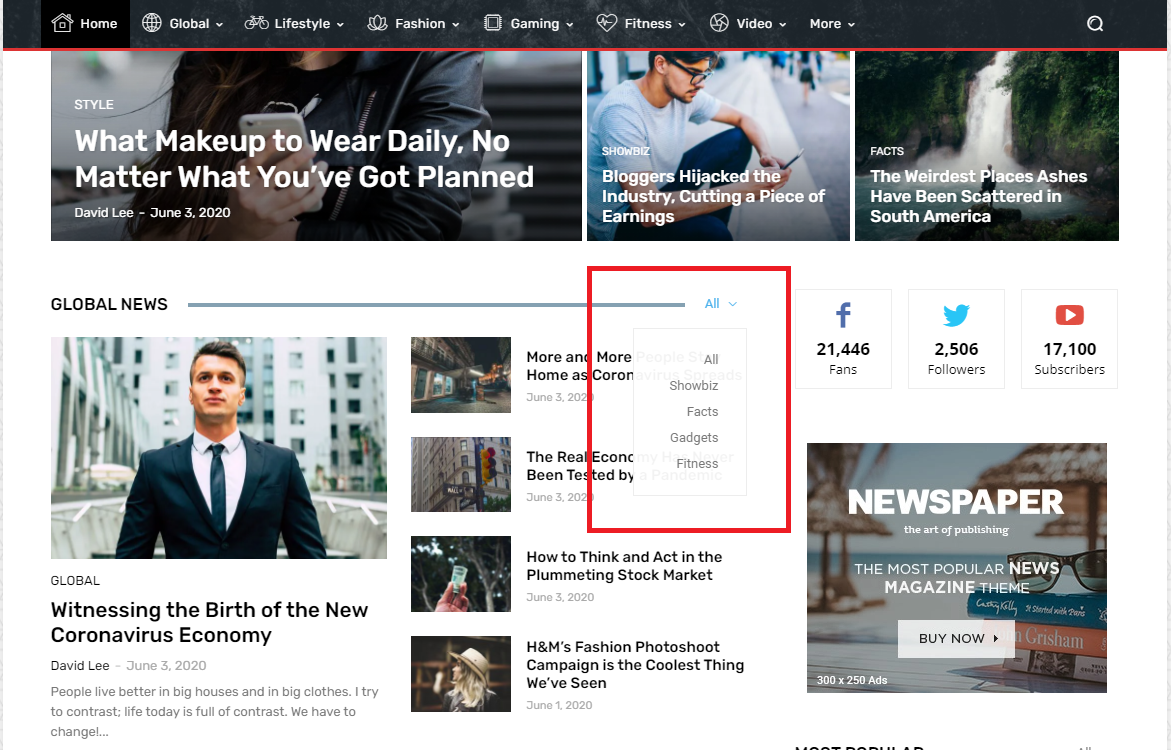
Is it possible for the “Global news” post block to exclude “All” from the categories in this way?
Modified screenshot:
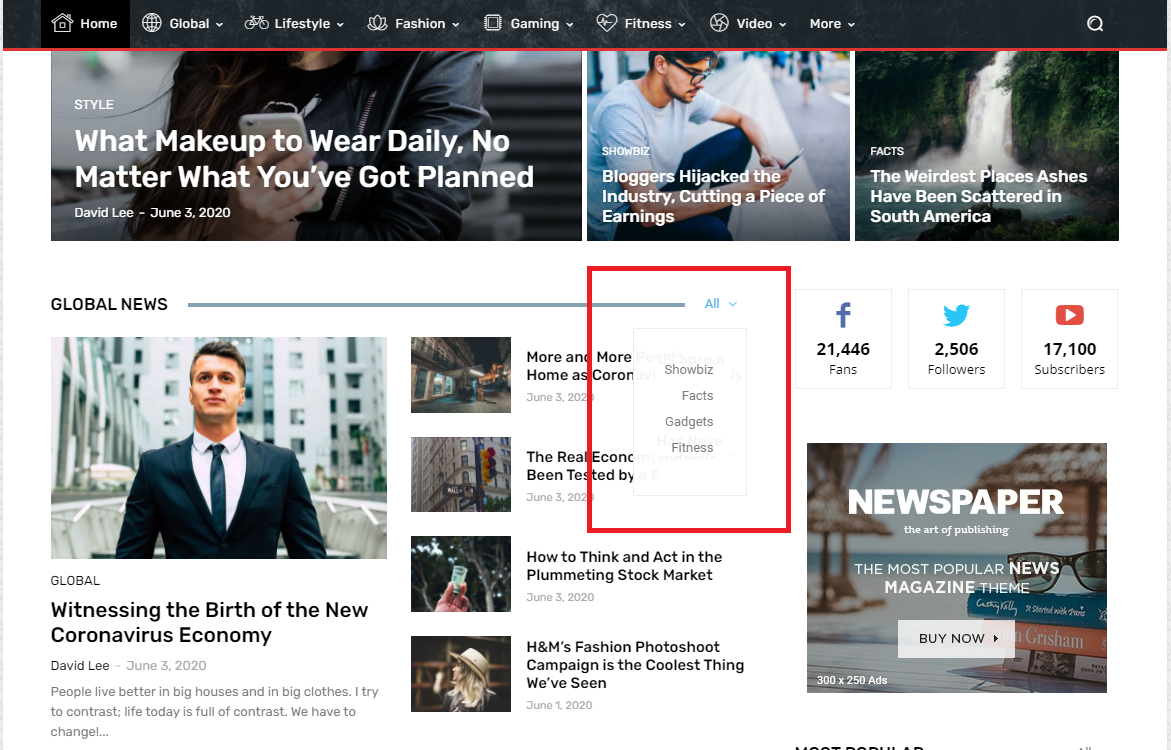
I hope it’s explained well.
I await support.
Thank you
 Vlad S
 Hello !
I have investigated this on your side and it appears that the problem is only on the middle grid as you can see here: https://www.screencast.com/t/1VMX0M4vQPsa ; My suggestion is to test and replace the block first, or to remove and re-add it and see if the issue still occurs.
Let me know the result !
Thank you !
Anamaria Hi,
You can add the time to be displayed on the block in WordPress -> Settings -> General in Date Format =>https://www.screencast.com/t/hMA3OjyexS where you can set the Date and Time Format.
Looks like that => https://www.screencast.com/t/NGI175bK
Hope this helps you!
Thank you!
Anamaria Hello,
Please first verify this element(Flex Block 1) with TagDiv Composer plugin and check if the article image size is correct or not, then set it correctly.
If the article image size is correct and also you didn’t solve the issue, then you can upload again the images in full size and set it again.
If the problem persists, please provide a link to your website and some screenshots.
Let me know about your results!
Thank you!
Calin Hi,
Please replace the css with this one https://i.imgur.com/jOqaSmb.png
body .td-header-top-menu {

display: block;

text-align: center;

}
Hope this will help you!
 Emmarnit
Hello, on one block the title of the articles appear twice and overlaps with each other making it difficult to see the title.
It works fine when logged in but this problem appears for new visitors or when I visit the website in incognito mode here is the website
https://emmarnitechs.com/
and here is the image https://ibb.co/phcrch1
2. Also is there a way to stretch the website width?
in the theme panel, I have stretched container and content but it still seems not to be fitting in the browser
here is the image of what I mean https://ibb.co/LNdFVcQ
 Andre_is_self_attracted
Hi there, i run into problems displaying only “wanted” categories into a Flex Block.
It makes no difference if I create new categories and attach article to them or use some categories which are included within a prebuild website.
For Example on the GOSIP Theme, under Filters (within a Flex Block” – The block only show posts if I use “All categories”.
I’ve read under the comment section on themeforest that some more users have this problem. How to fix?
 EQJF
EQJFHi there,
I’m using the “Newspaper Magazin Pro” Theme. I can’t figure out, how to change the appearance of new created sidebars.
e.g. Block header, header Color
Can anybody help me put?
Thx
J.
 Jose
JoseHello
I don’t see the option to put a numbered pagination (standard pagination), is there any way to do it?
In case this block does not support numbered pagination, is there any similar block that supports numbered pagination?

 duterte
How is the variable tdBlockNonce being generated?
We have successfully integrated the Newspaper theme mega menu outside wordpress. But this variable value always change..



