
- NewspaperFlex Block Builder and Flex Loop Builder
- NewspaperHow to use the Flex Blocks cache option
- NewspaperHow to edit modules for Flex Block X
- NewspaperHow to insert a block inside the content of a post
- NewspaperFlex Block Settings Guide
- NewspaperMeta Info on Modules and Blocks
- NewspaperTheme modules and blocks
- NewspaperThumbnails – Fix strange looking images on blocks
- NewspaperBlock settings tutorial
- NewspaperCategory Tag on Modules/blocks
- NewspaperWP Rocket and Newspaper Theme: Optimization Guide
- NewspaperSearch setup for custom post type
- NewspapertagDiv Opt-In Builder – Emails
- NewspaperBookmark – Save For Later
- NewspaperModules Builder in Newspaper Theme
- NewspaperFilters and sorting for taxonomies
- NewspaperUser review system
- NewspaperWooCommerce: Happy “Add to Favorites!”
- NewspaperLockers
- NewspaperLeads
 Anamaria
 Hello,
Please use this code
body.rtl .td_block_wrap {

    text-align: unset;

}
Set the code in theme panel -> custom code -> custom CSS.
Thank you!
Anamaria Hello,
You can use to filter a category and a tag using this option -> https://i.imgur.com/dJnjZGn.png on the block. You can find more details here https://forum.tagdiv.com/flex-block-settings-guide/
Thank you!
Anamaria Hello,
Please make sure that you have filtered the block correctly. For each category, on the flex block there is a special filter for the current category, which dynamically displays the posts from that category within each category -> https://forum.tagdiv.com/flex-block-settings-guide/
The Posts Loop automatically filters the posts depending on the cloud template you set (for example, on the category page, there will be posted posts from that category) https://forum.tagdiv.com/posts-loop/
Please check the block with “No posts” and delete it the offset number; leave it empty with no space or value: https://app.screencast.com/Gh9jDf6t0XtLS
Thank you!
 nycinsider
 Thank you for fixing that. Yesterday, I couldn’t get to the settings in the upper right corner b/c they were blocked by your Red Error Code Message that you can’t dismiss. Whatever you did fixed the post template, so at least for this hour, I can see the settings and there is no error message.
However, the same error message is still on the home page so I can’t edit that either. I saved it 10x last week after recreating it from scratch piece by piece and it saved fine. Yesterday, error message showed up again. There’s way to know what it’s saying, doesn’t find the actual error, you can’t dismiss it, etc. It’s useless other than it keeps me from having control over my business/income/site. Same true on my other site. I have made zero code, plugin or any other changes to my sites in months, probably over a year, other than updating your theme and other plugins.
If you’re making me choose between revenue-generating plugins and paying for your theme, I choose revenue (who wouldn’t?). The tagdiv editor doesn’t even work on pages where there are no plugins at all – just your code.
As for support, I thought it auto renewed through Envato the way the theme does. If not, I’ll consider us even for the dozens of other times I was paying for support and the only message I ever got was “it must your plugins. we don’t help when our theme fails and you use “unapproved” plugins”
-
This reply was modified 1 year by
nycinsider.
 rafo04
Hi everyone!
I want to add not just a single image but a whole group of “Text with Image” blocks into a slider.
Is there a way to achieve this with built-in tools, or do I need an additional plugin or custom code?
I would appreciate any advice or ready-made solutions!
Thank you!
 lpecchiproper
 Hi Bettina
thank you very much for the quick and accurate response, I have configured the blocks and EWWW as recommended, it works.
Best regards, Luca
lpecchiproperI’ve optimized my site images using, as you suggest, EWWW: it works perfecty for images but non for thumbs on block, and when images are used as background: .webp files are present but Newspaper uses the jpeg/png version.
I remember that somewhere in Theme Panel I saw that option
USE WEBP FORMAT
Enable or disable loading WebP images. Important: the theme will not create WebP images format, but will load them on blocks if they exist on your server.
but I’m not able to find that option anymore: did you delete it? Could you please help me?
About the method to deliver webp images, what option of EWW do you suggest? Both .htaccess rules and JS WebP Rewriting are working. And if I’ll be able to enable the USE WEBP FORMAT Newspaper option, what of those three method do you suggest.
Thanks in advance, Luca
 DavidCLM
I’ve already deactivated all plugins, reinstalled the tagdiv composer, changed the entire site and I couldn’t find the configuration or the problem… the checkboxes for all the tag div composer blocks disappeared.
 anttiwolk
Hello,
I am trying for hours but I do not get it working.
I am trying to set-up a filter in a flexblock_4.
I want to show only articles that have the category “Product News and Innovationes” and the taxonomy “car-manufacturer”
What ever I do, it won´t combine this selection.
Is there somewhere a proper explanation how to use the filtering? ANd is there a simple way to upload images without uploading them and to create a link? This is not very convenient.
Anamaria Hello,
Yes, this is how the mobile responsive version works. Yes, in your case, you should use a mobile page if you want to have a different design or order of the blocks.
I would like to take a look. Can you please email us at contact@tagdiv.com with the wp-admin and cPanel access and include the link to the topic in the email?
Thank you!
 Bettina
 Hello!
You can find it in the Flex block settings sort order: https://forum.tagdiv.com/7-days-post-sorting/ -> https://forum.tagdiv.com/flex-block-settings-guide/
Thank you!
 Simion C.
 Hi,
Indeed, the pagination is not working on the website at this time. It seems to work in the post pages, for the related articles block.
What if the jetpack boost plugin is causing the problem. You could make a quick test and deactivate it, and check the pagination again. If it works, then it’s probably a setting from the boost plugin that causes it.
Let me know.
Thank you!
Anamaria Hello,
This color is shown only on the Category Siblings, single post categories, not on the blocks or menu -> https://i.imgur.com/wqq5lZD.png -> https://i.imgur.com/AQpZp8H.png. That is why you need to use the suggestion from that topic.
Thank you!
Anamaria Hello,
Please block /wp-json/tdw/save_css
If an attacker wants to target this URL /wp-json/tdw/save_css they can do so. Even if the website uses a different theme, the attacker can still try that URL. We could add an option to be able to enable/disable the Live CSS, it will be considered. But for now in order to remove it this can only be done with a modification to the composer plugin. I think that all that removing it requires is to comment this line of code – https://prnt.sc/RtwvL5Nc4ikR -> https://prnt.sc/ymZmhdUfp57U But as I mentioned, the attacker can still try to access the URL.
Thank you!
 Daily Nintendo
 I kept looking and the network part of inspect element shows that mode-less.js and text.js give error 404. The internal files return those files however and both in the td-composer directory. wp-content/plugins/td-composer/css-live/assets/external/ace/mode-less.js and wp-content/plugins/td-composer/legacy/common/wp_booster/wp-admin/external/ace/snippets/text.js to be exact. Could this be the problem? If so what might be blocking the access?
 al-2
al-2 I mean add php code to the next block https://www.awesomescreenshot.com/image/52412599?key=67f06b4b2e10be2e35e66bb28d050034
it’s a single post on these archive pages
Thanks!
-
This reply was modified 1 year by
al-2.
 mottoyou
 Hi there,
I have the same problem on Firefox.
It’s not just related to Flex Block 1, but to multiple elements.
For instance, row or page title settings are missing:
https://prnt.sc/O9317fLA43ib
https://prnt.sc/HyJyOsYNmIFx
https://prnt.sc/0EiVLTJT_Y7A
I saw a related topic on that:
https://forum.tagdiv.com/topic/problem-inserting-into-all-blocks-help/
I just wanted to let you know that I’ve also detected the problem at my end, in case it helps.
Thank you for your support!
 thcp2020
Hi,
Throughout my website the flex block category tags moves to the right when you hover over the article, I would like to change this to move up slightly or just to change colour instead.
Please see below screenshots
1. how it looks normal – https://ibb.co/XCxhWqJ
2. hovering over article – https://ibb.co/mHGzSRx
All the best
 Yohanndev83
Hello,
I am experiencing an issue using the builder when creating pages in English.
Historically, the site has used www. and en. and has been functioning with WPML for over 10 years.
Regarding the .htaccess file and server settings (SOP/CORS, etc.), everything was functional until the introduction of the new theme with the td-composer builder.
Here is the first error that blocks the entire builder:
Uncaught SecurityError: Failed to read a named property 'tdcSidebar' from 'Window': Blocked a frame with origin "https://en.foobar.com" from accessing a cross-origin frame.

    at Object.resize (tagdiv_theme.min.js?ver=12.6.6:227:443)

    at tagdiv_theme.min.js?ver=12.6.6:230:134

    at dispatch (jquery.min.js?ver=3.7.1:2:40035)

    at jquery.min.js?ver=3.7.1:2:38006
I am in a difficult situation because, while trying to find a solution, I am compromising the security settings that were previously working fine.
Have you encountered this problem before? How can it be resolved?
Did you implement additional security measures in the plugin that are preventing all my attempts from working?
Thank you for your assistance.
Best regards,
Yohann
 Alex
AlexHi,
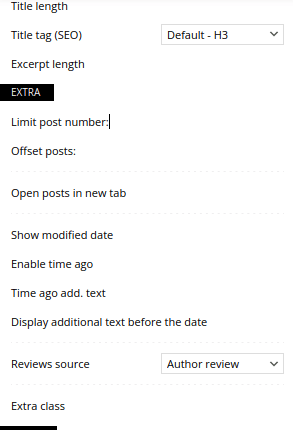
as you can see from the image on this link https://ibb.co/DRgzLnL I can no longer enter “limit post number”, “offsetpost”, “excerpt length”, “custom title” and “title url”.
I tried to deactivate all Newspaper plugins, clear the cache and then reactivate the plugins but the problem remains.
The situation is very unpleasant. In all these years that I use the Newpaper theme I have never had this kind of problem.
I’m waiting for your help.
Thanks,
 Horacio
Hi,
Mi site URL is: https://dialogos.online/
I am using Flex Block 1
In the window “General” I can’t change the “excerpt length” and I can’t change “limit post number” and “offset posts”.
Thank you for your help
Bettina Hello!
Ah, ok. Then add this CSS in the live CSS:
.td_block_template_3 .td-block-title > * { padding: 40px; width:100%;}
Thank you!
nycinsiderI am all of a sudden getting this error on my homepage and I am unable to change it. I don’t have the resources to undo all plugins, etc, and all the other troubleshooting steps you usually advise. I need a way to just fix this error – or a way to recreate the page so I can find the error. But without being able to copy the blocks, formatting, etc, I can’t reproduce the page. Thanks for the actual help and not putting the burden on my resources:)
Errors at columns: 1(models) : 2(dom). The model does not match the content Current state has involved an issue. You could try an UNDO operation (CTRL+Z / CTRL+SHIFT+Z)
Bettina Hello!
Go to the Newspaper -> Theme panel -> Theme fonts -> Modules and Blocks General : https://app.screencast.com/RdFO7xZFAPU1s
Save the settings, clear the cache, and check the results.
Thank you!
Bettina Hello!
Unfortunately, the old blocks don’t have this setting. Use the flex block instead.
Thank you!



