No search results were found in Documentation!
 Calin
Calin Hello,
I just checked this option on may install and this is working normal, https://www.screencast.com/t/e9618znK0 -> https://www.screencast.com/t/vgO4TiTw please make sure that you do not have a plugin conflict, please deactivate all non theme plugins, clear all cache and try again.
Thank you!
 kotsiak
 Forget it, tt’s ok now, I just had to clear cache from browser and it’s done.
 markwebbink
Hi,
Since I de-activated the plugins so that I could clear all cache (and re-activated them), the layout of the post editor is messed up. Any idea how comes? And how to solve it? http://prnt.sc/p5t06o
These blocks overlap the text instead of appearing under the text..
Calin Hello,
I made a test and for me is working http://prntscr.com/p5pd0m -> http://prntscr.com/p5pcpb -> http://prntscr.com/p5pd84 please make sure that you have the last version of the theme and you do not have a plugin conflict, please deactivate ALL plugins except tagDiv Composer, also if you are using child theme or cache plugin, deactivate them, clear all cache and try again.
Thank you!
 Kellykap
Hello,
I want to use font awesome icons on my website, but the fontawesome icons don’t show.
I already tried to deactivate the non-theme plugins and deleted the cache, but that was not the solution. Still no font awesome icons. Do you have any other ideas? Thanks!
Screenshot of empty font awesome: 
kotsiakI cannot login to wordpress. When I put username and password nothing happens and it redirects me to my_site/wp-login.php.
The last things I’ve done before having this problem, was te installation of Glue for Yoast SEO & AMP plugin and W3 Total Cache plugin.
What can I do in order to be able to login ?
Thanks
 GregorS
 Thanks for your instructions, I’ll take a look and let you know how it goes.
What I’m trying to do is implement a AdRotate ads in Header instead of Theme native ones, I’ve tried and succeeded using a workaround:
– Imported Header Template 1 (Magazine theme) via Cloud Template
– deleted Ad Element
– replaced it with sidebar Element
– and inserted AdRotate Widget in it’s place (instead of PHP code)
It actually worked and displayed ads properly.
But here is the issue with this new (imported) header – and my sec. Question
I now have two headers – one for homepage (this new imported one – Template 1) and other one for inside pages (the theme default one). I have removed ad element from both – so that does not impact this test (and deactivated unsupported plugin).
They are behaving differently when loading – please check this video (tagDiv Speed Booster and WP Super Cache are turned off).
You can see it in this video – LINK (.MVK)
Do you know why is there this “gap bottom” under menu when header from template 1 loads? The other one loads just fine.
Calin Hello,
First make sure that you install the Newspaper theme according to our documentation -> https://tagdiv.com/how-to-install-newspaper-theme/ also make sure that the demo was install successful and like in our guide from here https://forum.tagdiv.com/installing-demos/
This can be a plugin conflict, please deactivate ALL plugins except tagDiv Composer, also if you are using child theme or cache plugin, deactivate them, clear all cache and try again.
Please make sure that all the settings are like in our requirements, please follow the guide carefully
– https://forum.tagdiv.com/requirements-for-newspaper/
and please increase all requirements that are lower, and follow all steps.
Make sure that the php version is 7.1 or 7.2 not 7.3 also make sure that the wp-memory is at list 256MB.
Thank you!
Calin Hello,
This can be a plugin conflict, please deactivate ALL plugins except tagDiv Composer, also if you are using child theme or cache plugin, deactivate them, clear all cache and try again.
Also make sure that the theme system status is configured as mentioned in the requirements guide. Please follow the guide carefully
– https://forum.tagdiv.com/requirements-for-newspaper/
If there is still a problem, you can send us an email at contact@tagdiv.com and provide admin login, as well as cPanel or FTP if possible. We will take a look. Include a link to this topic in the email.
Let us know the results!
Thanks
Calin Hello,
This can be a plugin conflict, please deactivate ALL plugins except tagDiv Composer, also if you are using child theme or cache plugin, deactivate them, clear all cache and try again.
Also make sure that the theme system status is configured as mentioned in the requirements guide. Please follow the guide carefully
– https://forum.tagdiv.com/requirements-for-newspaper/
If there is still a problem, you can send us an email at contact@tagdiv.com and provide admin login, as well as cPanel or FTP if possible. We will take a look. Include a link to this topic in the email.
Let us know the results!
Thanks
 Vlad S
 Hello !
Please make sure that you do not have a plugin conflict, please deactivate ALL plugins except tagDiv Composer, also if you are using child theme or cache plugin, deactivate them, clear all cache and try again.
Thank you !
Vlad S Hello !
Please make sure that you do not have a plugin conflict, please deactivate ALL plugins except tagDiv Composer, also if you are using child theme or cache plugin, deactivate them, clear all cache and try again.
I have reproduced the templates you have and it works fine on our side. Each category has its own posts.
Thank you !
Calin Hi,
We understand that right in this moment our theme is quiet have, but we hope that in the coming update our theme will be more light.
What you can do is to check our guide for speed optimization, maybe you can find something that will help you -> https://tagdiv.com/how-to-increase-page-loading-speed/
There are many optimization guides provided by our users here in the forum, some made by us, you could check some of them too
– https://forum.tagdiv.com/cache-plugin-install-and-configure/
– https://forum.tagdiv.com/how-to-make-the-site-faster/
– https://www.infophilic.com/get-almost-100-pagespeed-newspaper-theme/
– https://forum.tagdiv.com/topic/score-100100-pagespeed-with-newspaper-wordpress-theme/
– https://forum.tagdiv.com/topic/newspaper-theme-speedify-your-website/
– https://forum.tagdiv.com/topic/tutorial-chriss-custom-optimizations-for-functions-php-etc/
– https://forum.tagdiv.com/cloudflare-cdn/
– https://forum.tagdiv.com/topic/theme-causing-high-cpu-usage-2/
– https://forum.tagdiv.com/topic/sql-querys-high-cpu/
– https://forum.tagdiv.com/topic/newspaper-theme-slow-to-respond/
– https://premium.wpmudev.org/blog/optimizing-your-wordpress-database-a-complete-guide/
– https://underconstructionpage.com/optimize-wordpress-database/
– https://crunchify.com/better-optimize-wordpress-database-all-in-one-guide/
Thank you for your understanding!
Vlad S Hello !
Please make sure that you do not have a plugin conflict, please deactivate ALL plugins except tagDiv Composer, also if you are using child theme or cache plugin, deactivate them, clear all cache and try again.
Also please provide a link to your website in order to inspect.
Thank you !
Vlad S Hello !
Please make sure that you do not have a plugin conflict, please deactivate ALL plugins except tagDiv Composer, also if you are using child theme or cache plugin, deactivate them, clear all cache and try again.
Thank you !
 Sibi Paul
Sir,
I am using Newspaper Theme for My Website https://www.fastunlocker.com
My Server is Litespeed Enterprise Hosted in AWS
CDN Enabled
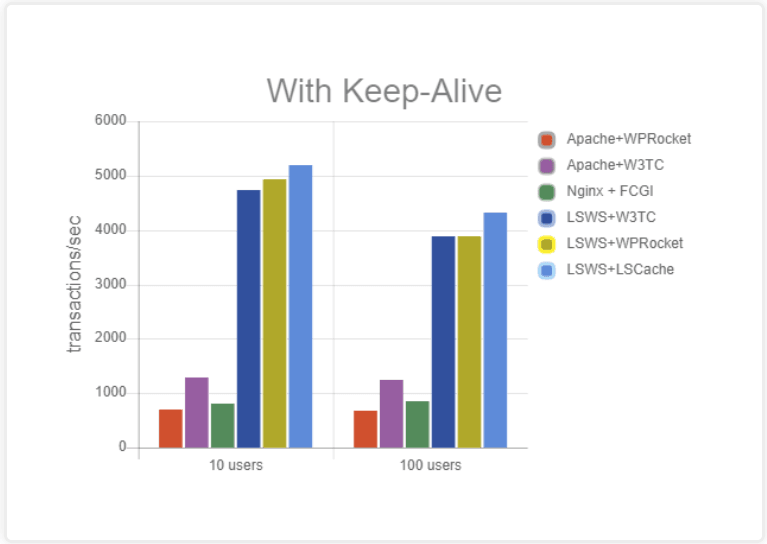
Optimized Using Litespeed Cashe
Refer this Page – https://blog.litespeedtech.com/2019/05/20/litespeed-cache-vs-wp-rocket/
Also, Check this Image – https://blog.litespeedtech.com/wp-content/uploads/2019/05/LSCWP-vs-WP-Rocket-a.png
Sir, I am almost happy with Everything in Newspaper Theme.
But,
Some Filesize is very huge in the Newspaper Theme.
When Compared to My Other Providers.
I have Subscription in Mythemeshop, GeneratePress… etc
When I Test Page speed after activating those themes,
Page size is around 60KB to 100KB
But, Newspaper Theme Page Size is 360+ KB
So, I would Like to Mention Two Test results
1 – https://gtmetrix.com/reports/www.fastunlocker.com/wa68Rx4a
2 – https://gtmetrix.com/reports/www.fastunlocker.com/PhPoslVb
The second one is the Newspaper Theme’s
I Really Appreciate its Facilities, When Compared to Other Themes… Newspaper is Fully Loaded.
I need a Small Help to Reduce the Size of Some Files.
site.com/wp-content/themes/Newspaper/images/icons/newspaper.woff?16
site.com/min/e7ce4.css
site.com/min/fe6e6.js
Kindly Help me on this…
The page is Optimized Great, But Size is High…
 liamc
liamc Hi Vlad,
Thanks for your reply.
Thats very interesting. I’ve disbaled all other plugins and it appears to have fixed it.
I have disabled the WP Super Cache plugin. Once disabled I think it is blowing out the server so I get the 504 Gateway error. Not to worry I will keep testing and report back.
Thanks again for your time.
Cheers
Liam
 suprim
Hello,
My website seems broken on google cached version here is the url https://webcache.googleusercontent.com/search?q=cache:vpZTHYSIf2AJ:https://highlightsfootball.com/+&cd=2&hl=en&ct=clnk&gl=uk
Calin Hello,
This can be a plugin conflict, please deactivate ALL plugins except tagDiv Composer, also if you are using child theme or cache plugin, deactivate them, clear all cache and try again.
Please make sure that all the settings are like in our requirements, please follow the guide carefully
– https://forum.tagdiv.com/requirements-for-newspaper/
and please increase all requirements that are lower, and follow all steps.
Make sure that the php version is 7.1 or 7.2 not 7.3 also make sure that the wp-memory is at list 256MB.
Let us know the results!
Thanks
Calin Hello,
I just make a test and for me the gallery is displaying normal in Firefox -> http://prntscr.com/p4l8s1
Please make sure that you do not have a plugin conflict, please deactivate all non theme plugins, also if you are using child theme or cache plugin, please deactivate them, clear all cache and try again.
Thank you!
Calin Hello acarter960,
1. If you want to change the MENU BACKGROUND COLOR from red in other color -> http://prntscr.com/p4kvko -> http://prntscr.com/p4kvqv -> http://prntscr.com/p4kw21 some times there are users that use cache plugins or other plugins that interfere with the theme, that is way we suggest to try only with theme plugins.
2. In order to change the color on responsive version you need to change this settings -> http://prntscr.com/p4kyii -> http://prntscr.com/p4kz36 or if you are using the mobile theme plugin you need to change the color from here -> http://prntscr.com/p4kzfg
Theme colors introduction -> https://forum.tagdiv.com/theme-colors-introduction/
3. You do not need to have developer skills, you need to know basic WordPress and to check our documentation to know how to use our theme.
Hope this will help you, if you have other questions, let us know!
Thank you!
Vlad S Hello !
Please make sure that you do not have a plugin conflict, please deactivate ALL plugins except tagDiv Composer, also if you are using child theme or cache plugin, deactivate them, clear all cache and try again.
Thank you !
Vlad S Hello !
Please make sure that you do not have a plugin conflict, please deactivate ALL plugins except tagDiv Composer, also if you are using child theme or cache plugin, deactivate them, clear all cache and try again.
Thank you !
 imkimc
 You’ll probably have to do minimize and combine your css to unblock the page rendering… I’ve used Fast Velocity Minify and WP-Rocket Cache to accomplish this. There are many alternatives (such as Clearfy which does many other things).
 dotpodjunk
I’ve installed the Newspaper 9.8 Theme without problems. Import the Church demo but when I want to make changes to the theme, the Theme Panel can’t save anything. It keeps loading without make any change.
I don’t have any extra plugin installed, only the Theme needs.
All my configuration it’s ok, except max_execution_time 30 and max_input_vars 1000 in Yellow and i’ve check the theme with and without Super Cache installed but the problem persists.
Thank you.