
- NewsmagRequirements for Newsmag
- NewsmagHow to update the theme
- NewsmagtagDiv Social Counter tutorial
- NewsmagTop bar templates
- NewsmagAjax view count
 REALIDADES
 I followed the steeps but still not working
1. disable TagDiv Composer
2. uninstall(delete) TagDiv Composer
3. clear cache (if cache plugin exists)
4. install TagDiv Composer
5. activate TagDiv Composer
6. clear cache (if cache plugin exists)
i desactive all the plugins except tagDiv ones but the problem still, now my page don’t show the principal page
my page’s link:
https://periodicorealidades.com
i have not personal code.
 aldrin
I am experiencing an issue with the Newspaper theme on my website. Despite activating all the recommended plugins, the mobile theme is being displayed on the desktop view. Below is the list of the plugins I have activated:
tagDiv Cloud Library (Version 3.5 | built on 15.05.2024)
tagDiv Composer (Version 4.9 | built on 15.05.2024)
tagDiv Mobile Theme (Version 2.6 | built on 31.05.2024)
tagDiv Newsletter (Version 2.1 | built on 31.05.2024)
tagDiv Standard Pack (Version 2.6 | built on 29.05.2024)
WP Super Cache (Version 1.12.2 | By Automattic)
Could you please guide me on how to resolve this issue? Any assistance you can provide would be greatly appreciated.
 Calin
Calin Hi Alex,
If the system status is like this – https://i.imgur.com/njRmLwS.png then indeed the theme must be activate. The activate theme tab should be like this – https://i.imgur.com/G3WiKvQ.png and this should be the successfully activation message – https://i.imgur.com/vxqEc9C.png
But if the theme is activated and you try to access the activation tab – https://i.imgur.com/WXJFnfg.png usually this is happening when a cache is apply on your webiste.
If the situation persits and you agree, I can take a look, for this please contact us via email at contact@tagdiv.com and please provide temporary wp-admin access to the website and the license key to try to activate it.
Thank you!
 Anamaria
 Hi,
Please check the console when you open edit content; if there is an error like this, please go to the Network tab, select the error, and select Preview -> https://i.imgur.com/iiBOHwP.png
Maybe the problem is caused by the server host
I think you will have a 403 or 404 error, so please check this topic -> https://forum.tagdiv.com/topic/wp-editor-for-text-with-title-and-column-text-not-updating-content/ and try the suggestions. Also, please check the cache, clear/purge all cache.
Please check this topic with the same error https://forum.tagdiv.com/topic/err_http2_protocol_error-on-go-daddy-hosting/
Thank you!
 Bettina
 Hello!
Make a test and deactivate all plugins except tagDiv ones. Also, if you are using a cache plugin, deactivate it, clear all cache, and try again.
If the problem is still there, then please contact us via email at contact@tagdiv.com and provide the following:
– admin url and credentials
– a link to this topic in order to identify you
Thank you!
 Korik12
I have disabled all the plugins on my site, with the exception of the tagdiv ones needed. I have cleared the cache and I’m still unable to update the theme panel, in particular the ads. How do you fix this?
Anamaria Hello,
You need to activate the tagdiv Standard pack plugin and clear the cache, but I recommend replacing blocks 1 to 25 with flex blocks and the standard templates (header, footer,single, etc.) with cloud templates.
Thank you!
Bettina Hello @janeybird!
Sometimes, the issue can be from a plugin conflict or a cache issue. That’s why we recommend first deactivating ALL plugins except tagDiv ones; if you are using a cache plugin, deactivate it, clear all cache (also from your browser), and see the results.
Thank you!
Bettina Hello @eg49991 !
I’ve already wrote “Gutenberg editor”: https://app.screencast.com/5cOiUzBOs3NGa
Make a test and deactivate all plugins except tagDiv ones. Also, if you are using a cache plugin, deactivate it, clear all cache, and try again.
If the problem is still there, then please contact us via email at contact@tagdiv.com and provide the following:
– admin url and credentials
– a link to this topic in order to identify you
Thank you!
Bettina Hello @AVNation !
Make a test and deactivate all plugins except tagDiv ones. Also, if you are using a cache plugin, deactivate it, clear all cache, and try again.
Let me know the results!
Thank you!
Anamaria Hello,
Have you checked for a plugin conflict? Please deactivate ALL plugins except tagDiv ones; also, if you use a child theme or cache plugin, deactivate them, clear all cache, and try again.
Please check this guide, delete the object cache file, and check again https://forum.tagdiv.com/general-options-may-interfere-newspaper-theme/
Also, please provide the link to your website.
Thank you!
 janeybird
I have tried repeatedly to show an ad on my homepage and it seems to kick out the code no matter how I do it. I have tried adding an ad spot under Theme Panel/Ads, and then in tagDiv added an Ad Box and selected the proper adspot for this ad. All I get is the title; Advertisement.
I have tried an Image Ad, by adding the image and then the url I want the visitor to go to when the ad is clicked, open in new window and nofollow. It shows with this but does not go to the url, it simply reloads my homepage in a new window.
I have tried adding the custom code to the custom code box (code that I got off of tagDiv documentation). This code will not stay where I put it using the tagDiv editor. I save it (save all), close, then refresh the page, and nothing. I go back into tagDiv editor, click on this ad box and under custom code it is now blank. I have deleted the cache of the page numerous times. I have deleted the entire cache numerous times.
What am I doing wrong? I did get it to work at one point, but I don’t know how. When I came back to work on my site today, it is gone again. Very frustrating. If any one has any suggestions I would appreciate.
Bettina Hello!
Normally, the plugins should remain installed and active. Our plugins are not set up to deactivate themselves. Make a test and deactivate ALL plugins except tagDiv ones. If you are using a cache plugin, deactivate it and see if the problem goes away.
Delete the plugin and re-install it again: https://forum.tagdiv.com/newspaper-how-to-update-a-plugin/
Follow these threads: https://forum.tagdiv.com/topic/tagdiv-plugins-automatically-deactivate/ -> https://forum.tagdiv.com/topic/tagdiv-cloud-library-auto-deactivated-a-few-minutes-after-i-activated-it/
I hope that helps you!
Thank you!
Anamaria Hello,
Have you checked for a plugin conflict? Please deactivate ALL plugins except tagDiv ones; also, if you use a child theme or cache plugin, deactivate them, clear all cache, and try again.
Please check this guide, delete the object cache file, and check again https://forum.tagdiv.com/general-options-may-interfere-newspaper-theme/
Thank you!
Anamaria Hello,
Have you checked for a plugin conflict? Please deactivate ALL plugins except tagDiv ones; also, if you use a child theme or cache plugin, deactivate them, clear all cache, and try again.
Please check this guide, delete the object cache file, and check again https://forum.tagdiv.com/general-options-may-interfere-newspaper-theme/
Thank you!
 simchris
 If using Chrome check to see if there is an update, as on Windows esp I have all sorts of weirdness. Also do hard cache refresh [ F5 ].
Bettina Hello Varun!
Make sure the block has no offset: https://forum.tagdiv.com/offset-feature/\
Make a test and deactivate all plugins except tagDiv ones. Also, if you are using a cache plugin, deactivate it, clear all cache, and try again.
If the problem is still there, then please contact us via email at contact@tagdiv.com and provide the following:
– admin url and credentials
– a link to this topic in order to identify you
Thank you!
Anamaria Hi,
Please disable the mobile theme plugin, clear the cache and check after.
Using our theme, you can choose from 3 mobile versions
-> mobile responsive => https://www.screencast.com/t/oJ2ShOp47
-> mobile theme plugin => https://forum.tagdiv.com/the-mobile-theme/
-> mobile page => https://tagdiv.com/newspaper-10-3-7-update-brings-customizable-and-fast-mobile-pages/ The option that you need to use.
Suppose you created the mobile pages with tagDiv Composer. In that case, when you install the Mobile Theme plugin, your pages will be overwritten by the plugin (the mobile theme comes with its templates for page, post, category, etc, so your current templates from the desktop theme will get converted to the mobile theme layout, the page content is made without builders in mobile editor => https://www.screencast.com/t/xbgZG8kH also, the options that are provided to edit the mobile theme version are limited (this keeps the things simple)).
This is a video about Responsive Newspaper Theme, AMP & Mobile Theme, Mobile Pages & Templates -> https://www.youtube.com/watch?v=SpGkOnJeNZY.
So, the mobile responsive is what you see when that you select the viewport on phone => https://www.screencast.com/t/matV17hH, so some settings may apply for each viewport(where is the border blue), and others are not(where the border is black).
The mobile page has the mobile templates from Cloud Library => https://www.screencast.com/t/YCcZ8rL8
The Mobile responsive version of the theme and the mobile page editor can be edit with tagDiv Composer, the mobile theme plugin cannot.
For example, you can have the mobile theme plugin activated and use the mobile page/mobile responsive version for the homepage/pages, but for the categories pages/404 page, you can’t use the mobile page/mobile responsive version if you have the mobile theme plugin activated.
So, if you want to design the pages with tagDiv Composer, you can use the mobile page or mobile responsive version.
Thank you!
 tyenews
I set up a website (twline365.com) on the wordpress website and installed the Newspaper theme on this website, but I designed the Header templates in cloud templates, which have four device display effects that can be adjusted. After I designed them, I tried them on the mobile phone. Looking at the results, there is no response to the style I designed.
I tried deleting the cache or opening it with a different browser, but the result was the same. It did not display according to the design of the mobile phone in the Header templates, but the computer responded normally.
There is a MOBILE setting in the background Theme panel of Newspaper. I have adjusted the settings, but the result of the content modification here is not the style I designed, so it can only be temporary.
Why can’t the styles designed by cloud templates be displayed in MOBILE?
Calin Hi,
The Quadmenu seems to be need to be inserted in the theme files to be display so this will not be quite indicate since the method should be done after each theme update. Maybe if this has a shortcode, then you can add it. I believe that on shortcode that can be used is this one : [quadmenu theme_location="top"] – https://quadmenu.com/documentation/integration/ the shortcode can be set using tagDiv Composer and set in column text or text with title and set the shortcode in text zone – https://i.imgur.com/DSSni9j.png
If you are using a cache plugin then you can choose from that plugin to exclude the tdbMenu.js from delay.
Thank you!
Anamaria Hi,
For the problem with the author links, maybe the author archives are disabled in the Yoast plugin; if they are, author links will be redirected to the homepage. Check if that is the case: http://prntscr.com/mbwwuk -> https://forum.tagdiv.com/general-options-may-interfere-newspaper-theme/ after that clear all cache, purge CDN(if you are using) and check the results.
For author template, please make sure that the cloud template is set global -> https://i.imgur.com/BhXV265.png
Thank you!
 charlesroos
 Also when i tried other languages like Russian then 99% of the Theme appearance stays in english. Maybe it is needed to do “cache clearing” etc to make translations work?
 zhifi
zhifiHi,
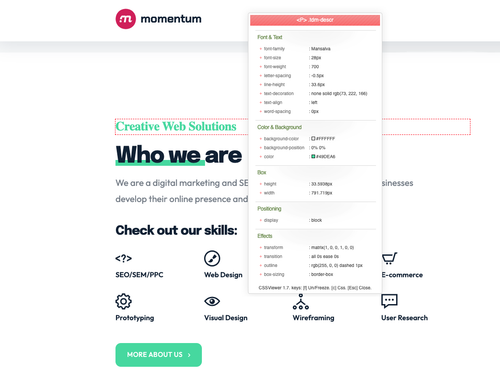
There seems to be an issue with Google Fonts. They load properly in the backend, but the frontend is not changing the font. Example: Mansalva font with Momentum Demo. I cleared my cache and used a computer that has never visited the site.
Backend:
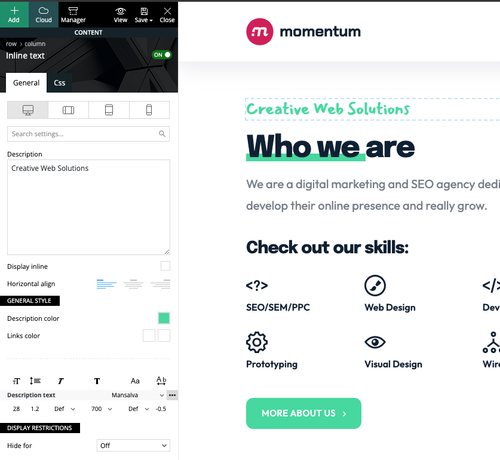
Frontend:
Bettina Hello @roccomaglio!
Make sure it is not from the cache plugin that you use. Please uninstall it and check again.
If the problem is still there, then please contact us via email at contact@tagdiv.com and provide the following:
– admin url and credentials
– a link to this topic in order to identify you
Thank you!
Bettina Hello @Seb!
Make a test and deactivate all plugins except tagDiv ones. Also, if you are using a cache plugin, deactivate it, clear all cache, and try again.
If the problem is still there, then please contact us via email at contact@tagdiv.com and provide the following:
– admin url and credentials
– a link to this topic in order to identify you
Thank you!



