
- NewspaperWP Rocket and Newspaper Theme: Optimization Guide
- TutorialsWhat is Ajax preloading?
 Catalin
 Hello michaelaulia,
I have inspected again your website and the featured image from Style 6 seems to work as expected, as you can see here -> https://www.screencast.com/t/pSb3mRnuT Clear all your caches and check again.
Thanks for the message!
Catalin Hello Jay Escobar,
Please ensure that you are using the latest version of Visual Composer which come bundled with the latest theme packet. Remove the old version and install it the latest one. If the problem is still there, I suggest you make a new clean install from scratch via FTP way and install only the plugins that come bundled with the theme core files and rule out any conflicting plugins. Clear all your caches and check the results. For more information about this, please check here -> https://forum.tagdiv.com/newsmag-install-via-ftp/
Thanks for your understanding!
 Bogdan B.
 Hello,
This could be a cache issue. Please only use wp super cache and these settings: https://forum.tagdiv.com/cache-plugin-install-and-configure/
Also the plugin needs a bit of adjustment as described here: https://forum.tagdiv.com/topic/help-cache-plugin/
Thank you!
Bogdan B. Hello,
This could be a plugin conflict so please disable all plugins except visual composer and revolution slider, clear cache and reset cdn files if you use it. Please also check any custom code you might have added to the theme panel or the theme files. If you use a child theme, please switch to the main theme to make sure it does not affect the proper functionality of the theme.
Thank you!
Catalin Hello Beyyette,
I have inspected your website and I saw that you do not respect the recommended size for your logo, as you can see here -> https://www.screencast.com/t/XCJIwWPvR Why? You should have 272*90 px for your logo. Otherwise, you will bring some white spaces (padding). After these changes, clear all your caches and check the results.
Thanks for your understanding!
 truth
truth Hello,
if I replace all the code in comments.php located in wp_booster with Facebook comment code, which I mentioned above, the mobile theme stops working with the cache plugin enabled.
Does this happen to you?
Thanks.
 Mahanta
Hi there My site hangs where I install revolution slider plugin (revslider). I tried cleaning the cache before and after install but nothing helped. Help please.
 simchris
 And PHP 5.6 has opcache which really speeds up WordPress quite a bit. Highly recommended to get this setup in your hosting panel.
 seikology
 Its working now. I clear the cache. Thank you so much sir.
Bogdan B. Hello
I have tested the tabs again but as expected, found no issues.
Please disable all plugins except visual composer, clear cache and reset cdn files if you use it. Please also check any custom code you might have added to the theme panel or the theme files. If you use a child theme, please switch to the main theme to make sure it does not affect the proper functionality of the theme.
Thank you!
 Simion C.
 Hi,
Please note that the mobile theme is tested and working properly on this device, with a default theme and using only the plugins provided with the theme. Usually this is caused by theme customization, custom code or problematic plugins. You should let the mobile theme active and disable all the other plugins, clear the cache and check the website on mobile.
If the issue is still present you can send us an email at contact@tagdiv.com and provide admin login information so we can take a look. Also paste a link to this topic.
Thanks
 saucemonsters
 All settings are correct. I deactivated plugins. Cleared cache. The problem is still there. Not sure how much deeper details I can provide. I was pretty thorough in my explanation the first time. Please review again and help me to fix.
Catalin Hello michaelaulia,
You should regenerate your thumbnails by using the Force Regenerate or Force Regenerate plugin. After this, clear all your caches, purge CDN files if you are using the CDN system and check the results.
Thanks for your understanding!
Simion C. Hi,
I have inspected you website and it seems to load poorly indeed. From what I can tell the website is taking a lot of time loading the cache you are using – https://www.screencast.com/t/DxOwNzhYt7x and almost half a second for each image on the website. Adding those together results in the present situation.
Basically these are the theme requirements – https://forum.tagdiv.com/requirements-for-newspaper/
What you could try is use the recommended cache plugin with the settings specified here
– https://forum.tagdiv.com/cache-plugin-install-and-configure/
You can try a fresh theme install with the latest version using one of these methods
– https://forum.tagdiv.com/how-to-update-the-theme-2/
Then install only the plugins provided in the theme package. Also take a look to the guide about improving page speed, provided above. Please let us know how it goes.
Thanks
 3click
 Hello,
i have the same problem, i have mobile menue show on desktop version !
i have no cache plugin installed ! all plugins that i have : Facebook Comments Plugin, tagDiv Social Counter and WPBakery Visual Composer.
but i use the theme in arabic language so i have the right to left activated.
you can see the image : http://chabeeba.3click-solutions.com/wp-content/uploads/2017/04/Sans%20titre.png
thanks for your help
Catalin Hello utzgurx,
Try to clear all your caches, purge all CDN files if you are using the CDN system and check the results. If you are using some untested plugins, try to disable all of them, leave just Visual Composer to active. Notice that all of untested plugins might interact with the theme core files and cause a lot of unknown issues. Also, if the problem is still there, please provide your website URL so I will be able to provide a more accurate response.
Thanks for your understanding!
Catalin Hello saucemonsters,
Please ensure that you have right setup your Trending sorting of your block from Block Settings in the panel. Also, if you are using some untested plugins, please try to disable all of them, leave just Visual Composer to active, clear all your caches and install only the plugins that come bundled with the theme core file and rule our the conflicting plugins. Clear all your caches and check the results. If the problem is still there, please provide some deeper details about your problem so I can identify it.
Thanks for your understanding!
Bogdan B. Hello,
Please increase your memory allocation like this guide shows: https://forum.tagdiv.com/system-status-parameters-guide/
If the translation still will not load, please disable all plugins except visual composer, clear cache and reset cdn files if you use it. The test again.
Let us know how it goes.
Thank you!
Bogdan B. Hello,
This could be a plugin conflict so please disable all plugins except visual composer, clear cache and reset cdn files if you use it. Please also check any custom code you might have added to the theme panel or the theme files. If you use a child theme, please switch to the main theme to make sure it does not affect the proper functionality of the theme.
Thank you!
saucemonstersI have the trending now widget in my right rail on all posts. An example is here. http://saucemonsters.com/college-dude-dumped-spotify/ The settings are definitely correct in that it should be showing the most popular in the last 7 days. However, some of the posts appearing are a month old. But in the same widget on the same page it shows new content from this week leading me to believe it is not a caching issue. (But I did clear all caches including my personal to be sure.) Here is a screengrab http://imgur.com/a/U6Pdd Please help me get only 7 days worth of posts to show.
 victortai
 Dear Simion,
Please see my setting, it follow what you recommended:

And, please see the page here: https://archieve.revolution.watch/
When the mouseover the Big Grid 1 Full, the image still having zoom effect.
All the cache (client/server) already flushed. Can you simply try the site above on your end?
regards,
vic
 eurodream
 Hello!
I have the same problem.
Removed the plugin and downloaded a new one.
Cleaned the cache.
But it still shows zero.
Site http://ksors-spain.org/
Simion C. Hi,
As I said before, please check if you have all the thumbs enabled in Theme panel->Block settings
– https://www.screencast.com/t/OgaBbows8
Big Grid 1 full uses this thumbnail size – https://www.screencast.com/t/GEcV67mEtE
The method provided above for the hover works properly on my end. If you select the options as shown in the screenshot, there will be no zoom effect when hovering. Maybe you have caching installed locally or server-side, try to clear the cache after making all these changes.
Thanks
 anoopcnair
I have been working with Godaddy hosting (the linux virtual server provider) because of the issues of very slow loading time of the site.
I tested the loading time with different tools but it’s seems loading time is very high. Rather in the flow I could see that it’s wait for 5S/7s before loading the website. This is really slow
(see the attached pic 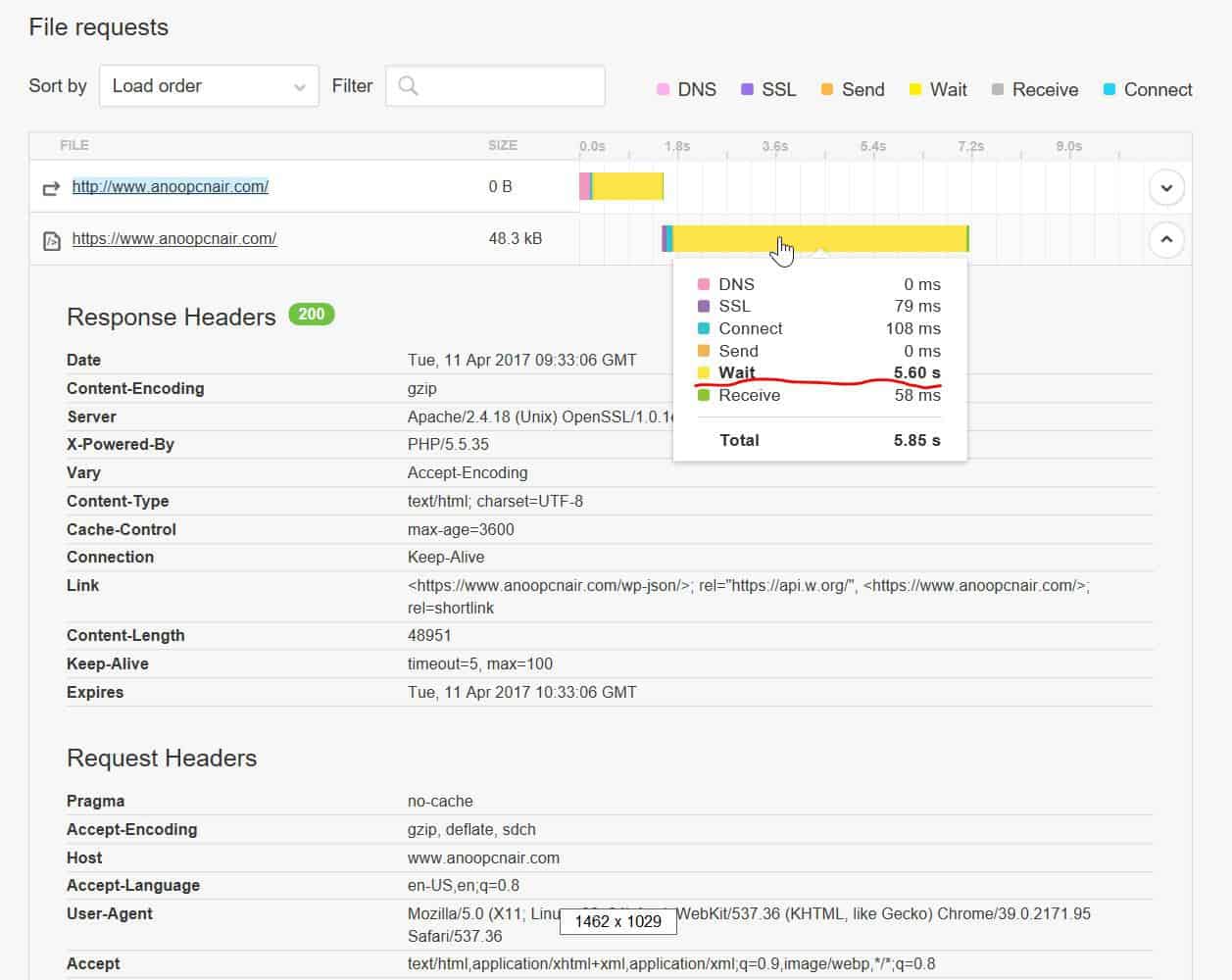 )
)
https://gtmetrix.com/reports/www.anoopcnair.com/3pyMLT7K (result is copied below)
https://tools.pingdom.com/#!/dtR5oa/www.anoopcnair.com
Godaddy says this is coding issue and the web developer says this is server issue but I’m stuck now . Any pointers would be really helpful !!
200 OK
anoopcnair.com
47.8 KB
7.52s
HeadersResponse
Response Headers
Date
Tue, 11 Apr 2017 09:34:23 GMT
Server
Apache/2.4.18 (Unix) OpenSSL/1.0.1e-fips mod_bwlimited/1.4
X-Powered-By
PHP/5.5.35
Link
<https://www.anoopcnair.com/wp-json/>; rel=”https://api.w.org/”, <https://www.anoopcnair.com/>; rel=
shortlink
Vary
Accept-Encoding
Content-Encoding
gzip
Cache-Control
max-age=3600
Expires
Tue, 11 Apr 2017 10:34:23 GMT
Content-Length
48957
Keep-Alive
timeout=5, max=100
Connection
Keep-Alive
Content-Type
text/html; charset=UTF-8
Request Headers
Host
http://www.anoopcnair.com
User-Agent
Mozilla/5.0 (X11; Linux x86_64; rv:49.0) Gecko/20100101 Firefox/49.0
Accept
text/html,application/xhtml+xml,application/xml;q=0.9,*/*;q=0.8
Accept-Language
en-US,en;q=0.5
Accept-Encoding
gzip, deflate, br
Connection
keep-alive
Upgrade-Insecure-Requests
Bogdan B. Hello,
Please disable all plugins except visual composer, clear cache and reset cdn files if you use it. Please also check any custom code you might have added to the theme panel or the theme files. If you use a child theme, please switch to the main theme to make sure it does not affect the proper functionality of the theme.
The memory allocation should be like so: https://forum.tagdiv.com/system-status-parameters-guide/
Let us know if you still have trouble with this.
Thank you!

