
- NewspaperCloudflare (CDN)
- NewspaperWP Rocket and Newspaper Theme: Optimization Guide
- NewspaperUsing the Theme Translations with WPML
- NewspaperRequirements for Newspaper
- NewspaperHow to Make the Site Faster
 Bogdan B.
 Hello,
Maybe you have automatic updates on so wordpress or a plugin got updated automatically and a conflict created itself. Please disable all plugins except visual composer, clear cache and reset cdn files if you use it. Then test the gallery again.\
Thank you!
 Andrei L.
 Hi
Thanks @Chris for your help!
@ifajig I’ve checked your site and fond some errors in browser’s console: http://screencast.com/t/TDkNenDoMk Try to deactivate all plugins, clear all caches, purge cdn files if you’re using then test the site again.
Let us know how it goes and if the problem persist please send us an email at contact@tagdiv.com with your login credentials and we will inspect this issue as soon as possible, also include a link to this topic.
Thanks!
 Catalin
 Hello josoro,
The CDN files can be purged only if you are using the CDN system for your website and before purging these files you will have to check your panel to find the button and grab it to purge all of these.
Thanks for your message!
 SlopeMedia
For a while now, my theme’s logo will not appear on mobile. We are running the latest version of the theme, we’ve tried clearing CDN/caches/etc and nothing is changing. It will show the alt-text, but not the image.
A regular and a retina version of the logo are uploaded (in the recommended size), and we are using Header 5 which the mobile theme tells us we don’t need to upload another logo under.
Website: http://www.slopemedia.org/
 josoro
 Hi,
I already delete the cache but I don´t know how to delete CDN files.
You can see the problem specially in the responsive menu (less than 765px width screen)
How can I delete the CDN files?
 gfran5
 Hi Chris, was reading an interesting article today where they mention prefetching dns for google analytics and also google fonts.. do you think this is something to add or no?
Here’s a link to that article: https://www.keycdn.com/blog/speed-up-wordpress/
Andrei L. Hi
Yes you should contact your host provider and ask him to remove any cache from server side. We’re not aware how and especially what files are cached by the server and for a good functionality is best to remove that cache.
Before making any optimization you have to make the site work properly an any devices. That means a clean install from the theme, no cache of any type, no cdn, no additional plugins except for those recommended. From this point you can start sites’s optimization, but you have to act carefully and test every step.
Thanks!
Catalin Hello josoro,
I have inspected your website and I saw that your icons are there. Purge all CDN files, clear all your caches and test it again.
Thanks.
Bogdan B. hello,
Please disable all plugins except visual composer, clear cache and reset cdn files if you use it. The test again. It could be a plugin conflict. Also if you have any custom code added, please remove it and if you use a child theme please witch to the main theme to rule out any customization issues.
Thank you!
Andrei L. Hi
Please make sure that you update thew theme according with our documentation, https://forum.tagdiv.com/newsmag-how-to-update-the-theme/ and also update Visual Composer at V 4.12 which is included in theme’s patch: https://forum.tagdiv.com/newsmag-how-to-update-visual-composer-plugin/ During the update process deactivate all plugins, deactivate the child theme if your using, just to make sure that there won’t be any conflict. After the update is completed clear all caches, purge the cdn if you’re using then test the site again.
Let us know if you need further assistance on this.
Thanks!
Catalin Hello Moforka,
Please try to disable all the untested plugins if you are using something like that, leave just Visual Composer to active, clear all your caches and install only the plugins that come bundled with the theme and rule out any conflicting plugins. Please check your hosting provider and request them to clear all your server caches. Also, if you are using the CDN system, try to purge all the files. It is very important to have the minimum requirements for your dedicated server for achieving best results in theme. Please check this to be in the parameters which are presented in our documentation here -> https://forum.tagdiv.com/requirements-for-newspaper/
Hope this helps and let us know how it goes!
Thanks.
Bogdan B. Hello,
Please try to disable all plugins except visual composer, clear cache and reset cdn files if you use it.
Then try to install a theme demo and see if the issue is still there.
Let us know how it goes and provide a link to your site if you still have trouble so we can inspect it.
Thank you!
 Nordpresse
 Hello, i tried everything and even without any cache, any cdn and any extensions, it does the bug as you can see:
It happens a third of the time with chrome and opera… I dont see why
Catalin Hello sainthilaire,
I have checked your website and I did not saw any problem with your mobile theme. Everything seems to work as expected. To rule out any conflicting plugins, please try to disable all the untested plugins, leave just Visual Composer to active, clear all your caches, purge CDN files if you are using the CDN system and install only the plugins that come bundled with the theme.
Hope this helps!
Thanks for your understanding!
Catalin Hello frenzygh,
Thumbs up for your project! I am glad that you begin to understand how you can create your website using our theme. So, please notice that our theme uses some thumbs for displaying the featured images for each post and if your image is too short than that thumb, will appear those gray margins -> http://screencast.com/t/aWWq9JTS As you can see in next example, you are using and image which is less than size of thumb, like this -> http://screencast.com/t/mPUNYhypAvV
Please notice that our system is based on cropping and not for resizing of images. Our cropping system to the center to top. Please notice that the cropping system of our theme is the same for all featured image and this will crop the image from the center to top. Please notice that you cannot change very easy this system and if you want this, please notice that is not a simple task and involve custom work. If you want to better understand this process, please check this topic here -> https://forum.tagdiv.com/topic/resize-thumbnails-to-proper-size/
If you need more assistance in this regard please provide your website URL so I can inspect it closer. Also, please try to disable all the active plugins, leave just Visual Composer to active, clear all your caches, purge CDN file if you are using the CDN system and install only the plugins that come bundled with our theme and rule out the conflicting plugins.
Thanks for your understanding!
Andrei L. HI
It could be a cache issue so try to clear all cachets, purge cdn if you’re using then test the site again. Let me know how it goes and if the problem persist please provide your site url so I can have a closer look and get back to you with a more accurate answer.
Thanks!
 muppins
Ad code:
<script type="text/javascript">

  ( function() {

    if (window.CHITIKA === undefined) { window.CHITIKA = { 'units' : [] }; };

    var unit = {"calltype":"async[2]","publisher":"chaoticways","width":300,"height":250,"sid":"Chitika Default"};

    var placement_id = window.CHITIKA.units.length;

    window.CHITIKA.units.push(unit);

    document.write('<div id="chitikaAdBlock-' + placement_id + '"></div>');

}());

</script>

<script type="text/javascript" src="//cdn.chitika.net/getads.js" async></script>
Size: 300×250
put in template 11 post type.
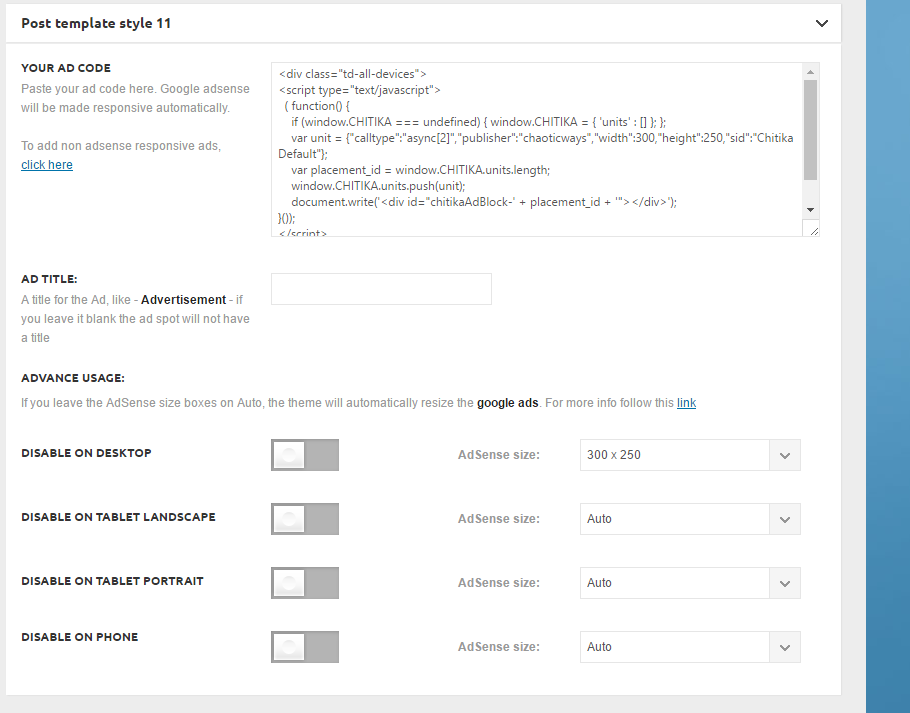
It’s not showing up on the top right next to the video:
http://ghesports.com/runescape-chaotic-ways-pk-video/
Nor is it showing on the homepage.
Bogdan B. Hello,
The duplication of featured images usually occurs when adding the image in the featured image section and on the post itself thus resulting in 2 images being displayed. Please make sure you do not ad the featured image inside the post content. Only add it here: http://screencast.com/t/fl8HNEo5
If this is not the case, we did have reports in the past with featured image duplication caused by plugins. Sometimes plugins add their own featured image like photon for example. In your case I can see in the code a WPDM template which contains the image. It could be a plugin causing this so please disable all plugins except visual composer, clear cache and reset cdn files. Then check the posts again.
Thank you!
Catalin Hello PatWire,
Please try to re-save your Permalinks, clear all your caches and test it again. Also, if you are using some untested plugins in the theme, please try to disable all of them, leave just Visual Composer to active, purge CDN files if you are using the CDN system and install only the plugins that come bundled with our theme and rule out the conflicting plugins.
Thanks for your understanding!
 Alex
Alex Thank you for your response Catalin,
Indeed, we have previously done everything you have outlined, including both cache clear in IE and WP Super Cache.
In dashboard WP Super Cache reports to be working properly. We are not using the CDN. We use the latest version of IE.
W3 validator reports several style issues, it is though noted throughout the forum – to be a typical issue, that TagDiv put on to do list to figure out.
Is there anything else that might be causing this ?
Thank you.
Catalin Hello Alex,
I have checked your mega menu and I noticed that feature works as properly, as you can see here -> http://screencast.com/t/KznmLWtU529P I guess that probably you have a caching issue on your side and that’s why you will get a bad layout. Please try to clear all your caches and browser caches, purge CDN file is you are using the CDN system and test it again.
Thanks for your understanding!
-
This reply was modified 9 years by
 Emil G.
 simchris
 Well, we have dedicated server with dual Xeon E5-2640v3 processors and 32GB of RAM. So, I have enough horsepower to throw at anything pretty much (except that one version/batch/trunk of Visual Composer that killed the box last year! which led to Radu’s “shim” plugin workaround). So, not best person to ask beyond saying “we have never had a problem with it” — but then, I never had issue with wp-postviews either, sooo…. unless you’re trying to do something funky with a CDN, bad ad network with timeout issues, etc. I don’t see a problem.
Oh, I know what one of the ‘hax’ we did was, as I don’t think it originally did/supported ‘async’ mode for stuff; which was one thing we did.
Anyway — works for me, “your mileage may vary.”
(and for you geeky folk; specs on just ONE of the processors on our new server went live Aug 5, sadly as our old server had total RAID failure during migration; http://ark.intel.com/products/83359/Intel-Xeon-Processor-E5-2640-v3-20M-Cache-2_60-GHz ).
-
This reply was modified 10 years by
simchris.
Catalin Hello yuccarichard,
Do you have some server caches on your dedicated server? Please try to clear all of these and if you do not have any access in this regard, please request this task to your hosting provider. Also, if you are using a CDN system please try to purge all the CDN files and check the results.
If you need more assistance in this regard after you have followed this advice, please send us an email at contact@tagdiv.com with your log-in information (wp-admin) so we can further inspect it closer and also, so I will be able to provide a more accurate response.
Thanks for your understanding!
Catalin Hello kwalsh22,
Please ensure that you are using the latest version of the theme and also, all the required plugins have updated to the latest version of them (Visual Composer 4.12 and Social Counter 4.1). If you are suing the CDN system, please try to purge all the files, clear all your cache and server cache (you will have to request this task to your hosting provider if you do not have any access to clear it) and then test it again and check the results.
Hope this helps and let us know how it goes!
Thanks for the message!
 Krisj
Krisj Hi!
Thank you for your reply.
I tried deactivating all the plugins except visual composer, cleared cache but couldnt reset cdn files.
There is no child theme activated.
I still can’t save the translations, its just loading.
All the other options save perfectly..
I have tried to delete the other themes aswell.
