
- NewsmagChild theme support
- NewspaperChild Theme Support
- NewspaperIntroduction to CPT and ACF with Newspaper Theme
- NewsmagWhat’s included in Newsmag theme package
- NewspaperHow to Update the Newspaper Theme
- NewspaperWhat’s Included in the Newspaper Theme Package
- ApiThe Theme API
- NewspaperFlex Block Settings Guide
- NewspaperPrimary Category: Build a hierarchy for your website
- NewsmagCustom Post Type Support
- NewsmagInstall via WordPress
- NewsmagInstall via FTP
- NewsmagBreadcrumbs
- NewspaperBreadcrumbs
- NewspaperHow to Install Newspaper via FTP
- NewspaperHow to Install Newspaper via WordPress
 Bogdan B.
 Hello,
Please first make sure amp is properly implemented as shown here: https://tagdiv.com/amp-newspaper-theme/
The YouTube video shows the old implementation.
This could be a plugin conflict so please disable all plugins except the page builder, mobile theme and AMP clear cache and reset cdn files if you use it. Please also check any custom code you might have added to the theme panel or the theme files. If you use a child theme, please switch to the main theme to make sure it does not affect the proper functionality of the theme.
Thank you!
Bogdan B. Hi,
It could be a plugin conflict affecting your whatsapp share. Please disable all plugins except the page builder, clear cache and reset cdn files if you use it. Please also check any custom code you might have added to the theme panel or the theme files. If you use a child theme, please switch to the main theme to make sure it does not affect the proper functionality of the theme.
Then test whatsapp again and see if it still provides the error.
Thank you!
 Calin
Calin Hi,
Also please make sure that you do not have a plugin conflict with untested plugins, please deactivate all non theme plugins, also if you are using child theme ( or cache plugin ), clear all cache deactivate the cache plugin and try again.
If there is still a problem, you can send us an email at contact@tagdiv.com and provide admin login, as well as cPanel or FTP if possible. We will take a look. Include a link to this topic in the email.
Thank you!
Calin Hi,
1. Our theme make thumbs for each block/module and that is way you have more then one image created.
Theme thumbs -> https://forum.tagdiv.com/theme-thumbs/
Thumbnails – Fix strange looking images on blocks -> https://forum.tagdiv.com/thumbnails-fix-strange-looking-images-on-blocks/
2. Please make sure that when you set an image you set it to full size -> https://www.screencast.com/t/P8gvWIMUM
Also please make sure that you do not have a plugin conflict with untested plugins, please deactivate all non theme/tested plugins, also if you are using child theme, clear all cache and try again.
Thank you!
Calin Hi,
I have imported the single post template 1 and for me is looking 1:1 -> https://www.screencast.com/t/5HYZZ5BX3V
Please make sure that you do not have a plugin conflict with untested plugins, please deactivate all non theme/tested plugins, also if you are using child theme, clear all cache and try again.
Also please try this with others templates too.
Thank you!
Calin Hi,
I checked your website and now you are using the responsive version of theme, not then mobile theme plugin.
Please make sure that you do not have a plugin conflict with untested plugins, please deactivate all non theme/tested plugins, also if you are using child theme, clear all cache and try again.
This is our list with tested plugins with our theme -> https://www.screencast.com/t/cmPkh9jba4sZ
Also now in Newspaper c9.6.1 you have 3 options, one for only mobile, one for mobile and AMP( this option is working only with the AMP that we provide ), and AMP ( this option allow you on which page/post to make AMP, also this option is available only with provided AMP plugin ); if you choose to use others amp plugins -> https://www.screencast.com/t/klPekGTzwi0F -> https://www.screencast.com/t/EjRDB03fp
How to Make an AMP Ready Website with Newspaper Theme -> https://tagdiv.com/amp-newspaper-theme/
You can deactivate the AMP on those pages/post were you get the google errors.
Thank you!
Calin Hi,
Please make sure that all the settings are like in our requirements, please follow the guide carefully
– https://forum.tagdiv.com/requirements-for-newspaper/
and please increase all requirements that are lower, and follow all steps.
WP_MEMORY_LIMIT try to increase it at least to 256mb.
Also please check the php version to be 7-7.2
Please make sure that you do not have a plugin conflict, please deactivate all non theme plugins, also if you are using child theme or cache plugin, please deactivate them, clear all cache and try again.
Thank you for your understanding!
Calin Hi,
Please make sure that all the settings are like in our requirements, please follow the guide carefully
– https://forum.tagdiv.com/requirements-for-newspaper/
and please increase all requirements that are lower, and follow all steps.
WP_MEMORY_LIMIT try to increase it at least to 256mb.
Also please check the php version to be 7-7.2
Please make sure that you do not have a plugin conflict, please deactivate all non theme plugins, also if you are using child theme or cache plugin, please deactivate them, clear all cache and try again.
Thank you for your understanding!
Calin Hi,
Please make sure that you made a clean installation like in our documentation -> https://tagdiv.com/how-to-install-newspaper-theme/
Please make sure that all the settings are like in our requirements, please follow the guide carefully
– https://forum.tagdiv.com/requirements-for-newspaper/
and please increase all requirements that are lower, and follow all steps.
Please make sure that you do not have a plugin conflict, please deactivate all non theme plugins, also if you are using child theme or cache plugin, please deactivate them, clear all cache and try again.
Also if you set some code in theme panel or theme file, please remove it, clear all cache and try again.
If the problem is still there, please provide me a link to your website, in this way I will be able to make some deep investigation and provide you a better answer.
Thank you for your understanding!
 rjdtramirez
 I have done all the requirements see screenshot below of my status
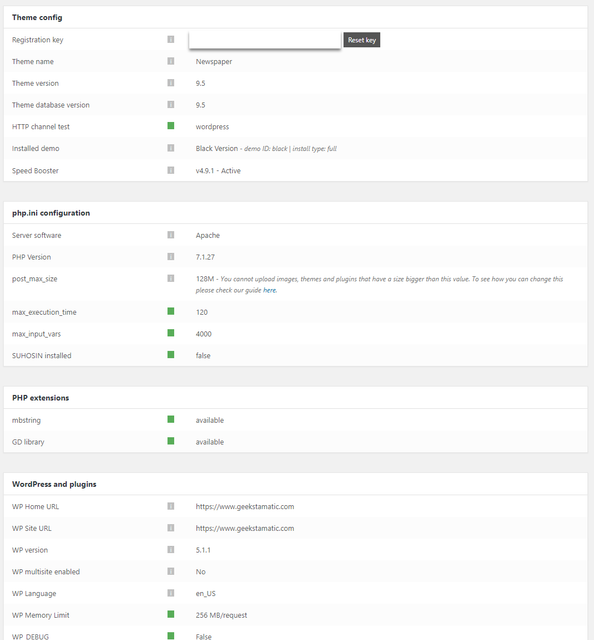
and disable my child theme
but issue still persist. i saw also this error below

Calin Hi,
Usually this is a plugin conflict, please make sure that you do not have a plugin conflict, please deactivate all non theme plugins, also if you are using child theme or cache plugin, please deactivate them, clear all cache and try again.
Thank you!
Calin Hi,
Please make sure that you do not have a plugin conflict, please deactivate all non theme plugins, also if you are using child theme please deactivate it, clear all cache and try again.
How you can get the post id -> https://www.screencast.com/t/0EwDgPhxZD
Please check our documentation about Block settings guide, there you’ll find the filter section -> https://forum.tagdiv.com/block-settings-guide/
Also please check our documentation for Unique articles -> https://forum.tagdiv.com/unique-articles/
Thank you!
Calin Hi,
This comment is a little bit different, those from theme panel show the comments from post, and the one from author page show the comments that author have write.
-> https://www.screencast.com/t/t3AYUJPoxZdX
For author page you need to use a cloud template from tagDiv Cloud Library or us a custom css
-> https://www.screencast.com/t/azp5sVXF3Uv
.author .td-author-counters span:last-child {
display:none;
}
Set the css in Newspaper>Theme panel>Custom code Custom css
You can check the social from here ->https://www.screencast.com/t/NloFAh1A or using tagDiv Composer -> https://www.screencast.com/t/Vq2QewXO -> https://www.screencast.com/t/Lu5k1yWECq
Thank you!
Calin Hi,
Please make sure that you follow our documentation for How to Update the Newspaper Theme for WordPress -> https://tagdiv.com/update-newspaper-theme/
Also our our mobile theme was tested only with the AMP plugin that we provide, we can not say for sure if the mobile theme will work properly with others AMP plugins or not.
In Newspaper c9.6.1 you have 3 options, one for only mobile, one for mobile and AMP( this option is working only with the AMP that we provide ), and AMP ( this option allow you on which page/post to make AMP, also this option is available only with provided AMP plugin )
Please make sure that you do not have a plugin conflict, please deactivate all non theme plugins, also if you are using child theme please deactivate it, clear all cache and try again.
Thank you!
Calin Hi,
Please make update to v9.6.1 follow our documentation for How to Update the Newspaper Theme for WordPress -> https://tagdiv.com/update-newspaper-theme/
In Newspaper c9.6.1 you have 3 options, one for only mobile, one for mobile and AMP( this option is working only with the AMP that we provide ), and AMP ( this option allow you on which page/post to make AMP, also this option is available only with provided AMP plugin )
Please make sure that you do not have a plugin conflict, please deactivate all non theme plugins, also if you are using child theme please deactivate it, clear all cache and try again.
Thank you!
Calin Hi,
The child theme will work only for the files that are mentioned in our guide -> https://forum.tagdiv.com/the-child-theme-support-tutorial/
The queries for blocks can be found in wp-content/themes/Newspaper/includes/wp_booster/td_data_source.php
Thank you!
Calin Hi,
Please make sure that all the settings are like in our requirements, please follow the guide carefully
– https://forum.tagdiv.com/requirements-for-newspaper/
and please increase all requirements that are lower, and follow all steps.
Please make sure that you do not have a plugin conflict, please deactivate all non theme plugins, also if you are using child theme or cache plugin, please deactivate them, clear all cache and try again.
If you want to move the website to other host/server some users recommend the duplicator plugin for migrating/moving websites, here are some guides I found about it
– http://www.wpbeginner.com/wp-tutorials/how-to-move-wordpress-from-local-server-to-live-site/
– https://www.shoutmeloud.com/migrate-wordpress-server.html
– https://pantheon.io/resources/quickstart-guide-migrating-wordpress-site
I didn’t test it but I believe it should make a perfect copy of the website, keeping all the settings, database, etc. Pages and posts, theme panel settings, ad codes in the theme panel, custom code in the theme panel are kept in the database, duplicating it will duplicate these as well.
You could give it a try, be sure to make a full backup before attempting.
Thank you!
Calin Hi,
Usually this is a plugin conflict, please make sure that you do not have a plugin conflict, please deactivate all non theme plugins, also if you are using child theme or cache plugin, please deactivate them, clear all cache and try again.
This is our list with tested plugins with our theme -> https://www.screencast.com/t/cmPkh9jba4sZ
Thank you!
 TravelDudes
 Can I overwrite the td_config file? I copied it to my child theme and didn’t seem to work.
Calin Hi,
Please make sure that you have the last version of Newspaper theme v9.6.1
Please make sure that all the settings are like in our requirements, please follow the guide carefully
– https://forum.tagdiv.com/requirements-for-newspaper/
and please increase all requirements that are lower, and follow all steps.
Please make sure that you do not have a plugin conflict, please deactivate all non theme plugins, also if you are using child theme or cache plugin, please deactivate them, clear all cache and try again.
Thank you!
Calin Hi,
Please make sure that all the settings are like in our requirements, please follow the guide carefully
– https://forum.tagdiv.com/requirements-for-newspaper/
and please increase all requirements that are lower, and follow all steps.
WP_MEMORY_LIMIT try to increase it at least to 256mb.
Also please check the php version to be 7-7.2
When tagDiv Composer is not working -> https://forum.tagdiv.com/tagdiv-composer-not-working/
Please make sure that you do not have a plugin conflict, please deactivate all non theme plugins, also if you are using child theme or cache plugin, please deactivate them, clear all cache and try again.
Thank you!
Calin Hi,
I check this on my install and for me is working correctly.
Please make sure that all the settings are like in our requirements, please follow the guide carefully
– https://forum.tagdiv.com/requirements-for-newspaper/
and please increase all requirements that are lower, and follow all steps.
Please make sure that you do not have a plugin conflict, please deactivate all non theme plugins, also if you are using child theme please deactivate it, clear all cache and try again.
Thank you!
Calin Hi,
Please make update to v9.6.1 follow our documentation for How to Update the Newspaper Theme for WordPress -> https://tagdiv.com/update-newspaper-theme/
Please make sure that you do not have a plugin conflict, please deactivate all non theme plugins, also if you are using child theme please deactivate it, clear all cache and try again.
Thank you!
Calin Hi,
Please make sure that all the settings are like in our requirements, please follow the guide carefully
– https://forum.tagdiv.com/requirements-for-newspaper/
and please increase all requirements that are lower, and follow all steps.
WP_MEMORY_LIMIT try to increase it at least to 256mb.
Also please check the php version to be 7-7.2
Please make sure that you do not have a plugin conflict, please deactivate all non theme plugins, also if you are using child theme or cache plugin, please deactivate them, clear all cache and try again.
Thank you!
 reatlat
My client ask me to add a lot of modification to theme directly. NOT CHILD THEME
Is any way to get the source files for stylesheets? (Sass/Scss/Less)
PS: client really don’t care about updates 🙂
