- NewsmagRequirements for Newsmag
 Bettina
 Hello @cavalrydesign!
Of course, you can install a post template from the Cloud Templates -> add new.
Documentation here:
– https://forum.tagdiv.com/cloud-library-templates/
– https://forum.tagdiv.com/design-post-pages-using-cloud-library-templates/
– https://forum.tagdiv.com/cloud-library-category-templates/
Check also our video tutorials here: https://www.youtube.com/c/tagdivThemes/videos
Thank you!
 ahmetekinler
Hi there,
I made minor additions to the following two files.
As a matter of fact, what I’ve done with each update is gone.
What should I do so that the changes I made are not lost in the update?
I guess I won’t be able to use the child theme?
wp-content/plugins/td-cloud-library/shortcodes/search/tdb_search_form.php
wp-content/plugins/td-composer/legacy/Newspaper/parts/search.php
Thanks
 Calin
Calin Hi,
I think that you are referring to this https://i.imgur.com/iwIvxGl.png I’m not sure, maybe it can work if you edit the files of that element -> wp-content/plugins/td-cloud-library/shortcodes/single/tdb_single_related.php. But, please try something different, what you should do is to use a flex block and in filter tab set https://prnt.sc/2410idq but this also has an inconvenience, will not select the taxonomy after the current post.
For the moment those are the only solutions that I have in my mind.
Thank you!
Bettina Hello @usacarry!
There is a conflict between TagDiv Composer and WP Bakery. So, I gladly recommend you to shift from WPBakery to Composer, because WPBakery is an old builder plugin. Please check our guide to know how to shift from WPBakery to Composer: https://www.screencast.com/t/6xLVMmlsY ; https://www.screencast.com/t/zWHrRmK1LQC ; https://www.screencast.com/t/vuFdT9Stx ; https://www.screencast.com/t/DWbSf3qj ; https://www.screencast.com/t/QuHyGccTK71v
We recommend to use cloud/PRO templates in order to have the possibility to edit them with the TagDiv Composer which contains a lot of functions and features, please check our tutorial here: https://forum.tagdiv.com/tagdiv-composer-tutorial/
Documentation here:
– https://forum.tagdiv.com/cloud-library-templates/
– https://forum.tagdiv.com/design-post-pages-using-cloud-library-templates/
– https://forum.tagdiv.com/cloud-library-category-templates/
Check also our video tutorials here: https://www.youtube.com/c/tagdivThemes/videos
Thank you!
 c386
c386Hi,
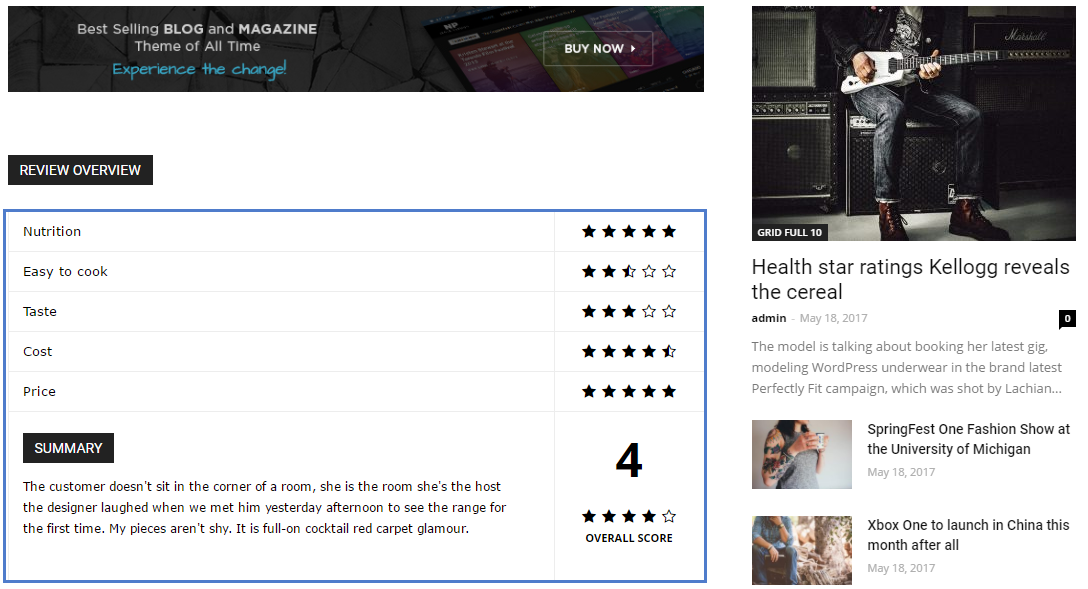
I want to make better use of the review system built into the Newspaper theme: https://forum.tagdiv.com/reviews-2/
The basic functionality works well – as shown here: https://forum.tagdiv.com/wp-content/uploads/2017/05/review.png – but is there a way to edit what is automatically added to the foot of the review?
I would like to add lists of pros and cons, some imagery, and basically want to use the review system in a more personalised way. The above guide suggests using tagDiv Cloud Library Post Templates in order to open up further customisation options. I don’t really need a whole new template in this instance, and just want to edit the review element.
What would be the best way to achieve this?
Thank you in advance.
 Doan Thanh Nhut
 I have taken a screenshot of my screen, all devices from Laptop, phone are the same. After 0.5 seconds, the main interface of the website’s homepage will be stabilized again.
-
Plugins I’m Using:
- Akismet Anti-Spam
- All 404 Redirect to Homepage
- Classic Editor
- Easy Table of Contents
- Insert Headers and Footers
- Smush Pro
- tagDiv Cloud Library
- tagDiv Composer
- tagDiv Social Counter
- tagDiv Standard Pack
- WP Rocket
- WPMU DEV Dashboard
- Yoast SEO
Bettina Hello Lucas!
On that block the sort order is Latest, that’s why it will take the new one there up. That option from WordPress is no more working with our theme.
A solution to keep that post every time the first one is to use cloud templates and then it is very simple: add a block into the page with the post’s ID in filter, limit:1. After this block, you can exclude the post from above. Check this guides: https://forum.tagdiv.com/flex-block-settings-guide/ ; https://forum.tagdiv.com/offset-feature/
For more customizations, we recommend to use cloud/PRO templates in order to have the possibility to edit them with the TagDiv Composer which contains a lot of functions and features, please check our tutorial here: https://forum.tagdiv.com/tagdiv-composer-tutorial/
Documentation here:
– https://forum.tagdiv.com/cloud-library-templates/
– https://forum.tagdiv.com/design-post-pages-using-cloud-library-templates/
– https://forum.tagdiv.com/cloud-library-category-templates/
Check also our video tutorials here: https://www.youtube.com/c/tagdivThemes/videos
Thank you!
 Anamaria
 Hello,
Please let me know what template you use for posts, form Theme Panel or Single Post Template from tagDiv Cloud Library.
Also, please check this topic with the same issue https://forum.tagdiv.com/topic/theme-panel-settings-are-not-saving-2/ and let me know the results.
Thank you!
Bettina Hello @dkleidonaris!
For more customizations, we recommend to use cloud/PRO templates in order to have the possibility to edit them with the TagDiv Composer which contains a lot of functions and features, please check our tutorial here: https://forum.tagdiv.com/tagdiv-composer-tutorial/
Documentation here:
– https://forum.tagdiv.com/cloud-library-templates/
– https://forum.tagdiv.com/design-post-pages-using-cloud-library-templates/
– https://forum.tagdiv.com/cloud-library-category-templates/
Check also our video tutorials here: https://www.youtube.com/c/tagdivThemes/videos
In order to help you efficiently, please provide more information about the issue or what you need to achieve, screenshots or a video.
A solution for sending a screenshot/video is this:
Download, capture, send: https://www.techsmith.com/jing-tool.html
After making the screenshot, you will have a link, paste it here.
Thank you!
 candersonnm
 Bettina,
Thanks for the response.
I do use the TagDiv composer for the header. The Discover Muscatine header is selected in the Theme Panel > Header > Cloud Library Template.
When I edit the header in Cloud Templates, the logo image and logo retina image correct. Show image is set to show, show text and tagline are set to hide.
It only happens on posts, not pages. On pages, it displays the header correctly. It also displays them correctly on category archive pages.
When I go into the cloud template area, it shows a template for single posts assigned to all posts. It also shows a mobile version of that same template. The main template shows it correctly on all four screen sizes.
*** Found problem as typing this — Had to go in and convert the header content on the post template and assigned the converted header to the cloud template ***
Link to screen shots:
https://www.dropbox.com/sh/w9jkllbtu7lej5e/AABVQ-BLHrATReyT9nXX7oEsa?dl=0
 jettza
Hi there,
I’m having some trouble with inserting social icons into my website. They have also disappeared from my header design.
When I drag the social icons element from the TagDiv composer to my site the element is invisible. There does appear the left-hand options for ‘icon size’, ‘padding’, the list of social networks, etc., however nothing appears on my website and additionally the CSS tab doesn’t offer any options.
I have added the social icons in my Footer manually by adding an ‘icon’ for each network, but I need for the social icons multipurpose shortcode to work for articles, authors as well as in my header.
I have made sure that all the links direct to the valid URLs and have tried deactivating all non-TagDiv plugins, but nothing works.
It seems to be an issue with connecting to the Cloud Library because sometimes I will add an element and the stock image will be missing.
Any help would be greatly appreciated!
Thanks,
Jett
Bettina Hello!
It seems that you use a cloud template for your posts, so the theme panel settings are not applied there. Please access your post and press the green button edit with the TagDiv Composer, click on that elements and you’ll find some settings for that.
For more customizations, we recommend to use cloud/PRO templates in order to have the possibility to edit them with the TagDiv Composer which contains a lot of functions and features, please check our tutorial here: https://forum.tagdiv.com/tagdiv-composer-tutorial/
Documentation here:
– https://forum.tagdiv.com/cloud-library-templates/
– https://forum.tagdiv.com/design-post-pages-using-cloud-library-templates/
– https://forum.tagdiv.com/cloud-library-category-templates/
Check also our video tutorials here: https://www.youtube.com/c/tagdivThemes/videos
Thank you!
Bettina Hello Tasakaal!
For default templates you need the tagdiv Standard Pack, please check your homepage now.
For more customizations, we recommend to use cloud/PRO templates in order to have the possibility to edit them with the TagDiv Composer which contains a lot of functions and features, please check our tutorial here: https://forum.tagdiv.com/tagdiv-composer-tutorial/
Documentation here:
– https://forum.tagdiv.com/cloud-library-templates/
– https://forum.tagdiv.com/design-post-pages-using-cloud-library-templates/
– https://forum.tagdiv.com/cloud-library-category-templates/
Check also our video tutorials here: https://www.youtube.com/c/tagdivThemes/videos
Thank you!
Calin Hi markyj2000, our theme offer the ability to use global ads (those need to be set in the theme panel and can be set in ad box as ad source) or you can set individual ad box per pages and cloud categories templates, in this way you have the possibility to choose the ads that you want to display. For more details, you can check our documentation from here -> https://forum.tagdiv.com/ads-adsense-overview/
I hope this will help you!
 Tdoc31
4 articles out of 17 do have the wp_booster error
https://lemagdici.com/2021/07/pour-une-meuse-potable-des-villes-se-mouillent/
https://lemagdici.com/2021/07/une-maison-de-sante-cest-plus-que-quatre-murs/
https://lemagdici.com/2021/07/axoncable-de-retour-sur-mars/
https://lemagdici.com/2021/07/a-lecole-dingenieurs-la-securite-se-pense-globale/
I read a lot, and can get my head around why they have this error
Version: 11.3.2
Active plugins
tagDiv Cloud Library
tagDiv Social Counter
tagDiv Mobile Theme
Official AMP for WP
system status is ok ( cache addon is not being detected)
PHP Version 7.4.26
WP Memory Limit 265 Mo
PHP Execution Time 120
PHP Max Input Vars 5000
I really dont know what to do !! any help out there ?
Calin Hi Bruno Riggs,
The Pulses Pro is using cloud templates, but the error message is like it was set the standard post template 1 (those are coming from the tagdiv standard pack) and after that this was removed.
Also, I checked your website and on frontend everything looks correct. Do you still have that problem? If yes, please make sure that all theme plugins are enabled and the theme requirements are set -> https://forum.tagdiv.com/requirements-for-newspaper/
Let me know the results!
Bettina Hello Mesut!
The standard pack plugin became deprecated. For more customizations, we recommend to use cloud/PRO templates in order to have the possibility to edit them with the TagDiv Composer which contains a lot of functions and features, please check our tutorial here: https://forum.tagdiv.com/tagdiv-composer-tutorial/
Documentation here:
– https://forum.tagdiv.com/cloud-library-templates/
– https://forum.tagdiv.com/design-post-pages-using-cloud-library-templates/
– https://forum.tagdiv.com/cloud-library-category-templates/
Check also our video tutorials here: https://www.youtube.com/c/tagdivThemes/videos
For cloud/PRO templates: you should add the sidebar from tagdiv Composer. Steps:
1. Add 1 row
2. Split into 2 columns( 2/3 + 1/3 )
3. You can add whatever you want into the second column and consider it a sidebar.
Take a look here in this video for example where I build 6 columns: https://www.screencast.com/t/mZ2c5XamTFN
For example, you can add a flex block with one post or any other block placed in the row or inner row for more than 4 columns: https://www.screencast.com/t/lMTepr9Uwc
Let me know the results!
Thank you!
Bettina Hello @Hindistack!
For more customizations, we recommend to use cloud/PRO templates in order to have the possibility to edit them with the TagDiv Composer which contains a lot of functions and features, please check our tutorial here: https://forum.tagdiv.com/tagdiv-composer-tutorial/
Documentation here:
– https://forum.tagdiv.com/cloud-library-templates/
– https://forum.tagdiv.com/design-post-pages-using-cloud-library-templates/
– https://forum.tagdiv.com/cloud-library-category-templates/
Check also our video tutorials here: https://www.youtube.com/c/tagdivThemes/videos
Please make sure that the Jetpack toolbar is not active, check this guide: https://forum.tagdiv.com/general-options-may-interfere-newspaper-theme/
Thank you!
 hcm
hcmSome Category pages load fine. Others display a ‘500’ server error page and throw the error below in the background. The page loads when the plugin is turned off.
Fatal error: Uncaught Error: Call to a member function the_post() on null
in ****/wp-includes/query.php on line 979
Call stack:
the_post()
wp-content/plugins/td-cloud-library/wp_templates/tdb_view_category.php:17
include()
wp-includes/template-loader.php:106
require_once()
wp-blog-header.php:19
require()
index.php:17
Bettina Hello @candersonnm!
If you use default templates, then please make sure you have Standard pack plugin installed and active. But, this plugin became deprecated.
For more customizations, we recommend to use cloud/PRO templates in order to have the possibility to edit them with the TagDiv Composer which contains a lot of functions and features, please check our tutorial here: https://forum.tagdiv.com/tagdiv-composer-tutorial/
Documentation here:
– https://forum.tagdiv.com/cloud-library-templates/
– https://forum.tagdiv.com/design-post-pages-using-cloud-library-templates/
– https://forum.tagdiv.com/cloud-library-category-templates/
Check also our video tutorials here: https://www.youtube.com/c/tagdivThemes/videos
Thank you!
 niranjanmotonews
When I try to set it as global for a single post, it’s get auto revert back to standard default. another issue is when I try to downgrade to the old version, it’s do nothing.
when we set post or category or header template from cloud library under thyme panel, it always reverts back to default,
let me know if there are any in the new theme and we are getting this fixed in updates, if not I need a refund.
also, the theme is not getting activated, it’s say got activated successfully but the above says not activated.
Calin Hi GSPConsultingServices,
If I’m right that code can be from the tagDiv Cloud Library and is for the Gutenberg editor from WordPress. Please make a test, disable the tagDiv Cloud Library and see if the problem is solved or not. If is solve, please delete the plugin and re-install it from Newspaper > plugins.
In case that the problem is still there we’ll need to take a look at it, for this please make a full backup for your website and contact us at contact@tagdiv.com and provide cPanel and wp-admin access. Also, include the link of this topic. We’ll check it as soon as possible.
Thank you!
Bettina Hello!
You can use the element “Column text” for blockquotes in a cloud template, so you can place it where you’ll like on each template.
For more customizations, we recommend to use cloud/PRO templates in order to have the possibility to edit them with the TagDiv Composer which contains a lot of functions and features, please check our tutorial here: https://forum.tagdiv.com/tagdiv-composer-tutorial/
Documentation here:
– https://forum.tagdiv.com/cloud-library-templates/
– https://forum.tagdiv.com/design-post-pages-using-cloud-library-templates/
– https://forum.tagdiv.com/cloud-library-category-templates/
Check also our video tutorials here: https://www.youtube.com/c/tagdivThemes/videos
Hope that helps you!
Thank you!
Anamaria Hello,
Please make sure that you do not have a plugin conflict, please deactivate ALL plugins except tagDiv plugins, also if you are using child theme or cache plugin, deactivate them, clear all cache and try again.
Did you use WP Bakery? If yes, we strongly recommend using only one of those plugins with our theme (WP Bakery or tagDiv Cloud Library, but not both).
Also, if you agree please provide the link to your website.
Thank you!
Anamaria Hello,
If you have a Single Post Template from Cloud Library then you need to add the inline ads like in this guide https://forum.tagdiv.com/article-ads/ -> https://www.youtube.com/watch?v=biTpVVlr8j8
Thank you!