No search results were found in Documentation!
 Bettina
 Hello @satyajit3097 !
If you will edit an article with the TagDiv Composer, then you can see the settings presented in that guide in my previous message. There, you can edit the mobile or tablet viewport.
More information about cloud templates can be found here:
– https://forum.tagdiv.com/cloud-library-templates/
– https://forum.tagdiv.com/design-post-pages-using-cloud-library-templates/
– https://forum.tagdiv.com/cloud-library-category-templates/
Thank you!
 Anamaria
 Hello,
To have the menu fro amp, you need to have selected mobile+ amp or amp.
Using our theme you can choose from 3 mobile versions
-> mobile responsive => https://www.screencast.com/t/oJ2ShOp47
-> mobile theme plugin => https://forum.tagdiv.com/the-mobile-theme/
-> mobile page => https://tagdiv.com/newspaper-10-3-7-update-brings-customizable-and-fast-mobile-pages/
If you created the mobile pages with tagDiv Composer, then when you install the Mobile Theme plugin, your pages will be overwritten by the plugin (the mobile theme comes with its templates for page, post, category, etc so your current templates from the desktop theme will get converted to the mobile theme layout, the page content is made without builders in mobile editor => https://www.screencast.com/t/xbgZG8kH also, the options that are provided to edit the mobile theme version are limited (this keeps the things simple)).
This is a video about Responsive Newspaper Theme, AMP & Mobile Theme, Mobile Pages & Templates -> https://www.youtube.com/watch?v=SpGkOnJeNZY
So, the mobile responsive is what you see then that you select the viewport on phone => https://www.screencast.com/t/matV17hH, so some settings may apply for each viewport(where is the border blue), and others are not(where the border is black).
The mobile page has the mobile templates from Cloud Library => https://www.screencast.com/t/YCcZ8rL8
Mobile responsive version of the theme and the mobile page editor can be edit with tagDiv Composer, the mobile theme plugin not.
For example, you can have the mobile theme plugin activate and use the mobile page/mobile responsive version for the homepage/pages, but for the categories pages/404 page you can’t use the mobile page/mobile responsive version if you have the mobile theme plugin activate.
So, if you want to design the pages with tagDiv Composer, you can use the mobile page or mobile responsive version.
Thank you!
 Satyajit3097
 Ok,
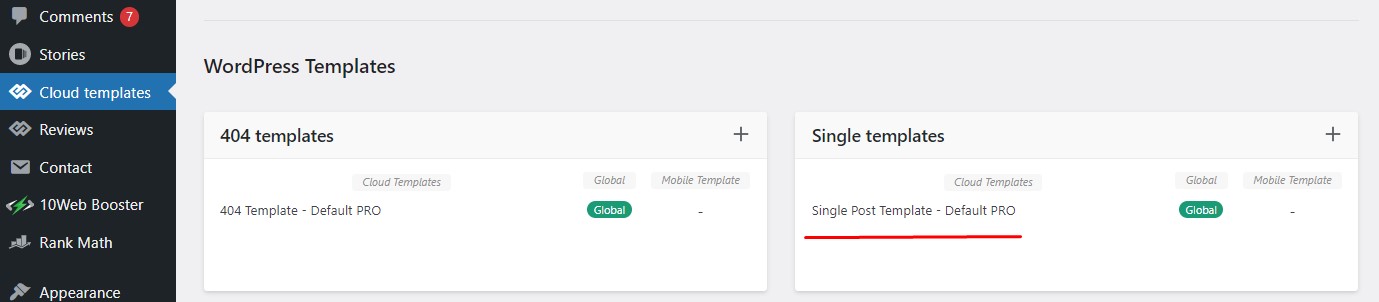
You mean, if I use cloud templates, then you have the option to display the ads as I need. I am sending a screen shot of Cloud Library Post Template, link is HERE, please check and how to use this template properly for my blog posts.
Also, intimate is it use for all the devices OR only for mobile version.
Thanks in advance.
-
This reply was modified 3 years by
Satyajit3097.
Bettina Hello @satyajit3097 !
I presented you with the 3 options that you have. Please take a little time to carefully read it, so you can choose a convenient version without the option of a mobile theme. If you will use cloud templates, then we have the option to display the ads as you need. Check out the section called “Cloud Library Post Templates” from here: https://forum.tagdiv.com/post-template-ads/
Thank you!
 ivpt
ivpt I am trying to replicate standard “Header Style 7” using cloud template.
I did import “Header Template 7” from Pre-designed Templates – tagDiv Cloud Library window: /wp-admin/admin.php?page=tdb_cloud_templates
It’s impossible mission to add social icons and iOS&Android icons before search icon in the main menu.
 PFN365
 Hi, I deleted the tagdiv Cloud Library and reinstalled it. Still getting the same errors in both instances.
Anamaria Hello,
You can try to delete the tagdiv Cloud Library and reinstall it from Newspaper -> Plugins.
Please activate the tagdiv plugins and follow the steps from this topic https://forum.tagdiv.com/topic/error-at-zones-6models-1dom-the-model-does-not-match-the-content-currene/
Thank you!
Anamaria Hi,
We give it because there are many old customers who use it and we don’t want them to be affected.
tagdiv standard pack loads all the styles even if it is not used; that’s why we recommended cloud templates.
it is very easy to import a cloud template, for your templates, you can find one similar to the one you are using now, or you can create one yourself.
You can find more details here -> https://forum.tagdiv.com/how-use-tagdiv-cloud-library-templates/-> https://forum.tagdiv.com/cloud-library-templates/
Thank you!
Anamaria Hello,
Please try to use a tag template from tagDiv Cloud Library, and after you can change the font as you want.
This is a video about how to change the fonts => https://www.youtube.com/watch?v=rbkYVyj1__Q also, you can use global font from Manager(Website Manager) -> Global fonts -> https://i.imgur.com/iY0bh4Y.png You need to edit with tagDiv Composer, select the menu -> https://i.imgur.com/5aLmN2O.png
Thank you!
Bettina Hello!
Basically, we have 3 options for mobile versions that you can use:
1. Responsive version: A responsive version of your website looks similar to the desktop version. TagDiv Composer is used to edit the page. Click on the mobile viewport: https://www.screencast.com/t/XDQJedlggSB. There, you can see your mobile version and edit or adjust the elements to look better.
2. Mobile pages: https://tagdiv.com/newspaper-10-3-7-update-brings-customizable-and-fast-mobile-pages
3. Mobile theme plugin: The Mobile Theme is a performance-optimized theme included in the main Newspaper theme that only loads on mobile devices. It comes with its own templates and designs for pages, posts, categories, etc., so your current templates from the desktop theme will get converted to the mobile theme layout. Please see https://forum.tagdiv.com/the-mobile-theme/ and https://forum.tagdiv.com/mobile-theme-introduction/ for more information.
A full explanation is here: https://www.youtube.com/watch?v=SpGkOnJeNZY
Make sure you do not use Mobile theme plugin, if you use the mobile option 1 or 2.
The AMP only works better with the Mobile Theme plugin. From my point of view, if you don’t use the Mobile Theme plugin, then there is no reason or benefit to AMP. Please read all about AMP here: https://forum.tagdiv.com/tagdiv-amp-plugin-tutorial/
For the cloud templates, you can choose a global font or a global color in the TagDiv Composer -> Website Manager: https://imgur.com/PM6VoBL. But, for the default templates, the theme panel settings are there. More info here: https://forum.tagdiv.com/theme-colors-introduction/ -> https://forum.tagdiv.com/font-customization/ -> https://www.youtube.com/watch?v=rbkYVyj1__Q
We recommend using cloud/PRO templates in order to have the possibility to edit them with the TagDiv Composer, which contains a lot of functions and features. Please check out our tutorial here: https://forum.tagdiv.com/tagdiv-composer-tutorial/
More documentation about the cloud templates is here:
– https://forum.tagdiv.com/cloud-library-templates/
– https://forum.tagdiv.com/design-post-pages-using-cloud-library-templates/
– https://forum.tagdiv.com/cloud-library-category-templates/
Thank you!
Anamaria Hi,
Did you deactivate the tagdiv Cloud Library?
I didn’t say to do this, you can activate it from Newspaper -> plugins
Thank you!
Anamaria Anamaria Hello @sebascalde,
The website works, but you cannot update or install a new prebuilt website or import a new cloud library.
Also, you can contact us via email at contact@tagdiv.com and please provide wp-admin and cPanel access.
Thank you!
Anamaria Hello,
Please try using a Single Post Template -> https://cloud.tagdiv.com/#/load/Single and after, which should work well.
Thank you!
Anamaria Hello,
You can use the cloud templates without using the elements from tagdiv Standard Pack; this plugin is deprecated.
There are many optimization guides provided by our users here in the forum, some made by us; you could check some of them
– https://forum.tagdiv.com/cache-plugin-install-and-configure/
– https://forum.tagdiv.com/how-to-make-the-site-faster/
– https://forum.tagdiv.com/topic/high-number-of-ajax-request/
– https://www.infophilic.com/get-almost-100-pagespeed-newspaper-theme/
– https://forum.tagdiv.com/topic/score-100100-pagespeed-with-newspaper-wordpress-theme/
– https://www.andraware.com/wp-rocket-for-newspaper-theme/
– https://spraythemes.com/newspaper-theme/how-to-speed-up-the-newspaper-wordpress-theme-using-wp-rocket/
– https://forum.tagdiv.com/topic/page-speed-guide-for-2023-beginners-and-advanced/
– https://forum.tagdiv.com/topic/newspaper-theme-speedify-your-website/
– https://forum.tagdiv.com/topic/tutorial-chriss-custom-optimizations-for-functions-php-etc/
– https://forum.tagdiv.com/cloudflare-cdn/
– https://forum.tagdiv.com/topic/theme-causing-high-cpu-usage-2/
– https://forum.tagdiv.com/topic/sql-querys-high-cpu/
– https://forum.tagdiv.com/topic/newspaper-theme-slow-to-respond/
– https://premium.wpmudev.org/blog/optimizing-your-wordpress-database-a-complete-guide/
– https://underconstructionpage.com/optimize-wordpress-database/
– https://crunchify.com/better-optimize-wordpress-database-all-in-one-guide/
If you use Wp Rocket, you can try to exclude the following files
/jquery-?[0-9.](.*)(.min|.slim|.slim.min)?.js
/jquery-migrate(.min)?.js
/wp-content/plugins/td-composer/legacy/Newspaper/js/tagdiv_theme.min.js
tdBlocksArray
Thank you!
Anamaria Hello,
You can build Single Post Template; not the post itself with images and content -> https://forum.tagdiv.com/design-post-pages-using-cloud-library-templates/
The theme has over 100 Single Post Templates -> https://cloud.tagdiv.com/#/load/Single you can import a template from here.
The WP Bakery is not compatible with the theme.
Thank you!
Anamaria Hello,
Those post templates that you have there are deprecated https://forum.tagdiv.com/design-post-pages-using-default-templates/ I recommend you to use cloud templates; also, for posts -> https://forum.tagdiv.com/design-post-pages-using-cloud-library-templates/
Thank you!
Anamaria Hello,
If you have a single post template from tagdiv Cloud Library you can set the Single Featured Image when you want to have it with drag and drop https://i.imgur.com/MvRTpjn.png
Thank you!
 dahlnewpage
I am using a cloud library header template. I thought I had done this before in Theme Panel – Theme Fonts, but can’t find it..
 Lekanolas
I can’t access the Cloud Library. I keep getting this error message :Envato key is missing or invalid. Please register your theme using a valid key and try again
 pedromoliv
1. I’m using Advanced Ajax Page Loader, some plugin that allows me to load all page content without reloading the window. Everything works properly, expect that when I switch to some other page I have to trigger image loading and other tagdiv js again. Is there a simple way to trigger it when some user clicks a new page?
2. Other question. I’ve made many changes to some files.
> plugins/td-cloud-library/shortcodes/single/tdb_single_author.php
> plugins/td-composer/td-multi-purpose/shortcodes/tdm_block_button.php
> plugins/td-composer/legacy/Newspaper/header.php
> plugins/td-composer/legacy/Newspaper/footer.php
how to make it part of my child theme? is that possible?
 qingyemoyu
I select some block elements from the tagDiv Cloud Library and add them to the page. How to reorder the block elements in the page
Anamaria Hi,
The tagDiv Composer is our page builder and it can be used for building pages and cloud templates, but not for creating posts. For this, you’ll need to use Gutenberg or a classic editor.
Using tagDiv Composer, you can build/edit the single post template (the layout of the posts).
Here is a video that will show you how to use the builder to create a website from scratch https://www.youtube.com/watch?v=SoGQ0d5kIBg to do this you’ll need to already have the posts.
Also, on our channel https://www.youtube.com/channel/UCOT1RiNysIPCTPSnVZskwtQ, you can find more videos that can help you and documentation https://forum.tagdiv.com/newspaper-theme-documentation/ and you can ask us here on the forum or email if you have any questions.
Also, if you want to have some blocks/elements on a certain post, then you can use a different single template for posts, you can duplicate the template -> https://forum.tagdiv.com/topic/different-logo-in-categorypage/
I hope this will help you!
Thank you!
 gruvii
 airambulanceweekly.com I am not using any plugins other than tagDiv Cloud Library, tagDiv Composer & tagDiv Opt-In Builder