
- NewspaperCreate Custom Code with the browser’s Inspector or the Live CSS Box
- NewspaperScroll Animation
- NewspaperWP Rocket and Newspaper Theme: Optimization Guide
- NewspaperHow to setup Twitch for Social Counter
- NewspaperModal Popup
- NewspaperFlex Block Settings Guide
- NewspaperAutoptimize Plugin – install and configuration
- NewspaperAdding Multiple Authors to Your Articles
- NewspaperDesign your Post Pages using the Cloud Library Templates
- NewspaperBig Grid Flex Settings
- NewsmagtagDiv Composer Tutorial
- TutorialsFrom WPBakery to tagDiv Composer
- NewspapertagDiv Composer Tutorial
- NewspaperTheme modules and blocks
- TutorialsDefault Block Settings Guide
- NewspaperThe Mobile Theme
- NewspaperCompare theme files – Winmerge tutorial
- NewsmagBlock settings tutorial
- NewsmagLogo & Favicon
- NewsmagFooter templates
 Alin [tagDiv]
 Hi,
There is not a specific css to reduce, you will have to use the browser inspector tool for each container from the megamenu and reduce margins, padding.., also please note that it may affect also the megamenu without subcategories so before add the custom css in the panel please also this. If you want to customize the megamenu and you don’t have basic html/css experience I suggest to get someone to help you as we cannot provide custom work at this time, sorry!
Thanks!
Alin [tagDiv] Hi,
Please disable all plugins except of Visual Composer, clear cache and try to add again the full url for twitter spot and see if you still have this issue. Try to disable also any js/css minification.
Thanks!
Alin [tagDiv] Hi,
You can use this custom css to hide the mobile menu – http://screencast.com/t/4PI5wkcy
@media (max-width: 767px) {

.td-header-menu-wrap-full {

display: none;

}

}
Thanks!
Alin [tagDiv] Hi,
You can try this custom css to change the article title color for all blocks/modules – http://screencast.com/t/autiTAA0G
.td-module-title a {

color: red;

}
For share title – http://screencast.com/t/2sMyyRSUncc
.single .td-post-share-title {

color: red;

}
And for mobile menu background please check this topic – https://forum.tagdiv.com/topic/sticky-header-color/#post-62914
Thanks!
Alin [tagDiv] Hi,
If you use the default page template and create your page using the pagebuilder the page title should not appear in front-end – http://screencast.com/t/njZsfW70A7
You can hide the menu search using this custom css in Theme Panel > Custom Css – http://screencast.com/t/167YsLpKCcJQ
#td-top-search {

display: none;

}
Thanks!
Alin [tagDiv] Hi,
Sorry for delay! We answer to the most oldest topics so if you add a new reply we get later to your topic.
1. We removed the quotes shortcodes, we use html with classes now. The quotes are not updated by the script, sorry. We tried to add them but on some cases there was a chance for errors to appear an we decided to not include them in the script.
Try to add the following code at the end of the functions.php file – http://screencast.com/t/OWxqEsYVK – http://pastebin.com/NZEJsWQZ
2. There is an option to change the blockquote color in Theme Panel > Theme Colors – http://screencast.com/t/GaVyoCu2xcU
3. You can change the hover color using custom css in Theme Panel > Custom Css – http://screencast.com/t/1BPyH3KM
.td-trending-now-wrapper:hover .td-trending-now-title {

background-color: red;

}
4. You can change the general color for post content links using custom css in Theme Panel > Custom Css – http://screencast.com/t/26hujdCrvc
.td-post-content a {
color: red;
}
Also you can add manually a color to your link(s) just edit the post select the link and add the color – http://screencast.com/t/3nfN9nIS0R
5. If you refer to the panel options for page content – http://screencast.com/t/T1GXLsNq1 please note that these options will not affect any page template created using pagebuilder(Visual Composer). Please provide a link and more details about what you are trying to do.
6. Do you refer to the lazy load effect? you can remove it from Theme Panel > Template Settings – http://screencast.com/t/dg4jDDqg7oI
Thanks!
 simchris
 What I do is load the CSS only for home page, then disable it on the post/pages so it doesn’t load at all.
You could likely hack the plugin to not load the CSS, then add the CSS to the main style.css, but not sure that would work.
 Andrei L.
 Hi
Try this custom css in theme panel > custom css: http://screencast.com/t/C8ol3XkaI0J
@media (max-width: 767px){

.td-main-menu-logo {

display: none !important;

}

}
Thanks!
Andrei L. Hi
You may need some css customization for that so please provide a specific link so I can inspect this, the link you provided above doesn’t work: http://screencast.com/t/WhflJWmNQ2
Please let me know!
Thanks!
Alin [tagDiv] Hi,
@doucare1971 Unfortunately the Menu Icons plugin was not tested with the theme so I cannot make any recommendations regarding this.
The Font Awesome 4 Menu plugin was tested with the theme and it works fine. I guess that you refer to this margin when you say that it isn’t in the middle – http://screencast.com/t/ce1CAHUIOPi This custom css is from the theme and that margin is added to have a little space when also text is added. You can remove this margin via custom css in Theme Panel > Custom Css – http://screencast.com/t/wsh0US3Nm
.sf-menu li .fa {

margin-right: 0 !important;

}
Hope this helps!
Alin [tagDiv] Hi,
You can change the general color for post content links using custom css in Theme Panel > Custom Css – http://screencast.com/t/26hujdCrvc
.td-post-content a {

color: red;

}
Also you can add manually a color to your link(s) just edit the post – http://screencast.com/t/3nfN9nIS0R
Thanks!
Alin [tagDiv] Hi,
You can use custom css for that area as there is no option in panel. Please try this – http://screencast.com/t/0RPgK3NhRQ
.comments #author {

font-size: 15px;

font-family: Roboto;

}

.comments #email {

font-size: 15px;

font-family: Roboto;

}

.comments #url {

font-size: 15px;

font-family: Roboto;

}

.comments #comment {

font-size: 15px;

font-family: Roboto;

}
Hope this helps!
 gfran5
Hi,
Is it possible to delete the CSS file from the js composer plugin and add the contents to the main style sheet to improve loading times?
THanks
Alin [tagDiv] Hi,
12. Every Big Grid block has a default padding bottom, you can change this if you want via custom css – http://screencast.com/t/zc1Ozy9TKtt
13. You can find the header files in the root of the theme – http://screencast.com/t/ji7fPHijn and also in theme’s functions you can find the favicon code – http://screencast.com/t/rk9t181Fpw
Thanks!
Alin [tagDiv] Hi,
If you refer to the pagination arrows for page template with latest articles(or any loop pages- category page..) unfortunately this cannot be targeted to change the background(only if you change the bg for all links – http://screencast.com/t/7q9u1HAdNw42 ), bu you can change the color for arrows – http://screencast.com/t/6iCsMt7L6
.page-nav  .td-icon-menu-left, .page-nav  .td-icon-menu-right {

color: red;

}
If you are referring to the block next/prev pagination you can change the background color via custom css – http://screencast.com/t/xmglzKPAAGt
.td-next-prev-wrap .td-ajax-next-page, .td-next-prev-wrap .td-ajax-prev-page {

background-color: red;

}
Thanks!
Alin [tagDiv] Hi,
Please make sure that you do a clean install of Newspaper 6 like it is suggested in the documentation – https://forum.tagdiv.com/how-to-update-the-theme-2/ as no old theme’s files should remain. Please note that Newspaper 6 is practically a new theme, all the code was rewritten and the old customizations(files customizations, custom css) will not work anymore. These are the files(placeholder images) used in version 6 – http://screencast.com/t/VyL1J1WWM8Jv
Thanks!
Alin [tagDiv] Hi,
There is also a specific theme css on pages/posts more accurate there is a padding and you will have to change that using custom css, for example – http://screencast.com/t/41EuNmnQ and add the space(padding) to the row – http://screencast.com/t/XpLQxhIMpM0
For footer the same – http://screencast.com/t/59JU8a0b
.page .td-main-page-wrap {

padding-top: 0 !important;

}
.page .td-main-content-wrap {

padding-bottom: 0 !important;

}
On post pages unfortunately you will need custom work as the theme doesn’t have an option to change the content background color. If you don’t know how to do it I suggest to hire someone to do this for you as we cannot provide custom work, sorry!
Thanks!
Alin [tagDiv] Hi,
This issue is related to share buttons, as the margin(top and bottom) is added to this container – http://screencast.com/t/GZ0ozUYO5 Please try this custom css to add margin when you don’t use share on top – http://screencast.com/t/79pxSO0oX6 Andrei also added this on our list.
@media (max-width: 767px){
.td-post-template-4 .td-post-title .td-module-meta-info {
margin-bottom: 15px !important;
}
}
Thanks!
-
This reply was modified 11 years by Alin [tagDiv].
simchris The plugin is only intended for use with the TagDiv theme. You could likely find a similar plugin if using a different WP theme. Or, you’d have to find all the CSS and functions used by the plugin, and port to the other theme; which is fairly involved and you likely would not know how to do that if asking here.
 scardoso
 Hey Alin,
My theme stopped croping the images for posts; they appear as they are. Is there any custom css so I can solve it?
 JBH
JBHWhat custom CSS code do i need to change the font type and size of the comment form:
– comment author name area
– author author email area
– comment text area
Thanks in advance!
 Aedin84
Hey,
So I’m in love with the video post format (Style 11) for the Newspaper theme and I want to emulate it for gallery purposes using the TagDiv Slider Gallery setting. I know how to tweak files and custom CSS, etc, but my problem is I don’t know what files to edit in order for the “theme panel” and “add/edit post” function to allow me you to change the style to one other than the default style through style 11.
To recap/be more clearer: I’ve created duplicates of style 11 and called them style 12 (single_template_12.php and loop-single-12.php), but before I begin designing/coding I want to be able to call the post format like so: 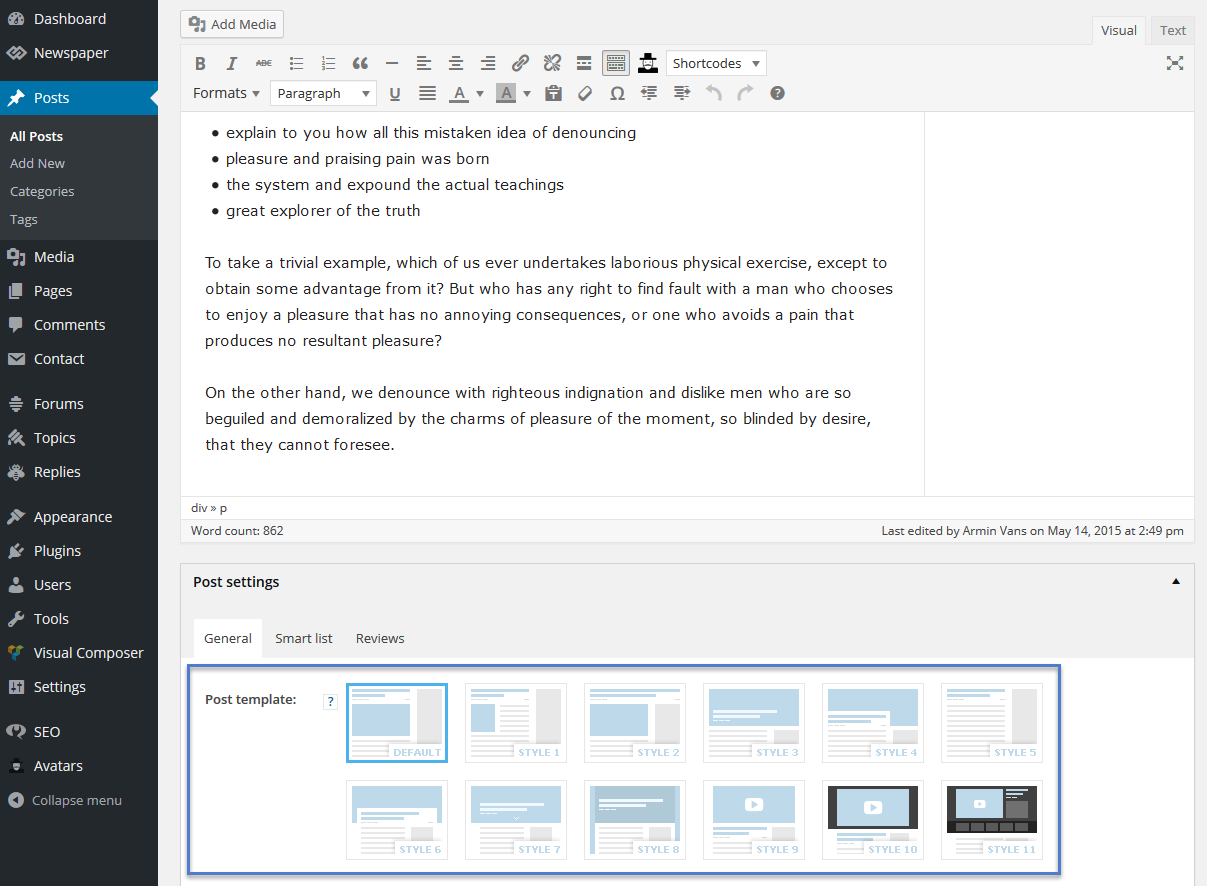
Thanks in advance for any/all help provided
 elvinf simchris
 I have some tips about this in my optimization guide …
but basically you would need to do search/replace in the main style.css file, then edit the /includes/ big function file to remove the lines related to google fonts, but also make sure none are selected in your theme panel (basically set everything to ‘default’).
That is the broad strokes.
a) change style.css to not use the fonts
b) remove use of the fonts loading in the page from Google in the functions file where that is added to page html
 Daniel Finch
 Thank you for the suggestion but sadly my CSS is gone for good. Lesson learned though. Always keep a back up of your CSS file locally.
