- NewspaperCreate Custom Code with the browser’s Inspector or the Live CSS Box
- NewspaperScroll Animation
- NewspaperWP Rocket and Newspaper Theme: Optimization Guide
- NewspaperHow to setup Twitch for Social Counter
- NewspaperModal Popup
- NewspaperFlex Block Settings Guide
- NewspaperAutoptimize Plugin – install and configuration
- NewspaperAdding Multiple Authors to Your Articles
- NewspaperDesign your Post Pages using the Cloud Library Templates
- NewspaperBig Grid Flex Settings
- NewspapertagDiv Composer Tutorial
- NewspaperTheme modules and blocks
- NewspaperThe Mobile Theme
- NewspaperCompare theme files – Winmerge tutorial
- NewspaperUsing Other Ads
- NewspaperBlock settings tutorial
- Using custom fonts
- Using typekit fonts
- NewspaperChild Theme Support
- NewspaperHow to Make the Site Faster
 Alin [tagDiv]
 Hi,
There is a margin bottom for all custom ads – http://screencast.com/t/yLYbA8Bj4 and unfortunately there is no specific class to target the ad when it is hidden. A solution is to remove this margin using media queries, try this custom css in Theme Panel > Custom Css to remove it for other devices than mobile – http://screencast.com/t/VsJTHrPH9Q
@media (min-width: 768px) {

.td-g-rec-id-custom_ad_2 {

margin-bottom: 0 !important;

}

}
Hope this helps!
 erik789
Hi guys, i’m new in html and css, i made a menu see: http://catalogue.spls.kz/ even if i write list-style-type: none, any way can’t get rid off that list dots from the left! How i can take them off? pls help!
Alin [tagDiv] Hi,
You have this custom css and it hide the page title on all pages(also category page, archive) – http://screencast.com/t/XvhMicB8i1b so please remove it and hide it only on specific pages using page id like you already know:
.page-id-521 .td-page-title {

display: none;

}
Thanks!
Alin [tagDiv] Hi,
You have to change the code like I suggested above and use browser inspector tool to see what css you need to change. I have provide you above an example how you can achieve this, but you may need additional css customizations. I suggest to get someone to help you if you don’t know how to do it as we cannot provide any type of custom work at this time, sorry!
Thanks!
 anastasios
Dear Tagdiv team,
We recently updated from v4 to v6 and need some help.
1.Can you please let me know how we can achieve this (background image/color sitewide only around the big grid?) The background option in the widget gives only a boxed background. Here is what we want to achieve: http://you.greekreporter.com/files/2015/07/Screen-Shot-2015-07-18-at-10.09.28-PM.png
2. How can we disable the “zoom effect” and “dark fade” on the big grid?
3. How can we add a color background on all sidebars?
Is there a way to have the same background across all the sidebar columns? We tried the code below we found in the forum but this works only on the front page sidebar.
.wpb_widgetised_column, .td-main-sidebar {
background-color: #dddddd;
}
4. We want all linked titles of posts across all blocks to underline instead of changing color. How can we achieve to have them black as original and underlined on hover?
Thank you so much!
Anastasios
 Lucian
 Hi,
Sorry for the delay! We have experienced some technical issues on Friday and we couldn’t answer you on time.
You can find the featured video URL under td_video post meta: http://screencast.com/t/ImeLXY1E and the source/via URL and name under these meta: http://screencast.com/t/f3lRYgdfp
You can do it via custom css, post a link to your site here so I can inspect it and give you a starting custom css code so you can customize it.
Thanks
 kompic
 The issue is cosing your cache/minify plugin. Try disabling js minify and similar stuff regarding js.
If the issue continue do the same for css.
Don’t forget to clear your cache after changing settings.
kompicHi, as good as it is, pagespeed topics are always good to read.
Me, I respect do work going on here, but I do have something to add about pagespeed in general.
Chris and Ing Geek have some nice stuff here, I managed to get my demo newspaper content to 86/80 on GT Metrix, 61/80 on google insights, etc… and all that without Wp Super cache, or Wp rocket.
Included with those two caching plugins I managed to get above 94/90 on GTMETRIX, and 82/82 with google.
Somehow I managed to stumble on great plugin called WP Super Simple Speed.
This plugin alone, got me above 90s in GTM, and 72/86 (if i remember corectly) on Google insights.
When i included WP rocket… my website flew. I think it was something like 98/94 on gtmetrix, and above 90s in google.
But my images were not loading corectly bc of wp rockets js minify and stuff with css.
In general Expirience was awesome.
I tried to combine stuff, but i am not nearly done with testings (doing alot of combinations for 2 days) so I could use some help with this.
Thoughts?
 lecker
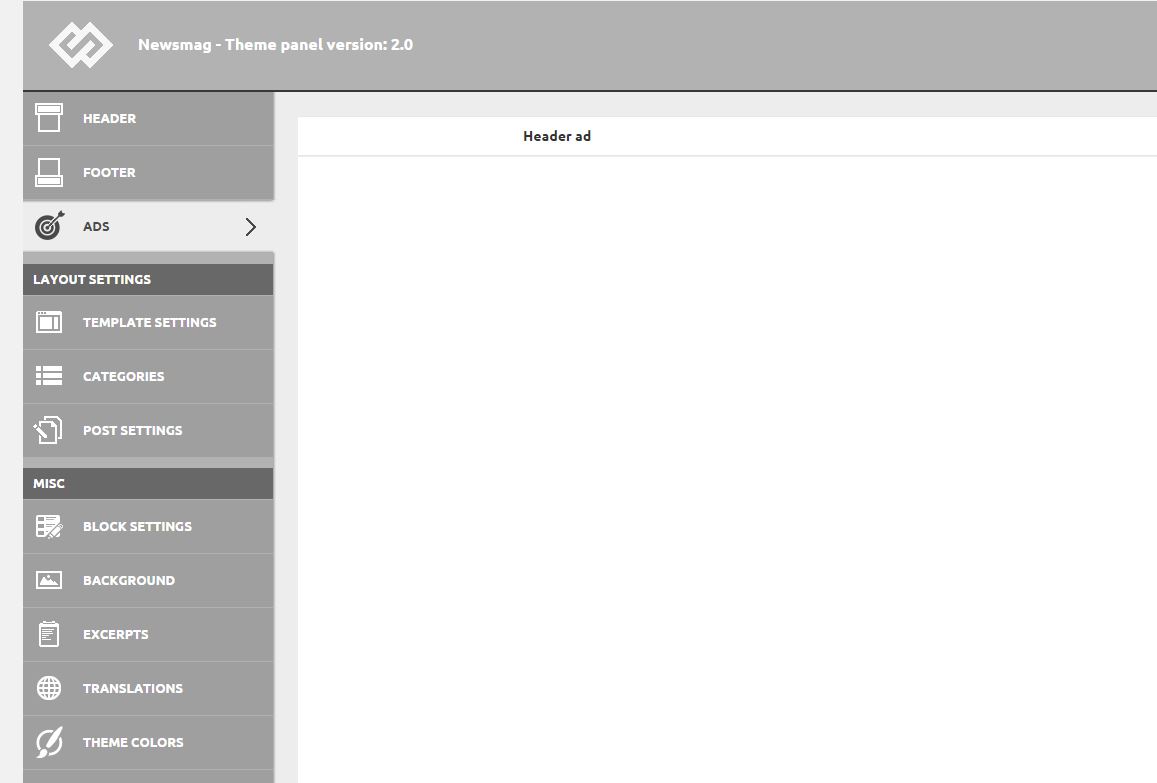
After installing the 2.0 update, I found that the Theme Panel menu is showing some weird css with a lot of white blank stuff. Unfortunately most of the settings aren’t visible because of this, and expanding a sub-menu just shows the option for a fraction of a second, and then it’s blank again.
https://i1.wp.com/www.idevice.ro/wp-content/uploads/2015/07/themepanel.jpg
 gfran5
 This may be obvious to some but you can improve your site load time MASSIVELY! if you aren’t using any of these plugins (Woocommerce, BBpress, Buddypress) remove all the CSS in the stylesheet.. i found there is quite alot for Buddypress
After that i reccommend using this site http://csscompressor.com/ – it has many settings to do with readability, so you can optimize your site but still be able to read it clearly.
gfran5Hi,
I have been working on making my site as quick as possible, obviously i’ve started by removing things i don’t need for my site.. I have removed all BBpress, BuddyPress and Woocommerce CSS
Should i remove all the .php files related to these as well (bbpress.php, woocommerce.php, etc).. will this speed site up at all?
Thanks
Glenn
 daemonlynx
 Do we have any news with that issue ? I need a solution as soon as possible – my client finds that css issue dissapointing :/
 vidmartx
Hello to all
I’m using the plugin https://accesspressthemes.com/wordpress-plugins/accesspress-anonymous-post-premium/
to let my users send video posts. I receive the posts as Pending and after revision, I approve or reject it. The problem is that I don’t know what is the right meta key to the field “Featured video”. I have tried td_video and td_post_video, but the info is saved as a custom field, not in the “Featured video” field…
Anyone knows how can I solve it?
By other side, I would like to highlight the megamenus when an user is watching the Main category or a subcategory of it. Anyone knows what is the CSS code for this?
Thanks a lot
 doucare1971
 Don’t know if you are using visual composer to use the sidebar for your post, category or page, but the image and input the css class where in the row of the element for the widgetized sidebar. That made a non sticky sidebar stick. If you aren’t using the page builder, then sorry, just trying to help.

 felizubi
Hi, I already replaced ‘Roboto’ and ‘Open Sans’ fonts on style.css with my typekit fonts.
Now when I load a page, I see for a fraction of a second, one or two different fonts before my typekit font appears, for example on the main menu of the page.
I know that on includes/wp-booster/td_wp_booster_functions.php and includes/td_config.php there are info about Google font, but exactly what code should I remove to completely get rid of them, especially because it looks funny and makes the loading slower.
regards,
Felipe Z.
gfran5 Hi,
I’m using NewsMag 1.7 but noticed a few things in version 2 that seem interesting.
1. Added .screen-reader-text class for better usability – I found the CSS for this in styles, but what exactly are you using this for, is it on post page? Would like to know what this adds and how to add it.
2. We audited the theme and and we made major improvements in speed and memory usage, especially in use cases that have big taxonomies, like a lot of categories or tags. – Is this something i would be able to fix on NewsMag 1.7, please let me know how to implement improvements?
3. The panel now uses the modern WordPress media upload – Is this easily updated with one file and which file is it?
Thanks!
 alfredm
 Awesome, that did it for the regular post!
For lists, is there another way to remove the clickthrough to image link aside from using the custom css below?
I have a plugin where if a user points their cursor over a photo, a share button pops up on the left of the image and the css actually removes that. http://unyawn.com/biggest-fails-of-the-week-071415/
.td-sml-link-to-image {
pointer-events: none;
cursor: default;
}
 Ace
Ace Thanks for the swift reply..
I’ll try to report back when/if I find out what’s breaking it.
Cheers!
..[10 mins later]..
This seems to be the culprit:
function remove_cssjs_ver( $src ) {
if( strpos( $src, ‘?ver=’ ) )
$src = remove_query_arg( ‘ver’, $src );
return $src;
}
add_filter( ‘style_loader_src’, ‘remove_cssjs_ver’, 10, 2 );
add_filter( ‘script_loader_src’, ‘remove_cssjs_ver’, 10, 2 );
-
This reply was modified 11 years by
Ace.
 Bryson T
I don’t use it often, but decided to use one of the slider smart lists, #3, today. Found two issues with it:
- Paragraphs – This Smart List doesn’t obey paragraph formatting on the front-end. I can enter proper paragraph spacing on the backend for a 3 paragraph slide, but the first one ALWAYS comes out with a single line break instead of a full carriage return (2 line breaks, or default behavior for
<p></p>tags). Could not figure it out. Checked source code in the editor and all was fine.I inspected the output in Chrome and found that my first paragraph was placed before an empty paragraph tag (
<p></p>). The source of the post did not match this. I could not find a way to get that text inside the paragraph tags. See source code from output:
- Images – Images went to the right as expected, but half of them (all set at Medium size, no link, no modal, no additional classes) padded themselves away from the right side, like this one:

I was unable to correct either problem without custom CSS, which makes it a bug. This is with v6.1. I have not upgraded to 6.3 yet, but this is not mentioned in the changelogs as being addressed.
Thanks.
 TechRanker
 This happens when you use a CDN. I fixed this issue a while back. If I remember, I went to the W3 Total Cache CDN settings page and removed *.css and/or *.js from one of the fields there.
There’s probably a better solution. I never spent time to find out.
Backup your settings before you change them.
 simchris
 For the sidebar I just add a text block above the Google ad boxes with
– advertisement –
I use custom CSS to wrap in div with small size and centered-text.
You don’t have to do this for Google policies. What you CANNOT do is put word “sponsors” ! You will get warning for that.
simchris Hi
I have not yet updated to NM 2.0 …
I will be doing so soon; and will post *updated* code for bottom of functions.php file. Not tested with child them, nor will I. 🙂
Note the things which are “safe” to use are those which modify the general WordPress core stuff, like removing versions, adding warning for those trying to guess login, changing default compression, emoji removal.
Don’t use Thomas’ long winded block of stuff for htaccess; as most of that has nothing to do with me and seems related to his optimization third party service doing stuff – some of which looks redundant to me.
Bryson T’s “slim” summary from July 2 in this thread, above, would be safe place to start.
Always remember to clear *all* your caching couple of times so you’re not loading old/new CSS and functions!
Alin [tagDiv] Hi,
You will have to use custom css if you remove the crop function, the modules were designed to work with thumbnails so the images are cropped to that specific size. You will need custom work to achieve that and I suggest to get someone to help you with this if you don’t know how to do it as we cannot provide custom work at this time, sorry!
Here you can find all the thumbnails sizes if you want to change/add another size – http://screencast.com/t/Vq8AWFHJyP3 and the thumb is used on module – http://screencast.com/t/WdtHPR7u also on smartlist – http://screencast.com/t/clbKN9bvQ
Thanks!
 Andrei L.
 Hi
Do you have any custom modification to display social widgets in main menu?
By default header style 5 don’t include top widget, and you will need aditional css customization, unfortunately we cannot offer custom work as we work hard on the development, updates, fixes and support. You can always get a freelancer from sites like: http://studio.envato.com/ if you don’t know how to do it yourself.
You can try to use media queries and customize social icons for each screen size like here: http://screencast.com/t/OJx6J1N8F this is for dekstop, and you need to find a similar solution for small devices:
@media(min-width: 1024px){

.td-header-style-5 .td-header-sp-top-widget{

  top: 5px;

  right: 70px;

}

}
Thanks!
Andrei L. Hi
You can use style 4 and the image gradient it’s been removed: http://screencast.com/t/9HJJunOocC – http://demo.tagdiv.com/newspaper/big-grid-8/
Also for the style 1 you can use this custom css:
.td-grid-style-1.td-hover-1 .td-module-thumb a:last-child:before{

display: none;

}
Here it’s the result: http://screencast.com/t/5TEuXoGS7RoT
Thanks!