
- NewspaperCreate Custom Code with the browser’s Inspector or the Live CSS Box
- NewspaperScroll Animation
- NewspaperWP Rocket and Newspaper Theme: Optimization Guide
- NewspaperHow to setup Twitch for Social Counter
- NewspaperModal Popup
- NewspaperFlex Block Settings Guide
- NewspaperAutoptimize Plugin – install and configuration
- NewspaperAdding Multiple Authors to Your Articles
- NewspaperDesign your Post Pages using the Cloud Library Templates
- NewspaperBig Grid Flex Settings
- NewsmagtagDiv Composer Tutorial
- TutorialsFrom WPBakery to tagDiv Composer
- NewspapertagDiv Composer Tutorial
- NewspaperTheme modules and blocks
- TutorialsDefault Block Settings Guide
- NewspaperThe Mobile Theme
- NewspaperCompare theme files – Winmerge tutorial
- NewsmagBlock settings tutorial
- NewsmagLogo & Favicon
- NewsmagFooter templates
 Joophil
Dear team,
To optimize the speed of your theme it would be great if you can envisage adding to remove the scale image function.
Example:
The following images are resized in HTML or CSS. Serving scaled images could save 328.0KiB (95% reduction).
https://scontent-amt2-1.cdninstagram.com/v/t51.2885-15/sh0.08/e35/s640x640/94998816_117920966554255_9081828368682745857_n.jpg?_nc_ht=scontent-amt2-1.cdninstagram.com&_nc_cat=107&_nc_ohc=zS7dvCZNLHYAX8oLFCc&oh=260ca8476c14b4fed22ed5fe746c03e9&oe=5ED8387D is resized in HTML or CSS from 640×640 to 123×123. Serving a scaled image could save 51.0KiB (96% reduction).
https://scontent-amt2-1.cdninstagram.com/v/t51.2885-15/sh0.08/e35/s640x640/95263505_577593573108326_8088564644110953941_n.jpg?_nc_ht=scontent-amt2-1.cdninstagram.com&_nc_cat=102&_nc_ohc=ZJrpj23NZ4wAX8TjeCR&oh=1c37883791db139a27e624a66466a71f&oe=5ED7ACAA is resized in HTML or CSS from 640×640 to 123×123. Serving a scaled image could save 46.9KiB (96% reduction).
https://scontent-amt2-1.cdninstagram.com/v/t51.2885-15/e15/c0.170.612.612a/95480320_2895174420568854_7055432005298358763_n.jpg?_nc_ht=scontent-amt2-1.cdninstagram.com&_nc_cat=106&_nc_ohc=gLb6VZkJzSMAX8FZQdz&oh=58a58223159cb131498bfd71fdbc30dc&oe=5EB1E323 is resized in HTML or CSS from 612×612 to 123×123. Serving a scaled image could save 46.6KiB (95% reduction).
https://scontent-amt2-1.cdninstagram.com/v/t51.2885-15/sh0.08/e35/s640x640/95638066_2482687075326382_380996079009832276_n.jpg?_nc_ht=scontent-amt2-1.cdninstagram.com&_nc_cat=110&_nc_ohc=Sbz4_oMe22MAX-UU85H&oh=8b0c254e0df541a0f35f6e64fd81c667&oe=5ED96FFE is resized in HTML or CSS from 640×640 to 123×123. Serving a scaled image could save 43.2KiB (96% reduction).
https://scontent-amt2-1.cdninstagram.com/v/t51.2885-15/sh0.08/e35/c0.180.1440.1440a/s640x640/95290856_131080441847992_1546148710897306361_n.jpg?_nc_ht=scontent-amt2-1.cdninstagram.com&_nc_cat=104&_nc_ohc=8lOCP6y5qmkAX8C4e93&oh=069c8a5f34d96c0f5daef183f729671a&oe=5EDA192D is resized in HTML or CSS from 640×640 to 123×123. Serving a scaled image could save 35.8KiB (96% reduction).
https://scontent-amt2-1.cdninstagram.com/v/t51.2885-15/sh0.08/e35/s640x640/95664993_1156162614742331_5885832196259704259_n.jpg?_nc_ht=scontent-amt2-1.cdninstagram.com&_nc_cat=111&_nc_ohc=DMLuTyH6P94AX-qXv3o&oh=71424ee1d728eff6ae92d5905a6c8d81&oe=5ED8437D is resized in HTML or CSS from 640×640 to 123×123. Serving a scaled image could save 28.3KiB (96% reduction).
https://scontent-amt2-1.cdninstagram.com/v/t51.2885-15/e15/c236.0.607.607a/95283434_160599848706902_2220365279409710506_n.jpg?_nc_ht=scontent-amt2-1.cdninstagram.com&_nc_cat=102&_nc_ohc=LQ3Ny_ExJVMAX98FXOQ&oh=09addff407c43f75cae36568127c1689&oe=5ED90468 is resized in HTML or CSS from 607×607 to 123×123. Serving a scaled image could save 28.1KiB (95% reduction).
https://scontent-amt2-1.cdninstagram.com/v/t51.2885-15/sh0.08/e35/s640x640/95326489_278177126538008_1423417206362401829_n.jpg?_nc_ht=scontent-amt2-1.cdninstagram.com&_nc_cat=108&_nc_ohc=c2NONy_ZWboAX8Nxb6z&oh=bd54178f417d62cd3762074b10d7d22f&oe=5EDA3CB9 is resized in HTML or CSS from 640×640 to 123×123. Serving a scaled image could save 28.1KiB (96% reduction).
https://scontent-amt2-1.cdninstagram.com/v/t51.2885-15/e35/c157.0.405.405a/94780501_2961646670593722_8584864967714192596_n.jpg?_nc_ht=scontent-amt2-1.cdninstagram.com&_nc_cat=106&_nc_ohc=xETMg9pKF_UAX-p-Xpg&oh=26a42875c5ce83977046aa32f31a9ac4&oe=5EB21F63 is resized in HTML or CSS from 405×405 to 123×123. Serving a scaled image could save 20.1KiB (90% reduction).
 smile099
 That’s a list from Gutenberg. Just a simple list in Gutenberg, so I think what I need is a custom css code?
 Calin
Calin Hi,
After you set the image https://i.imgur.com/cTJSjFe.jpg you need to set an opacity on background color in css tab -> https://i.imgur.com/3UfG5my.jpg
Hope this will help you!
Calin Hi,
If you use a standard footer style then the background image can be change from here -> https://i.imgur.com/kWcNZy3.png if you are using a footer page you can edit it with tagDiv Composer -> https://i.imgur.com/VTtx7FZ.pngn select the row from the page and change the image from css tab -> https://i.imgur.com/2UmnM60.png and if you are using a cloud footer -> https://i.imgur.com/aE7XeJv.png you can edit the homepage -> https://i.imgur.com/7YApIa2.jpg with tagDiv Composer and edit the footer as for footer page -> https://i.imgur.com/2UmnM60.png
If you want you can check our documentation for footer template from here -> https://forum.tagdiv.com/footer-templates/
Thank you!
Calin Hi,
Unfortunately there is no option to display the top menu on mobile devices, but if you do not use the mobile theme plugin then you can use a custom css to display it (if you want I can help you with this, just provide me a link to your website), but if you use the mobile theme plugin, then you can not display it.
Thank you!
 kdahal01
I am not able to edit this price widget sidebar css. There is extra white space in bottom. Please help me.
https://coindesknepal.com/
 Neelesh
 Some more questions related to SVG-
(3) Is there any way to add SVG background using tagdiv composer or custom CSS?
(4) Can i add animated SVG in background or as logo?
NeeleshHello,
I want to use SVG logo in mobile theme. How can i do that? Is there any way using Custom Code settings of mobile theme. Please sent custom code CSS or HTML to inset SVG logo in mobile theme.
I have a problem with favicon in mobile theme. When i open my site on mobile it has default favicon of wordpress. How can upload my own favicon in mobile theme? Site address hindinzone.com
Thank you.
 Dale-R7
Hi there –
Is there some CSS I can use to move the Excerpt field in line with the Category meta? (similar to this example of having the Author inline with the Category: https://d.pr/i/HAUd5H )
Note: I’m using Flex Block 5
Thx!
 Topfgartenwelt
Is there a way to reduce the effort for the main thread?
The result in Google Page Speed Insights:
Script Evaluation
4.144 ms
Style & Layout
1.101 ms
Other
913 ms
Script Parsing & Compilation
477 ms
Garbage Collection
336 ms
Parse HTML & CSS
230 ms
Rendering
228 ms
Greetings Kathrin
Calin Hi,
If you are using a single post template from tagDiv Cloud Library, then you can set the color by editing the template with tagDiv Composer -> https://i.imgur.com/Juif01I.png click on element and look for stars color -> https://i.imgur.com/EbkZsqS.png
If you are using a default post style, then you can achieve this with a custom css.
-> https://i.imgur.com/dK96iJ0.png
.td-review-stars{

color: red;

}

.td-review-overall .td-icon-star{

 color: green;

}
The code need to be set in theme panel> custom code> custom css.
Thank you!
Calin Hi,
1. That is a single post template (smart template) from tagDiv Cloud Library, it ca be edited with tagDiv Composer-> https://i.imgur.com/4ZzCXTu.png -> https://i.imgur.com/4FWUiWY.png unfortunately there are only few settings for the number, but you can use custom css to apply more style on numbers.
2. In order to achieve that you need to set an excerpt length on flex block, this can be set in theme panel -> https://forum.tagdiv.com/excerpts-introduction/ or individual on flex blocks -> https://i.imgur.com/TmbTCjo.jpg
Hope this will help you!
Thank you!
Calin Hi,
TO implement the lightbox you need to set a code in function.php, it will be indicate to set it in child theme file to not be overwrite on theme update.
add_action( 'after_setup_theme', 'yourtheme_setup' );
function yourtheme_setup() {
// add_theme_support( 'wc-product-gallery-zoom' );
add_theme_support( 'wc-product-gallery-lightbox' );
// add_theme_support( 'wc-product-gallery-slider' );
}
The code need to be set at the end of the file -> https://i.imgur.com/TDJvoqn.png aslo you need to add this custom css https://i.imgur.com/l27jkjw.png to theme panel> custom code> custom css ->
.pswp__bg {

    background: #00000096;

}

.pswp--open{

z-index: 9999;

}
Hope this will help you!
Thank you!
 Vlad S
 Hello !
1. I pressume you mean the part wich includes the latest articles section. That one comes from the page building: https://www.screencast.com/t/uzXRgXTiHlH That part is NON Editable using tagDiv Composer.
2. Please simply disable the mobile theme and let us know so we can investigate your website with the mobile theme plugin deactivated. At the moment your website has mobile theme plugin and everything looks fine: https://www.screencast.com/t/sLsavTM589S ; https://www.screencast.com/t/8LP9EsTX
3. As you can see here. On one gutenberg block I have added an additional class: https://www.screencast.com/t/kaBcRBJqx5NS ; https://www.screencast.com/t/7OKjlDj0k ;
This allows you to have better targeting when you want to customize that specific block using css.
I hope this is more helpful !
Thank you !
Calin Hi,
If you are using a standard post template, then you’ll need a css to change the color -> https://i.imgur.com/xD2D6Au.png
.td-comments-title span{

color: yellow;

}
If you use a single post template from tagDiv Cloud Library then you can edit it with tagDiv Composer -> https://i.imgur.com/LK3iYqZ.png -> https://i.imgur.com/4SRJKt4.png
Hope this will help you!
Vlad S Hello !
You can use this CSS code here: .td-all-devices {
margin-bottom: -25px;
}
The code must be inserted here: https://www.screencast.com/t/J1Nxw5s5
Thank you !
Calin Hi,
This can be done with custom css, if you want I can help you with this, just provide me a link where I can inspect your woocommerce search widget.
Thank you!
 Ramachandran
Hello,
I’m using Tech Pro Theme and I want to change site title from uppercase to Lowercase.
I don’t need CSS, is there any way I can change it from “uppercase” to “lowercase”
PFA Screenshot – https://snipboard.io/WsN1AE.jpg
 Tounizino
hey
1.how can i change the list numbering style in my post.. is there any CSS code to do so and how
https://i.imgur.com/AvJJpvB.png
2. how to fix the alignment here: https://i.imgur.com/QVQvCoO.png
best regrads
 ludyma
 Hi.
You are right not to understand, you make the copy of the question wrong.
The question is how do I change that block at the bottom of the page that is always seen, how or where is that option to change or remove it.
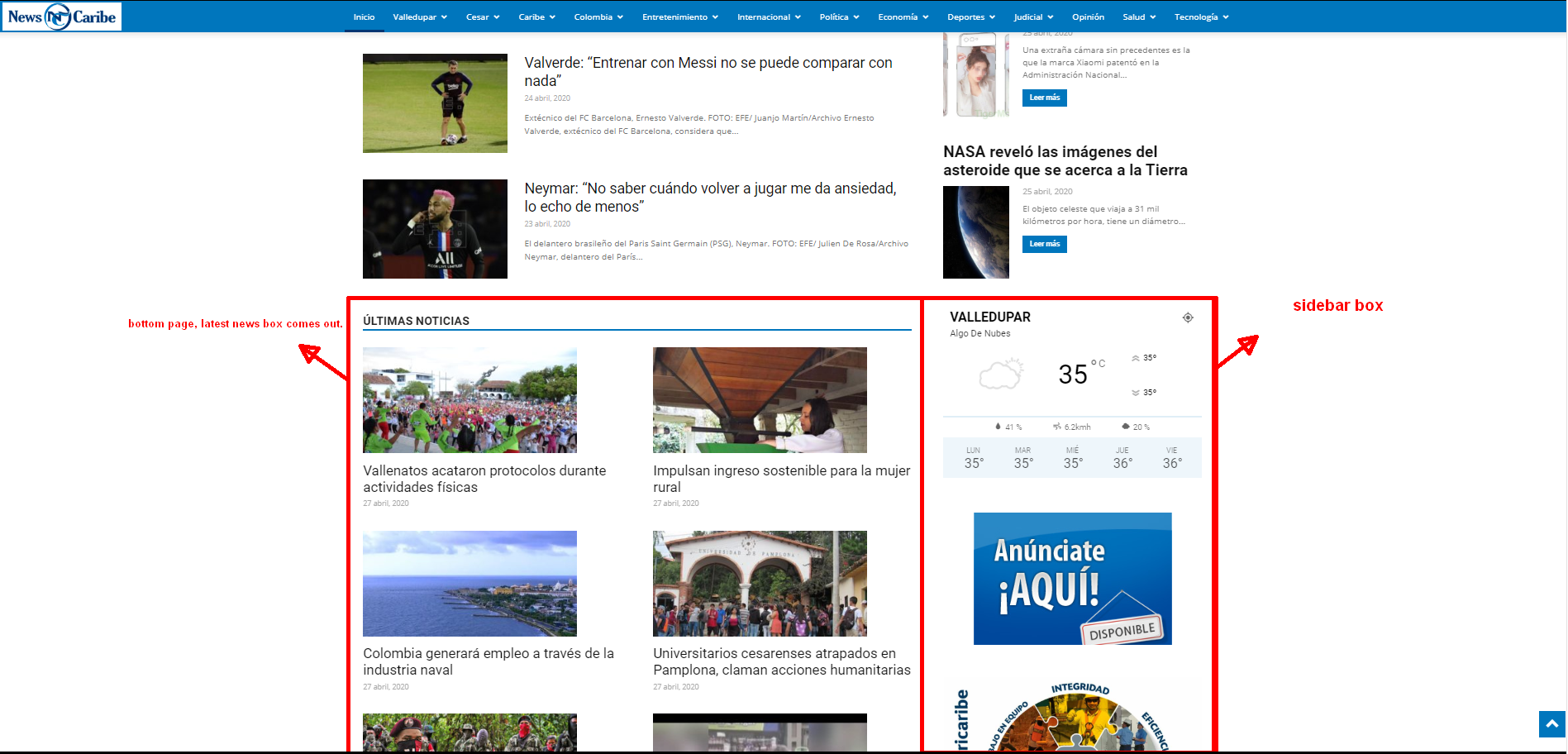
The css options is added for the selected block. That can help when you want to add extra css to that specific class.
An example of how to do it can be more specific.

 emmalabbe
 All necessary plugins are activated, I use the same elements on other pages and it’s OK. I think that there was an error while saving the page the last time, because when I edit the page with TagDiv composer, I see that several blocks have been mixed with a “text with title” element : now the following code is appearing as the content of the “text with title” element. I see normally the header and the “text with title” element, except that its content is the following:
—————————————–
[vc_row_inner][vc_column_inner width="1/3"][tdm_block_column_content title_text=”QXBwbGljYXRpb25z” title_tag=”h3″ title_size=”tdm-title-sm” url=”#” image1=”3999″ description=”Q2hvaXNpc3NleiUyMGxhJTIwbWVpbGxldXJlJTIwYXBwbGljYXRpb24lMjBwb3VyJTIwbGElMjBsYW5ndWUlMjBxdWUlMjB2b3VzJTIwJUMzJUE5dHVkaWV6JTIwZXQlMjBzZWxvbiUyMHZvdHJlJTIwbml2ZWF1LiUyMEQlQzMlQTljb3V2cmV6JTIwbm90cmUlMjBiZXN0LW9mJTJDJTIwbm9zJTIwciVDMyVBOWR1Y3Rpb25zJTJDJTIwZXQlMjB0b3VzJTIwbm9zJTIwdGVzdHMuJTIw” tdc_css=”eyJhbGwiOnsicGFkZGluZy1ib3R0b20iOiIyOSIsImJhY2tncm91bmQtY29sb3IiOiJyZ2JhKDExMSwxNzksMjMyLDAuMjUpIiwiZGlzcGxheSI6IiJ9fQ==” content_align_horizontal=”content-horiz-center” images_height=”70%” image_height=”258″ image_width=”368″ tds_title1-f_title_font_family=”394″ tds_title1-f_title_font_weight=”500″ f_descr_font_size=”15″ f_descr_font_line_height=”24px” description_color=”#666666″ descr_padding=”0 20px” media_size_image_height=”326″ media_size_image_width=”634″][/vc_column_inner][vc_column_inner width="1/3"][tdm_block_column_content title_text=”UmVzc291cmNlcyUyQyUyMG0lQzMlQTl0aG9kZXMlMkMlMjBhY3Rpdml0JUMzJUE5cw==” title_tag=”h3″ title_size=”tdm-title-sm” url=”#” image1=”1372″ description=”RGVzJTIwcmVzc291cmNlcyUyMGdyYXR1aXRlcyUyMG91JTIwcGF5YW50ZXMlMjBldCUyMGRlcyUyMGlkJUMzJUE5ZXMlMjBjb25jciVDMyVBOHRlcyUyMHBvdXIlMjBwcmF0aXF1ZXIlMjB1bmUlMjBsYW5ndWUlMjBzYW5zJTIwc2UlMjBydWluZXIu” tdc_css=”eyJhbGwiOnsicGFkZGluZy1ib3R0b20iOiIyOSIsImJhY2tncm91bmQtY29sb3IiOiJyZ2JhKDIyMSw1MSw1MSwwLjI2KSIsImRpc3BsYXkiOiIifX0=” content_align_horizontal=”content-horiz-center” image_height=”258″ image_width=”368″ f_descr_font_size=”15″ f_descr_font_line_height=”24px” description_color=”#666666″ tds_title1-f_title_font_family=”394″ tds_title1-f_title_font_weight=”500″ descr_padding=”0 20px” media_size_image_height=”273″ media_size_image_width=”440″][/vc_column_inner][vc_column_inner width="1/3"][/vc_column_inner][/vc_row_inner][vc_row_inner][vc_column_inner][td_block_text_with_title custom_title=”Apprendre avec un professeur ou en passant un examen” header_color=”#dc725b”][/vc_column_inner][/vc_row_inner][vc_row_inner][vc_column_inner width="1/3"][tdm_block_column_content title_text=”Q291cnMlMjBldCUyMEF0ZWxpZXJz” title_tag=”h3″ title_size=”tdm-title-sm” url=”#” image1=”8267″ description=”RCVDMyVBOWNvdXZyZXolMjBkZXMlMjBwcmVzdGF0YWlyZXMlMjBkZSUyMGNvdXJzJTIwJUMzJUEwJTIwZGlzdGFuY2UlMjBvdSUyMGVuJTIwZmFjZS0lQzMlQTAtZmFjZSUyQyUyMGV0JTIwY29uc3VsdGV6JTIwbm9zJTIwYXZpcyUyMGV0JTIwbGVzJTIwcHJvbW90aW9ucyUyMGFjY29yZCVDMyVBOWVzJTIwJUMzJUEwJTIwbm9zJTIwbGVjdGV1cnMu” tdc_css=”eyJhbGwiOnsicGFkZGluZy1ib3R0b20iOiIyOSIsImJhY2tncm91bmQtY29sb3IiOiJyZ2JhKDE2OCwyMywxMTUsMC4yNSkiLCJkaXNwbGF5IjoiIn19″ content_align_horizontal=”content-horiz-center” image_height=”258″ image_width=”368″ tds_title1-f_title_font_family=”394″ tds_title1-f_title_font_weight=”500″ f_descr_font_line_height=”24px” description_color=”#666666″ f_descr_font_size=”15″ descr_padding=”0 20px” media_size_image_height=”404″ media_size_image_width=”350″][/vc_column_inner][vc_column_inner width="1/3"][tdm_block_column_content title_text=”Q2VydGlmaWNhdGlvbnMlMjBldCUyMGZvcm1hdGlvbnMlMjBkaXBsJUMzJUI0bWFudGVz” title_tag=”h3″ title_size=”tdm-title-sm” url=”#” image1=”10196″ description=”VG91cyUyMGxlcyUyMHRlc3RzJTIwZXQlMjBkaXBsJUMzJUI0bWVzJTIwZGUlMjBsYW5ndWUlMkMlMjBsZSUyMGQlQzMlQTl0YWlscyUyMGRlcyUyMGV4YW1lbnMlMkMlMjBldCUyMG5vcyUyMGNvbnNlaWxzJTIwcG91ciUyMGxlcyUyMHIlQzMlQTl1c3Npci4=” tdc_css=”eyJhbGwiOnsicGFkZGluZy1ib3R0b20iOiIyOSIsImJhY2tncm91bmQtY29sb3IiOiJyZ2JhKDIzMiwxOTgsMzIsMC4yNSkiLCJkaXNwbGF5IjoiIn19″ content_align_horizontal=”content-horiz-center” image_height=”258″ image_width=”368″ tds_title1-f_title_font_family=”394″ tds_title1-f_title_font_weight=”500″ f_descr_font_line_height=”24px” description_color=”#666666″ f_descr_font_size=”15″ descr_padding=”0 20px” media_size_image_height=”467″ media_size_image_width=”700″][/vc_column_inner][vc_column_inner width="1/3"][/vc_column_inner][/vc_row_inner][vc_row_inner][vc_column_inner][td_block_text_with_title custom_title=”Apprendre en voyageant” header_color=”#dc725b”][/vc_column_inner][/vc_row_inner][vc_row_inner][vc_column_inner width="1/3"][tdm_block_column_content title_text=”JUMzJTg5dHVkZXMlMjBzdXAlQzMlQTlyaWV1cmVzJTIwJUMzJUEwJTIwbCclQzMlQTl0cmFuZ2Vy” title_tag=”h3″ title_size=”tdm-title-sm” url=”#” image1=”1275″ description=”Q29tbWVudCUyMHBhcnRpciUyMGFwciVDMyVBOHMlMjBsZSUyMGJhYyUyQyUyMGV0JTIwciVDMyVBOXVzc2lyJTIwc29uJTIwYWRtaXNzaW9uJTIwZGFucyUyMHVuZSUyMHVuaXZlcnNpdCVDMyVBOSUyMCVDMyVBMCUyMGwnJUMzJUE5dHJhbmdlci4=” tdc_css=”eyJhbGwiOnsicGFkZGluZy1ib3R0b20iOiIyOSIsImJhY2tncm91bmQtY29sb3IiOiJyZ2JhKDAsOTQsMywwLjIpIiwiZGlzcGxheSI6IiJ9fQ==” content_align_horizontal=”content-horiz-center” image_height=”258″ image_width=”368″ f_descr_font_size=”15″ f_descr_font_line_height=”24px” description_color=”#666666″ tds_title1-f_title_font_family=”394″ tds_title1-f_title_font_weight=”500″ descr_padding=”0 20px” media_size_image_height=”534″ media_size_image_width=”800″][/vc_column_inner][vc_column_inner width="1/3"][tdm_block_column_content title_text=”Vm95YWdlcyUyMGxpbmd1aXN0aXF1ZXMlMjBwb3VyJTIwbGVzJTIwcGx1cyUyMGRlJTIwMTglMjBhbnM=” title_tag=”h3″ title_size=”tdm-title-sm” url=”#” image1=”6945″ description=”VG91dGVzJTIwbGVzJTIwYWx0ZXJuYXRpdmVzJTIwcG91ciUyMHBhcnRpciUyMGVuJTIwcyVDMyVBOWpvdXIlMjBjb3VydCUyMG91JTIwbG9uZyUyQyUyMGVuJTIwJUMzJUE5Y29sZSUyMGRlJTIwbGFuZ3VlJTJDJTIwQXUlMjBwYWlyJTJDJTIwUFZUJTJDJTIwZXRjLi4u” tdc_css=”eyJhbGwiOnsicGFkZGluZy1ib3R0b20iOiIyOSIsImJhY2tncm91bmQtY29sb3IiOiJyZ2JhKDAsMTExLDE5NiwwLjIpIiwiZGlzcGxheSI6IiJ9fQ==” content_align_horizontal=”content-horiz-center” image_height=”258″ image_width=”368″ f_descr_font_size=”15″ f_descr_font_line_height=”24px” description_color=”#666666″ tds_title1-f_title_font_family=”394″ tds_title1-f_title_font_weight=”500″ descr_padding=”0 20px” media_size_image_height=”680″ media_size_image_width=”1024″][/vc_column_inner][vc_column_inner width="1/3"][tdm_block_column_content title_text=”U3RhZ2VzJTIwZXQlMjBqb2JzJTIwJUMzJUEwJTIwbCclQzMlQTl0cmFuZ2Vy” title_tag=”h3″ title_size=”tdm-title-sm” url=”#” image1=”3598″ description=”Tm9zJTIwY29uc2VpbHMlMjBwb3VyJTIwdHJvdXZlciUyMHVuJTIwc3RhZ2UlMjBvdSUyMHVuJTIwam9iJTIwJUMzJUEwJTIwbCclQzMlQTl0cmFuZ2VyJTIwKHJ1YnJpcXVlJTIwZW4tY291cnMlMjBkZSUyMGQlQzMlQTl2ZWxvcHBlbWVudCku” tdc_css=”eyJhbGwiOnsicGFkZGluZy1ib3R0b20iOiIyOSIsImJhY2tncm91bmQtY29sb3IiOiJyZ2JhKDAsNTAsOTYsMC4yKSIsImRpc3BsYXkiOiIifX0=” content_align_horizontal=”content-horiz-center” image_height=”258″ image_width=”368″ f_descr_font_size=”15″ f_descr_font_line_height=”24px” description_color=”#666666″ tds_title1-f_title_font_family=”394″ tds_title1-f_title_font_weight=”500″ descr_padding=”0 20px” media_size_image_height=”680″ media_size_image_width=”1024″][/vc_column_inner][/vc_row_inner][vc_separator][/vc_column][/vc_row][vc_row][vc_column][td_block_text_with_title custom_title=”Quelles langues apprendre et comment devenir bilingue” block_template_id=”td_block_template_12″ header_text_color=”#1e73be”] Vous voulez en savoir plus sur les langues étrangères en général, leur utilité, la signification du bilinguisme ? Voici 2 rubriques qui pourront vous intéresser.
—————————————–
I probably need to rebuild the elements, but I wanted to let you understand what happened, in case there is an easy way to get it back.
Thank you.
Calin Hi,
You need to set the sidebar from woocommerce not for page -> https://i.imgur.com/tjiP3Dv.png
To remove the title description use a custom css -> https://i.imgur.com/Z9k9fvB.png
#tab-title-description{

display: none;}
The rest of settings seems to be good.
If you have other questions, let us know!
Thanks.
Calin Hi,
This can be achieve if you are using a single post template from tagDiv Cloud Library, edit it with tagDiv Composer, click on search buttons and set the color -> https://i.imgur.com/Q45E32c.png for standard post style you need to use a custom css.
Hope this will help you!
Calin Hi,
The color on these buttons can be change only with custom css, if you want I can help you with that, I only need a link to your product page.
Thank you!
Calin Hi,
For the moment on header template the hover color can be set only with custom css -> https://forum.tagdiv.com/create-custom-code-using-the-browsers-inspector/
Thank you!



