- NewspaperCreate Custom Code with the browser’s Inspector or the Live CSS Box
- NewspaperScroll Animation
- NewspaperWP Rocket and Newspaper Theme: Optimization Guide
- NewspaperHow to setup Twitch for Social Counter
- NewspaperModal Popup
- NewspaperFlex Block Settings Guide
- NewspaperAutoptimize Plugin – install and configuration
- NewspaperAdding Multiple Authors to Your Articles
- NewspaperDesign your Post Pages using the Cloud Library Templates
- NewspaperBig Grid Flex Settings
- NewspapertagDiv Composer Tutorial
- NewspaperTheme modules and blocks
- NewspaperThe Mobile Theme
- NewspaperCompare theme files – Winmerge tutorial
- NewspaperUsing Other Ads
- NewspaperBlock settings tutorial
- Using custom fonts
- Using typekit fonts
- NewspaperChild Theme Support
- NewspaperHow to Make the Site Faster
 Bogdan B.
 Hello,
This is a caching issue. The old style.css is still being served through your cache plugin, server cache or cdn
Please clear all caching.
Thank you!
 prashanth
Hi,
I got few error messages on my Google Search Console related to AMP. They are;
1. Invalid CSS Stylesheet.
2. Prohibited HTML Tag with AMP equivalent.
The first error is most commonly occurring.
You can test it here.
You can use the below link for testing.
Any help will be highly appreciated.
Thanks.
 Catalin
 Hello Marvar,
In order to achieve the best results after you will install the latest update you have to follow some rigorous steps like this -> you have to delete both of your themes, child theme, and main theme. All your customizations from your Newsmag 1.7 theme will do not work because all the files from this were changed in Newsmag 4.2 and as the main theme and also you lose all changes.
The Newsmag 4.2 is a whole new theme so an update from 1.7 to 4.2 may cause the same issues as switching to another theme (but we did try to maintain compatibility where ever possible).
Always make a full backup of your current installation – https://codex.wordpress.org/WordPress_Backups and then do a clean update, meaning that we recommend that you delete the old version of the theme before uploading the new one – https://forum.tagdiv.com/how-to-update-the-theme-2/ update also the plugins that come bundled with the theme files from the /plugins folder.
The shortcodes have been changed so old ones will not work anymore. Please note that old files customization or custom CSS will not work with the new version and you will have to adjust or re-add them.
Bottom line is that Newsmag 4.2 is a whole new theme built from scratch.
Unfortunately, you will have to clear your agenda and spare a bit of time to adjust all your settings to the new version of the theme.
Hope this helps and let us know how it goes!
Thank you for the message!
Catalin Hello imanowil,
Try to use the code below and place it in Theme panel -> Custom CSS area. You sohuld reduce the line height.
@media(max-width:767px){

.td-module-title{

line-height:12px!important;

}}
Thanks.
 Simion C.
 It seems there is a code which also hides the related articles on mobile, without using the mobile theme
– https://www.screencast.com/t/2Yyn6MjhlbC
I couldn’t say exactly where that code is coming from, check again the custom CSS code sections, and advanced CSS section in the phones field.
 aripitsupport
Can’t update theme Newspaper8.0—-> 8.7 is Error
array(7) { [“el_class”]=> string(0) “” [“el_id”]=> string(0) “” [“class”]=> string(28) “td_uid_13_5a71dc79d2713_rand” [“css”]=> string(0) “” [“tdc_css”]=> string(108) “eyJhbGwiOnsiYm9yZGVyLWNvbG9yIjoicmdiYSgwLDAsMCwwLjAxKSIsImNvbG9yLTEtb3ZlcmxheSI6InJnYmEoMCwwLDAsMC4wMSkifX0=” [“tdc_css_class”]=> string(28) “td_uid_13_5a71dc79d2713_rand” [“full_width”]=> string(11) “stretch_row” }
wp booster error:
TD Composer Internal error: The system tried to use an att that does not exists! class_name: vc_row Att name: “tdc_css_class_style” The list with available atts is in tdc_composer_block::render
/www/www_padragon/wp-content/plugins/td-composer/includes/tdc_composer_block.php > get_att
 gsasho
 wp booster error:
td_api_base::mark_used_on_page : a component with the ID: td_css_res_compiler is not set.
/home/almartbg/public_html/300qdove.com/includes/wp_booster/td_api.php
wp booster error:
Missing parameter: ‘file’
/home/almartbg/public_html/300qdove.com/includes/wp_booster/td_autoload_classes.php
Fatal error: Class ‘td_css_res_compiler’ not found in /home/almartbg/public_html/300qdove.com/wp-content/themes/Newspaper/includes/shortcodes/td_block_trending_now.php on line 38
Catalin Hello reidostorrents,
Unfortunately, this plugin has not been tested with the theme and we cannot say for sure if it will work or not with the theme, sorry! As a hint, you can check the following topic here -> https://forum.tagdiv.com/topic/minifed-style-css-is-not-showing/
Thanks.
Bogdan B. Hello,
The blocks only get font options when on pages. Not as widgets in the wordpress widgets area Sorry but for the moment widgets can only be handled with css.
You can create your block and add a custom class to it so it can be targeted with css. Then you can use the code like so:
.mycustomclass .td-module-title{
font-size:20px!important
}
.mycustomclass .td-module-meta-info .td-post-author-name{
font-size:20px!important;
}
.mycustomclass .td-module-meta-info .td-post-date{
font-size:20px!important;
}
mycustomclass can be an y name you add in your custom class field.
Thank you!
Simion C. Glad they worked. Enter that code for the centering in Advanced CSS in the desktop section, so it does not affect phones. That would be a solution.
Simion C. Hi,
The code could be made for precise. You could try it like this in Theme panel->Custom code->Advanced CSS for phones
.td-footer-instagram-container {

display: none;

}
This code will remove only the footer Instagram.
Thanks
Simion C. You are using Visual composer on posts, that is why the post content is displaying like that. The composer is removing that default padding set for default post content created normally. I could give you a code to fix this
– https://www.screencast.com/t/vE5H2gXVR
Enter the code in Theme panel->Mobile theme->Custom CSS section
.td-post-content .vc_row {

margin-left: 0;

margin-right: 0;

}
Thanks
Catalin Hello imanowil,
You sohuld use the code below and place it in Theme panel -> Custom CSS area.
@media(max-width:767px){

.category .td-module-title a{

font-size:14px;

}}
The result is here -> https://www.screencast.com/t/ks8YNR5xN3
Thanks for the message!
Bogdan B. Hello
First off, let me thank Ochelh for the help! We appreciate it.
Now for the issue at hand: CSS works in cascades. It will first load the default style and then make the rewrites you add in the theme panel. Any change you make to the css will be loaded like that. In order to make this load faster you should add the custom code directly in style.css under the main theme folder. This will make the rewrite much faster and not noticeable.
Thank you!
Catalin Simion C. Hi,
That would be the breadcrumb container, I could give you a code to remove it since you are not displaying breadcrumbs, It would look like this
– https://www.screencast.com/t/nmQzTANM
– https://www.screencast.com/t/81KDL32eu8pD
This is the code for that, enter it in Theme panel->Custom CSS
.td-crumb-container {

display: none;

}
Thanks
 Jfthai2015
 If that helps, here’s what I did for the same plugin.
As it seemed to be a pain in the neck to replace the tagdiv stars, I decided to place the scorebox over the featured image.
For this, I just added these lines in td_module.php: http://prntscr.com/ihnft3
The rest is just a matter of CSS, module by module
 john1964
If I wanted to do a child theme, or customize the name of the theme on the main css file… Would I lose all of the work I’ve done in customizing and setting up the theme?
 m2sahin
hi,
I thought it was an advanced Membership system compatible with Buddypress when I took this theme.
I’m very upset to see you have no membership system.
When I asked if it would included in next updates, you said you didn’t have a plan like this.
But The Membership system compatible with BuddyPress for me is very important.
so I will ask for your help.
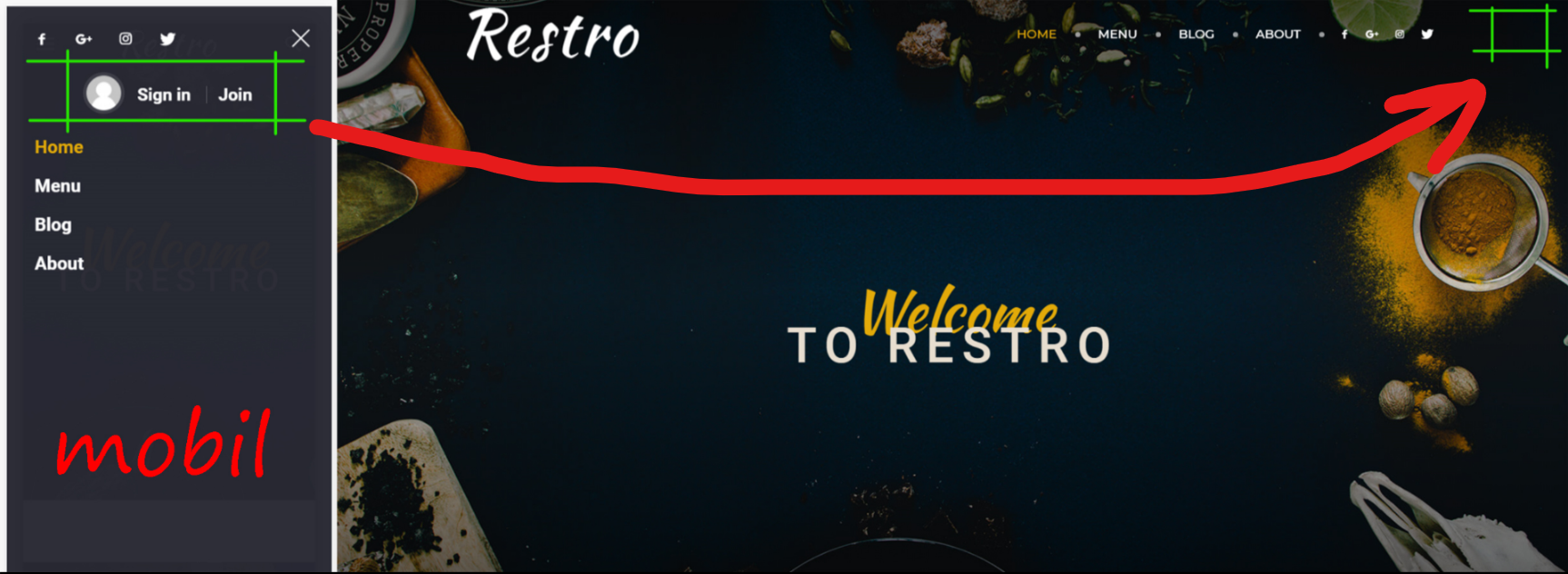
1- can i do it like in a photograph → https://i.hizliresim.com/G9D3d3.png
and can i change CSS settings
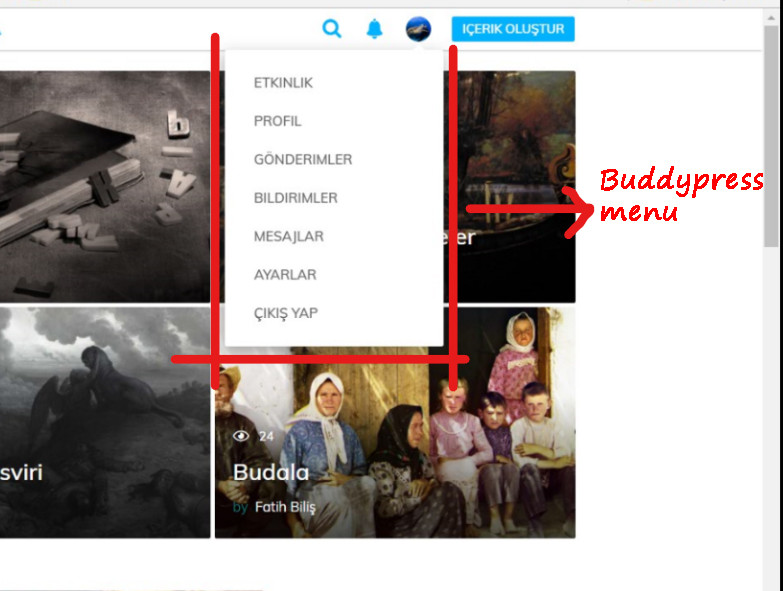
2- Can I put a buddypress menu on the profile like in a photo → https://i.hizliresim.com/kO6G6J.jpg
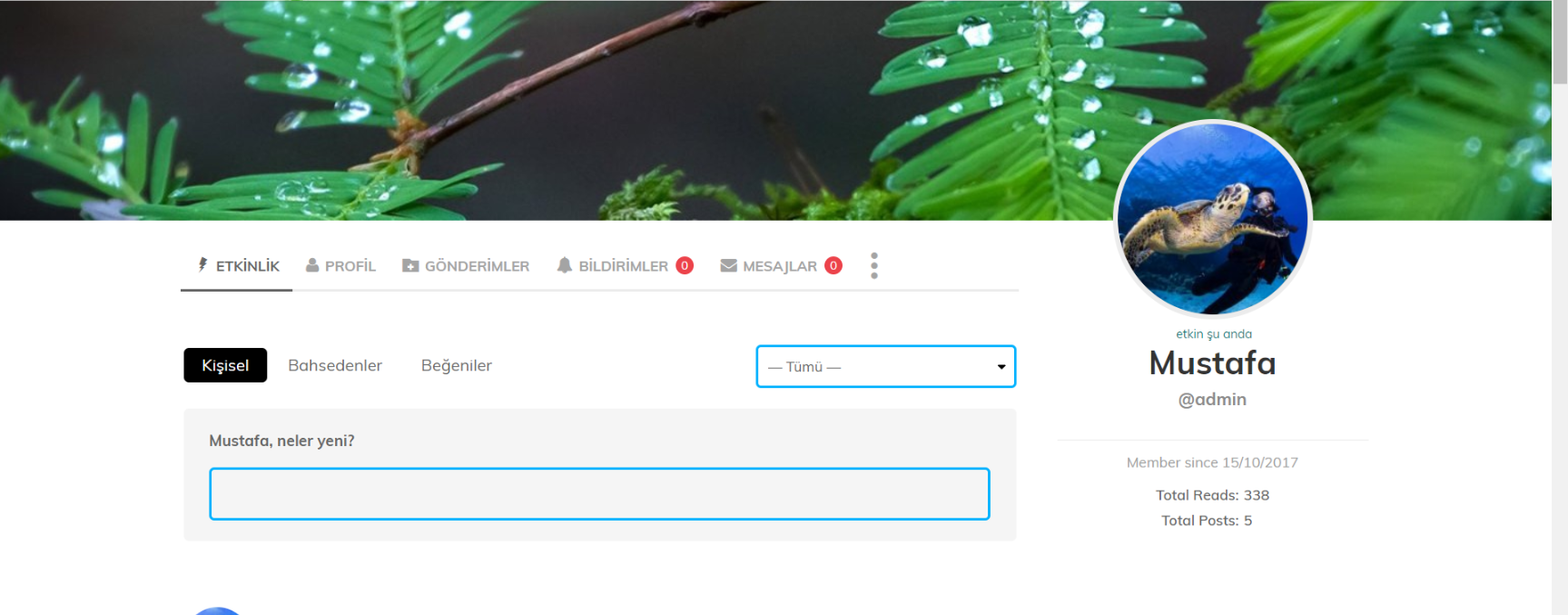
3- is it possible to change BuddyPress profile page css settings → Example → https://i.hizliresim.com/y0qNJ9.png
note: The main slice is not English. If I speak rude, I apologize.
thank you
 oneprimalscream
Hello! I have successfully hidden the Instagram widget in the footer of the pages on mobile using the following code in the mobile section of the Advanced Custom CSS area, but when I do this, it’s also hiding the widget within the Smart Sidebar and default Sidebar on mobile.
@media {
.td-instagram-main{
display:none;
}
}
I was able to successfully show the default Sidebar widget by adding a custom CSS class to the widget, but I can’t seem to find the area to do this within the Smart Sidebar.
oneprimalscream Adding is_string($att_value) && to the td_css_res_compiler.php file seemed to do the trick – thank you!
oneprimalscream Adding is_string($att_value) && to the td_css_res_compiler.php file seemed to do the trick – thank you!
 Nieuwetijdskind
Hi Guys,
On a single-post, header style 8, post template style 6, global-block-template-1, with this url
: https://www.nieuwetijdskind.com/hoe-word-je-een-goede-coach/
Custom css does not remove the responsive Google Ad, injected through the themepanel Header ad.
I use this code in the Custom CSS section of the theme panel:
.postid-73907 .td-g-rec-id-header
{ display: none;
}
It works well except with with this posttemplate. 🙁
Theme and plugins etc all updated.
Please assist.
Kind Regards,
Gordon
 obccgmbh
Hello,
we are using your theme since V 7.0 and we were very happy with it. But after the last update the front-end view is crashing on every site, where the sidebar module is active.

Where is the problem? Do we have to fix it by ourselves through CSS or is that a known issue?
 tonygibran