
- NewspaperCreate Custom Code with the browser’s Inspector or the Live CSS Box
- NewspaperScroll Animation
- NewspaperWP Rocket and Newspaper Theme: Optimization Guide
- NewspaperHow to setup Twitch for Social Counter
- NewspaperModal Popup
- NewspaperFlex Block Settings Guide
- NewspaperAutoptimize Plugin – install and configuration
- NewspaperAdding Multiple Authors to Your Articles
- NewspaperDesign your Post Pages using the Cloud Library Templates
- NewspaperBig Grid Flex Settings
- NewsmagtagDiv Composer Tutorial
- TutorialsFrom WPBakery to tagDiv Composer
- NewspapertagDiv Composer Tutorial
- NewspaperTheme modules and blocks
- TutorialsDefault Block Settings Guide
- NewspaperThe Mobile Theme
- NewspaperCompare theme files – Winmerge tutorial
- NewsmagBlock settings tutorial
- NewsmagLogo & Favicon
- NewsmagFooter templates
 Bogdan B.
 Hello,
Unfortunately we cannot say for sure as we have not tested instant articles with our theme. The plugin is not among the tested and recommended plugins. Sorry for the inconvenience. The quote styles from our theme could not be applicable for instant articles.
You can change the design of the default blockquote if you have a bit of css knowledge.
You cna use this class to target the quotes:
.td-post-content blockquote p{ your css code here }
Thanks.
Bogdan B. Hello,
You can add css code to the theme panel custom code section: https://www.screencast.com/t/aTlgCabMoKPC
You can change the color from this code with one you choose from here: http://htmlcolorcodes.com/
Thank you!
 grizzzzly
Hello TagDiv Community!
I need help customizing the header of my website. Can someone tell me the CSS I might need in order to put the text I have below my header to be on top of my main menu using Header Style 8?
See this screenshot to better see what I’m trying to do — https://snag.gy/TWigwH.jpg
 The Irish Place
I am trying to set custom (google) fonts in the theme panel. After changing the fonts and stylings some are saving and they are displayed on the front end. Others are reverted back to their previous setting after the save. This has happened multiple times.
I am running the latest verion of the theme and all plugins.
Also I notice some of the fonts/stylings are taken from the demo installation (default demo)… I have made a new homepage layout in TD-Composer.. and set style and layout options in the theme panel. Can I just uninstal this demo to remove its influence? Or will that cause I lot of issues if the stylesheet disapears?
What the best way to approach that?
The issue is when the page loads it loads the default font and colour accents. After 2 seconds the custom settings kick in and are displayed correctly…. but the initial load is still the ‘default’ settings. Should I uninstal that demo or should I look to edit the css somewhere. I suppose that would lead to quicker page speed if I did it that way??
Site: theirishplace.com
 drcocci@gmail.com
Hi,
my new site is online right now http://www.uroblog.it . There is a graphic issue during every page loading, it persist since long time.
In mobile version, top bar start in black background color and it changes to correct color only when dhe loading is finished.
In desktop version, main header menu starts in black background color and it changes to correct colo when the loading is finished.
All of this is very ugly and fastidious. It seems a bad graphic design theme.
Why don’t start in correct color?
How can I fix?
Regards
Dr. A. Cocci
 EquipaRefrigeracao
Hello,
I hope you’re doing good.
I’m with a great problem on my website: the images are not being displayed in the posts, and others things like submenu, search field not too. Sometimes they show up, sometimes they do not.
I think it could be a problem with CSS or JavaScript on the Newsmag theme, since I tried everything: I optimized the images, solved SSL problems, optimized the database, try it on other browsers, flushed browser cache, but so far nothing solved my problem.
This is a post example: https://www.equiparrefrigeracao.com.br/camara-fria-peixe/
Could you help me? See the image attached, please.
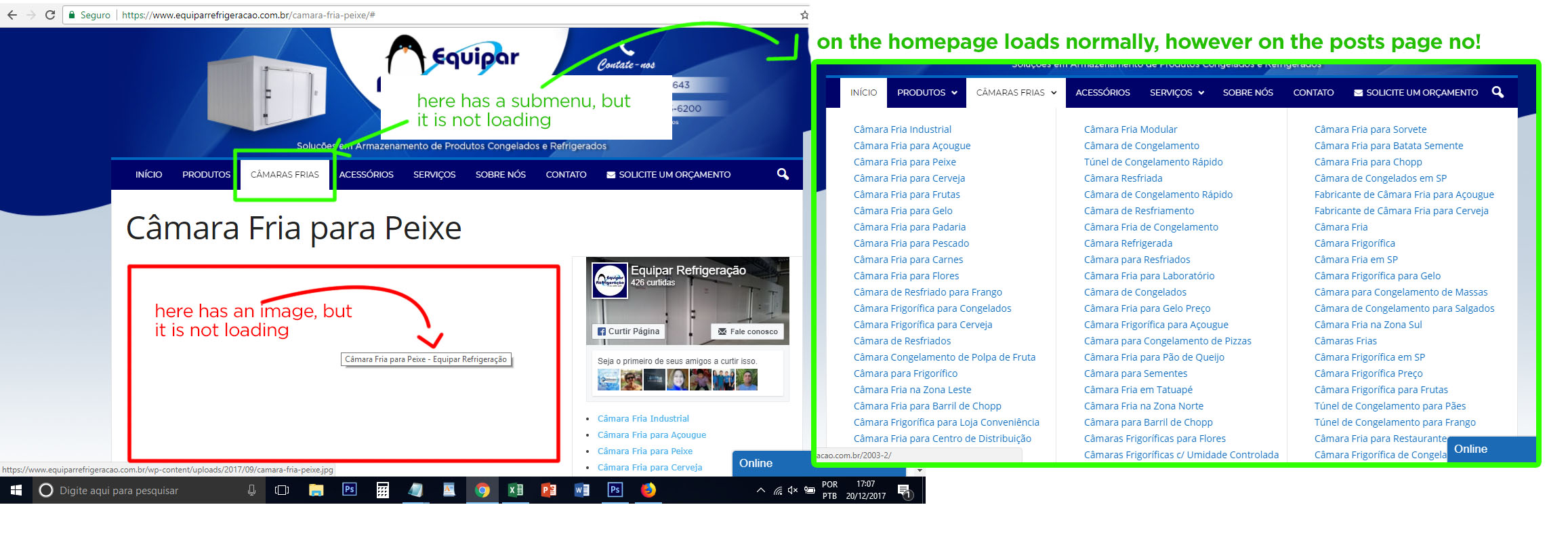
Thank you
 Simion C.
 Hi,
You could comment it, there should not be any problems. The text will simply not be displayed anymore
– https://www.screencast.com/t/QogMFxEgC4
An option to disable the Live CSS editor is not available at the moment, it could be implemented in future updates. If you are not using it, you could disable it as mentioned in this topic
– https://forum.tagdiv.com/topic/live-css-div-on-the-frontend-luckily-in-displaynone-mode-for-everyone/
Thanks
 DavidSiqueiros
 Hello, Does which CSS does this go into? Also can you give me the code for it to go to white or a very light grey?
Simion C. Hi,
There is a setting in the theme panel that removes the author name on posts
– https://www.screencast.com/t/xc1ge2g5
– https://www.screencast.com/t/q9WTGGffiHR
This setting should be sufficient, there would be no need for additional CSS code. If you disabled them in the panel as shown and they are still displayed, try clearing any installed cache. It could be a caching issue.
Thanks
 Thakksy
 Thanks for the support, I deleted the css code emptied the cache and changed to “Block Header 6′ just like the rest of the site but it still isn’t displaying correctly.
Simion C. Hi,
No need to create a child theme for simple theme customization. That is why the theme has the custom code sections in the theme panel
– https://www.screencast.com/t/Iotpalkd
Code entered in any of these sections will not be lost after a theme update, so ther will be no risk of losing it. So simply enter the code in the Custom CSS box and save. The code will apply to the element.
If you want to learn more about child themes see this guide
– http://www.wpbeginner.com/beginners-guide/wordpress-child-theme-pros-cons/
– https://forum.tagdiv.com/the-child-theme-support-tutorial/
Thanks
 mrx
mrx Hello Simon,
thanks.
If I comment-out this code with unwanted output text, will everything be alright?
Or simply please tell me how can I completely disable Live CSS editor. Same thing has been done with disabling of Login Modal via remove its code.
Simion C. Hi,
I really couldn’t say why this code that is present only in the page source would be picked and displayed in the search results like that.
This code originates from the tagDiv composer plugin and is related to the Live CSS editor, from the admin bar
– https://www.screencast.com/t/aqrwdf4Yjt
– https://www.screencast.com/t/JIyGlWMac5
Thanks
 mubodhi
Hi There.
I need to hidden on all posts the author. I deactivate in theme panel the show author and date, i add in css
.td-post-date, .td-author-line{
display: none!important;
}
and the author isn´t hidden.
How i can do it?
Thank you very much.
 Equinoctium
 Hello Bogdan,
Thanks a lot for your support. Should I create a Child theme as this is change to the CSS base code?
Do I need to create the Child theme before I add your CSS code or after?
Thanks a lot 🙂
ThakksyHi there,
I hope you can help with a small issue today. How to remove the .td-gadgets css from posts sidebar so I can keep the block titles the same as the rest of the site pages?
Thanks so much.
Bogdan B. Hello,
Please choose the grid style from the tagdiv composer. Set it to grid style 4.
And then add this code in the theme panel-> custom css box: .td-grid-style-4 .td-big-grid-post .entry-title{
background-color: rgba(0,0,0,.7);
}
Thank you!
mrxIn search results by Yandex the snippets of the news contain unwanted text: Write CSS OR LESS and hit save, Edit with Live CSS. … Write CSS OR LESS and hit save. CTRL + SPACE for auto-complete.
Why so? And how can I remove these ones?”
Much similar problem was with LOGIN MODAL. See here.
Bogdan B. Hello,
Please use this code in your custom css box:
.td_block_fancy_text .tdm-fancy-title2{

text-shadow: 2px 8px 27px rgba(0, 0, 0, 0.81);

}
You can change the values of the color to get different results. The 0.81 is the opacity. it goes from 0 to 1 so smaller values will make it more transparent.
Thank you!
 godfatherblog
 Thank you. I solved the problem myself by writing the necessary styles in the CSS itself.
Bogdan B. Hello,
Add this code in the theme panel-> custom css box to remove the meta info for that block:
.td-blog-fitness .td_block_big_grid_fl_4.td-grid-style-4 .td_module_mx21 .td-meta-info-container .td-module-meta-info{

display:none;

}
Thanks.
Bogdan B. Hello,
If you do not use the mobile theme, then you can only hide the login with css. Please use this code in your theme panel-> custom css box:
@media(max-width:767px){

.td-menu-login-section{

display:none;

}
Thanks.
Simion C. Hi,
I believe you are referring to the customization made through the Live CSS editor
– https://www.screencast.com/t/CpGwAa5wYI
After using the editor and saving code in it, this code will be saved in the database so it will not be lost after a theme update. They will be stored in the wp-options->td_live_css_local_storage option in the database.
Thanks
 simchris
 Add the expiration headers for your own content; you can’t do so for anything loaded from other sites.
You can minify the CSS and .js but a little tricky. See my long winded tutorial in the docs > tutorials > best of forums here for one way to do that.
 irfan.id
Hi… After some optimize, my blog is get good score on GTmetrix.. but I found still low score for YSlow Score, please take a look at this image https://s10.postimg.org/lj5ljtm2h/Screenshot-2017-12-20_GTmetrix_Performance_Report_A_95_B_80.png. How to optimize “Add Expires headers and Minify” “JavaScript and CSS”? both are in high and medium priority.
Thank you


