
- NewsmagInstalling pre-built websites
- NewsmagIntroduction
- NewsmagSmart Lists
- NewsmagTheme thumbs
 zhifi
zhifi Can you reply with a link to where I can provide login details? The site is under construction and I don’t want Google to crawl the site with demo links.
zhifiHi,
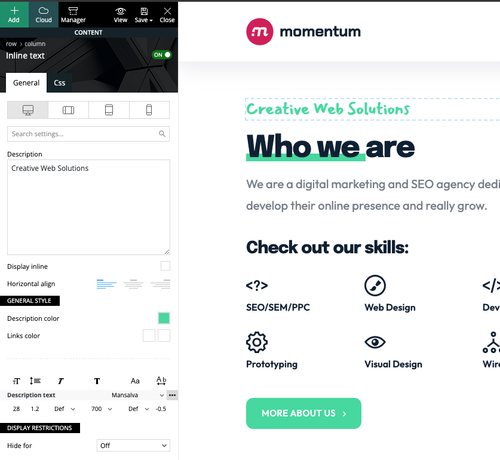
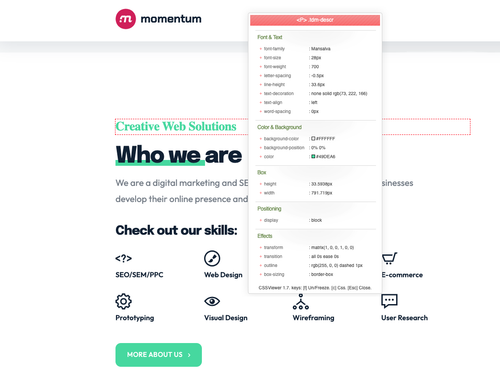
There seems to be an issue with Google Fonts. They load properly in the backend, but the frontend is not changing the font. Example: Mansalva font with Momentum Demo. I cleared my cache and used a computer that has never visited the site.
Backend:
Frontend:
 Joe
Joe Hello Bettina.
Unfortunately, I’m not getting far enough to follow your instructions. I can’t install the section. Nothing happens when click the green ‘Import Section’ button.
As previously stated, when I give up and close the screen for the “Latest Videos Section – Town Talk” I very very briefly see a pop-under screen pop-under window that says Load Section with a Yes or No choice on it. However, that disappears as quickly as ‘Load Section’ screen when I close it. I’m never able to see it long enough to select “yes”.
Here’s a video demonstration. You’ll see what I’m speaking of at 23 and 35 seconds about the pop-under window. You will need to pause the video and look at those marks.
Thanks.
 av
avI tested my site in Chrome incognito mode and I noticed that in the header, the theme rendered the social media icons vertically, versus horizontally. This appears to be a bug. Can you please advise?
av Thanks for your reply. I was actually referencing what I observed through the Composer (same area shown in your screenshot). In the Free News demo, can you try to disable weather and then view? For me, weather still displays. Same concept with other elements with the on/off toggle… “off” still displays the elements.
avI created a new custom post type and I noticed that the posts there do not use the same template as the default “post” type. Can you please advise how this can be done?
 thanhtan09
Hi team,
I purchased newspaper theme. I tried to load World Matters template (https://demo.tagdiv.com/newspaper_world_matters_pro/). But it show Block is no longer support. Please help me how to create a section like below picture.
Thanks.
avI entered “Boston” for the weather location after entering my own API key, and the temperature appears to be cached and does not update. I have also disabled (turned toggle off) for the “Header weather” feature, and I still see the widget appearing in my header.
avIn theme panel > header, I have a value defined under “TEXT LOGO FOR HEADER STYLE 9, STYLE 10 AND STYLE 11:” for “TEXT LOGO” AND “TEXT LOGO TAGLINE”, and the “LOGO H1 ON PAGES” toggle is turned off. Emphasis on values defined, but I don’t want values to display. When I go to my website (Free News demo content), I can see the header logo without issue on page load (if I do not start scrolling down). But once I start scrolling down, in place of the logo, I see the value I entered for “TEXT LOGO TAGLINE”. This appears to be a bug.
avWhen installing the “Free News” demo content, I had a different “First Name” and “Display name publicly as” configured (i.e. John) in /wp-admin/profile.php. I changed first name to something else (i.e. JJN) and made sure “Display name publicly as” reflected that. However, the URL for author posts still reflects /author/john/ versus /author/jjn/. How can I edit this?
avI am using the latest version of the Newspaper theme (Free News demo content). I would like to adjust the max height of the image to approximately 600px, while keeping the default width as-is. To ensure that the image does not shrink non proportionally, I would like to reposition focus to center-center if the height of the image exceeds 600px.
It would be great to do this without using CSS for performance reasons, if possible.
 Anamaria
 Hi,
Please don’t use blocks 1 to 25, big grid,or standard templates for header, footer, etc. Use cloud templates and flex blocks and big grids flex, as the demo was made.
The issue with the homepage was resolved after I disable the mobile theme plugin as I said to you to do.
Thank you!
 efisher_ftec
In the last couple of days, we have noticed that using the Facebook share icon in the posts no longer works. Instead, we get a ‘reload’ button on the facebook page. At first, we thought it was a plugin, but turns out that your demo site does the same thing. If you go to:
and click the Facebook icon, you are directed to:
You must be logged in to Facebook before the blank page with reload button appears.
Sharer.php seems to be deprecated and no support according some posts on Facebook’s forums. Do you have any updates or new ways we can use to share posts to Facebook, or should we be looking at using a dedicated plugin for that?
 Bettina
 Hello!
Yes, you are right. Unfortunately, you can’t assign them globally. You should set the font to each element. There is only a possibility to do that, if you will install a demo with global fonts already done and already assigned to each element. The guide is here: https://forum.tagdiv.com/font-customization/
You have the settings to change font size or weights on each element. They could be custom, with different values and not the same.
You can copy-paste for example a flex block in the tagdiv Composer. Right-click on the element -> copy and paste after another element by clicking on other element, right-click -> paste. Also, you can change some settings for style to one flex block (copy-style) and apply on other blocks(paste-style).
We recommend you to have the fonts locally stored. Check this thread: https://forum.tagdiv.com/topic/how-do-i-disable-the-mobile-share-button-and-font-optimization/
That option will load alternative fonts for different devices. So, you will have a little bit more control about what font will display there.
Thank you!
Bettina Hello!
Check on our demos: https://demo.tagdiv.com/select_demo/newspaper-prebuilt-websites/?demo-type=membership
Thank you!
 jshallo
Hi, I want to add a directory in addition to my news front end. Can a Directory Demo be installed within an existing theme, or do you have to build it from scratch?
I was also curious if the review system has allowed users to upload images yet.
Thank you.
John
Bettina Hello!
Do you want to install the demo with content or without content?
Did you try again? It could be from the internet connection.
Check all these requirements for the theme: https://forum.tagdiv.com/requirements-for-newspaper/
Make a test and deactivate all plugins except tagDiv ones. Also, if you are using a cache plugin, deactivate it, clear all cache, and try again.
If the problem is still there, then please contact us via email at contact@tagdiv.com and provide the following:
– admin url and credentials
– a link to this topic in order to identify you
Thank you!
 Dantecool02
I can download the prebuilt website CRYPTO GAMING PRO, but once its about to be finished I get this message:
nordicooffline.wpenginepowered.com says
tagDiv Importer detects that your server is not properly configured. Don’t worry, the importer will continue to install the demo after you click the OK button.
Steps to verify:
Please go to the SYSTEM STATUS tab and check if all parameters are green
Verify the permissions on your upload folder
Contact our support via email contact@tagdiv.com (please provide your product license key)
Now I have the upload permission to 0777 even so there shouldn’t be a problem there, also everything is green under system status. What could I be missing?
Bettina Hello Radan!
You can use the design. But the demo won’t work without the Newspaper theme and the tagdiv plugins.
Thank you!
Anamaria Hi,
You can install only the design -> https://forum.tagdiv.com/installing-demos/ or you can import the templates from Cloud Library -> https://forum.tagdiv.com/design-post-pages-using-cloud-library-templates/ -> https://forum.tagdiv.com/cloud-library-category-templates/
Thank you!
Bettina Hello Gregor!
If you will use in the future cloud templates (that we recommend), then you have in the TagDiv Composer a lot of options for customization. We wanted to create the easiest platform, so you can build your website without knowing any code and have the possibility to customize every field from any demo. That’s why you do not need a child theme with cloud templates. But you can use the child theme you have with the default templates.
The child theme is not overwritten by the update. An issue with that could be the compatibility of your child theme with the new version of our theme.
If you have some custom modifications directly in the theme files, then better save the code and replace it after every update. You can use a staging plugin, so you won’t ruin your website.
For every update, we always recommend the following:
-> First of all, please make sure you have a backup.
-> Please deactivate all the non-tested plugins with our theme before updating.
-> Update WordPress, PHP, the theme, and plugins to the latest version: https://forum.tagdiv.com/how-to-update-the-theme-2/.
-> Check all these requirements for the theme: https://forum.tagdiv.com/requirements-for-newspaper/
Thank you!
 sourcenettechnology
Hello,
I have enabled NewsPaper theme on my site and its working fine with the demo data. But when I was trying to add live content and delete all the posts my site is having issues. It gives me error like ‘redirected you too many times’. It only works if there is at least one published post at my dashboard. The issue is with tagDiv Cloud Library plugin because I have created template for my home page.
Can you please look into this and let me know what causes this issue.
I have also attached some screenshot below.
Here’s my site details :
Site URL : https://thehence.com/
Site info : https://thehence.com/site-info.txt
 iMohitPahwa
 hey, I just installed ink parlor demo and i am having the same issue. Were you able to resolve it?
 ioannisch
Hey team , i brought before 2 days theme and im in edit mode and i edit my demo site but as you can see in pc mode i have setup correctly and in mobile version i see only one categorie last articles , But in tagdiv panel i see correctly same as pc version , in edit mode i see same version pc and mobile , but if i log in demo site from my mobile i see only one categorie latest article, . What need to do ? here is my demo site http://e-agrotis.gr.www249.your-server.de/ What i do wrong
 Bolongo
 Hello Ana Maria,
Thank you for your feedback, but it still doesn’t work. For your information:
I have installed and activated all the required plugins
I have also deactivated the tagdiv Standard pack plugin as you recommended.
I have followed all the configuration information for “tagDiv Opt-In Builder – Paywall/Subscription”.
I have consulted the topic “https://forum.tagdiv.com/topic/tagdiv-composer-does-not-save-only-content-of-homepage/” which apparently does not concern me as I do not have any save issues or 40x errors.
I have uninstalled and reinstalled the theme, but I still have the same problem on this page “https://www.pressebits.com/checkout-week_pro/?plan_id=1”.
The Issues
The action button does not work.
The menu is also not functional.
I have not installed any extensions other than those required for the theme.
Request
I really bought your theme for paid article subscriptions. Could you please let me know if there is a refund program in my case? I really need this module. Please help me. Below is the “Newspaper system status” and everything is okay on that side. Thank you for your understanding.
heme config
Registration key i 828a4626 – **** – **** – **** – 1a21327f3673 Reset key
Theme name i Newspaper
Theme version i 12.6.6
Theme database version i 12.6.6
HTTP channel test wordpress
Installed demo i Newsweek PRO – demo ID: week_pro | install type: full
tagDiv advertisement i
Theme Mobile Newspaper mobile version
php.ini configuration
Server software i Apache
PHP Version i 7.4.33
post_max_size i 512M – You cannot upload images, themes and plugins that have a size bigger than this value. To see how you can change this please check our guide here.
max_execution_time 360
max_input_vars 250000
SUHOSIN installed false
PHP extensions
mbstring available
GD library available
WordPress and plugins
WP Home URL i https://www.pressebits.com
WP Site URL i https://www.pressebits.com
WP version i 6.5.4
WP multisite enabled i No
WP Language i fr_FR
WP Memory Limit 256 Mo/request
WP_DEBUG False
Caching plugin WP super cache – for best performance please check the plugin configuration guide here.
