
- NewspaperHow to Make the Site Faster
- NewspapertagDiv AMP Plugin Tutorial
- NewspaperNewspaper Theme Support
- NewspaperCustom ad spots
- NewspaperRequirements for Newspaper
 meri
meri Hi Calin,
The configuration of WP Super Cache is exactly as explained on https://tagdiv.com/wp-super-cache-plugin-install-and-configure/
And I do not use any CDN.
I noticed that, if I removed “td-ht-fast-news-menu” in Extra class, then it would load faster but looks really bad (black with a standard font) before to look normal (white with the right font).
Hope they’ll find a way to solve this.
Thanks
 imkimc
I understand that updating a theme can be difficult, but should it necessitate rebuilding the website?
We used your theme and page builder in confidence that moving forward TagDiv would continue to support those tools. We complained about speed, but were told that it was just us. We used the tools you provided, which you apparently now want us to stop using.
Now we (and many others) are faced with the following (and please correct me if I am wrong):
1) If we have used TagDiv Composer to build our site, we will have to rebuild any pages, headers or templates under the new theme because the short codes are put right into the text. For many, that is essentially rebuilding their entire website!
2) If we do not want to see all of the TadDiv short codes from Composer, we must use the Standard Plugin, which essentially returns the site to 9.8 compatibility and the same old CPU/speed problems.
3) I cannot see (and I have looked) how upgrading to 10 from 9.8 would benefit someone currently using your theme? There is no comparison on your website to show the benefits of the upgrade.There is nothing to recommend updating except the dubious honor of rebuilding your website.
Are there major security patches?
Is it needed for 5.3 compatibility?
Will 9.8 continue to receive security/other patches?
4) TagDiv Newspaper 9 is not a fast theme, there is unneeded JS running creating CPU cycles where there doesn’t need to be. The code just isn’t clean. This may be due to legacy code but I’ve had conversations with TagDiv before this related to speed and was always assured that the theme was fast, it was just my site was slower. Now I will quote the truth from your website:
Deactivate Standard Pack for blazing fast-websites. To gain page loading speed for your website, you’ll need to deactivate the Standard Pack plugin. This step will separate the templates (pages, singles, headers, footer) you’ve created or imported from the tagDiv Cloud Library from the ones built inside the Newspaper theme panel. All of the default templates from the theme and some of the elements from the tagDiv Composer will be disabled by deactivating the Standard Pack.
5) So, by running the standard pack we are negating any reason to update. The 9 theme was causing websites to be slower and by deactivating all of those features you spent so much time creating and selling to us in 9, we essentially slowed our sites down. The solution? Upgrade to 10 and turn off the Standard Pack Plugin. Which brings up the following…
4) Deactivating the Standard Pack plugin will cause any site that has modified any part of the Newspaper theme using the TagDiv Composer to show up as short codes and break the site completely.
I will again quote from your site:
For example, your website uses one of the default headers from the theme panel, and you deactivate the Standard Pack, your header will be displayed as a series of text and symbols on the frontend.
Guys, you screwed up. It’s pretty obvious to those of us who used your theme and if you can’t see it then that’s on you, and your inability to remain customer focused and customer centric.
• In 9 you introduced a bunch of cool toys, showed us how to use them and set us loose.
• These toys introduced a bunch of extra code that slowly but surely slowed our sites and caused excessive CPU cycles on our servers. (for those of us who pay for SPU usage, this not only slows our sites but eats into our pocketbooks)
• In 10 you back tracked and told us to turn OFF the cool toys you gave us to make the site run faster. Ah, but if you do that then your site will break, affording you the “opportunity” to rebuild your site.
Unless you can be upfront with us and admit you made a mistake and are now trying to fix it the reasons to continue using Newspaper become nearly non-existent.
(and yes, to all of you out there who know “all of the things”, these conclusions were discovered using a test site which has been wiped and copied several times to come to the place we are today)
I’m an independent and my time is money. I can’t charge my clients for upgrading their websites can I now? When the recommendation to go with one of the most popular themes in use came from me?
As a test, I’m going to delete Newspaper and scrub it’s existence from one site. Then install a flexible, fast page-builder friendly theme and rebuild that client’s website to see what the difference is and how long it takes. I’m going to guess between 30 – 40 hours of my time. I guess we’ll see what the end result is…
Where do I send the bill? (rhetorical question I know)
 Calin
Calin Hi,
No, you understand this wrong, you deactivate the standard plugin only if you replace the page elements with flex elements and cloud, without classic elements ( block, style ), only hen you can deactivate the standard pack, because the standard pack is the old version of the theme, by deactivating it you’ll have only the cloud elements that will make your website faster.
I hope I was clear this time, if not, let me know!
Thank you!
 T2N
T2NHey,
I can’t understand where to remove dependencies from this guide: https://tagdiv.com/newspaper-theme-update-standard-pack-or-tagdiv-cloud-templates/ “Easily removing the dependencies” part in order to remove TD Standard Pack plugin and make the website faster. Should I remove the files from TD Standard Pack or TD Cloud Plugin?
Calin Hi,
You can make your website faster by following the steeps from this topic -> https://forum.tagdiv.com/topic/action-required-please-read-how-to-update-to-the-newspaper-theme-v-10/
Hope this will help you!
Thank you!
 Vlad S
 Hello !
Please note that we answer the topics from Latest to Newest Monday – Friday from 08:00AM to 05:00PM GMT+2 So multiple replies to your topic will only make us to get harder to your topic. Also note that is not recommended to reply in other users topic since you will make the response time longer !
Also let us know what was your e-mail adress you have sent your message from so we can identify you faster.
Thank you !
 Decentralbox
Hello there,
I have a problem with fonts. Although I disabled Google Fonts in “Theme Panel > Theme Fonts > Google Fonts Seetings”, requests are still sent to Google.
I use Newspaper 10 without the “tagDiv Standard Pack-Plugin”.
There are 2 versions of my website:
• Version 1 with Newspaper 9.8: Fonts are not loaded from Google
Example: https://imgur.com/7oGdZO9
Pingdom: https://imgur.com/4EsFyVZ
• Version 2 with Newspaper 10 loads fonts from Google?
Example: https://imgur.com/n1XHgQ3
Pingdom: https://imgur.com/dMybF6a
I have set the same fonts in version 2 as in version 1.
As I want a faster website, I would like to do without Google fonts. How do I manage not to load Google fonts?
Thank you in advance!
 smehr1
 @co50 I think Calin was trying to tell you where the dpi settings were, if you would like to adjust the threshold to display retina images down to 100dpi.
Also a part of retina is set in this file -> http://prntscr.com/pt251i -> wp-content/plugins/td-composer/legacy/common/wp_booster/td_util.php and this file -> http://prntscr.com/pt25ns -> wp-content/plugins/td-composer/legacy/Newspaper/js/tagdiv_theme.js if you change the tagdiv_theme.js you’ll need to mimify the code en replace the one from tagdiv_theme.min.js
That seems to be the main cause of your issue and I would personally not consider it a “bug” – its just how they have their theme configured to keep images / page sizes optimized for faster load times.
 Alina S
Hello, Community!
We know you all want to make your website faster :), we want that for you, too. Newspaper theme 10 brings you a new way to build a faster WordPress website. For the first time in WordPress, you have the freedom to choose how much code the theme is loading and optimize your website’s performance straight from the beginning.
To give you this functionality, we’ve introduced a new plugin called the Standard Pack (available to you for free.) When you update to Newspaper 10, you must activate this plugin, or your website will display the shortcodes on the frontend. We cannot make the plugin automatically activate for you, so you’ll need to go to WordPress Admin area > Newspaper Theme > Plugins and enable the Standard Pack plugin.
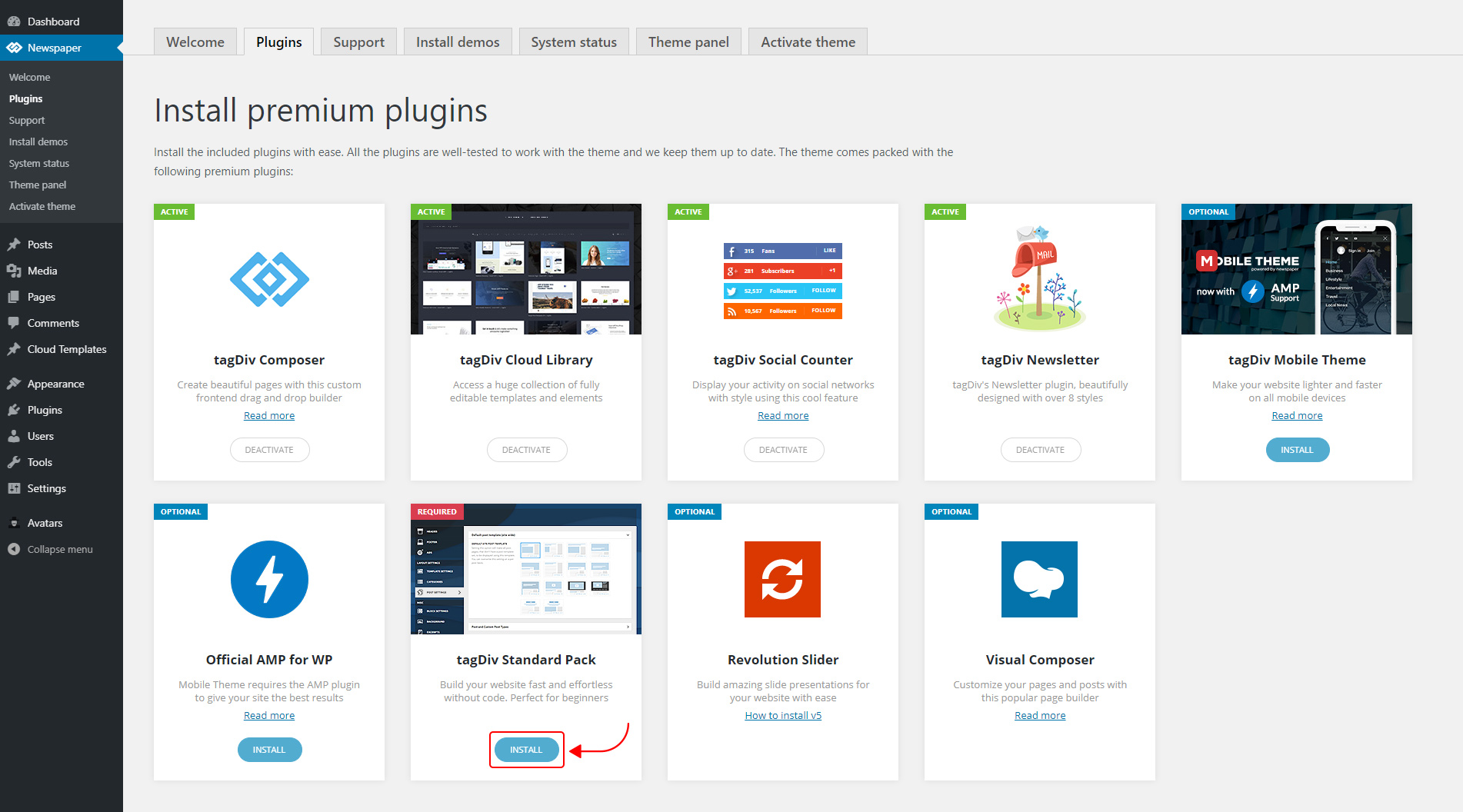
The new Standard Pack Plugin has two functions:
– it brings all the functionality you love in the previous versions
– allows you to separate things when you want to build everything customized and go for website’ performance.
The complete list of templates influenced by the Standard Pack plugin:
In the theme panel:
15 Headers
8 Category templates
10 Big Grids
19 Modules for blocks
14 Single post styles
14 Footer templates
In the tagDiv Composer:
25 Blocks
12 Big Grids
10 Big Grid Full
1 Big Grid Slide
Extra
All the demos that are not marked as PRO Demos.
You can find more details on how to use the Standard Pack Plugin in the dedicated article. When your website has no more dependencies on the Standard Pack plugin, you can deactivate it to increase the page loading time and performance.
If you need the previous version, you can download it from here (Newspaper v9.8).
I hope you’ll enjoy this update!
Thank you!
 Keresztlabda
 I tried to update, but when I upload the new files I get an error saying: the folder is exists. So I installed an other template, activate and after delete a Newspaper9 theme and then installed the Newspaper10 files, it was succesfull and when it finished with the update the website looks like then earlier. So it was easy and now the website is much faster.
Vlad S Hello !
We have investigated your website and everything seems to be in order with your instagram. Let us know if the issue is still there and also post a picture of your issue in order to find it faster.
Thank you !
 be2name
 Hello bettingspin,
we haven’t experienced your problems with WPRocket, but we don’t use the mobile theme of Newspaper. As a quick workaround a faster clearance setting of the WPRocket-Cache might be helpful.
There is also a setting in WP-Rocket to have a separate cache for the mobile pages. Maybe you should try to change this setting and see, if it helps.
 Benedict Paramanand
Hello,
My site is “sustainabilitynext.in”
I want to purchase some plugins for my site, they are
1) Formidable Forms
2) Monster Insights (Google Analytics)
3) SSL Certificate Plugin
4) Yoast SEO (SEO Plugin)
5) WP Rocket (to make wordpress faster)
6) Popup Builder
Now my question is,
1) Are these plugins required by me or is there any other setting in the theme to get the required service.
2) If these are required, is there any other alternate plugin which are more economical, but of same features
Vlad S Hello !
Please make sure that you follow all the steps found in at the 5th step here: https://forum.tagdiv.com/how-to-make-the-site-faster/
Thank you !
 bleakfiber
As stated in the title, I have incredibly low load times whenever I activate the TD Composer plugin. If I disable the plugin the site loads much faster. I would love to be able to continue using the plugin, so I can use the blocks and parallax feature, but currently, it takes 15-25 seconds to load any page completely.
 augstburgerjohn
 Hi
Thank you for that fast reply! Our office is soon closed, so I will reach out again tomorrow with the admin details etc on mail and it would be good if you guys could give us a hand and fix it on the site yourself. Cause the site is already up live and running. We are a famous Content Marketing Agency in Switzerland, and we cannot turn the site off because of the readers… that’s why I ask you to do that work for us as you can probably do it a lot faster and know already where to look. So tomorrow I would reach out again and supervise the work you do if that’s fine.
Thank you in advance!
 GiadaBenassi
Hi, i have a problem with tag Div Speed Booster plugin. I have follow your guide -> https://forum.tagdiv.com/how-to-make-the-site-faster/ but when i insert the script for printing all style and all script registered, these are not all. I have insert my site on the Google Page Speed but the scripts and styles of render blocking resurces don’t match with the script printed. I can’t find a single one and i can’t optimize them. How can i do?
Vlad S Hello !
Follow the step 5 of this tutorial in order to fully implement the speed booster: https://forum.tagdiv.com/how-to-make-the-site-faster/
Thank you !
Vlad S Hello !
Please make sure that you have followed carefully all the steps that are being found here: https://forum.tagdiv.com/how-to-make-the-site-faster/
There is however a workaround if you truly wish to use speedbooster with your current plugins, you can make it work by removing or commenting out this code here: https://www.screencast.com/t/RZLIOPUNdqh
Thank you !
 cantoute
 It’s because our users seem to love the search function that I’m going to need this badly… happy to help if possible, because the debounce stuff really are 4 dummy lines to add and they really make a difference on usability and server load.
It’ll make search display much faster then calling on every keypress.
With 140k posts and over 50k daily users… it’s really to be hard on server
Thanks
 aleabuamer
Hi
When I visit my homepage the first time, it loads slowly… then, it depends of what page, is loading slow or not
I download whole the web page and I see a file of 1144 MB (base.js). It’s JavaScript.
How can I do it loading faster?
Thx for all
Another Question:
When I see a post, below there are related posts and another posts from author: Can I hide the second button (posts from author) without using css?
thx
Vlad S Hello !
That can be modified by editing the Page scroll percent as you can see here by default is 50, going down it will make it faster: https://www.screencast.com/t/wfN4tvncHu7t
Thank you !
 bangokokesports
I just enbled auto loaded for the ‘single post content’ and noticed that it takes around 3 seconds to load the next page. How could I make it faster? My website is https://bangkokesports.com/.
When open site normally, it take only 1-2 seconds.
Thank you
Calin Hi,
We understand that right in this moment our theme is quiet have, but we hope that in the coming update our theme will be more light.
What you can do is to check our guide for speed optimization, maybe you can find something that will help you -> https://tagdiv.com/how-to-increase-page-loading-speed/
There are many optimization guides provided by our users here in the forum, some made by us, you could check some of them too
– https://forum.tagdiv.com/cache-plugin-install-and-configure/
– https://forum.tagdiv.com/how-to-make-the-site-faster/
– https://www.infophilic.com/get-almost-100-pagespeed-newspaper-theme/
– https://forum.tagdiv.com/topic/score-100100-pagespeed-with-newspaper-wordpress-theme/
– https://forum.tagdiv.com/topic/newspaper-theme-speedify-your-website/
– https://forum.tagdiv.com/topic/tutorial-chriss-custom-optimizations-for-functions-php-etc/
– https://forum.tagdiv.com/cloudflare-cdn/
– https://forum.tagdiv.com/topic/theme-causing-high-cpu-usage-2/
– https://forum.tagdiv.com/topic/sql-querys-high-cpu/
– https://forum.tagdiv.com/topic/newspaper-theme-slow-to-respond/
– https://premium.wpmudev.org/blog/optimizing-your-wordpress-database-a-complete-guide/
– https://underconstructionpage.com/optimize-wordpress-database/
– https://crunchify.com/better-optimize-wordpress-database-all-in-one-guide/
Thank you for your understanding!
Vlad S Hello !
AMP stands for Accelerated Mobile Pages. This is a way to construct web pages that will render quickly for static content. When put into action, AMP consists of AMP HTML, the AMP JS library, and the Google AMP Cache. When a page isn’t optimized for mobile use, you risk the chance of increased bounce rates—30% of users leave a page if it does not load within 3 seconds. The end product of AMP drastically improves the performance of mobile websites on the internet—so much so that the load time is often appearing to be instant. It relies on existing technologies and works in collaboration with the Internet’s biggest names. AMP is not a totally different technique for creating pages—it actually consists of normal HTML with a few restrictions and added specialized tags and does not require a lot of additional work. AMP JS works to make sure that the most important content is loaded quickly and clearly, while third party content such as ads are not at the forefront so that users will see their preferred content as soon as possible. AMP has discovered that content that loads quickly leads to faster reading, and in turn that results in more consumption.
If you want to see your amp pages on mobile you have to add /?amp to your link for example: http://www.test.com/?amp
I hope this is helpfull !
Thank you !
