
- NewsmagFooter templates
- NewspaperDesign your Post Pages using the Cloud Library Templates
- NewspaperFooter Builder
- Apitd_api_footer_template::delete
- Apitd_api_footer_template::update_key
- Apitd_api_footer_template::update
- Apitd_api_footer_template::add
- ApiAPI – Footer Template – Introduction
- NewspapertagDiv Composer – Website Manager
- NewspapertagDiv Opt-In Builder – Emails
- NewspapertagDiv Cloud Library Plugin
- NewspaperUsing the Theme Translations with WPML
- NewspaperThe Mobile Theme
- NewspaperChild Theme Support
- ApiThe Theme API
 Calin
Calin Hi,
I think that you are using a default footer style, please check in Appearance > Widgets in Footer 1 set there the content you want to display -> http://prntscr.com/q29nzv
Thank you!
Calin Hi VidrioMag,
The footer on La Mode demo is a footer page , you’ll need to edit it from theme panel with tagDiv Composer -> https://i.imgur.com/DcwrWXq.png
Hi christogonus,
If you want to remove the Latest article you need to change the page template to default -> https://forum.tagdiv.com/page-templates-2/ if you want to change the Latest Articles text please check in Homepage Latest Articles in Posts Loop Settings -> http://prntscr.com/pqz5za
For the footer try the above suggestion if you have a footer page, if not, please check in appearance > widgets -> http://prntscr.com/q29hz0
Thank you!
 Vlad S
 Hello !
Please note that some of the old demos and templates were considered a dependency and will deactivate with standard pack. You will have to use only the layouts available once the standard pack is deactivated in order to convert your website.
When you will deactivate the standard pack all the older versions will turn out in a shortcode because they won’t be rendered anymore.
Some templates like the footer, homepage, author will create be created as a page. Find out more about it here: https://forum.tagdiv.com/cloud-library-templates/
The settings haven’t changed that much. For instance you can install the Default PRO demo and start customizing it using the tagDiv Composer. All the layouts that will be inserted in the theme without standard pack should be fully customizable with tagDiv Composer.
I hope this was helpful !
Thank you !
Calin Hi,
Unfortunately at the moment we are not able to provide a step by step tutorial.
First I recommend you to check documentation, in this way when you’ll star will start to work on your website will be more easy.
-> https://forum.tagdiv.com/newspaper-theme-documentation/
-> https://tagdiv.com/category/documentation/
You’ll see that you do not need to create everything from scratch, you can use demos, header/footer/post/category templates.
Thank you!
 fatih-2
 Also, I’m trying to use cloud pro templates as I’m going to update to version 10 in the next months.
I’ve imported pro footer template and editing it. I’m filling up some custom contents like texts etc but I don’t know how to translate them. Probably string tanslation is not an option in this case. Should I duplicate the footer template and create it with secondary language? But after how do I set the multilanguage footers to dedicated pages?
It is becoming more confusing using the cloud templates
Vlad S Hello !
If you have deactivated the standard pack plugin you will be able to install only the Pro Demos. You will see the normal demos but you won’t be able to install them.
Demo is a full layout, if you install a demo you will see in your cloud library that the demo automatically imports the footer, header, author, etc templates. you can delete those and create your own or you can modify them.
As a MUST I would say you need to have Header, Footer, Demo or Homepage and a single post template.
I hope this was helpful !
Thank you !
 Josef
JosefNow we imported DefaultPro without additional data.
And after we imported all DefaultPro templates.
But two templates DefaultPro “Footer” and “Home”
are still showing in wordpress administration on tab “Pages” and not in tab “Cloud Templates”.
This is correct? or is it bug? Thank you for this information.
JosefPlease, when we want install on clean WordPress clean Newspaper 10.x,
so we not installed and actived StandartPack,
which CloudTemplates we must install – if we want have DefaultPRO ?
We import DefaultPRO but without additional data (because we not want have from start in our ftp and database trash with demo images etc)
but imported Demo DefaultPRO not import CloudTemplates and page Footer,Homepage.
So we need help from someone from Newspaper Team, we need know information which CloudTemplates we must install. Thank you for help.
Josef Hello Vlad,
Yes we have installed clean WordPress + clean Newspaper 10.x with demo DefaultPro (without data)
So for us is mainly set logo images in header and footer only via – cloud templates? ..and we not must set these logo images via theme panel? right?
Calin Hi rwoonacott,
The content for about us and privacy can be set in theme panel if you are using a default footer style -> http://prntscr.com/pye1dk -> http://prntscr.com/pye1hg -> https://forum.tagdiv.com/footer-templates/
If this is not what you mean, please provide some more details and some screenshots.
Thank you!
JosefHi, on clean WordPress + clean Newspaper 10.x
where is from first time used Default PRO template,
can I change logo only in “Cloud templates, and footer in Pages”?
or I must set logo images in old “Newspaper Panel” too?
I asking, because in Default Pro template are all logo images set only via “Cloud templates, and footer in Pages”.
Changing logo via “Newspaper Panel” not have any effects.
 imkimc
I understand that updating a theme can be difficult, but should it necessitate rebuilding the website?
We used your theme and page builder in confidence that moving forward TagDiv would continue to support those tools. We complained about speed, but were told that it was just us. We used the tools you provided, which you apparently now want us to stop using.
Now we (and many others) are faced with the following (and please correct me if I am wrong):
1) If we have used TagDiv Composer to build our site, we will have to rebuild any pages, headers or templates under the new theme because the short codes are put right into the text. For many, that is essentially rebuilding their entire website!
2) If we do not want to see all of the TadDiv short codes from Composer, we must use the Standard Plugin, which essentially returns the site to 9.8 compatibility and the same old CPU/speed problems.
3) I cannot see (and I have looked) how upgrading to 10 from 9.8 would benefit someone currently using your theme? There is no comparison on your website to show the benefits of the upgrade.There is nothing to recommend updating except the dubious honor of rebuilding your website.
Are there major security patches?
Is it needed for 5.3 compatibility?
Will 9.8 continue to receive security/other patches?
4) TagDiv Newspaper 9 is not a fast theme, there is unneeded JS running creating CPU cycles where there doesn’t need to be. The code just isn’t clean. This may be due to legacy code but I’ve had conversations with TagDiv before this related to speed and was always assured that the theme was fast, it was just my site was slower. Now I will quote the truth from your website:
Deactivate Standard Pack for blazing fast-websites. To gain page loading speed for your website, you’ll need to deactivate the Standard Pack plugin. This step will separate the templates (pages, singles, headers, footer) you’ve created or imported from the tagDiv Cloud Library from the ones built inside the Newspaper theme panel. All of the default templates from the theme and some of the elements from the tagDiv Composer will be disabled by deactivating the Standard Pack.
5) So, by running the standard pack we are negating any reason to update. The 9 theme was causing websites to be slower and by deactivating all of those features you spent so much time creating and selling to us in 9, we essentially slowed our sites down. The solution? Upgrade to 10 and turn off the Standard Pack Plugin. Which brings up the following…
4) Deactivating the Standard Pack plugin will cause any site that has modified any part of the Newspaper theme using the TagDiv Composer to show up as short codes and break the site completely.
I will again quote from your site:
For example, your website uses one of the default headers from the theme panel, and you deactivate the Standard Pack, your header will be displayed as a series of text and symbols on the frontend.
Guys, you screwed up. It’s pretty obvious to those of us who used your theme and if you can’t see it then that’s on you, and your inability to remain customer focused and customer centric.
• In 9 you introduced a bunch of cool toys, showed us how to use them and set us loose.
• These toys introduced a bunch of extra code that slowly but surely slowed our sites and caused excessive CPU cycles on our servers. (for those of us who pay for SPU usage, this not only slows our sites but eats into our pocketbooks)
• In 10 you back tracked and told us to turn OFF the cool toys you gave us to make the site run faster. Ah, but if you do that then your site will break, affording you the “opportunity” to rebuild your site.
Unless you can be upfront with us and admit you made a mistake and are now trying to fix it the reasons to continue using Newspaper become nearly non-existent.
(and yes, to all of you out there who know “all of the things”, these conclusions were discovered using a test site which has been wiped and copied several times to come to the place we are today)
I’m an independent and my time is money. I can’t charge my clients for upgrading their websites can I now? When the recommendation to go with one of the most popular themes in use came from me?
As a test, I’m going to delete Newspaper and scrub it’s existence from one site. Then install a flexible, fast page-builder friendly theme and rebuild that client’s website to see what the difference is and how long it takes. I’m going to guess between 30 – 40 hours of my time. I guess we’ll see what the end result is…
Where do I send the bill? (rhetorical question I know)
Calin Hi Thomas,
For footer, you can use a page as footer, edit it with tagDiv Composer -> http://prntscr.com/pwfncx, set the layout in 3 -> http://prntscr.com/pwfn2z set sidebar widgets in each columns -> http://prntscr.com/pwfnpt and select the sidebar you want to show from widgets area like this -> http://prntscr.com/pwfo0f
Thank you!
Vlad S Hello !
You can have those removed if you use a Cloud Template footer and design it as you wish. Find out more about it here: https://forum.tagdiv.com/footer-templates/
Thank you !
 Janus Moos
 I’ve now found the old footer templates by activating The Standard Pack. So it seems that I can get back to the way the footer worked before the update. That’s good.
Any help on how to use cloud templates without having plugins reinsert themselves multiple times would be much appreciated!
Janus MoosHi TagDiv,
Where can I choose the standard footer templates that used to be part of the theme? I no longer have access to them in the Theme Panel – only an option to select a footer page.
However, this (unfortunately) is not an option for me, since using cloud templates to create a footer makes some of my plugins reinsert themselve several times – and in some cases braking them completely (e.g. a paywall plugin). Looking through the forum here it seems to be a wide spread problem…
Do you have some good ideas on how to create a footer that works like it used to in the theme (via widgets and menus)?
Thanks in advance!
Janus MoosHi TagDiv,
Templates from the Cloud Library breaks the paywall on my site.
Whenever the page I’m viewing uses a cloud template the paywall starts posting itself over and over again. So if I have a cloud template as header or footer it breaks everywhere. If I disable cloud templates on header and footer it works fine. And if I use a cloud template on a single post – then that post creates the same error.
This happen on both my production site with Newspaper 9.8 and a local site with Newspaper 10.
If I use only the standard templates for everything there are no problems.
Do you know what is causing this? And more importantly: what can I do to avoid this problem?
Thank you in advance!
 Prateek
 Hi, DecentralBox.
Let me help you out.
I understand what you mean. Had the same problem and figured it out somehow.
You first have to create a template for the footer (import a footer template from the cloud library). Customize it according to your taste. You’ll notice that the footer template that you created will be moved into the pages section unlike other template that remain in the Cloud Template section.
Now go to the theme panel and in the footer section select the footer template(page) you created from the footer page dropdown. Save changes. You done. I faced some issues while saving changes don’t know why but I solved it by selecting an actual page (about/contact/etc), clicking on the edit footer page button and coming back and selecting the footer page template. It just worked.
Now if you’re using the mobile theme also (with or without amp), the footer template wouldn’t work on the mobile theme. For this, you have to activate the standard pack. After activating choose the a footer option or subfooter option (if you need one) from the theme panel. Save the changes. then go to mobile theme section select the footer menu and save changes again. Finally disable the standard pack. That’s it.
Hope you understand. You can DM on insta (@prtksng) if you have any doubt.
I can’t help you much with the telegram thing. In cloud library templates some icons are missing (stumble upon in my case). So what I did was used the icons module instead of social media and the copy pasted the icons for all the social media profiles and then changed the links and icons.
-
This reply was modified 6 years by
Prateek.
 Alina S
Hello, Community!
We know you all want to make your website faster :), we want that for you, too. Newspaper theme 10 brings you a new way to build a faster WordPress website. For the first time in WordPress, you have the freedom to choose how much code the theme is loading and optimize your website’s performance straight from the beginning.
To give you this functionality, we’ve introduced a new plugin called the Standard Pack (available to you for free.) When you update to Newspaper 10, you must activate this plugin, or your website will display the shortcodes on the frontend. We cannot make the plugin automatically activate for you, so you’ll need to go to WordPress Admin area > Newspaper Theme > Plugins and enable the Standard Pack plugin.
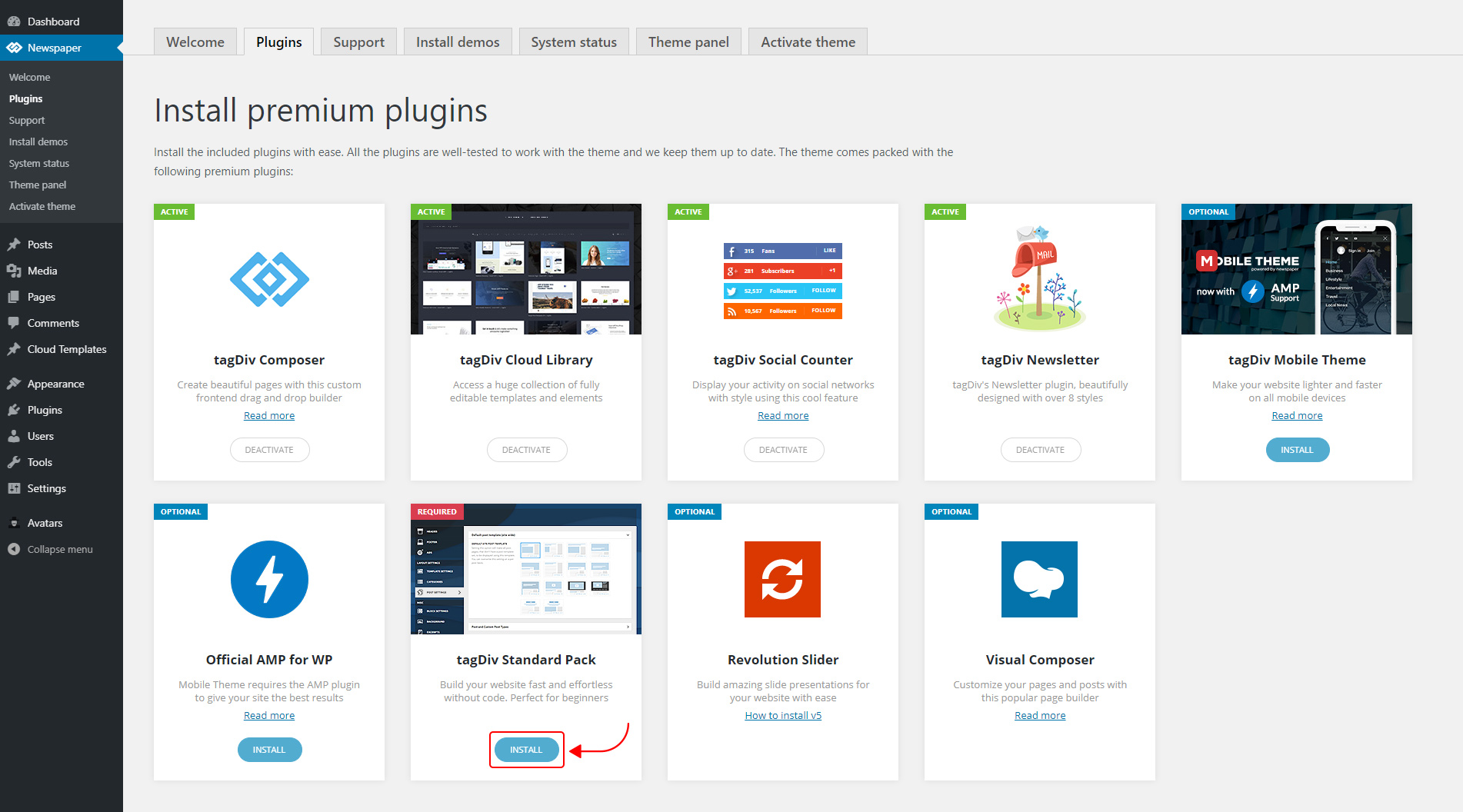
The new Standard Pack Plugin has two functions:
– it brings all the functionality you love in the previous versions
– allows you to separate things when you want to build everything customized and go for website’ performance.
The complete list of templates influenced by the Standard Pack plugin:
In the theme panel:
15 Headers
8 Category templates
10 Big Grids
19 Modules for blocks
14 Single post styles
14 Footer templates
In the tagDiv Composer:
25 Blocks
12 Big Grids
10 Big Grid Full
1 Big Grid Slide
Extra
All the demos that are not marked as PRO Demos.
You can find more details on how to use the Standard Pack Plugin in the dedicated article. When your website has no more dependencies on the Standard Pack plugin, you can deactivate it to increase the page loading time and performance.
If you need the previous version, you can download it from here (Newspaper v9.8).
I hope you’ll enjoy this update!
Thank you!
Calin Hello,
Please make sure that all the settings are like in our requirements, please follow the guide carefully
– https://forum.tagdiv.com/requirements-for-newspaper/
and please increase all requirements that are lower, and follow all steps.
Please make sure that you do not have a plugin conflict with untested plugins, please deactivate all non theme/tested plugins, also if you are using child theme, clear all cache and try again.
Also you need to use the tagDiv Composer to edit the page.
The EDITOR PICKS, POPULAR POSTS and POPULAR CATEGORY are part for footer style 1 -> http://prntscr.com/ps3lzi if you want to change only the text for these blocks then you can do it from Theme Panel > Translations http://prntscr.com/ps3nhs -> http://prntscr.com/ps3ne6
The ABOUT US and Follow us sections can be set from theme Panel> Footer -> http://prntscr.com/ps3n0s the social networks are set in Theme panel> Social Networks -> http://prntscr.com/ps3n93
Thank you!
 smehr1
 Thank you Vlad. I found the action hook in the footer.php that is pulling in the job description in place of the footer do_action('tdc_footer') but when I comment this out it breaks the footer.
What I don’t understand is why this Job plugin will work if I use one of the standard footer options, but when I use a custom footer, it breaks – resulting in the job post appearing twice on the page, replacing the custom footer. Here is a link to a job post so you can see what I’m talking about: https://mp.adcreview.com/job/process-development-engineer-associate-experience-will-dictate-exact-title/
Is there a way to call the custom footer, similar to how you call the standard footer templates that could resolve this?
Calin Hi,
That is not an official documentation for our theme, also that is for Newspaper v7 and you are using Newspaper v9.8 please check our documentation carefully ->https://forum.tagdiv.com/footer-templates/ also make sure that you do not gave a plugin conflict, please deactivate all non theme plugins and try again and if there is still a problem and you can not manage it, you can send us an email at contact@tagdiv.com and provide admin login, as well as cPanel or FTP if possible. We will take a look. Include a link to this topic in the email.
Thank you!
Calin Hi,
There are two ways to set the newsletter at the end/bottom of each posts, but you’ll need to set only the code that you set in tagDiv newsletter.
1. You can set the code in Theme panel > Ads > Article bottom ad -> http://prntscr.com/pm1xzu
2. You can set it in footer, using a footer widget -> https://forum.tagdiv.com/newsmag-footer-templates-2/
Thank you!
 stevebullman
For some reason on the posts page I have the author box showing 3 times. Once beneath the post, once beneath the previous/next articles, and then once below the footer. Can’t see any options anywhere relating to this. I have tried changing the templates and they all do the same.
Calin Hi,
Please make sure that you have set that menu for footer menu mobile too -> http://prntscr.com/piydu3
Also what social media buttons you want to remove ? if you are referring to sharing buttons -> http://prntscr.com/piybuq, then you can deactivate theme from theme panel -> https://forum.tagdiv.com/design-post-pages-using-default-templates/
Thank you!

