
- NewspaperHeader Builder
- NewsmagHeader styles
- NewsmagHeader ads
- NewspaperHeader ads
- NewspaperHeader styles
- Apitd_api_header_style::delete
- Apitd_api_header_style::update_key
- Apitd_api_header_style::update
- Apitd_api_header_style::add
- ApiAPI – Header style – Introduction
- NewspaperSearch setup for custom post type
- NewspapertagDiv Composer – Website Manager
- NewspaperBookmark – Save For Later
- NewspaperWooCommerce: Happy “Add to Favorites!”
- NewspaperModal Popup
- NewspaperFlex Block Settings Guide
- NewspaperPosts Loop Element
- NewspaperHow to Add a Logo in Newspaper
- NewspaperDefault Category Settings
- NewspaperWhen tagDiv Composer is Not Working
 ferrari6
I want to change this image. From where to do that?
Site URL: https://soulsteer.com/
Screenshot: https://ibb.co/WpFnf4HC
 IT Webmedia
Solved!
Hello, I want to change teh Cali Sight logo with my own. I managed to find and change it for the main header but the floating header and the mobile page keeps showing the Cali Sight logo. How or where can I change that?
All my best,
André
 lecker
 Salut, redeschid topicul asta, pentru ca atunci am renuntat la idee, dar actualizand tema si pluginurile la cea mai recenta versiune, problema e fix aceeasi.
Warning: require_once(td_deploy_mode.php): Failed to open stream: No such file or directory in /www/wp-content/themes/functions.php on line 14
Fatal error: Uncaught Error: Failed opening required ‘td_deploy_mode.php’ (include_path=’.:/usr/share/php’) in /www/wp-content/themes/functions.php:14 Stack trace: #0 /www/wp-settings.php(739): include() #1 /www/wp-config.php(32): require_once(‘…’) #2 /www/wp-load.php(50): require_once(‘…’) #3 /www/wp-blog-header.php(13): require_once(‘…’) #4 /www/index.php(17): require(‘…’) #5 {main} thrown in /www/wp-content/themes/functions.php on line 14
Aveti vreo solutie ?
 Simion C.
 Hi,
So you want logged out users to not see the submit a story menu item? Or what exactly will be different in the header logged in versus logged out.
In the composer there are some options for display restrictions, they are available for rows and columns, and inner rows and inner columns, like so -> https://prnt.sc/eDY_sXIz2ftM Using that option it is possible to show or hide content based on being logged in or not.
In the Submit page you could add a new row and use some text saying that they have to register first. Then hide that row for logged in users. But I’m not quite sure what you want to do with the header. Could you lease explain more?
Thank you!
 bpotter
Hello,
Just wondering if it’s possible to set a different header menu for logged-in users?
I would like the “Submit a Story” form to only be useable by logged-in subscribers, whilst the “Submit a Story” page shows a message to unlogged-in visitors the need to register.
Thanks
 LeaderBiH
Hello,
I am using Newspaper theme version 12.7.6.
I have a problem in the Theme Panel > Ads section. When I open the Ads panel, I can see all ad positions such as:
Header ad, Sidebar ad, Article top ad, Article inline ad, Article bottom ad, Custom ad 1, Custom ad 2, etc.
However, when I click on any ad position to open and edit it, the panel does not open. Instead, the loading icon keeps spinning and nothing happens.
Could you please help me resolve this problem?
 opinandosinanestesia
I understand that to display a video as a “header image,” I need to upload the video to my media library, is that correct? Is there a way to do this? Thanks!
 franciscorgl
Hi Newspaper/TagDiv support team,
We are running Newspaper theme version 12.7.6 on our WordPress site (https://www.opisantacruz.com.ar) and we are experiencing an issue with the mobile menu not opening when tapping the hamburger icon on mobile devices.
Here are the details:
**Issue:**
The hamburger menu icon is visible in the mobile header but tapping it does nothing — the menu does not open on Safari (iOS) or Chrome (Android/iOS).
**Setup:**
– Theme: Newspaper 12.7.6
– Page builder: TagDiv Composer
– Mobile header configured in TagDiv Composer with the “Mobile menu” block set to “Mobile Theme” menu
– WP Rocket plugin active with “Delay JavaScript execution” enabled
– WP Engine hosting with server-level caching
**What we have tried:**
1. Excluding tagdiv_theme.min.js from WP Rocket’s Delay JavaScript execution — menu still not opening
2. Excluding /td-composer/legacy/Newspaper/js/tagdiv_theme — menu still not opening
3. Excluding tagdiv_npm — menu still not opening
4. Excluding /wp-content/themes/Newspaper and tagdiv-composer — this caused a blank page on article URLs and had to be reverted
5. Clearing all caches (WP Rocket + WP Engine) after each attempt
**Console errors detected (Chrome DevTools):**
– [Violation] 'setInterval' handler took 133ms in tagdiv_theme.min.js?ver=12.7.6:236
– Uncaught SyntaxError: Unexpected token '.' in swg-basic.js:1
– Two 404 errors: /wp-content/cache/min/1/wp-content/plugins/td-composer/css-live/assets/external/ace/snippets/text.js and ace/mode-less.js
**Question:**
Which specific JavaScript file handles the mobile hamburger menu toggle in Newspaper 12.7.6, and what is the correct way to exclude it from WP Rocket’s Delay JavaScript execution without breaking other functionality?
Alternatively, is there a recommended configuration for using Newspaper 12.7.6 with WP Rocket’s Delay JavaScript execution enabled?
Thank you.
Simion C. Hi,
From what I see only the homepage is indexed https://prnt.sc/20wGw_TYFNur
The theme has no capability to use noindex, or index, or anything else. All the theme does is to display your content.
Perhaps the nature of the issue is more related to how the website looks.
I see broken and missing images everywhere and a very large ad at the top, also the sticky header has no background and it looks a bit bad. For example this is what I’m seeing when arriving on the homepage of your website -> https://prnt.sc/wwnagCba-OA_
Please check the website in incognito mode to see how it looks for a regular visitor. That’s how it looks to Google as well.
Here are some more broken things I’m seeing
https://prnt.sc/UKT_uotknb1n
https://prnt.sc/5SvO1ew1QN_M
https://prnt.sc/Ztmcn9qE6mh8
https://prnt.sc/oMhe6g8lG5uq
These could be a reason for not indexing the website’s content. If the website has visual problems Google may not index it. I suggest looking into these issues, maybe the visual issues are related to the litespeed optimization. And maybe the missing images https://prnt.sc/V56A1nVfHgWj are related to the Jetpack site accelerator, I see you use it.
Once those issues are fixed, the website should look better and it can’t hurt the indexing either. Let me know if you need help with it.
Thank you!
Simion C. Hi,
As far as I know there’s no issue with the post settings currently. I checked as an author, in the block editor the post settings are there at the bottom -> https://prnt.sc/no-yHvBANdHI They just need to be opened and it’s all there -> https://prnt.sc/XFSq26yfORLf Same with the classic editor -> https://prnt.sc/tInILVzc8Ud2
If the settings are truly missing on your website, maybe it’s some kind of plugin conflict. That’s the first thing to check.
If you used a cloud header template before, it couldn’t have just disappeared. From what I see using the wayback machine, you used to use a standard header template, template 5 -> https://prnt.sc/VkP4uig1R0m_ That kind of template requires this plugin -> https://prnt.sc/rQ-ehi9kAEad then you can use it again. If that standard pack plugin is not active, then yes, some settings from the theme panel won’t be available.
Or would you like to switch to using a cloud header template? I’ll help set it up if you want.
Thank you!
 Technodia
I want to cange Logo Gossip. Uloaded logo (272 x 90px)at Newspaper – Theme panel. No change in Header. Can anybody suggest?
Version: 12.7.6 REGISTERED. TagDivi Comositor is not working.https://thescienceonline.com/
 padix
padix Hello,
My authors are not able to see post settings, I’am able to see from ADMIN on my side.
One more questions, my Header menu template dissapparead and I want to replicate the old menu, how to make what I marked with RED with BLACK, I want it to be black – https://www.dropbox.com/scl/fi/42e9qjzh3px3jh5ukyamq/Screenshot-2026-05-26-at-00.21.11.png?rlkey=3kz1veismh8ynflppo5g8tztg&st=u4v5ejdi&dl=0
Best,
Klaus
Simion C. Hi,
The option to convert a header or footer will appear while editing a mobile page or a mobile template.
Pleased edit a mobile page -> https://prnt.sc/lOHNKHS22v8d
Or a mobile template -> https://prnt.sc/4vApjdiH2QRc
Then the option should be available.
Thank you!
Simion C. Hi,
I will take a look at it, it’s faster this way. Please send an email at contact@tagdiv.com and provide a link to the website and admin login (user and pass) and I will investigate the issue as soon as possible.
As a note, this is an issue with the composer usually caused by something from the header or the page, or depending on the case. The only problem is not being able to use the composer, it’s in no way affecting the Google indexing. If there’s also a problem with that, please note that these are unrelated.
Thank you!
 raccontareancora
Hello,
I’m experiencing a layout sync error in the Header, specifically in column 1 of row 1.
Error message:
“Layout sync error in Header, column 1 of row 1. The editor expects 1 block but the page is rendering 3. Usually caused by an unclosed HTML tag in a text block (e.g. without ).”
I have already checked the content but I’m unable to resolve. I have also tried several methods to resolve the issue (including reviewing the HTML, undoing recent changes, and checking the layout structure), but the problem persists.
The issue only appears in homepage and prevents me from editing the layout correctly.
Additionally, Google has not been indexing the homepage or the articles since this issue started
Could you please help me identify where the extra blocks are coming from or how to fix the mismatch between the editor and the rendered page?
Thank you in advance for your support.
Kind regards
Antonella
 Westfrieslandpraat
 When i remove the upper column the whole header is gone.
WestfrieslandpraatChange header not posible.. see attachtment. when remove the 2 upper rows, the header is deleted. 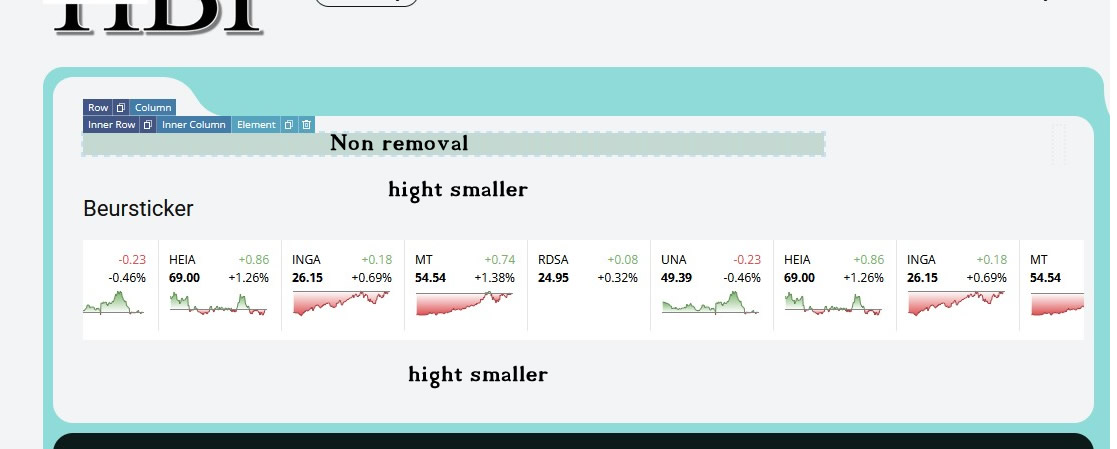
 sridhar.edesk
 Hi Simion,
Thank you for checking and clarifying the issue.
We understand that the templates are custom-built through the child theme and therefore cannot be edited using the composer. The reason we customized the header and footer is to ensure they match the overall look and feel of our website and maintain consistent branding across all pages.
Please let us know if there is any recommended approach from your side that would still allow us to retain these customizations while using the composer for other sections.
Thank you!
Simion C. Hi,
That usually means that there’s a problem with the page content, if it happens just in a specific page. Or if it happens everywhere there may be a problem with the header or the footer. Or it could be a conflict with a plugin.
I’ll take a look at it and try to find the cause. Please send us an email at contact@tagdiv.com and provide a link to the website and admin login. I will check as soon as possible.
Thank you!
 muckel
Hello tagDiv Support,
I am experiencing a responsive layout issue with the Newspaper Theme / tagDiv Composer on mobile devices.
Problem description:
On the second/narrower mobile viewport, the entire layout suddenly behaves as if the desktop width is still active. Rows, columns and content containers expand to desktop width instead of adapting to the smaller mobile viewport.
Important details:
* The issue only appears on the narrower mobile viewport.
* Desktop and larger mobile/tablet viewports work correctly.
* The problem affects the entire viewport width, not just a single element.
* I already checked common responsive settings and cleared caches.
* The problem persists even after removing several header elements.
* The affected pages are built with tagDiv Composer and Cloud Templates.
* I suspect either:
* corrupted viewport-specific Composer settings,
* a responsive inheritance problem,
* Stretch Row / fixed-width settings not resetting correctly,
* or a known issue related to the lower mobile viewport.
Additional observations:
* I found references in your changelog mentioning fixes related to:
* responsive checkbox behavior on lower viewports,
* sticky columns on mobile,
* viewport-specific layout issues.
Questions:
1. Are there known issues in recent Newspaper versions related to the second mobile viewport?
2. Is there a known bug where desktop width settings persist on smaller mobile breakpoints?
3. Could this be related to:
* Stretch Row,
* Sticky Columns,
* Cloud Header templates,
* Mobile Theme plugin,
* or Composer viewport inheritance?
4. Is there a recommended way to fully reset viewport-specific Composer settings for rows/columns?
Environment:
* WordPress
* Newspaper Theme
* tagDiv Composer
* Cloud Templates enabled
* Classic Editor
* Responsive mode (not AMP)
Thank you.

Simion C. Hi,
The mobile theme is optional, use it only if you want to. The mobile theme has it’s own homepage, header, footer, post template, category template etc. These are created to be as simple as possible. All the available settings for the mobile theme are in the theme panel -> https://forum.tagdiv.com/the-mobile-theme/ Everything is supposed to change after you activated it, it should look as presented here -> https://forum.tagdiv.com/mobile-theme-introduction/ But if you want to use the mobile theme and there are design problems, I can check as well. Let me know.
This is the logo I see on your website on desktop -> https://prnt.sc/qoEBatFN4683
And on mobile -> https://prnt.sc/LiFBcobZB4wc
The desktop logo and the mobile logo are independent from each other, so they can be different. The logos are set in the composer like this -> https://forum.tagdiv.com/add-logo-newspaper/
Thank you!
opinandosinanestesia Good afternoon. I apologize if I didn’t explain myself clearly. I’ll try to explain better. Normally, the header image in all posts appears above the post title.
For some strange reason, it now appears below.
I would like to change this setting so that the header image appears, as it did before, above the post title.
How can I do this? Thank you!
Simion C. Hi,
Please check the mobile theme guide carefully -> https://forum.tagdiv.com/mobile-theme-introduction/ Pages behave in a special way when the mobile theme is active.
The settings for the mobile theme are in the theme panel -> https://forum.tagdiv.com/the-mobile-theme/
When the mobile theme is active each page requires adding content in a mobile editor. So if you edit a page normally in the backend -> https://prnt.sc/0qqKUP1JHP2J and you scroll down, there should be a mobile editor section -> https://prnt.sc/MERKIYr-4iM5 That’s the content the page will display on mobile.
The purpose of the mobile theme is performance. That’s why it has it’s own homepage, post template, category template, header, footer, etc. and it’s own section for adding page content. If it would just display the desktop content then it would have no purpose.
And as a note, the mobile theme is an optional plugin. Sometimes with some decent caching and optimization you can simply not use it and use the responsive version.
Thank you!
Simion C. Hi,
I will help as much as I can.
1. For this issue it will be faster if I can investigate directly on the website. There’s probably an issue with the header. Please send an email at contact@tagdiv.com with a link to the website, admin login, and a link to this topic.
2. The matter with that sidebar limitation has a long history. First, after getting a lot of requests (and I mean a lot) over the years to remove it, we decided to finally remove it. After we removed it, we started receiving a lot of requests to add it back. So we decided to make it optional, it can be enabled/disabled in the theme panel here -> https://prnt.sc/GLKqtqvWaczV Please enable it if you were using it.
Let me know after sending the email so I can check as soon as possible.
Thank you!
 Mark
MarkWe have a support contract and are seeing two issues we’d like your help resolving.
I can send further sensitive or confidential information to your contact email referencing this specific ticket.
— Issue 1: Layout sync error blocking front-page edits —
When attempting to edit the front page in tagDiv Composer, the editor displays:
“Layout sync error in Header, row 2. The editor expects 1 element but the page is rendering 0. Usually caused by an unclosed HTML tag in a text block (e.g. <div> without </div>). View page | Undo (Ctrl+Z / Ctrl+Shift+Z) to restore.”
The error points to the header ad position in Header row 2, which renders as an “EMPTY INNER COLUMN” with a red outline in the editor.
The Undo shortcut (Ctrl+Z / Ctrl+Shift+Z) does not fix the problem.
This has been an ongoing issue for multiple months and is preventing front-page edits.
— Issue 2: Sidebar preview missing in post editor —
After updating our various web sites to 12.7.6, the post editor no longer shows the sidebar reservation area — the visual cue that previously showed the authors the actual rendered width of the post content with the sidebar reservation accounted for.
This affects both the production site and the dev site. Other sites we host using prior versions of the theme are not affected and continue to show the sidebar preview correctly.
Thanks — looking forward to getting this resolved.

