
- NewspaperHeader Builder
- NewsmagHeader styles
- NewsmagHeader ads
- NewspaperHeader ads
- NewspaperHeader styles
- Apitd_api_header_style::delete
- Apitd_api_header_style::update_key
- Apitd_api_header_style::update
- Apitd_api_header_style::add
- ApiAPI – Header style – Introduction
- NewspaperSearch setup for custom post type
- NewspapertagDiv Composer – Website Manager
- NewspaperBookmark – Save For Later
- NewspaperWooCommerce: Happy “Add to Favorites!”
- NewspaperModal Popup
- NewspaperFlex Block Settings Guide
- NewspaperPosts Loop Element
- NewspaperHow to Add a Logo in Newspaper
- NewspaperDefault Category Settings
- NewspaperWhen tagDiv Composer is Not Working
 Bogdan B.
 You can use any header style you want with or without an ad. The logo however will still be constrained to the containers even if the re is no header ad.
I’m not sure what you are trying to achieve though.
Thank you!
 Simion C.
 Hi,
That should work for posts that use post template 1. I have tried it as well. I entered the code mentioned in the header file like this
– https://www.screencast.com/t/A2t0dLAbTPO
Also I made a small modification in the code regarding the language
– https://www.screencast.com/t/RSUWLkdQA
Then modified for example post template 2 with the other code mentioned in the topic
– https://www.screencast.com/t/F9YPM8plWAsy
The result is that posts that use post template 2 display the Facebook comments
– https://www.screencast.com/t/anvgmQlO
Thanks
Simion C. Hi,
There is a guide for setting font awesome icons in the menu
– https://forum.tagdiv.com/how-to-add-icons-in-menu/
But there is no documentation for adding a multi-purpose icon in the menu.You could try it as you mention, use an additional CSS code to increase the icon size and better positioning. I have tried like this
– https://www.screencast.com/t/jWX0599AEW2p
– https://www.screencast.com/t/pPj656Ij7d
Maybe this is useful to you
.td-header-main-menu .tdc-font-tdmp {

font-size: 1.4em!important;

vertical-align: middle;

margin-right: 10px;

position: relative;

top: -1px;

}
Thanks
Simion C. Hi,
The header logo can be uploaded in the theme panel
– https://www.screencast.com/t/ILvRCbJ2sa1
Please check these logo size recommendations as well
– https://forum.tagdiv.com/logo-favicon/
Uploading a logo image there should display it accordingly on the website. If you upload it and it does not appear, maybe it is a caching issue. Clear all caching installed after setting the desired logo. Let us know if there still is a problem.
Thanks
 Kingx26
Hello,
I have implemented ads in the articles of my site. However, I need to hit enter and put a space for the ad to appear after the 1st paragraph. The space makes my article looks unstructured and I was wondering if there was any way to remove that space?
As seen here: https://www.techsiting.com/200-gaming-pc/
If I don’t put that space the ad goes below the header or image of the next paragraph, which is what I don’t want.
As seen here: https://www.techsiting.com/best-mid-range-graphics-cards/
This is what I want for all my articles (no space below the ad): https://www.techsiting.com/top-10-best-pc-gaming-chairs-200/
Please help. Thanks
 MESOTU
 Hi Simion,
I’m using header style 1 and am having the same issue with the search icon being pushed below the menu. I just upgraded from 8.2 to 8.5.1. I have re-saved my settings as you mentioned and cleared the browser cache, site cache, and my CDN cache, but the problem is still there. I have used the following code to hide the search icon until there is consensus on a fix:
.td-icon-search{
display:none!important;
}
If perhaps I’m missing something, I’d welcome any input/feedback/tips which anyone can provide.
Kind regards
 kerone
 I copied and pasted the code in the advanced case under mobile devices. Did not display the top menu header on mobile
 jcaristina
 I have the same problem. I downloaded the google analytics plugin. When I enter the code in the Theme Panel, the code begins to appear in the left-hand header. I do not know what else to do.
I’m waiting for some help.
 Multi-Prêts Hypothèques
Hi,
There is a major problem with my website.. https://lazonemph.com/ user : invite password: invite
Everything is messed up.. What should I do ?
Should I reset my theme? Thank you.
I could give you the access…
It seems to be a problem with the CSS, everything has changed. Black Headers are not the one’s I have chosen, the background is at the top of the page, footer is also different. Hope this is not something easy to solve.
Thank you.
 morexiM
On Template Style 7 for posts, is there a way to move the title below the featured image instead of on top of it? Is there some kind of css workaround where we can remove it entirely? We tried display none on the title:
.td-post-template-7 .td-post-header header .entry-title {
display: none;
}
but when the page load it still pops up for a second and disappears. Please let us know if there is a work around.
 drcocci@gmail.com
Hi,
I have had lot of problems whit my theme child on v8.5 Newspaper.
Now I have updated to v8.5.1 (already replaced with new theme-child files from “code” folder) but some problems are solved but there are new like this:
[tdm_block_column_title title_text=”TCdFU1BFUlRPJTIwUklTUE9OREU=” title_tag=”h1″ title_size=”tdm-title-md” tds_title=”tds_title3″ tds_title3-subtitle_text=”Hai un dubbio? Chiedi all’esperto!” tds_title3-subtitle_position=””]

I migliori professionisti della salute rispondono alle tue domande.
Chiedi a Uroblog
in page http://91.197.229.197/~uroblogi/esperto-risponde/ between main header menu and contact form.
Any new multipurpose object seems to works!
 ThatisY
 Thanks for the reply.
Here is what I am looking for my home page https://ThatisY.com I want to use HEADER STYLE 12 with no ad is it possible at least??
morexiMWe are currently using the Template Style 7 on the pages for our posts and are wondering if there is a way to control the scaling of the featured images on the fullwidth header. Also, is there a way to change to way the image is pinned (i.e. change it from top center to middle centered) the way we can change the way the thumbnail images are pinned when cropped?
 zseo
zseo I did follow step by step exactly, even i see the code block from inspect element, i tried deactivating all the plugins but alas it doesnt work.
Can you please take a look at my single post template if i missed anything?
<?php
// Template 1 – post-final-1.psd – featured image float left
//get the global sidebar position from td_single_template_vars.php
locate_template(‘includes/wp_booster/td_single_template_vars.php’, true);
get_header();
global $loop_sidebar_position, $td_sidebar_position, $post;
$td_mod_single = new td_module_single($post);
?>
<div class=”td-main-content-wrap td-container-wrap”>
<div class=”td-container td-post-template-1 <?php echo $td_sidebar_position; ?>”>
<div class=”td-crumb-container”><?php echo td_page_generator::get_single_breadcrumbs($td_mod_single->title); ?></div>
<div class=”td-pb-row”>
<?php
//the default template
switch ($loop_sidebar_position) {
default:
?>
<div class=”td-pb-span8 td-main-content” role=”main”>
<div class=”td-ss-main-content”>
<?php
locate_template(‘loop-single-1.php’, true); ?>
<div class=”fb-comments” data-href=”<?php echo get_permalink($td_mod_single->post->ID); ?>” data-width=”100%” data-numposts=”5″></div>
</div>
</div>
<div class=”td-pb-span4 td-main-sidebar” role=”complementary”>
<div class=”td-ss-main-sidebar”>
<?php get_sidebar(); ?>
</div>
</div>
<?php
break;
case ‘sidebar_left’:
?>
<div class=”td-pb-span8 td-main-content <?php echo $td_sidebar_position; ?>-content” role=”main”>
<div class=”td-ss-main-content”>
<?php
locate_template(‘loop-single-1.php’, true); ?>
<div class=”fb-comments” data-href=”<?php echo get_permalink($td_mod_single->post->ID); ?>” data-width=”100%” data-numposts=”5″></div>
</div>
</div>
<div class=”td-pb-span4 td-main-sidebar” role=”complementary”>
<div class=”td-ss-main-sidebar”>
<?php get_sidebar(); ?>
</div>
</div>
<?php
break;
case ‘no_sidebar’:
?>
<div class=”td-pb-span12 td-main-content” role=”main”>
<div class=”td-ss-main-content”>
<?php
locate_template(‘loop-single-1.php’, true); ?>
<div class=”fb-comments” data-href=”<?php echo get_permalink($td_mod_single->post->ID); ?>” data-width=”100%” data-numposts=”5″></div>
</div>
</div>
<?php
break;
}
?>
</div> <!– /.td-pb-row –>
</div> <!– /.td-container –>
</div> <!– /.td-main-content-wrap –>
<?php
get_footer();
 netalee
Hey,
I’m trying to change the header background http://dontflyfryair.com/
but it’s ruin the resolution for every pic I put there.
I tried high resolution and different sizes, and it does the same.
How can I solve it?
Simion C. Hi,
I believe that is category template 2, try a code like this
– https://www.screencast.com/t/o2IEZUGJcr
.td_category_template_2 .td-category-header .td-page-title {

margin-top:-17px;

}
Thanks
 rvarnhem
Hello,
I’ve created a website in a test subdomain on my domain camperreisverslagen.nl.
I used Newspaper theme and everything looks fine on test.camperreisverslagen.nl.
To test my migration I migrated complete site and database to dev.camperreisverslagen.nl. Still looks great and experienced no problems.
However, I migrated complete site to my root-domain and now the Theme settings seems to be different as there is a mobile menu popping up on the Home Screen (dekstop). Also background images have disappeared and Header style seems to be mixed up as both Logo as Text Logo are visible.
Also on mobile the site does not work correctly.
Any idea how this can occur and how it can be solved? It’s strange that migrating to my dev subdomain does work, and to my root domain changes things.
Thanks a lot, Rene
 haqemcom
 For mobile header ? where can i find to modify code ?
drcocci@gmail.comHi,
I would like to abandon the “awesome font” icons in favor of your new “tagDiv multypurpose icons”.
So in menu they are bad in main menu header layout or I cant understand how do it….
I’m tring to use:
ESPERTO RISPONDE <i class="tds-icon tdc-font-tdmp tdc-font-tdmp-support-dialog td_uid_28_5a27eb28218d9 td-fix-index td-only-icon"></i>
But icons are too small, see http://91.197.229.197/~uroblogi/
Have you some guide/howto for tagdiv theme icons on menu ?
Thanks
Dr. A. Cocci
 Catalin
 Hello onnie,
For page title, please check here -> https://www.screencast.com/t/VgeXaKfo2 Sorry, the theme does not have any such an option for it. You should do this only with the CSS code. You should use the code below and place it in Theme panel -> Custom CSS area.
The code is ->
.td-category-header .td-page-title {

text-transform: lowercase;

}
Thanks.
 sejpost
 Hi Bogdan, on my mobile version, the white search icon is wrapped below. How do I make it be on the right side of the top bar when bringing up the mobile version of http://www.coronadotimes.com ? I want to use the “regular” mobile version I’ve been using for the site, but the “white search icon” wraps under the top header vs. showing up on the right? Thanks for the help.
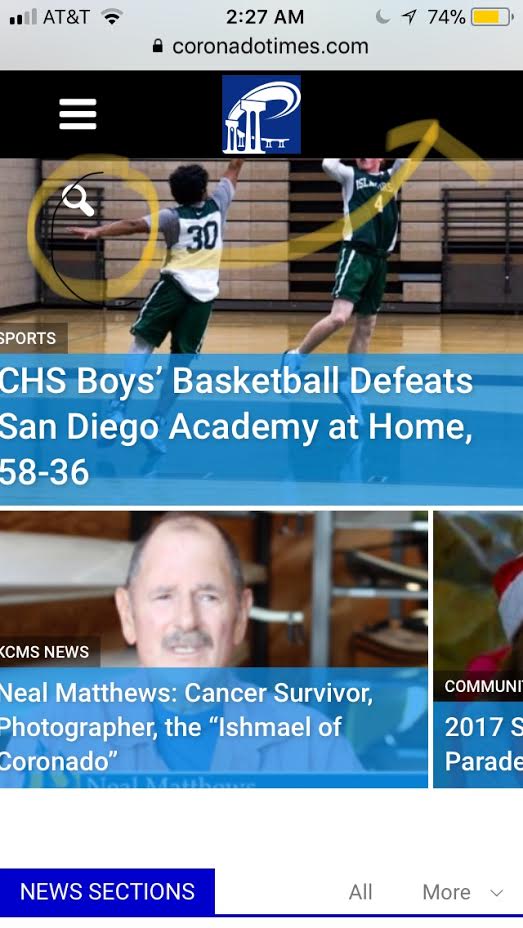
-
This reply was modified 8 years by
sejpost.
 ronnie
 So which of the font settings in the theme panel do I need to change for .td-category-header .td-page-title?
The category title is in caps, but I can’t find anywhere in the theme panel fonts section to change it.
Simion C. Hi,
That would be possible if you make a modification to that header template. By default the header ad in that header style is displayed below the main menu
– https://www.screencast.com/t/qeIbi3QnfseI
If you were to move the code below the top menu section like this
– https://www.screencast.com/t/F6lrixAT
The header ad will show below the top menu and above the logo, like here
– https://www.screencast.com/t/HVJ5Z7lc9kD
This would be a solution to achieve a similar result as the website mentioned.
Thanks
Bogdan B. Hello,
Please add this code in your advanced css section under mobile devices:
.td-header-top-menu-full{

display:block;

}

.td-header-sp-top-menu{

display:block!important;

text-align:center;

}

.td-header-sp-top-widget{

display:none!important;

}
Thank you!
Simion C. Hi,
You could use the empty page template, this will not show the header and footer, only elements you choose to place on the page with the composer
– https://www.screencast.com/t/aoPwWaQ0hTsP
Thanks
