- NewspaperHomepage – How to build and set it
- NewspaperHow to edit modules for Flex Block X
- NewspaperGeneral Options that May Interfere with the Newspaper Theme
- NewspaperThe Newspaper Mobile Theme: Introduction
- NewspaperHow to Add a Logo in Newspaper
- NewspapertagDiv Shop
- NewspaperHow to Use tagDiv Cloud Library
- NewspaperDesign your Post Pages using the Cloud Library Templates
- NewspaperHeader Builder
- NewspapertagDiv Cloud Library Plugin
- NewspapertagDiv Composer Tutorial
- NewspaperNewspaper theme documentation
- NewspaperThe Mobile Theme
- NewspaperPage templates
- NewspaperTheme Colors Introduction
- NewspaperFooter Builder
- NewspaperMain Menu
- NewspaperPre-built Websites: Introduction
 creinhardt
Hi,
I’m trying to add an image every 5th post in a visual composer block (Block 9). Where is the loop that controls the posts that are displayed in that block?
I’m using the page-homepage-blank.php template, and the loop in that file doesn’t seem to be what i’m looking for.
I also tried td_module_8.php, but adding a counter in there didn’t seem to do the trick.
Is there somewhere else I shold be looking?
I’m not asking for you to do this for me, just point me in the right direction.
Thanks!
 LFLizmark
Hi TagDiv.
First of all, you have a very good theme.
It’s certainly true that WordPress powers the 21% of the websites of the whole Internet, and Joomla does the 10% of it. Despite of it, the level of organization, professionalism, freedom to do the things in a very correct and precise way that you have in Joomla, it does not exist or apply in WordPress, because it was created to be easy all the time. Anyway, in some way or another, I decided to create a blog using WordPress, so I bought your Newspaper theme, installed it, and started configuring the different elements.
My problems are these…
01- All the images in the homepage disappeared in the demo. If I click to any post (article) they show on that post.
02- Other thing, is there some way that I can have a special folder in which to handle ALL my media files in an organized way and not having to use the Upload button all the time? Also, I discovered another disgrace in WordPress and is the autogeneration of thumbnails. Professional designers prefer to have the control, not to have WordPress have it for you.
I think that there might be some ways in order to make it work in that way and get rid of the Upload Media. By the way, trying to solve that situation I already bought two other plugins which are WP Edit Pro (which is an editor) with a bonus called “WP Edit Pro File Manager” and WP Media Folder. They both are used to “fix” the damn problem that WordPress has about dealing with the images. Standard WordPress users don’t mind about organization, but professional web designers do.
Please, I need your help concerning this topic. How can I contact your direct support and not just the forum?
 abhinav2899
I am using Newspaper theme on my website (http://www.strengthupgrade.com). I have created the homepage using Visual composer and I am using the ‘Big Slide’ element on the page. The problem is that the images are not adjusted or cropped according to the slider and there is white space left around it.
Check my site’s homepage, you will see what I’m talking about. There is a lot of white space between ‘Keanu Reeves’ photo and the post’s name. How can I fix this?
 thirdharbor
Hi,
I have the Random Posts option selected for the sidebar on my homepage (http://www.shughal.com/). I’ve noticed both here and throughout the site, random posts are never actually ‘random’, they’re simply the oldest posts from my site.
Any thoughts on this bug?
 Alin [tagDiv]
 Hi,
You can find header templates in parts > header – http://screencast.com/t/bbM68e3A You can create a condition depending in template that you use and add a condition to display “header ad” on your homepage and else used do_shortcode to display a custom ad(paste your code in Theme Panel > Ads). You can find out more details about conditional tags here – https://codex.wordpress.org/Conditional_Tags and use this code for your custom ad:
<?php echo do_shortcode('[td_block_ad_box spot_id="custom_ad_1"]');?>
Thanks!
-
This reply was modified 11 years by Alin [tagDiv].
 info@theparentbook.com
Hi all,
Does anyone know how i can edit the latest articles block at the bottom of the homepage. I cant find it on the actual homepage editor in wordpress, it’s not a widget either. ALl i want to do is control which categories show in this ‘latest articles’ section.
url is http://www.theparentbook.com
 kingyatta
I have not activated the Newsmag theme yet. Im trying to do a lot of the customizing before it goes live. So it leads me to my question. I need to separate my homepage header from the header used by all the other pages. How do I do this? I have an ad code from my ad network one needs to be used for my homepage and needs to placed in the header. The other code needs to be placed in all the other pages and post header. How do I created two different headers? I notice when you click the header.php it has no header code in it. Where do I find the header for the style Newsmag I want to use?
Alin [tagDiv] Hi,
You can translate it using Translation section – http://screencast.com/t/Hjzjk1gDD and you can change the background color using custom css in Theme Panel > Custom Css – http://screencast.com/t/7LdsTahIdIFh
.td_read_more {

background-color: red !important;

}
Also if you want to hide it you can use custom css code. For example to hide the button for block 9 on homepage – http://screencast.com/t/VdLdmXrmeQ
.home .td_block9 .td_read_more {

display: none;

}
Thanks!
 dire
direHi,
I need to change”the button” continue in the posts, in the homepage.
I want to change the name and the colour ( now is the theme colour)
Is it possible?
Or is possible to eliminate this link and leave only the excerpt?
Thank you
Irene
 simchris
 Sorry … hit return and somehow deleted my message.
Meant to say — you can try using fewer dbase queries by having fewer blocks on homepage, try having fewer queries in sidebar, possibly not use the “suggested flyout” and also not use the megamenu. The more “go grab stuff” items you have the more it slows down dbase.
ALSO: be sure to increase your default memory with both php.ini / host panel *and* in your wp-config.php file (WP defaults to 40MB unless you actually edit your wp-config.php file to increase; it needs to be at least 64MB with 128MB recommended).
 Lewis
LewisHi there
i want add this pools to homepage . but after install it i did not find it in the Visual Composer .?
How to add it there ?
thanks
Alin [tagDiv] Hi,
If you use a template with bg the Big Slider is added automatically on the page and these are options from the backend – http://screencast.com/t/BVzwyKy8wV so it shows the featured articles. If you want to modify this you need to edit page-homepage-slider.php and change the sort order and specify a category(if you want to show articles from a specific category) please check this topic as reference – https://forum.tagdiv.com/topic/exclude-posts-from-big-slide-homepage-bg-no-article/
Or you can change the page template and add Big Slider from Visual Composer elements, so you will be able to change setting for Big Slider from backend – http://screencast.com/t/Kjb5Z6sshJ
Thanks!
-
This reply was modified 11 years by Alin [tagDiv].
 isaushkin
Hello!
I want to change the setting of the big slider on the homepage: show only the main news in the slider. But I can’t find the change settings of the big slider in the template “Homepage + bg – article list”. I see only block without big slide setting. Please, help me.

King regards,
allpetro.ru
Alin [tagDiv] Hi,
Do you refer to the hover color? – http://screencast.com/t/x66xnFNf1t3O This is the theme accent color that is used also on hover – http://screencast.com/t/VKEX5PbHc and you can change it via custom css depending what module(if you use blog for you homepage) do you use.
Also if you are using blocks on your page if you change the background color for your block title it will change automatically the hover color for your articles titles like you ca see on our demo – http://screencast.com/t/MI5hGnqlh8 – http://demo.tagdiv.com/newsmag/
Please provide more details and your site url so we can take a look.
Thanks!
Alin [tagDiv] Hi,
If you refer to the normal slider(that you are using on homepage) please check td_module_slide.php and uncomment author code – http://screencast.com/t/kixLgl8yk – http://screencast.com/t/QuqTf3QC
Thanks!
 Ace
AceHello,
My site url is http://mimoshow.com.au/ .
Ant the pagination in Homepage does not work.

Thanks.
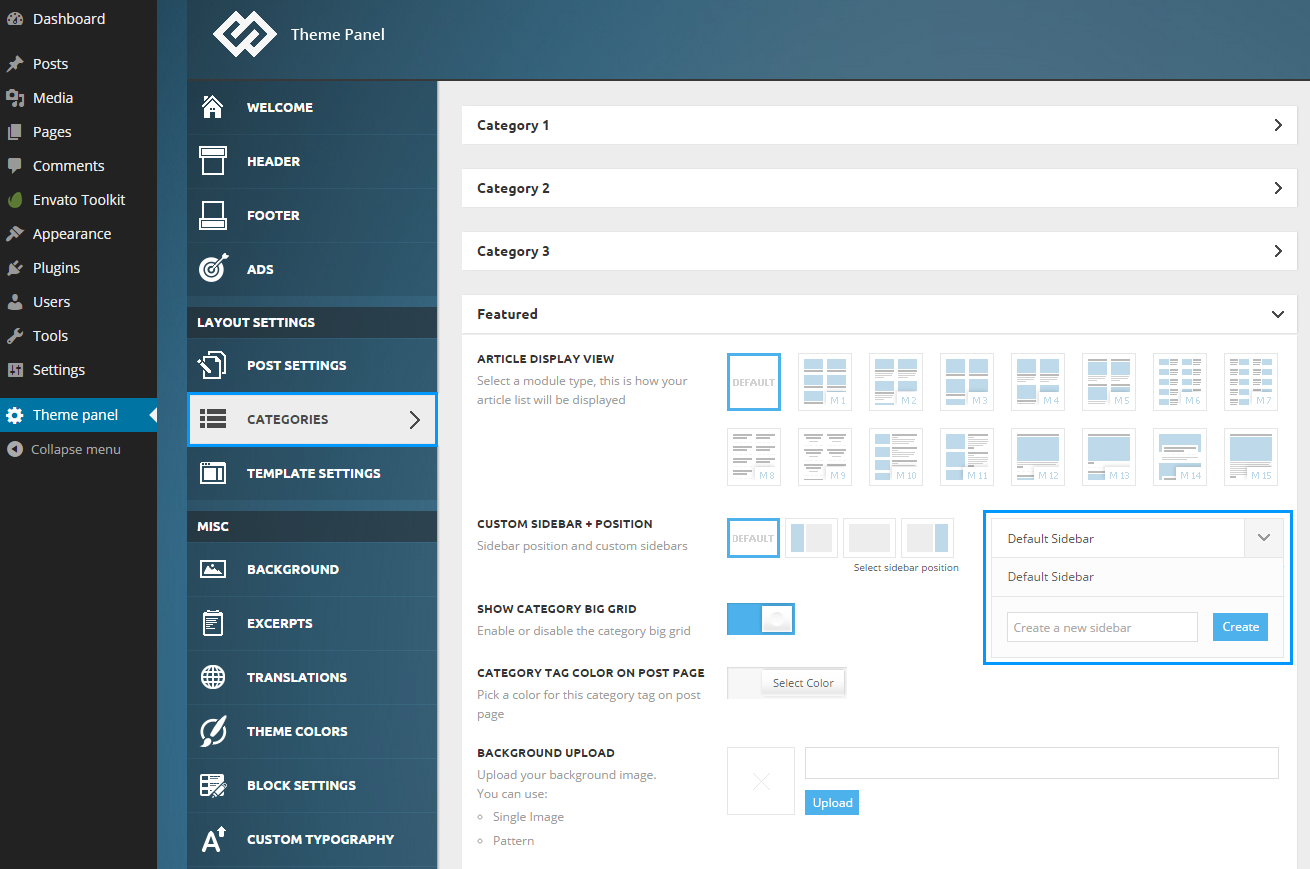
simchris Hi, create a new sidebar for homepage, then select that sidebar in your VC home page custom layout.
See theme docs for how to create new sidebar:
https://forum.tagdiv.com/wp-content/uploads/2014/10/theme-panel-catregories-sidebar-gen.png
 mazhar
Dear Community,
I am using newsmag at suretimes.com. I want to display different sidebards on home page and inner pages.
On homepage, i will show only few stories from my selected categories, which i did already. But the problem is, the same sidebar stories are shown on the inner page as well,
In inner pages, i want to add more stories from different categories. Currently i am getting same stories on both homepage and inner pages.
Please let me know how can i display different stories in home page and inner page. Thanks in advance.
 ufukergun
Hello,
There is a problem on my homepage that you can see the link below.
http://i.hizliresim.com/a5l7L7.jpg
Or you can check it on my site: http://www.sosyalme.com
How can I fix the problem,
Thanks,
Ufuk
 glenjapan
I downloaded the demo version of newsmag. Now I am trying to modify everything to my own material.
Im struggling how to modify the homepage blocks.
For example, the “fashion week” block under the featured pictures, how do I change this block to my own articles???
Thankyou.
 jonymimoso
 Hi Lucian,
I have the ad code added, have the sidebar ad added on the homepage using the VC and have an Adbox widget on the widgets but nothing shows..
Thank you
 Lucian
 Hi,
I’ve checked your site however could not find any ad in your sidebar in homepage and post pages. Please make sure that you add it right and add the ad code in theme panel, like this: http://screencast.com/t/K17N05dMe then add the sidebar ad to the a page using the ad box VC element: http://screencast.com/t/zysAsghKv or using the ad box widget in appearance > widgets section: http://screencast.com/t/k9mzUUvw
Thanks
 dirceufc
I need to change the display of the post on the main page as shown in the figure below. (Model Blog Classic).
http://www.folhadobico.com.br/formato-post.jpg
Can I even do this in theme admin panel?
 StevieB1962
Hi!
I am new to WordPress and website development in general but pushing along. I am working in Newspaper 4 Theme and and I am having trouble with my Gallery Slide under the Posts Menu. I get the following message when I click on the gallery slide on the Homepage:
404 error -Page Not Found
My homepage is http://www.bartysbits.com if you would like to see what I mean.
WordPress is directing the user to a bad link. I think this is because of the first post I uploaded which is under the Coal Dusts tab.
Can anyone help me?
Steve
 pbn
pbn Is this SHIM being worked on for the Newspaper theme? I have the Newspaper theme and the visual composer problem is affecting us as well? We have Newspaper 4.6.3 running on a WAMP stack. We get 2500 visits a day tops so that may be why it takes longer to affect us than larger sites?
I don’t get CPU usage warnings all I see is that the time to first byte on our site seems to slip everyday. I moved our site to an entirely different server and it helped for a day. The first day the TTFB was 900ms, today it’s 2000ms by the end of the week it’ll be back at 8000ms just like when we hosted it on a different server.
If I disable the Visual Composer, the time to first byte goes from 2000ms to 600ms.
The shim helps keep some of my article elements inline but all the columns don’t work. Disabling the Visual Composer also messes up the sliders on the front page and the shim doesn’t fix that.
Is there going to be a fix for this soon or do I need to manually rebuild my homepage?
I also noticed that if I removed and then reinstalled the Visual Composer Plugin, that it “reset” the issue and I’m back to 900ms TTFB. I presume it will just slip away again though…
-
This reply was modified 11 years by
pbn.