
- TutorialsHow to install Revolution Slider
- TutorialsHow to Install bbPress forum
- TutorialsFrom WPBakery to tagDiv Composer
- TutorialsDefault Block Settings Guide
- TutorialsImport Revolution Sliders
- TutorialsSystem status parameters guide
- TutorialsHow to Update the WPBakery Page Builder plugin
- TutorialsExisting content
 Calin
Calin Hello,
1. Yes, this can be done using the Opt-in builder, if you want you can check some or our demos to see how it’s work – https://i.imgur.com/vaQOZb0.jpg -https://demo.tagdiv.com/select_demo/newspaper-prebuilt-websites/
Also, you can check the documentation of tagDiv Opt-in builder to see how it can be set – https://forum.tagdiv.com/tagdiv-opt-in-builder/ – https://i.imgur.com/wPiKQsd.png
2. Normally the opt-builder subscription is based on subscriptions made using this plugin, so if the subscription was made using the woocomerce it will not work, but those will have access to the shop pas on the current account.
3. The opt-in builder plugin can be installed from Newspaper > plugins – https://i.imgur.com/yQre6j5.png
Thank you!
Calin Hi Petra,
The theme settings are saved in database and if the theme was used on the restore backup, then the database should contain the theme settings, just make sure that the theme plugins are also installed, for example tagDiv Composer, if you are using classic templates, then you’ll also need the tagDiv Standard pack plugins and for cloud templates the tagDiv Cloud Library, all those plugins can be installed from Newspaper > plugins.
Thank you!
 Anamaria
 Hi,
Please check this topic https://wordpress.org/support/topic/site-fails-to-scan-for-amp/ and make sure that you installed like in our guide https://forum.tagdiv.com/tagdiv-amp-plugin-tutorial/
Thank you!
Anamaria Hello,
It seems you have the mobile theme plugin enabled; please disable it, clear the cache, and check after.
Using our theme, you can choose from 3 mobile versions
-> mobile responsive => https://www.screencast.com/t/oJ2ShOp47
-> mobile theme plugin => https://forum.tagdiv.com/the-mobile-theme/
-> mobile page => https://tagdiv.com/newspaper-10-3-7-update-brings-customizable-and-fast-mobile-pages/
Suppose you created the mobile pages with tagDiv Composer. In that case, when you install the Mobile Theme plugin, your pages will be overwritten by the plugin (the mobile theme comes with its templates for page, post, category, etc so your current templates from the desktop theme will get converted to the mobile theme layout, the page content is made without builders in mobile editor => https://www.screencast.com/t/xbgZG8kH also, the options that are provided to edit the mobile theme version are limited (this keeps the things simple)).
This is a video about Responsive Newspaper Theme, AMP & Mobile Theme, Mobile Pages & Templates -> https://www.youtube.com/watch?v=SpGkOnJeNZY
So, the mobile responsive is what you see then that you select the viewport on phone => https://www.screencast.com/t/matV17hH, so some settings may apply for each viewport(where is the border blue), and others are not(where the border is black).
The mobile page has the mobile templates from Cloud Library => https://www.screencast.com/t/YCcZ8rL8
Mobile responsive version of the theme and the mobile page editor can be edited with tagDiv Composer, the mobile theme plugin not.
For example, you can have the mobile theme plugin activated and use the mobile page/mobile responsive version for the homepage/pages, but for the categories pages/404 page you can’t use the mobile page/mobile responsive version if you have the mobile theme plugin activated.
So, if you want to design the pages with tagDiv Composer, you can use the mobile page or mobile responsive version.
Thank you!
Anamaria Hi,
From your screenshot on that website, you have a pirated license, and that is why you can reset it; what I can recommend is to do a fresh install of the theme and activate it with a valid license https://i.imgur.com/1xRc5vL.png
You can download the latest package from your account from Themeforest -> https://forum.tagdiv.com/install-via-ftp/
Thank you!
 akashdeep305
i installed mobile theme with amp after that im unable to change template mode its only default selected Transitional Mode and when google cached my amp pages and i click on any article from google search its showing a white page with loading icon and nothing open
 Mujaro
Hey guys,
any chances how I can fix that I can’t search Members (Buddypress) installed, with the searchbar?
It only finds postings.
And what I have to do when BuddyPress css is overnighting the newspaper css for it?
Thanks for your help
 simba-king
Hi. I have a problem when I want to install the footer is don’t be installed (check this screen) is still in the please wait status (check this screen https://ibb.co/D7HtnMP) and also I tried to with another footer template (Fitness) check (https://ibb.co/SXXDkQF) also same problem.
I have that only with footer templates I installed the category and page templates are installed very fast, but that is still in status many hours without installing.
ONLY FOR INFORMATION, I HAVE A VERY GOOD CONNECTION.
simba-kingHi.please I have a new website and I want to add the key but when I click to reset key is don’t give the case when I can enter the key only will be refreshed the page without giving the place when I can enter the key. Check screen attached. (https://ibb.co/2MbYKF1)
and also when I want to install the update 12.6.1 also still the page stopped without installing the last update. Check screen (https://ibb.co/9y5g29f) please HELP me.
 AlemLolic
Hi,
i use Custom forms shortcodes from TagDiv Composer but i have this error, can someone help me to enable it.
Sorry, post create is disabled on this template!
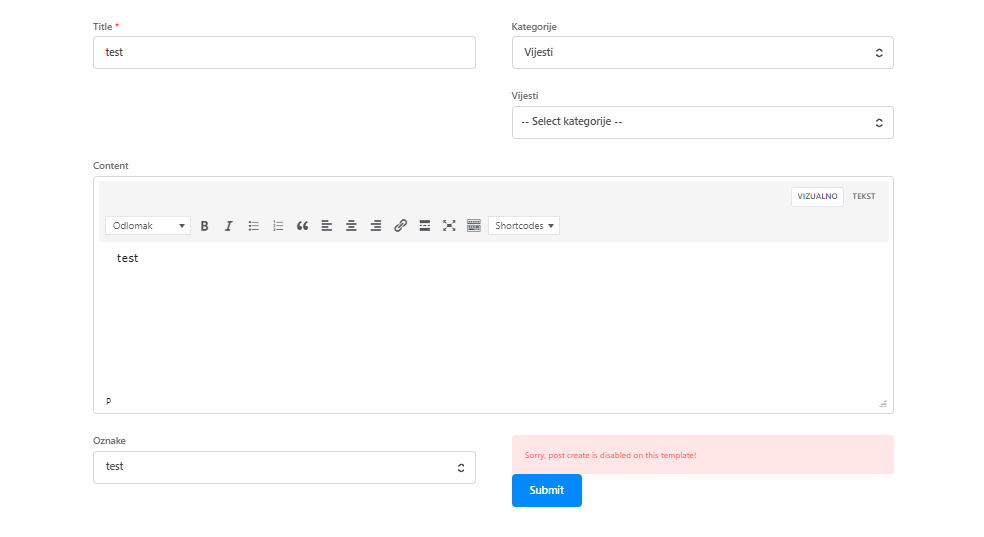
Current demo installed: Fitness Blog PRO
thanks.
 tiwariproduction9
after installation amp official plugin and activate showing the error (Your site cannot be scanned. There are no AMP-enabled URLs available) please help how to fix
 ArtSeine
Hello, where is the registration code of Revslider. I bought Newspaper 12 theme and when i want to install this plug-in, it asks me a registration code.
So where is it ?
Thanks
 platamun47
 I have latest installed theme + WP Roket.
 Muhammad Nauman
 Thanks so much for responding, the issue is not in the filter, it’s in the displaying the post for newly created categories after newspaper theme installation. check out this video.
https://screenrec.com/share/eRm6MPFk9y
 Renato Tbw
 Hi Anamaria,
I’m talking about the “posts” tab in wordpress. As soon as I install the Newspaper update, wordpress stops counting my visits.
https://drive.google.com/file/d/1JWhAllg5rZMi7z-vzsH51PHGXE0Pgx7_/view?usp=sharing
Anamaria Hi,
Do you have the same plugins installed and the same configuration for the server?
Thank you!
 mmedia6587
 Anamaria,
I have actively installed the following: TagDiv Composer, CloudLibrary and Standardpack.
Is it enough ?
When I check another website where I run older version 12.6., editing works flawless.
Anamaria Hi,
Do you have plugins installed like composer and cloud library?
Thank you!
 Bettina
 Hello @kurdi!
We will take into consideration your queries.
Please respect all the steps before updating the theme, and make sure that you are up-to-date and not infected. If your files are infected and you do the update, then the infected files will remain there, no matter which version of the theme or plugin you use. The main step is to delete every infected file from your installation, and then everything will be OK and not compromised.
Let us know about your issues and which errors you encountered there, so we can help you all. You can also send us an email, so we can check all these issues.
Thank you!
 kurdi
kurdi Hello tagdiv support. I am asking for something specific here please read
I’m having such a hard time removing this malware. My hosting company removed it one time, apparently via editing the database, but it has come back. They have removed it again, but they said it is only a matter of time till the issue re-surfaces.
I am running into many issues; I will mentioned three of them:
(1) Updating my version of Newspaper breaks my site; (2) updating td-composer with a newer version is apparently not possible without updating Newspaper, and (3) I tried running the SQL query mentioned by mmorselli somewhere on these pages and got nothing but errors
I am sure I am speaking for a lot of Newspaper users when I request the following:
(A) A patch, please. If these problems are due to a vulnerability in your plugin, why not release a patch? Perhaps a temporary plugin that just cleans it up?
(B) In the short term, if a patch is not forthcoming, can you please provide a version of td-composer that removes the vulnerability and can be installed on older versions of Newspaper?
(C) If no patch, can you please provide a removal guide FOR DUMMIES with simple to understand steps. Perusing many posts on these forums where people say different things has not worked out for me.
Thanks
Bettina Hello!
If you want to move the theme to another website or change domain/migrate, you’ll need to reset the license key from that website: https://www.screencast.com/t/Zt12bpyX and remove the theme (delete), in this way the license will be available for the new website and you can use the theme without any problems.
You can re-install the WordPress again, or deactivate the theme and delete it. After that, you can activate any theme.
Thank you!
Anamaria Hi,
The tagdiv plugins are installed, like the cloud library, opt-in builder?
You can contact us via email at contact@tagdiv.com
Thank you!
 jojo-dtla
The server is the latest version of open lite speed with the newest version of Newspaper. The site loads soooo slow. If I switch to another theme then the site loads fast.
Help!
 nolandolce
 Hi Calin,
I figured out a workaround, furthering through the initial instructions from HeritageLab. This workaround means I don’t need to install the advanced fields plug-in.
In the custom field value box, I simply include:
(<)img src=”” alt=”” width=”20″ height=”20″ border-radius=”50%”(>) Medically Reviewed by (<)a href=””(>)(<)b(>)(name)(<)/b(>)(<)/a(>), (title)
You can see the example here: https://rareparenting.com/what-is-occupational-therapy-for-children/
The only problem is that the border radius isn’t working. Could you let me know how to update this so it works?
Also, the alignment of the custom field also doesn’t work, within the TagDiv designer. It horizontally aligns but the vertical alignment doesn’t work. Any ideas about this?
Overall, this does mean a lot of work per-post, so it would be great if the theme can be updated to accommodate guest authors, multiple authors, and two rows.
Thanks!
-
This reply was modified 3 years by
nolandolce.
-
This reply was modified 3 years by
-
This reply was modified 3 years by
Anamaria Hi,
Unfortunately, you can try to use the suggestions from those topics.
There are many optimization guides provided by our users here in the forum, some made by us; you could check some of them
– https://www.infophilic.com/get-almost-100-pagespeed-newspaper-theme/
– https://forum.tagdiv.com/cache-plugin-install-and-configure/
– https://forum.tagdiv.com/how-to-make-the-site-faster/
– https://forum.tagdiv.com/topic/high-number-of-ajax-request/
– https://forum.tagdiv.com/topic/score-100100-pagespeed-with-newspaper-wordpress-theme/
– https://www.andraware.com/wp-rocket-for-newspaper-theme/
– https://forum.tagdiv.com/topic/page-speed-guide-for-2023-beginners-and-advanced/
– https://forum.tagdiv.com/topic/newspaper-theme-speedify-your-website/
– https://forum.tagdiv.com/topic/tutorial-chriss-custom-optimizations-for-functions-php-etc/
– https://forum.tagdiv.com/cloudflare-cdn/
– https://forum.tagdiv.com/topic/theme-causing-high-cpu-usage-2/
– https://forum.tagdiv.com/topic/sql-querys-high-cpu/
– https://forum.tagdiv.com/topic/newspaper-theme-slow-to-respond/
– https://premium.wpmudev.org/blog/optimizing-your-wordpress-database-a-complete-guide/
– https://underconstructionpage.com/optimize-wordpress-database/
– https://crunchify.com/better-optimize-wordpress-database-all-in-one-guide/
Also, pagespeed is not covered by support -> https://forum.tagdiv.com/newspaper-theme-support/
If you use Wp Rocket, you can try to exclude the following files
/jquery-?[0-9.](.*)(.min|.slim|.slim.min)?.js
/jquery-migrate(.min)?.js
/wp-content/plugins/td-composer/legacy/Newspaper/js/tagdiv_theme.min.js
tdBlocksArray
To be able to optimize and to remove CLS and LCP please check these guide => https://developers.google.com/web/tools/lighthouse/ -> https://www.sqlpac.com/en/documents/google-pagespeeds-lighthouse-6-new-features-lcp-cls.html -> https://web.dev/lighthouse-whats-new-6.0/ -> https://web.dev/lcp/ -> https://web.dev/cls/



