
- NewsmagInstall via WordPress
- NewsmagInstall via FTP
- NewsmagInstalling pre-built websites
- NewsmagUsing the theme translations together with WPML
- NewsmagHow to update a plugin
- NewsmagNewsmag theme support
- NewsmagCustom Post Type Support
- NewsmagImport / Export theme settings
- NewsmagHow to add icons in the menu
- NewsmagRequirements for Newsmag
- NewsmagNewsmag documentation
- NewsmagHow to update the theme
- NewsmagBlock settings tutorial
- NewsmagHow to update the WPBakery plugin
- NewsmagIntroduction
- NewsmagMain menu
- NewsmagFeatured image or video
- NewsmagAuthor card
 Bettina
 Hello @soku!
If you use standard templates, then make sure you have the Standard Pack plugin installed and activated.
Let me know the results!
Thank you!
 Anamaria
 Hello,
If you install a Pro Prebuilt Website the changes from the Theme Panel for fonts will not apply, to change the font on block/post you can edit with tagDiv Composer -> https://prnt.sc/10grx77 , select the block/post and in Style, you can change the font => https://www.screencast.com/t/sUE7ug4UIAR5 also, after you can copy the style and paste it -> https://i.imgur.com/WCHxXlr.png
This is a video about how to change the fonts => https://www.youtube.com/watch?v=jQvA64uTLkI
Hope this helps you!
Thank you!
Bettina Hello Barbara!
I suggest you to install a polish keyboard, so you’ll have these marks and you can put it again easily: https://www.screencast.com/t/Tp5SkC3LI
If you do not delete the marks and save, then it will remain like you need in the TagDiv Composer.
Thank you!
Anamaria Hello,
Please check if you have the tagDiv Standard Pack plugin installed and activated, if not, please activate it, clear the cache and see if the error persists.
Thank you!
Anamaria Hello,
Using our theme you can choose from 3 mobile versions
-> mobile responsive => https://www.screencast.com/t/oJ2ShOp47
-> mobile theme plugin => https://forum.tagdiv.com/the-mobile-theme/
-> mobile page => https://tagdiv.com/newspaper-10-3-7-update-brings-customizable-and-fast-mobile-pages/
If you created the mobile pages with tagDiv Composer, then when you install the Mobile Theme plugin, your pages will be overwritten by the plugin (the mobile theme comes with its templates for page, post, category, etc so your current templates from the desktop theme will get converted to the mobile theme layout, the page content is made without builders in mobile editor => https://www.screencast.com/t/xbgZG8kH also, the options that are provided to edit the mobile theme version are limited (this keeps the things simple)).
This is a video about Responsive Newspaper Theme, AMP & Mobile Theme, Mobile Pages & Templates -> https://www.youtube.com/watch?v=SpGkOnJeNZY
So, the mobile responsive is what you see then that you select the viewport on phone => https://www.screencast.com/t/matV17hH, so some settings may apply for each viewport(where is the border blue), and others are not(where the border is black).
The mobile page has the mobile templates from Cloud Library => https://www.screencast.com/t/YCcZ8rL8
Mobile responsive version of the theme and the mobile page editor can be edit with tagDiv Composer, the mobile theme plugin not.
For example, you can have the mobile theme plugin activate and use the mobile page/mobile responsive version for the homepage/pages, but for the categories pages/404 page you can’t use the mobile page/mobile responsive version if you have the mobile theme plugin activate.
So, if you want to design the pages with tagDiv Composer, you can use the mobile page or mobile responsive version.
Better deactivate the mobile theme plugin and see the results, and assign the mobile page for page, like this => https://www.screencast.com/t/lektAhyjd
Also, clear your cache.
Hope this helps you!
Thank you!
Anamaria Hello @terahlynn,
I’m sorry to hear that, but can you give me more details on what problems you encountered when trying to install a prebuilt website?
Also, for the logo please let me know if you have installed the mobile theme plugin, if yes, then you need to add the logo in Theme Panel -> Mobile Theme -> Header https://i.imgur.com/xLy7CWY.png
Also, if you use a responsive or mobile page, please check those articles
-> https://forum.tagdiv.com/add-logo-newspaper/
-> https://tagdiv.com/newspaper-10-3-7-update-brings-customizable-and-fast-mobile-pages/
This is a video about Responsive Newspaper Theme, AMP & Mobile Theme, Mobile Pages & Templates -> https://www.youtube.com/watch?v=SpGkOnJeNZY
Also, please us know what plugins you have installed.
Also, please provide some screenshots/video and the link to your website.
Please note the Support team is not 24/7 available. We answer the topics from Latest to Newest Monday – Friday from 08:00 AM to 05:00 PM GMT+2
Thank you!
 Madalin
 I have same issue few days ago, I am not expert and I suggest you to wait answer from someone from the theme. But just try to uninstall plugins amp and mobile theme and then check your mobile if working 🙂
 jacek736
can’t install composer plugin after 11,4
can’t go back to prevoius version
 terahlynn
I apologize for my ignorance here but I can’t get support to email me back and my site has been down and losing money for half of the day.
I successfully installed the pre-built site (not the one I wanted, just the only one that worked) and I was able to upload my logo, but when in mobile view it still shows the default site name from the theme.
I have tried to go into the cloud template editor, but it doesn’t even show that it’s there when I toggle to mobile view.
WP says this is a theme issue. I’m desperate for help here.
 novagreen
 Hi all and happy new year! I also thought that might be server-side problem, but i have already installed x2 Newspaper Themes for my domain.com and sub.domain.com. At domain.com Theme works without any problems but at sub.domain.com Theme doesn’t saving Theme Panel settings. Spinning Wheel is my main hero 😀
So, it can’t be server-side problem. Any advice please?
 ndorado
 Hello,
I have been editing a digital newspaper for several years with my own editing tool. Now I want to transfer it to wordpress with the newspaper theme and I’m doing tests. I have installed the CPT UI plugin. And I can create post types and templates that work very well with newspaper using the theme panel.
But I would like to know if the following is possible.
1. Criteria for content to be published in certain areas or blocks of the home page.
2. Classify the contents with a type of content type criterion but with the same template to later be able to order them. For example by Press Releases.
3. Being able to mark a content by other criteria such as: featured, sponsored, regardless of the categories.
4. Finally, being able to associate it with a client (which is in a client database, of course).
Thank you and regards,
-
This reply was modified 4 years by
ndorado.
 glorianino
Hi. After installing the Newspaper Magazine Pro prebuilt website, I realized that the mobile version on the demo is different from the one displaying on my website. How do I fix this.
Additional issues that I’m having is there is a “Sign in” and “Click here – to use the wp menu builder” displaying on the menu on mobile instead of the categories. How do I fix this too?
Anamaria Hello,
I’m sorry, but I’m not sure I fully understand your issues.
Can you provide more details, like what plugins you have installed? Also, please do a test using only tagDiv plugins -> https://i.imgur.com/j8q38If.png, and see if you can edit the pages.
Please note the Support team is not 24/7 available. We answer the topics from Latest to Newest Monday – Friday from 08:00 AM to 05:00 PM GMT+2
Thank you!
 Calin
Calin Hello,
Unfortunately, there is no guide for how to move from Newsmag to Newspaper, but I will try my best to help you.
First, you need to make sure that you have a full backup for your website and database.
Now what you need to know is that during this process some elements, design from your website can be changed, so here are the steps that you need to do:
Right now you have the Newsmag theme activated, what you need to do is to install via WordPress the Newspaper theme, but do not activate it. After the theme is installed, go in plugins and disable all tagDiv plugins you have enabled, after that you need to activate the new theme (Newspaper theme) and make sure that you update and activate tagDiv Composer, tagDiv Standard pack (those plugins should bring back the website look and can be installed from Newspaper > plugins), also enable the rest of tagDiv plugins that you are using -> https://i.imgur.com/MvKx52B.png
I hope this will help you!
Anamaria Hello,
Please do the following steps
1. disable tagDiv Opt-in builder
2. uninstall(delete) tagDiv Opt-in builder
3. clear cache (if cache plugin exists)
4. install tagDiv Opt-in builder
5. activate tagDiv Opt-in builder
6. clear cache (if cache plugin exists)
After this, it should work fine.
Also, for column text, please check this topic https://forum.tagdiv.com/topic/wp-editor-does-not-work-error-404/#post-426375
Thank you!
 akashchopra
tagdiv composer plugin not installing
following errors:
1. Internal Server Error
The server encountered an internal error or misconfiguration and was unable to complete your request.
Please contact the server administrator to inform of the time the error occurred and of anything you might have done that may have caused the error.
More information about this error may be available in the server error log.
Web Server at wci.in
or
2. Destination Folder Already Exists Error
I tried many times deleting entirely also.
 Murugar
hi,
currently this newspaper theme was bought under my domain, by end of month i will need to change hosting and need to delete the website under this domain using this theme, when i reinstall back the same bought theme, will there be any issue? domain name will be the same,
 Tim4962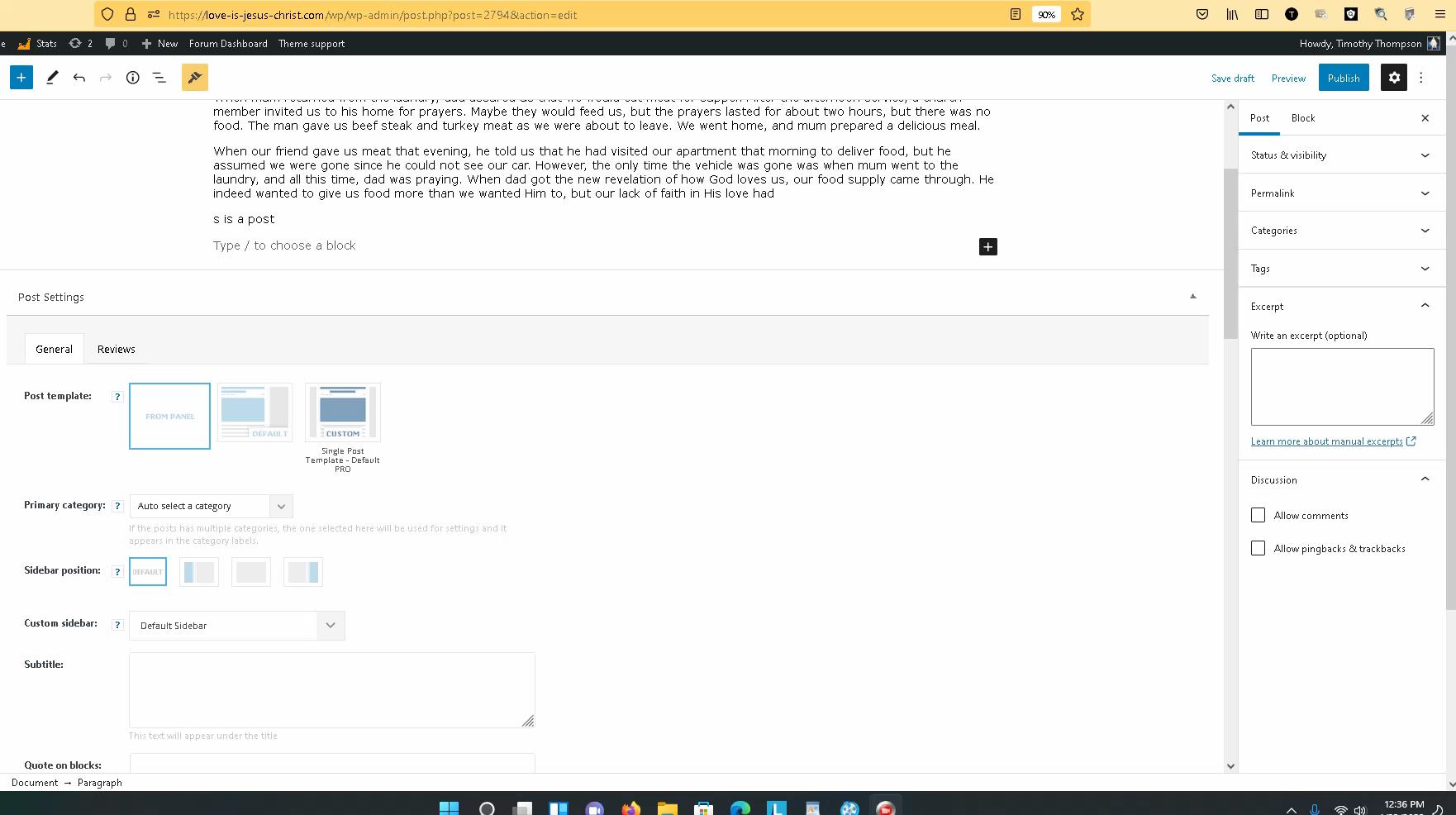
I have created well over 100 articles and have added many plugins. The last update was about two weeks ago. I have done a lot since then.
THE PROBLEM: The problem is when I try to create a “NEW POST”. Now as I create the post articles using the sidebar admin menu. I no longer see the area where I can add an image. Maybe I am having a really bad day. I could really use your sincere help in this matter.
I tried reinstalling WordPress, no luck. I deactivated all plugins except the Newspaper theme and still made no difference. I do understand that I can add an image on any part of the article, but that image would not show up on the front page, homepage newspaper theme. You can see my page here, My Home Page
Maybe reinstalling the newspaper theme? I am just trying not to lose my work. But as I wait for your response I am going to back up the site again.
So again, nothing on the side panel where I can add an image. Don’t see this, (Select or Upload Media)
Thanks for your help!
Timothy Thompson
 joyce_emerson
when I upload my own logo, it appears two logos side by side, and there is no setting to remove.
I installed the CLASSIC prebuilt website.
 Themedad
 I dont seem to be able to import demo data as well, just stays at installing all day.
 Lalit
LalitHi,
Today, I found that Date not showing in the Article meta info across all module (flex block, post loop) on homepage, category pages, tags, author archive pages and so on.
Watch it: https://drive.google.com/file/d/1GqclXZBNnxwR1gbdUCHruLQYjTmKJ4Hz/view?usp=sharing
Is it a bug?
What I have done to find the issue?
1. Deactivated all plugins and reactivated one by one.
2. Switched back to Newspaper parent from the child theme.
3. Deactivated, deleted, and reinstalled only default newspaper plugins – td composer, cloud library, and newsletter.
4. Removed all plugins except the newspaper default.
Please help soon. I am using Newspaper Tech news demo
Regards,
 reloaded
Hi, it’s been a while i was thinking about it and i think i would like to try switching to Newspaper after years of Newsmag.
One of the reasons is that Newsmag seems to be going discontinued judjing the number of updates they receive. Newsmag is kind of 2 updates per year in the last 2 or 3 years VS countless updates for newspaper.
My doubs are about the transition: what are the steps i should follow in order to avoid problems? Do they have any plugins in common? Do you recommend switching off all plugins before theme installation?
And What will happen to post template styles which i randomly used with newsmag? Will they find an automatic conversion in newspaper of what else?
Thanks,
Paolo
 ar15usr
 Hi Anamaria..
I already have all plugins off, and use no security plugin.
I believe this is something to do with the Host (Bluehost). I have installed on another host (Hostinger) and I do not have the problem. I will be transferring to the new host anyhow so looks like this issue is solved..
Thanks
 jeffreytszchung
 I have the 3 install, I finally get the cloud template and import a product page, but it cannot be linked and while i press the product the link shows a blank page.
(konggokhk.com/store)
 mmchunt
https://btlonline.org/ – The Newspaper theme download no longer includes the most recent version of WP Bakery Page Builder tested with the theme. We developed our site several years ago using Page Builder instead of TagDiv.
The site shows the following for the Page Builder plugin:
WPBakery Page Builder
You have version 6.6.0 installed. Update to 6.8.0. View version 6.8.0 details.
Why is the plugin no longer included in the download? Version 6.6 was released 2/22/2021. There have been 2 releases since that time. When are you planning to give users a new version? It would be far too much work for us to redo our site using TagDiv Composer.



