
- NewsmagTheme colors introduction
- NewsmagSmart list ads
- NewsmagIntroduction
- NewsmagMain menu
- NewsmagLogo & Favicon
- NewsmagHeader ads
- NewsmagSmart sidebar
- NewsmagSharing buttons
- NewsmagCategory tag on modules/blocks
- NewsmagBackground introduction
 newspaper-user
Hey sir, i jist wanted to ask one more thing. Can we align social icons on the left side of the posts in Mobile Theme.
Just like this website has done: https://ibb.co/QbH1hS6
Is there any CSS code for this. I’m using Mobile Theme Plugin for Mobile Theme
 Calin
Calin Hi,
I think that I provide some confusion with above answers, please let me explain again:
This file wp-content/plugins/td-composer/legacy/Newspaper/parts/header/td-login-modal.php is responsible for the login/register content when the login button is selected.
This file wp-content/plugins/td-composer/legacy/Newspaper/parts/login.php is responsible for the login/register using the responsive version for theme for mobile devices.
This file wp-content/plugins/td-composer/mobile/parts/login.php is responsible for the login/register using the mobile theme plugin layout.
And this file wp-content/plugins/td-composer/mobile/parts/register.phpis responsible with the mobile theme plugin to display the content for login/resister
Hope this will help you!
Thank you!
Calin Hi line77,
The problem with menu and footer it can be from mobile theme plugin, maybe you didn’t use it before and you you have this plugin enable, please check and let me know the results.
If this is not the case, please provide me a link where I can inspect the problem.
As for extra plugins, I do not know what to say, we can provide answers only for tested plugins, because we know how these are reacting when are using with our theme.
Thank you for your understanding!
 Vlad S
 Hello !
The Mobile theme was specially designed for optimization on mobile devices. Unfortunately on mobile theme you cannot do much changes of design. If you want to have the same design as on desktop mode you can achieve that by simply disabling the mobile theme.
You will have to recreate your pages into the Mobile editor or completely disable the mobile theme. The mobile editor will not render shortcodes !
Also you can disable mobile theme on certain pages or posts by following this setting: 
Please take a look here: https://forum.tagdiv.com/the-mobile-theme/
Mobile theme plugin can be disabled from Newspaper Plugins as you can see here: https://www.screencast.com/t/LnkZCEVC
Thank you !
 mouthing off magazine
 Hey Vlad,
Thankfully, I’ve managed to sort out my First Query. The Front Page is now in accordance with the rest of my pages.
However, the video component is still not showing up right on the mobile version. Here is a link to one of our video articles to check it out:
https://mouthingoffmagazine.com/mouthing-off-artists-spotlight-irene-shoshanne-carlucci/
While I’ve got you here though, there are a few more things I have noticed, that I’m having a difficulty solving.
1) In our contacts page I have placed my volunteering staff’s dedicated email addresses using the social media/mail icon. However, upon clicking the icon (which has the appropriate email attatched to it) it just comes up with a 404 error rather than opening up my mail to send an email.
Here is a link to see what I am talking about: https://mouthingoffmagazine.com/contact/
2) I have created a sidebar that I have placed for our articles. While I have changed the header style of the headers to match our theme, I have been unable to find an option to change the colour of the header to match the headers on our front/home page. (See First Link (Video) to see this sidebar)
3) I have recently minified our CSS, Javascript, HTML, etc. Using the W3 Total Cache. However, since then I have recieved AMP ‘validated URL’s’ erorr’s with the statement ‘Invalid markup removed’ occuring & my Error Index keeps having Invalid inline script errors, however, these always have the markup status of removed.
None of this seems to be causing any issues to the actual site and it appears to be in perfect working order. However, as someone who is quite new to all of this, I’m a little uneasy as whether this is just a small, insignifcant issue that sometimes occurs after minifying or whether this will cause greater issues down the line.
Apologies for all the questions & thank you for all of your help!
Calin Hi,
You are using cloud templates, therefore to add an retina image will be done using tagDiv Composer -> https://i.imgur.com/oOvWgIY.jpg -> https://i.imgur.com/jJw1FR0.png make sure that you set it on sticky menu and mobile version too -> https://i.imgur.com/ORqY7Eq.png
For the problem with fonts, maybe the site was made on staging and after you moved the fonts are no longer recognize, what I suggest is to make a full backup to the theme and database, after that delete the theme and install it gain on the live website, if there is going something wrong restore the backup, but not before to check if the icons are displaying or not.
Thank you!
Calin Hi,
If you are using a cloud header or a PRO Demo, you can edit with tagDiv Composer the homepage and remove the login element using the right click https://i.imgur.com/acOqrXR.png -> https://i.imgur.com/678Y1Wk.png and make sure that the option from theme panel is disable -> https://i.imgur.com/fRIb2xO.png this will remove the code for login, but if you are using a standard/default header style, this will be only hide.
If you are using the mobile theme plugin, you can disable this option from here -> https://i.imgur.com/s72HWmZ.png
Hope this will help you!
 vbrashier
Good morning, I need some help. My website, https://bluebonnetnews.com, is struggling since the new theme was installed. The AMP and mobile themes are not working properly. The AMP seems to cause my pages to look wrong, particularly in an Edge browser. I have attached this screen grab to show you. The picture on the left is what happens to the site after I post each and every post. I have to manually deactivate and reactivate the AMP plug-in to fix the problem. Also the mobile version of the site needs to look like the front page of the website (the photo on the right, or at least something remotely like it). The mobile version looks mostly normal when the mobile theme is not activated; however, the photos are then missing. The sidebars are also not showing up in the mobile version and I need that fixed.
Here is the link:
Calin Hi,
I think that I provide some confusion with above answers, please let me explain again:
This file wp-content/plugins/td-composer/legacy/Newspaper/parts/header/td-login-modal.php is responsible for the login/register content when the login button is selected.
This file wp-content/plugins/td-composer/legacy/Newspaper/parts/login.php is responsible for the login/register using the responsive version for theme for mobile devices.
This file wp-content/plugins/td-composer/mobile/parts/login.php is responsible for the login/register using the mobile theme plugin layout.
And this file wp-content/plugins/td-composer/mobile/parts/register.phpis responsible with the mobile theme plugin to display the content for login/resister
If you want to change the link from the sign in button you need to edit this file wp-content/plugins/td-composer/legacy/Newspaper/parts/login.php (because you are using the responsive version), what you need to do is to replace the id
What you need to do is to replace the id=”login-link-mob” with href=”your-url” https://i.imgur.com/QiPAxSi.png -> https://i.imgur.com/mlnxJey.png
Hope this will help you!
Thank you!
Calin Hi,
1. Mobile menu, then you are using the mobile theme plugin too, but this is not enable on all pages and posts, this one can be edited from theme panel> mobile theme > https://i.imgur.com/QI5Ew1T.png -> https://i.imgur.com/ukQ6DN7.png please make sure that the colors from there are set transparent also please check the colors from here too -> https://i.imgur.com/WQ1b3XT.png after that make sure you clear all cache and try again.
Let me know the results!
Thank you!
 Roularta
Hi support!
I want to use the tagDiv Mobile Theme plugin, but I’m not able to because I run into the following error:
This version of the tagDiv Mobile Theme plugin is not supported by the current activated theme!
Please make sure you’ve updated the theme properly! Follow this guide.
See screenshot: 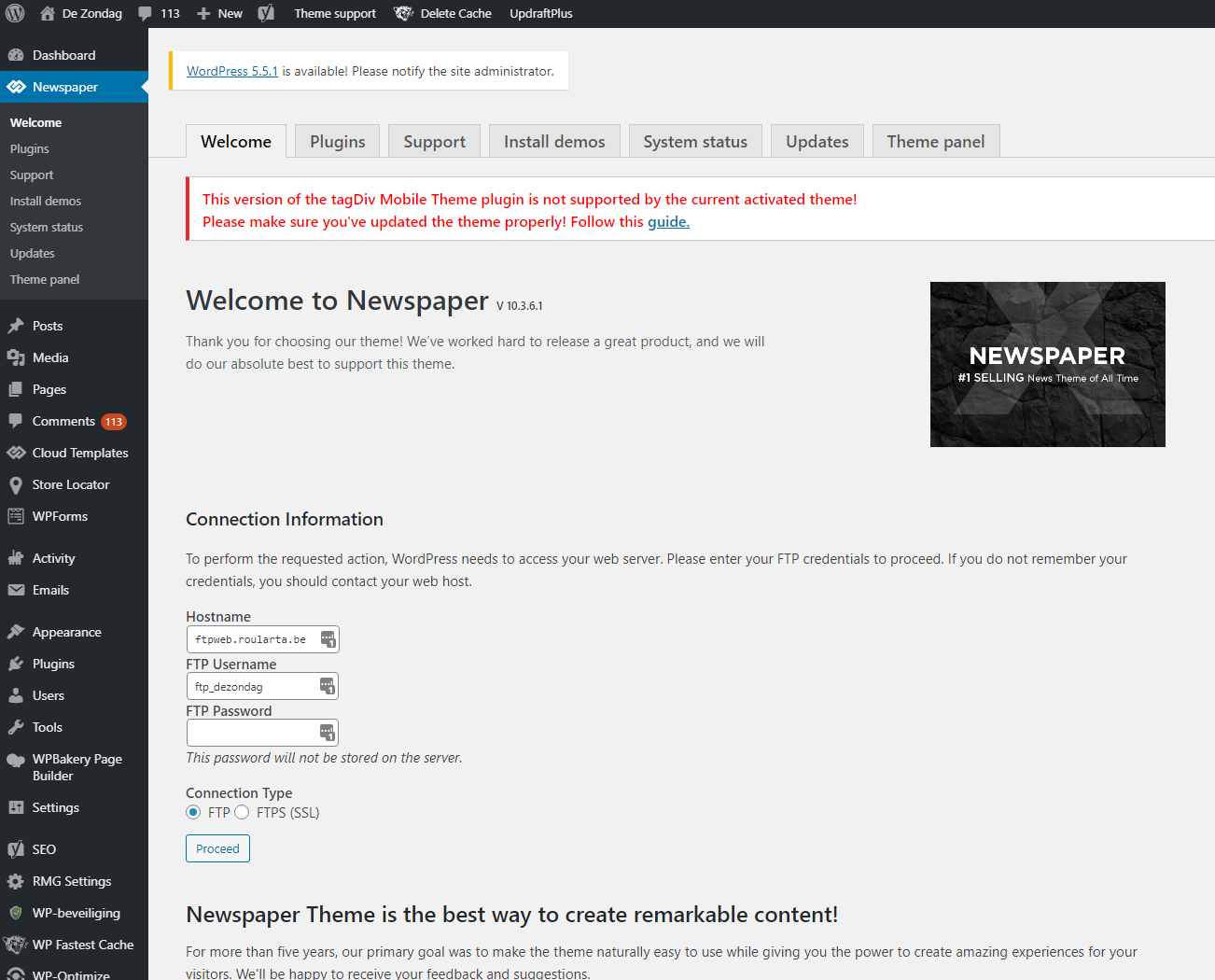
I’ve done what the error says and updated the Newspaper theme and it’s plugins to the latest versions.
See screenshot: 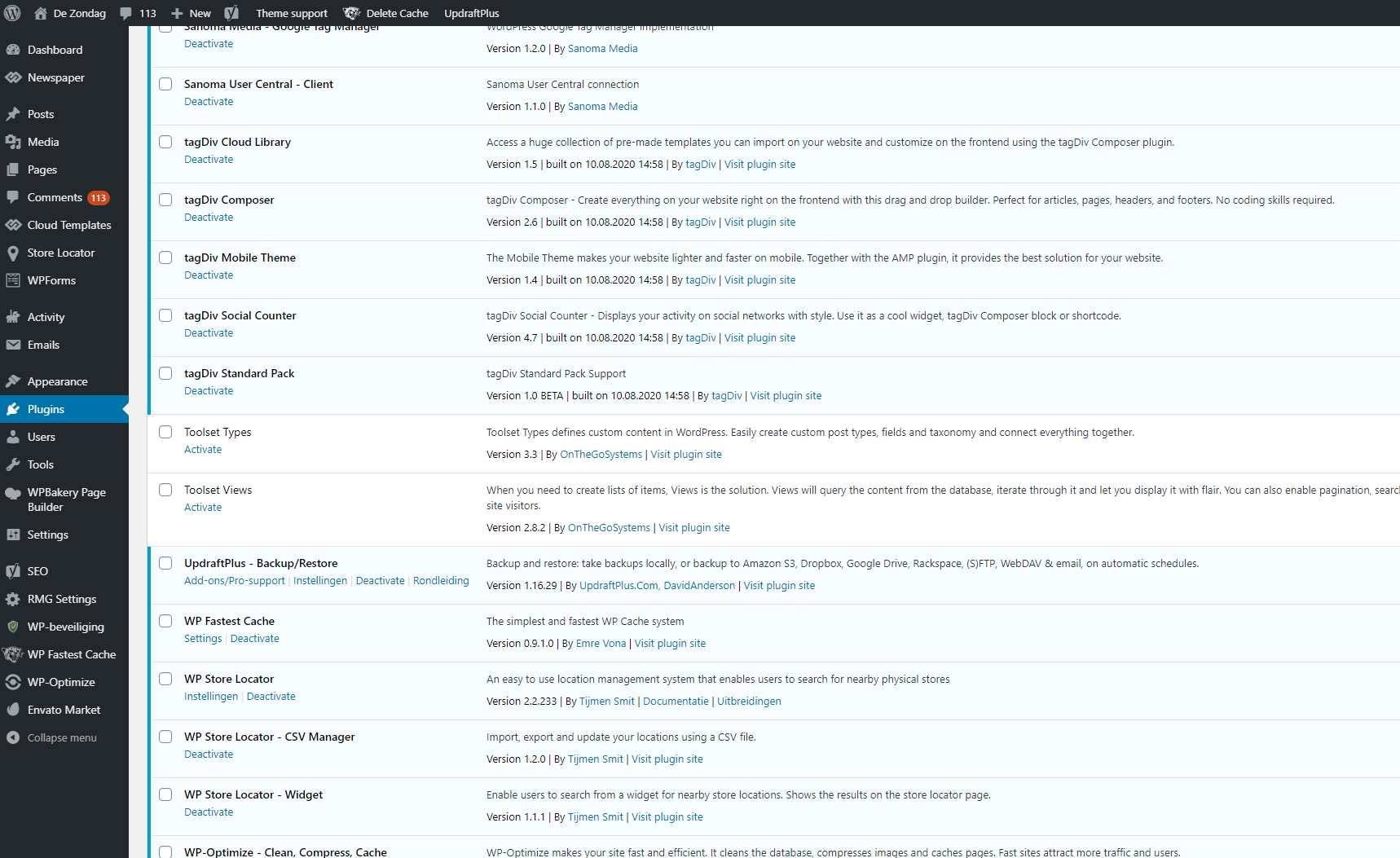
Do you have a clue what’s going on here?
Kind regards,
Sam from Roularta
 BAZ123
I created the page https://www.gladbecker-zeitung.de but firefox shows the page is not save. i can not find the fault.
In the “theme panel”-settings at “background”, “mobile menu/search settings”, “background image” there is file “http://gladbecker-zeitung.de/wp-content/uploads/2020/09/login-mod.jpg” i can not delate. i habe the same proble at “sign in/join background”. There is a file “http://gladbecker-zeitung.de/wp-content/uploads/2020/09/login-mod.jpg” i can not delate. Are the two problems related? How can I delete the files?
mouthing off magazineDear Tag Div Team,
I’ve just started looking over the mobile theme to optimise my site for mobile users.
I’ve begun altering the settings for my logo, header, footer, etc. using the mobile theme on the theme panel and have run into a few issues. While the changes that I have made are present once I click on one of my articles (I can see my footer, header, menu, and the correct colour scheme), these changes have unfortunatly not occured on my front page.
Instead, the header, footer and menu system do not appear as they should and remain unaltered after I’ve refreshed the page on my mobile.
Any help would be amazing with this!
All the best,
Greg
 Rifat Sharna
 Hi,
Thanks for pointing out AMP issue…may be my homepage is not set to amp then, I’ll check it later.. 🙂
But..background on my mobile menu isn’t the one you showed!…yes, when I check from pc/mi browser, I can see like that….but when I actually check from facebook/chrome mobile, it becomes this gray one!
– https://ibb.co/CnxmwgM
And I already tried multiple times to remove this nasty gradient color on menu background from theme panel….but failed!! (How to do that exactly?)
And also, I tried to change the settings for mobile menu (disabling ‘sign in’ option), but no matter I disable it from theme panel, it is not getting saved!!
I just wanna get back the previous mobile homepage! 🙁 🙁 (that you can still see from pc but actual mobile version is so different now, please check it!)
Calin Hi Nagarig,
To make sure that the arrow back to to is displaying -> https://i.imgur.com/VXMNkfu.png, please make sure that this code:
.td-scroll-up{

display: block;

}
is set in theme panel> custom code> advance css > phones
For the mobile header ad you need to use tagDiv Composer, edit the homepage, click on mobile view port and add in header an ad box like this -> https://i.imgur.com/KlQSzRF.png then set the ad and check the results.
If there is still a problem, please let me know and provide some screenshots with the settings that you’ve made.
Thank you!
Calin Hi,
If this option is not working for you, please try this custom css -> https://i.imgur.com/EdG8sMG.png
.td-post-sharing-visible .td-social-network {

    border-radius: 50%;

}
This code need to be set in theme panel> mobile theme> custom code> css.
Let me know the results!
Calin Hi,
If the have a code for amp analytics, you can set it in theme panel> mobile theme > amp analytics -> https://i.imgur.com/Q2YqRcg.png also the code set in theme panel> analytics/js code> will be use for desktop and mobile version too -> https://i.imgur.com/TqXmJ5i.png
Hope this will help you!
Calin Hi Rifat Sharna, for making a tests for amp you need to set the url like this http://sassygirljunjihyun.com/?amp if the homepage is set to amp if no, you can test the posts by adding the ?amp parameter in url like this -> https://i.imgur.com/VZwzbze.png and test it like this -> https://search.google.com/test/amp?id=seVExKJb-IpOxLYyviuthQ -> https://i.imgur.com/yZYUL1t.png
Also the background image on mobile seems to be as in your screenshot -> https://i.imgur.com/BEwWFBL.png also if you want to change or remove the colors you can do it from theme panel> mobile theme > theme colors => https://i.imgur.com/8N3GHsJ.png
Thank you!
Calin Hi,
That is the mobile theme layout, this problem is usually happen when you are using the theme fore desktop and the mobile theme plugin for mobile devices and your cache plugin do not recognize the mobile plugin.
To avoid these problems, we recommend to use as a cache plugin the WP Super Cache plugin with the settings from our guide https://forum.tagdiv.com/cache-plugin-install-and-configure/ or use the mobile theme plugin only for amp -> https://i.imgur.com/QQf5SEN.png or disable it.
Thank you!
 AEGISAlliance
 Adding @ to line 792 made the mixed content warning when editing templates go away, but the non-AMP mobile version is still broken.
I tried uninstalling and reinstalling the AMP plugin. Then uninistalled Jannah theme just to be safe, then updated permalinks with no changes. No luck. I disabled wp fastest cache and the premium plugin, refreshed permalinks again. (I’ve had no problems with wp fastest cache and Newspaper theme btw.)
I went into WP-Optimize and ran database optimizations, including cleaning some orphaned data that didn’t need to be in the database. Still no luck. Re-enabled wp fastest cache plugin, and I had been clearing cloudflare cache too during this time. Still no luck. I was also clearing browser cache.
I checked .htaccess file but didn’t see anything out of the ordinary unless I missed it.
I had noticed the mobile theme was broken not long after trying to add that logo image to MintySide Pro footer that caused the @ to disappear on line 792.
I emailed you guys Cpanel and WP-Admin logins.
-
This reply was modified 6 years by
AEGISAlliance.
newspaper-user Hey as you mentioned i changed it from theme pannel as you can see in the screen shot.
https://ibb.co/vLfR3dp
But still it didn’t reflect on my mobile theme, the social sharing buttons is still coming in squarish shape as you can see in screenshot.
https://ibb.co/R6RyZRw
You can check my website here
 ddj
ddjOn the mobile (responsive) version of schoolnewsnetwork.org, the icons for “menu” and “search” are not appearing. I am NOT using the Mobile Theme plugin.
Also, the logo is appearing incorrectly on responsive. It briefly shows up correctly (white text), but then is covered up by the incorrect version (purple text & green graphics).
On desktop, the small arrow icons in navigation and the search icon are also not appearing.
Yesterday the site was modified to eliminate the Standard Pack. It’s now using Cloud Library.
Screenshot: https://www.dropbox.com/s/llg5a8vaocm5fyj/IMG_4345.jpeg?dl=0 and https://www.dropbox.com/s/3qlwduuhgh90xbo/2020-09-21_11-01-41.jpg?dl=0
 palani99
 Hi Support Team,
1. Actually My question is – what are the Exact Website size settings for the Laptop, Mobile, Desktop, PC, etc.
I don’t know the exact length and width of my website for all devices. SO Please suggest me where to change the size of my website in my Newsmag theme Panel settings; Also Please let me know what are the exact size [length, breadth, and Height of my Blog should be for all devices]. please suggest me.
Thank you so much! Please Reply me.
Calin Hi plisevich, these are not normal situations, usually the users that had these kind of experience had to many untested plugins, also the theme requirements were not set and the hosts were to slow.
To make the SEO Yoast to recognize the homepage, please set some text using tagDiv Composer in column text or text with title, this will be reader by SEO Yoast.
TO have a mobile friendly version we recommend to use the mobile theme plugin -> https://forum.tagdiv.com/the-mobile-theme/ this will make the website more simplest for mobile and easy to use, also the website should not crashes.
For speed optimization please follow our tutorial for page speed -> https://tagdiv.com/how-to-increase-page-loading-speed/
Also you can check these similar topics for more solutions: -> https://forum.tagdiv.com/topic/optimize-script-to-improve-site-speed/ -> https://www.infophilic.com/get-almost-100-pagespeed-newspaper-theme/
– https://forum.tagdiv.com/topic/a-few-tips-for-newspaper-x-speed-high-cpu-usage-issues/
– https://tagdiv.com/how-to-increase-page-loading-speed/
To make sure that the them is saving and work correctly, make sure that this is not a plugin conflict, disable all not theme plugins and make some tests only with tagDiv plugins enable.
If you want us to provide assistance, we can do that, we will try to help as much as we can. If however you have decided to request a refund, you can do so here https://themeforest.net/refund_requests/new
I hope to hear good news from you!
Let me know the results!
Calin Hi,
To fix these problems, we recommend to use the amp plugin with mobile theme plugin. In this way was made the amp plugin to work with our theme.
Thank you!



