
No search results were found in Documentation!
 Edward
 Do not work with plugins that optimize photos (jetpack for example).

For example link on foto: _https://i1.wp.com/parenting.firstcry.com/wp-content/uploads/2018/05/251541382-H.jpg?resize=300%2C205
 Manoel
Hey, so I am currently trying to optimize the speed of my page and tried to do everything from here: https://forum.tagdiv.com/how-to-make-the-site-faster/ and here: https://www.infophilic.com/get-almost-100-pagespeed-newspaper-theme/
I added the multi purpose style css to the ts-speed-booster.php. It currently looks like this:
function css_mover() {

        //if ($this->td_theme_name == 'Newspaper') { }

        // wp 011 - Newspaper 6
$this->move_style_to_footer_queue('bbp-default-bbpress'); //bbpress old
$this->move_style_to_footer_queue('bbp-default'); // bbpress
$this->move_style_to_footer_queue('contact-form-7');
$this->move_style_to_footer_queue('td-plugin-multi-purpose');
But Google Pagespeed still tells me that I have blocking CSS resources: td-multi-purpose/style.css?ver=4.9.6
 emssp
emssp Hello,
http://otelders.org
I have tried my best to optimize it. There are more than 20 featured images loaded in full size for the first time/Ctrl+F5.
Thank you!
 minamoto19
 If you use nginx with php-fpm fastcgi running and have a high traffic website make sure to add
fastcgi_read_timeout 300;
to your nginx configuration despite of memory_execution_time.
That fixed the above error but now we see a lot of:
SELECT post_id FROM wp_postmeta WHERE meta_key = '_wp_attached_file' AND meta_value = 'logo.svg';
and
SELECT post_id FROM wp_postmeta WHERE meta_key = '_wp_attached_file' AND meta_value = '2017/10/logo-og.png';
in slow mysql queries and CPU usage against memory is very high(last night we had two 502 errors with cloudflare optimized).
Just letting you know everything was OK with another theme and 15 more plugins installed.
How to handle this?
Kind Regards
-
This reply was modified 8 years by
minamoto19.
-
This reply was modified 8 years by
 Simion C.
 Best to use smaller images if possible, or thumbnails of them
– https://www.screencast.com/t/QJjwJHA0Sw1w
Also check online image optimization guides and tutorials, there are plenty
– https://www.wpexplorer.com/optimize-images-wordpress-guide/
– https://cyberchimps.com/guide/optimize-images-for-wordpress/
 Catalin
 Hello Vijila,
Please notice that we have a useful guide for increasing your website performance which is here -> https://forum.tagdiv.com/how-to-make-the-site-faster/ Please try to follow all the steps from there if you want to achieve good results to your website. Notice that the speed of your website depends on how well your site is optimized and it is not a simple task and if you do not have any experience in this regard you will do not bring good results for the theme.
Thanks.
 ertha013
I’ve had run this website with both Newspaper and Newsmag theme before, I however never had a problem with image quality when I was running on “Newspaper” only in “Newsmag” that the problem is found.
Here’s my website SME Frog
Despite having all of my images customized each by each… whether being high resolution or image quality, even they’re optimized or not, the display of the image in many audience screens are quite blurry, which has been bugging me for long.
My goal is to always serve the best quality reading experience to the readers, so this is quite serious for me and really would like to fix it if there’s a way. (there should be?)
Some things I have tried
– The images were clearer if it was uploaded during the time that I used Newspaper (from the old theme)
– No matter how you re-upload or regenerate thumbnail, the result will still be the same in Newsmag
– Remove the image optimization (imagify,kraken for I.E) won’t change anything.
– Caching is also not the issue.
Basically I’m lost now, don’t really know how to fix this, hope anybody has experienced and got the solution before.
Simion C. I found this similar topic in the super cache plugin forum
– https://wordpress.org/support/topic/few-questions-about-wp-super-cache-in-combination-with-cloudflare/
Seems they do not recommend using both at the same time.
If you want to try and optimize the website in general, there are many user provided tutorials that you can try, such as these
– https://forum.tagdiv.com/topic/score-100100-pagespeed-with-newspaper-wordpress-theme/
– https://forum.tagdiv.com/topic/newspaper-theme-speedify-your-website/
– https://forum.tagdiv.com/topic/tutorial-chriss-custom-optimizations-for-functions-php-etc/
 nitrofox
 Hi Simion C.,
Thanks for getting back to me.
Yes, it’s the supercache and didn’t solve the problem.
Last update supercache “Add ipad to mobile list (#525)”
“1.6.0
Fix issues in multisite plugin (#501)
Fixes wp-cli plugin deactivate/activate (#499)
Cleanup – change quotes. (#495)
$htaccess_path defines the path to the global .htacess file. (#507)
Fix ‘cannot redeclare gzip_accepted()’ (#511)
Correct the renaming of tmp_wpcache_filename (removed unnecessary slash in path) which caused renaming to fail. (#516)
Add check for Jetpack mobile theme cookie (#515)
Optimize wp_cache_phase2 and create wpsc_register_post_hooks (#508)
WPCACHEHOME has a trailing slash (#513)
Cleanup cache enable/disable and update_mod_rewrite_rules (#500)
Post Update now clears category cache (#519)
Various fixes for saving the debug page form (#542)
Expert-caching and empty parameters, like ?amp, should not serve cached page (#533)
Tiny Yslow description fix (#527)
Add ipad to mobile list (#525)
Hide opcache_invalidate() warnings since it’s disabled some places. (#543)
Check that HTTP_REFERER exists before checking it. (#544)
Replace Cron View” with WP Control because it’s still updated. (#546)
adding hook (wp_cache_cleared) for full cache purges (#537)”
Catalin Hello trailblazer,
Please notice that the speed of your website depends on how well your site is optimized. Notice that is not a simple task and if you do not have any experience in this regard you will do not bring good results for the theme. Also, notice that we have a speed optimization tutorial but this is addressed only to advanced users. So, if you follow the steps which are presented in this tutorial here -> https://forum.tagdiv.com/how-to-make-the-site-faster/ you can increase the page speed loading and if you are not aware of the steps in this regard, please consider hiring a freelancer/developer to help you because the speed optimization services are not covered by our support policy, as you can read here -> https://forum.tagdiv.com/support-policy-2/ Check our documentation here -> https://forum.tagdiv.com/requirements-for-newspaper/ regarding on dedicated server to fit our requirements.
Unfortunately, our theme does not have such an option to minify the style.css file and we cannot recommend any plugins with this functionality because is not tested with our theme. For minifying this file, we are using CloudFlare for our demo and works fine. If you want to read other views from our users, please check this topic -> https://forum.tagdiv.com/topic/tip-how-to-easily-minify-your-css-without-breaking-your-site/
One of our top members here on the forum wrote his own optimization tutorial here:
https://forum.tagdiv.com/topic/tutorial-chriss-custom-optimizations-for-functions-php-etc/ and here -> https://www.infophilic.com/get-almost-100-pagespeed-newspaper-theme/
Basically, these are the theme requirements
– https://forum.tagdiv.com/requirements-for-newspaper/
Thanks for your understanding!
Catalin Hello alecaus,
Check if the Speed Booster is enabled in System Status. It can be disabled if you are using some untested plugins which are not tested with it. Otherwise, please check the following topic from here -> https://forum.tagdiv.com/topic/security-and-backup-always-incompatible-with-speed-booster/
Please notice that the speed of your website depends on how well your site is optimized. Notice that is not a simple task and if you do not have any experience in this regard you will do not bring good results for the theme. Also, notice that we have a speed optimization tutorial but this is addressed only to advanced users. So, if you follow the steps which are presented in this tutorial here -> https://forum.tagdiv.com/how-to-make-the-site-faster/ you can increase the page speed loading and if you are not aware of the steps in this regard, please consider hiring a freelancer/developer to help you because the speed optimization services are not covered by our support policy, as you can read here -> https://forum.tagdiv.com/support-policy-2/ Check our documentation here -> https://forum.tagdiv.com/requirements-for-newspaper/ regarding on dedicated server to fit our requirements.
Unfortunately, our theme does not have such an option to minify the style.css file and we cannot recommend any plugins with this functionality because is not tested with our theme. For minifying this file, we are using CloudFlare for our demo and works fine. If you want to read other views from our users, please check this topic -> https://forum.tagdiv.com/topic/tip-how-to-easily-minify-your-css-without-breaking-your-site/
One of our top members here on the forum wrote his own optimization tutorial here:
https://forum.tagdiv.com/topic/tutorial-chriss-custom-optimizations-for-functions-php-etc/ and here -> https://www.infophilic.com/get-almost-100-pagespeed-newspaper-theme/
Basically, these are the theme requirements
– https://forum.tagdiv.com/requirements-for-newspaper/
Thanks for your understanding!
 dplatas2
Can please someone tell me why my Newspaper8 theme is so much slow and why is it crashing every 30 minutes with error: Internal Server Error 500. Also it rises ony my Cpanel CPU usage 100/100%, Physical memory to 1gb, and entry processes to 20/20… My website is well optimized and yet is extremely slow, crashes all the time and from the hosting company tells me that the problem is from the theme… My site url is https://mypet.net/
Simion C. Hi,
The featured image can be bigger, for example the live theme demos use in some cases much bigger image sizes
– https://demo.tagdiv.com/newspaper/
This will however not have an impact, these original images will not be loaded in their full size on the website. Only thumbnails created from them will be shown
– https://forum.tagdiv.com/theme-thumbs/
Of course images can be further optimized. If you do not set featured images the modules in block and grids will display a default placeholder thumb. Of course your hosting plan has be ready for increased content and traffic
– https://forum.tagdiv.com/requirements-for-newspaper/
Suggestions for website speed are many, in this forum and also online
– https://forum.tagdiv.com/cache-plugin-install-and-configure/
– https://forum.tagdiv.com/cloudflare-cdn/
– https://forum.tagdiv.com/how-to-make-the-site-faster/
– https://forum.tagdiv.com/topic/score-100100-pagespeed-with-newspaper-wordpress-theme/
– https://forum.tagdiv.com/topic/newspaper-theme-speedify-your-website/
– https://forum.tagdiv.com/topic/tutorial-chriss-custom-optimizations-for-functions-php-etc/
 meri
meriHi,
I noticed that the biggest image of my 1st block is cropped: https://ibb.co/hMOcjS
URL is: http://www.coupdepoker.com
Any idea why and how to fix it?
For images, I use EWWW Image Optimizer + Force Regenerate Thumbnails.
Thanks
Catalin Hello Tomb,
Our theme only has Google Analytics section. If you want to add another Google code you should read the documentation before using it. Please check here -> https://www.lunametrics.com/blog/2017/03/02/install-google-optimize/
Thanks for your understanding!
 Tomb Raider Italy
Hello,
I have entered the Google Analytics code in the “Analytics” field.
If I want to enter the Google Optimize code, should I enter it in the same field?
Thank you
Umberto
 juanca1612
 They commented to me from the server that it seemed that the code of the initial page was not correct, apparently it showed too much code and it could be the reason that Facebook will not get to read these labels.
The code that they advised me to start would be like this:
<!doctype html >
<!–[if IE 8]> <html class=”ie8″ lang=”en”> <![endif]–>
<!–[if IE 9]> <html class=”ie9″ lang=”en”> <![endif]–>
<!–[if gt IE 8]><!–> <html lang=”es-ES” prefix=”og: http://ogp.me/ns#”> <!–<![endif]–>
<head>
<style type=”text/css” media=”all”>/*!
<title>Blog de las Mejores Recetas con Thermomix. Recetas de Comidas, Carnes, Panes, Pescados y Cocina Española</title>
<meta charset=”UTF-8″ />
<meta name=”viewport” content=”width=device-width, initial-scale=1.0″>
<link rel=”pingback” href=”” />
I have fretted with the Autoptimize cache plugin and it seems to have removed enough code from the start, and another one to move it to the end of the page. I see that the page works well and that Facebook now does take the OpenGraph tags, could you tell me if the code looks good now?
Thank you very much Simion C.
Edward disabled all plugins
???
/wp-content/cache/autoptimize/
/wp-content/plugins/onesignal-free-web-push-notifications/
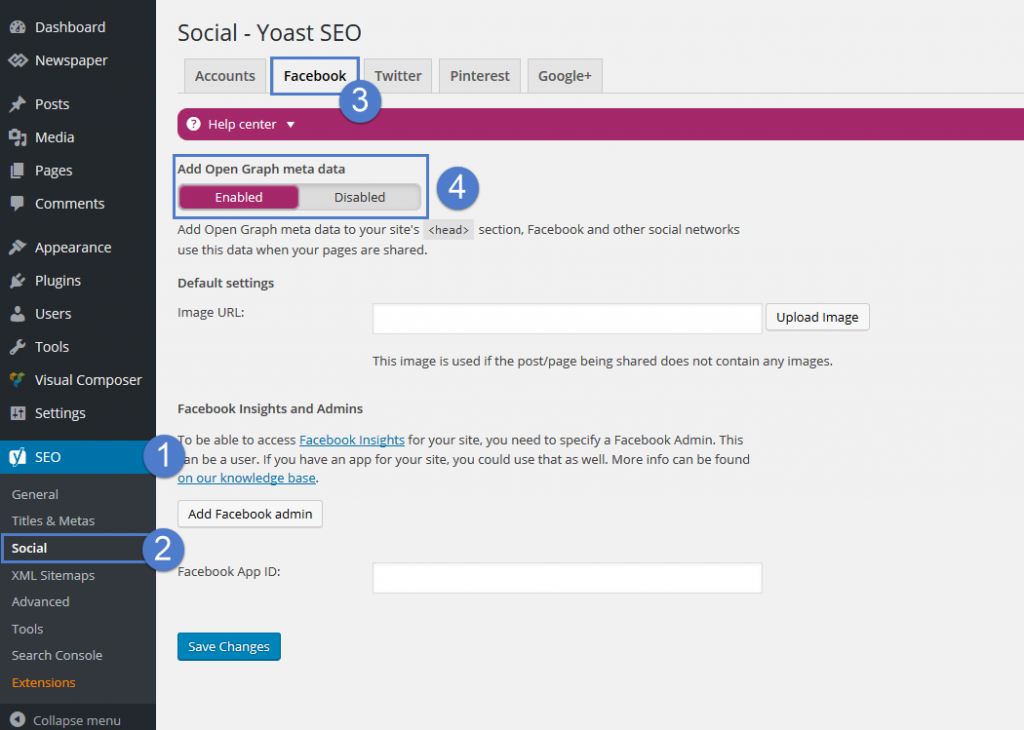
By default, the themes don’t come with any OG data. We decided not to add them because most SEO plugins come with such a feature. For best results, we recommend using the WordPress SEO by Yoast plugin, the Facebook metadata can be enabled from SEO -> Social -> Facebook:
 rmdail
I’ve been running yoast SEO for years now. After switching over to the newpaper theme, the titles are no longer being optimized by yoast. Looking at the code, it looks like a lot of the meta tags in the header are also being duplicated.
The following are the meta tags that are being duplicated:
<meta property=”og:type” content=”article” />
<meta property=”og:title” content=”” />
<meta property=”og:description” content=”” />
<meta property=”og:url” content=”” />
<meta property=”og:site_name” content=”” />
<meta property=”article:tag” content=”” />
<meta property=”article:tag” content=”” />
<meta property=”article:tag” content=”” />
<meta property=”article:tag” content=”” />
<meta property=”article:tag” content=”” />
<meta property=”article:tag” content=”” />
<meta property=”article:section” content=”” />
<meta property=”article:published_time” content=”” />
<meta property=”article:modified_time” content=”” />
<meta property=”og:updated_time” content=”” />
<meta property=”og:image” content=”” />
What needs to be done to get the yoast SEO plugin to work correctly with the theme?
 Prajwal Desai
Hi,
I am trying to optimize my website to the best but I am stuck with few things. Could you tell me if there is any way to improve on the below things. The below lines are from gtmetrix results. I have read your optimization guide but that didn’t help much.
1) :path /wp-content/themes/Newspaper/images/icons/newspaper.woff?15 – This is taking 277 ms to load.
2) /css?family=Roboto%3A300%2C400%2C400italic%2C500%2C500italic%2C700%2C900%7COpen+Sans%3A300italic%2C400
%2C400italic%2C600%2C600italic%2C700 – This is taking 170 ms to load
3) https://fonts.googleapis.com/css?family=Roboto%3A300%2C400%2C400italic%2C500%2C500italic%2C700%2C900
%7COpen+Sans%3A300italic%2C400%2C400italic%2C600%2C600italic%2C700 – This is taking altogether 50 ms to load. They are multiple files with roboto and other google fonts which I am not using at all. I am using the default font provided by you guys.
Link – https://gtmetrix.com/reports/prajwaldesai.com/Pl3NPY1q
 Bogdan B.
 Hello,
It should not search for the theme folder. I’m not sure why this happens. As you can imagine, you cannot access the theme folders in the browser.
You can use robots.txt to prevent google from indexing parts of your site though.
http://www.wpbeginner.com/wp-tutorials/how-to-optimize-your-wordpress-robots-txt-for-seo/
Thank you!
Catalin Hello,
I have checked your website on google page speed and the results is below ->
https://developers.google.com/speed/pagespeed/insights/?hl=ro&url=https%3A%2F%2Fwww.jiujitsutimes.com%2Fgarry-tonon-mom-was-afraid-of-contact-sports-now-she-wants-his-opponents-blood%2F&tab=desktop
Please notice that the speed of your website depends on how well your site is optimized. Notice that is not a simple task and if you do not have any experience in this regard you will do not bring good results for the theme. Also, notice that we have a speed optimization tutorial but this is addressed only to advanced users. So, if you follow the steps which are presented in this tutorial here -> https://forum.tagdiv.com/how-to-make-the-site-faster/ you can increase the page speed loading and if you are not aware of the steps in this regard, please consider hiring a freelancer/developer to help you because the speed optimization services are not covered by our support policy, as you can read here -> https://forum.tagdiv.com/support-policy-2/ Check our documentation here -> https://forum.tagdiv.com/requirements-for-newspaper/ regarding on dedicated server to fit our requirements.
Unfortunately, our theme does not have such an option to minify the style.css file and we cannot recommend any plugins with this functionality because is not tested with our theme. For minifying this file, we are using CloudFlare for our demo and works fine. If you want to read other views from our users, please check this topic -> https://forum.tagdiv.com/topic/tip-how-to-easily-minify-your-css-without-breaking-your-site/
One of our top members here on the forum wrote his own optimization tutorial here:
https://forum.tagdiv.com/topic/tutorial-chriss-custom-optimizations-for-functions-php-etc/ and here -> https://www.infophilic.com/get-almost-100-pagespeed-newspaper-theme/
Basically, these are the theme requirements
– https://forum.tagdiv.com/requirements-for-newspaper/
Thanks for your understanding!
 pinnaclecompass
 Hello,
Thanks for the response Bogdan, Simon and fametaxi.
We were finally able to update the theme 8.7.1. We updated the theme and the plugins in the theme package, including Visual Composer.
We are still having trouble with the search and menu button on mobile, on our home page caymancompass.com. We did a test where we deactivated all plugins, then activated each plugin at a time, starting with Visual Composer.
Everything else works great. The only clues I have is that:
1. Images don’t show, (opacity 0) so the animation doesn’t fire. Currently, we have some CSS to override it until we find a fix.
and 2. when we tried to use Autoptimize to test if combining all javascript helped, the buttons worked again, but photo galleries did not. So, it’s something with js, but we’re stuck. I even added this line to css, as Mr. Google suggested, but still no luck:#td-top-mobile-toggle {
cursor: pointer !IMPORTANT;
}
The above solution did not work either.
Any advice would be appreciated. We will continue to troubleshoot.
Catalin Hello pakdefense,
Notice that the theme does not have any such an option that allows you to make these changes, sorry! You can try using the Seo Yoast plugin to change these and for more information about this case, please start reading the following useful guides from here -> https://yoast.com/wordpress-robots-txt-example/ -> http://www.wpbeginner.com/wp-tutorials/how-to-optimize-your-wordpress-robots-txt-for-seo/
Thanks for your understanding!
Catalin Hello Rohit,
Please notice that the speed of your website depends on how well your site is optimized. Notice that is not a simple task and if you do not have any experience in this regard you will do not bring good results for the theme. Also, notice that we have a speed optimization tutorial but this is addressed only to advanced users. So, if you follow the steps which are presented in this tutorial here -> https://forum.tagdiv.com/how-to-make-the-site-faster/ you can increase the page speed loading and if you are not aware of the steps in this regard, please consider hiring a freelancer/developer to help you because the speed optimization services are not covered by our support policy, as you can read here -> https://forum.tagdiv.com/support-policy-2/ Check our documentation here -> https://forum.tagdiv.com/requirements-for-newspaper/ regarding on dedicated server to fit our requirements.
Unfortunately, our theme does not have such an option to minify the style.css file and we cannot recommend any plugins with this functionality because is not tested with our theme. For minifying this file, we are using CloudFlare for our demo and works fine. If you want to read other views from our users, please check this topic -> https://forum.tagdiv.com/topic/tip-how-to-easily-minify-your-css-without-breaking-your-site/
One of our top members here on the forum wrote his own optimization tutorial here:
https://forum.tagdiv.com/topic/tutorial-chriss-custom-optimizations-for-functions-php-etc/ and here -> https://www.infophilic.com/get-almost-100-pagespeed-newspaper-theme/
Basically, these are the theme requirements
– https://forum.tagdiv.com/requirements-for-newspaper/
Thanks for your understanding!
