
- NewspaperAutoptimize Plugin – install and configuration
- NewspaperWP Rocket and Newspaper Theme: Optimization Guide
- NewspapertagDiv Composer – Website Manager
- NewspaperModules Builder in Newspaper Theme
- NewspaperThe Newspaper Mobile Theme: Introduction
- NewspaperBest Of Forums
- NewspaperHow to Make the Site Faster
 Anamaria
 Hello,
so of the plugins you use, there are those that also require memory of 256M, these are WP Rocket and WMPL -> https://docs.wp-rocket.me/article/128-increase-php-memory-limit-in-wordpress -> https://wpml.org/home/minimum-requirements/#:~:text=In%20order%20to%20run%2C%20WPML,%2C%20theme%2C%20and%20all%20plugins. So there is a possibility that this problem is caused by memory, as you and the host noticed after increasing the memory limit.
Also, to optimize the website with WP Rocket please check this guide https://www.infophilic.com/get-almost-100-pagespeed-newspaper-theme/
Thank you!
 Micha
Micha Unfortunately, not quite so simple, there is a tutorial (https://forum.tagdiv.com/how-to-make-the-site-faster/), but really much, you get out unfortunately not. You can do a lot with Cloudflare, but only with the Pro version and of course if you optimize WpRocket a little bit (https://www.andraware.com/wp-rocket-for-newspaper-theme/)
If it’s your own server, you can get a lot out of it with Nginx and Redis in conjunction with W3C Cache. And of course in which one throws for example some from the head (rds etc.)
 jonesjw
 Hi – here are the plugins I have. It’s odd because up to oh a week or so ago I didn’t have this issue. I don’t know if an update on some plug-in caused an issue or not.
Thanks for any help.
Everest Business Directory
Deactivate
An ultimate business directory plugin for WordPress
Version 1.2.7 | By Access Keys | Visit plugin site
Select Flip Html5 Short Code
Flip Html5 Short Code
Deactivate
Flip Html5 WordPress Plugin
Version 1.0 | By fliphtml5.com | Visit plugin site
Select Head and Footer Scripts Inserter
Head and Footer Scripts Inserter
Upgrade to PRO | Settings | Deactivate
Easily and safely add your custom HTML code (plus JavaScript, CSS, etc.) to your WordPress website, directly out of the WordPress Admin Area, without the need to have an external editor.
Version 4.52 | By Space X-Chimp | View details | Donate
Enable auto-updates
Select Really Simple SSL
Really Simple SSL
Premium Support | Settings | Deactivate
Lightweight plugin without any setup to make your site SSL proof
Version 5.3.3 | By Really Simple Plugins | View details
Enable auto-updates
Select Really Simple SSL pro
Really Simple SSL pro
Settings | Deactivate
Optimize your SSL security with the mixed content scan, secure cookies and advanced security headers.
Version 5.5.2 | By Really Simple Plugins | View details
Enable auto-updates
Select tagDiv Cloud Library
tagDiv Cloud Library
Deactivate
Access a huge collection of pre-made templates you can import on your website and customize on the frontend using the tagDiv Composer plugin.
Version 2.3 | built on 12.05.2022 9:11 | By tagDiv | Visit plugin site
Select tagDiv Composer
tagDiv Composer
Deactivate
tagDiv Composer – Create everything on your website right on the frontend with this drag and drop builder. Perfect for articles, pages, headers, and footers. No coding skills required.
Version 3.4 | built on 12.05.2022 9:11 | By tagDiv | Visit plugin site
Select tagDiv Social Counter
tagDiv Social Counter
Deactivate
tagDiv Social Counter – Displays your activity on social networks with style. Use it as a cool widget, tagDiv Composer block or shortcode.
Version 5.1 | built on 30.05.2022 15:09 | By tagDiv | Visit plugin site
Select tagDiv Standard Pack
tagDiv Standard Pack
Deactivate
tagDiv Standard Pack Support
Version 1.5 | built on 29.07.2022 8:01 | By tagDiv | Visit plugin site
Select WP Rocket
WP Rocket
Settings | FAQ | Docs | Support | Deactivate
The best WordPress performance plugin.
Version 3.11.5 | By WP Media | Visit plugin site
Auto-updates disabled
Select WPML Media
WPML Media
Deactivate | Registered
Add multilingual support for Media files | Documentation | WPML Media Translation 2.7.0 release notes
Version 2.7.0 | By OnTheGoSystems | View details
Enable auto-updates
Select WPML Multilingual CMS
WPML Multilingual CMS
Deactivate | Configure | Registered
WPML Multilingual CMS | Documentation | WPML 4.5.8 release notes
Version 4.5.8 | By OnTheGoSystems | View details
Enable auto-updates
Select WPML SEO
WPML SEO
Deactivate | Registered
Multilingual support for popular SEO plugins
Version 2.0.1 | By OnTheGoSystems | View details
Enable auto-updates
Select WPML Sticky Links
WPML Sticky Links
Deactivate | Configure | Registered
Prevents internal links from ever breaking | Documentation | WPML Sticky Links 1.5.4 release notes
Version 1.5.4 | By OnTheGoSystems | View details
Enable auto-updates
Select WPML String Translation
WPML String Translation
Deactivate | Configure | Registered
Adds theme and plugins localization capabilities to WPML | Documentation | WPML String Translation 3.2.1 release notes
Version 3.2.1 | By OnTheGoSystems | View details
Enable auto-updates
Select WPML Widgets
WPML Widgets
Deactivate
Easily select which widgets you want to show for which languages
Version 1.0.6 | By Jeroen Sormani | View details
Disable auto-updates
Select Yoast SEO
Yoast SEO
Required by Yoast SEO Premium | FAQ | Settings
The first true all-in-one SEO solution for WordPress, including on-page content analysis, XML sitemaps and much more.
Version 19.5.1 | By Team Yoast | View details
Disable auto-updates
Select Yoast SEO Premium
Yoast SEO Premium
Deactivate
The first true all-in-one SEO solution for WordPress, including on-page content analysis, XML sitemaps and much more.
Version 19.1 | By Team Yoast | View details
Auto-updates are enabled based on this setting for Yoast SEO.
Select Yoast SEO: News
Yoast SEO: News
Settings | Deactivate
Google News plugin for the Yoast SEO plugin
Version 13.1 | By Team Yoast | View details
 Bettina
 Hello @madpixel!
We have 3 options for mobile versions that you can use:
1. Responsive version: A responsive version of your website looks similar to the desktop version. Edit the page with TagDiv Composer. Click on the mobile viewport: https://www.screencast.com/t/XDQJedlggSB; there you can see your mobile version and edit or adjust the elements to look better.
2. Mobile pages: https://tagdiv.com/newspaper-10-3-7-update-brings-customizable-and-fast-mobile-pages
3. Mobile theme plugin: The Mobile Theme is a performance-optimized theme included in the main Newspaper theme that only loads on mobile devices. It comes with its own templates and design for pages, posts, categories, etc., so your current templates from the desktop theme will get converted to the mobile theme layout. Please see https://forum.tagdiv.com/the-mobile-theme/ and https://forum.tagdiv.com/mobile-theme-introduction/ for more information.
A full explanation is here: https://www.youtube.com/watch?v=SpGkOnJeNZY
You can choose to use whichever one is more affordable and useful for you.
For the option 1 and 2, you need to deactivate the Mobile Theme plugin.
Thank you!
jonesjw and Kinsta has added: “Your current plan has a hard limit of 256M for the PHP memory limit. We can leave the define( ‘WP_MEMORY_LIMIT’, ‘512M’ ); since it can be added on your config file. Also, As 256M is a high value in most cases, it likely means there is a setting misconfigured within your plugins/theme. and reach out to the theme developers to optimize those ajax request moving forward.”
jonesjw and they say:
“On your current plan, the hard limit for PHP memory_limit is only 256M. Your site’s theme panel requires higher than that. You may wish to consider upgrading the plan for more resources. Though you still need to reach out to your web developers and review the APM data to optimize those high ajax requests.”
 ExtraSportz
Hi! Hi calin, ads on desktop are not showing fully stretched to screen size on destop. Please Take a look: https://imgur.com/P38nPXt.
How to make them fully optimized with the screen.
Anamaria Hi,
We have 3 options for mobile versions that you can use:
1. Responsive version: A responsive version of your website looks similar to the desktop version. Edit the page with TagDiv Composer. Click on the mobile viewport: https://www.screencast.com/t/XDQJedlggSB; there you can see your mobile version and edit or adjust the elements to look better.
2. Mobile pages: https://tagdiv.com/newspaper-10-3-7-update-brings-customizable-and-fast-mobile-pages
3. Mobile theme plugin: The Mobile Theme is a performance-optimized theme included in the main Newspaper theme that only loads on mobile devices. It comes with its own templates and design for pages, posts, categories, etc., so your current templates from the desktop theme will get converted to the mobile theme layout. Please see https://forum.tagdiv.com/the-mobile-theme/ and https://forum.tagdiv.com/mobile-theme-introduction/ for more information.
A full explanation you can find here: https://www.youtube.com/watch?v=SpGkOnJeNZY
Thank you!
Anamaria Hi,
There are many optimization guides provided by our users here in the forum, some made by us, you could check some of them
– https://forum.tagdiv.com/cache-plugin-install-and-configure/
– https://forum.tagdiv.com/how-to-make-the-site-faster/
– https://forum.tagdiv.com/topic/high-number-of-ajax-request/
– https://www.infophilic.com/get-almost-100-pagespeed-newspaper-theme/
– https://forum.tagdiv.com/topic/score-100100-pagespeed-with-newspaper-wordpress-theme/
– https://forum.tagdiv.com/topic/newspaper-theme-speedify-your-website/
– https://forum.tagdiv.com/topic/tutorial-chriss-custom-optimizations-for-functions-php-etc/
– https://forum.tagdiv.com/cloudflare-cdn/
– https://forum.tagdiv.com/topic/theme-causing-high-cpu-usage-2/
– https://forum.tagdiv.com/topic/sql-querys-high-cpu/
– https://forum.tagdiv.com/topic/newspaper-theme-slow-to-respond/
– https://premium.wpmudev.org/blog/optimizing-your-wordpress-database-a-complete-guide/
– https://underconstructionpage.com/optimize-wordpress-database/
– https://crunchify.com/better-optimize-wordpress-database-all-in-one-guide/
Maybe your hosting provider can provide some advice as well.
Thank you!
 Calin
Calin Hello,
The remain problem seems to be from an inline css -> https://i.imgur.com/qLc5D1x.png this is not changing the opacity from 0 in 1. Most of the time this kind of problems has been caused by cache and optimize plugins (settings related to css minify, image loading).
Thank you!
Calin Hello,
I see. If the WP Rocket plugin is installed, then please checked the settings from those guides (unfortunately we didn’t test the plugin with the theme and for this we do not know exactly the right settings)
– https://www.infophilic.com/get-almost-100-pagespeed-newspaper-theme/
– https://www.xtechkr.com/optimize-newspaper-theme/
I hope this will help you!
 truji
truji Hello i already send a email for receiving support I already disable autoptimize the issue is still appearing. Hope you can help me.
Thanks!
 rafaelpetermann
 Hi Calin, thank you for your answer.
We are using a plugin to regularly clean and optimize the database, was one of the first items we implemented.
I just didn’t understand about the ajax pagination. We are using it just in one place: one block on the archive pages so people can see older posts. Everywhere else there is no pagination (and we actually remove it from the query, like I said on the first topic, to have lesser calls to the database).
Is there anything else you guys can recommend us doing?
Calin Hi,
I believe that the siteground optimizer has some settings for css and js, so it is possible some of them to interfere with the theme. Maye the css is minfy and set as inline or something like this.
Please check the settings related the those.
I hope it will help you!
Calin Hello!
I’m sorry to hear about this. Please note that every page speed needs some improvement, and it is not enough to install the theme alone because there are many factors which can affect your page speed quality.
Some factors which you need to take into account are:
External factors: server speed, if you are using CDN or not, the external resources loaded by your website like ads, fonts, tracking scripts like Facebook Pixel, Google Analytics, Twitter analytics, Hotjar and so on.
Internal factors: the number of elements on the page, image size, image formats, if you are using mobile optimized layouts, console errors, if you are using the Standard Pack plugin or not, if you are using the PRO demo or a standard one.
https://forum.tagdiv.com/topic/optimize-script-to-improve-site-speed/
– https://forum.tagdiv.com/topic/a-few-tips-for-newspaper-x-speed-high-cpu-usage-issues/
– https://tagdiv.com/how-to-increase-page-loading-speed/
– https://forum.tagdiv.com/how-to-make-the-site-faster/
– https://forum.tagdiv.com/topic/score-100100-pagespeed-with-newspaper-wordpress-theme/
– https://www.infophilic.com/get-almost-100-pagespeed-newspaper-theme/
– https://developers.google.com/speed/docs/insights/v5/about
– https://www.youtube.com/watch?v=tnkVapqhIHc
Please check the tutorials from those platforms gt metrix and Google Pagespeed Insights and I’m sure you can increase the page speed.
Please note that page speed is not covered by the support team: https://forum.tagdiv.com/newspaper-theme-support/
Thank you for understanding!
 canopi_life
 Hello again,
After a few days of peace, the css gets crazy again.
It happened when we uploaded a new post.
I found it could be the host problem (Siteground) so I installed the siteground optimizer. It solved the problem.
But now the header dropdown menu stops to work.
Correct (list drops down when hovered): https://imgur.com/2VNRcGL
False (list doesn’t drop when hovered): https://imgur.com/JauZYHH
Do you know what setup I can alter in SG optimizer?
Many thanks!
Best,
Yen
 jasongavin
My ad network recommended I should add placeholder containers to my images to prevent layout shift. They said the Theme Developer should be able to help take care of that.
Tested page:
https://boraboraphotos.com/where-is-bora-bora/
As the image loads in, it pushes the content down. This single shift is causing 0.06 CLS. Just this one fix should be enough to get mobile CLS within the passing range of <0.1.
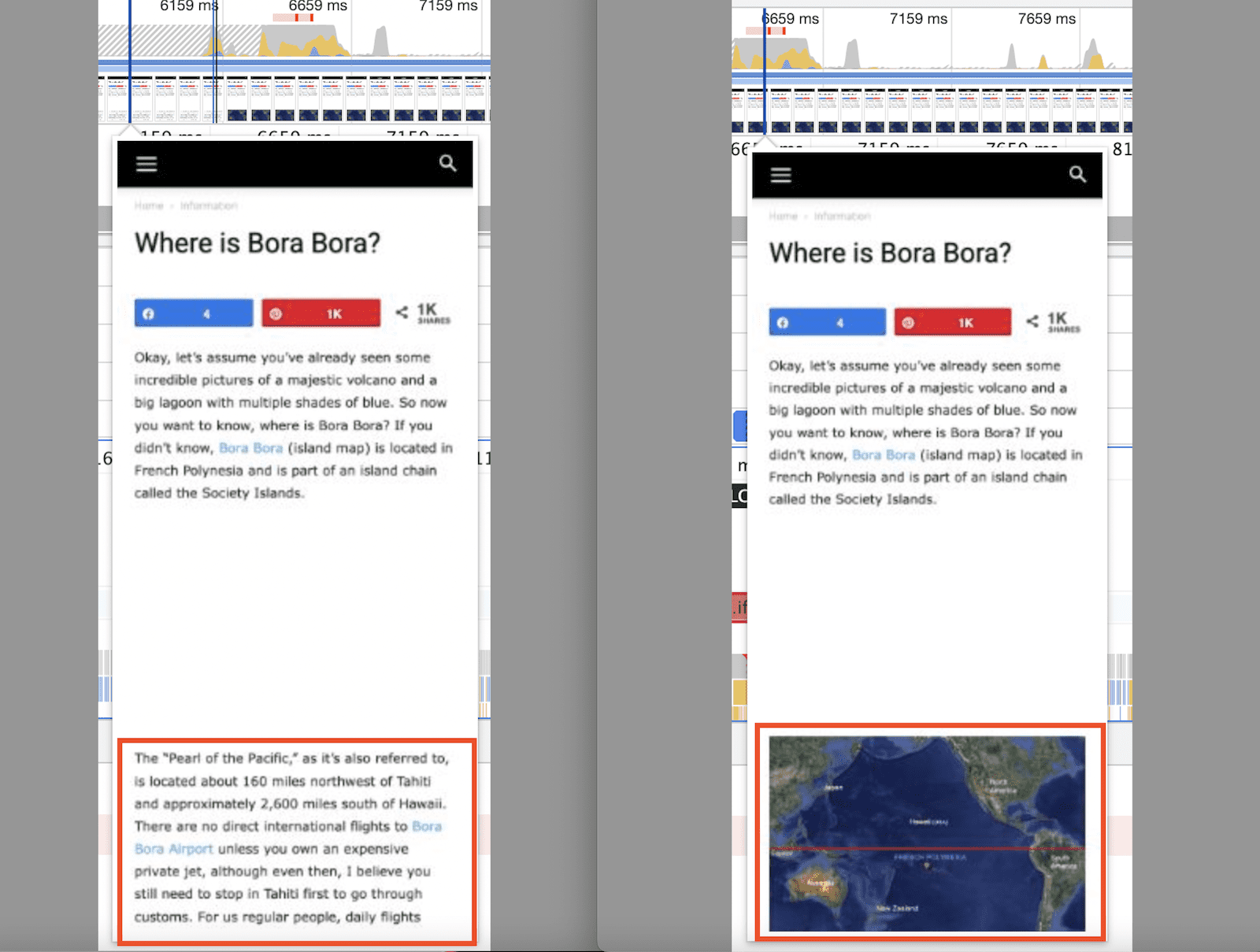
This shows the CLS measurement from the above image pushing the content down.
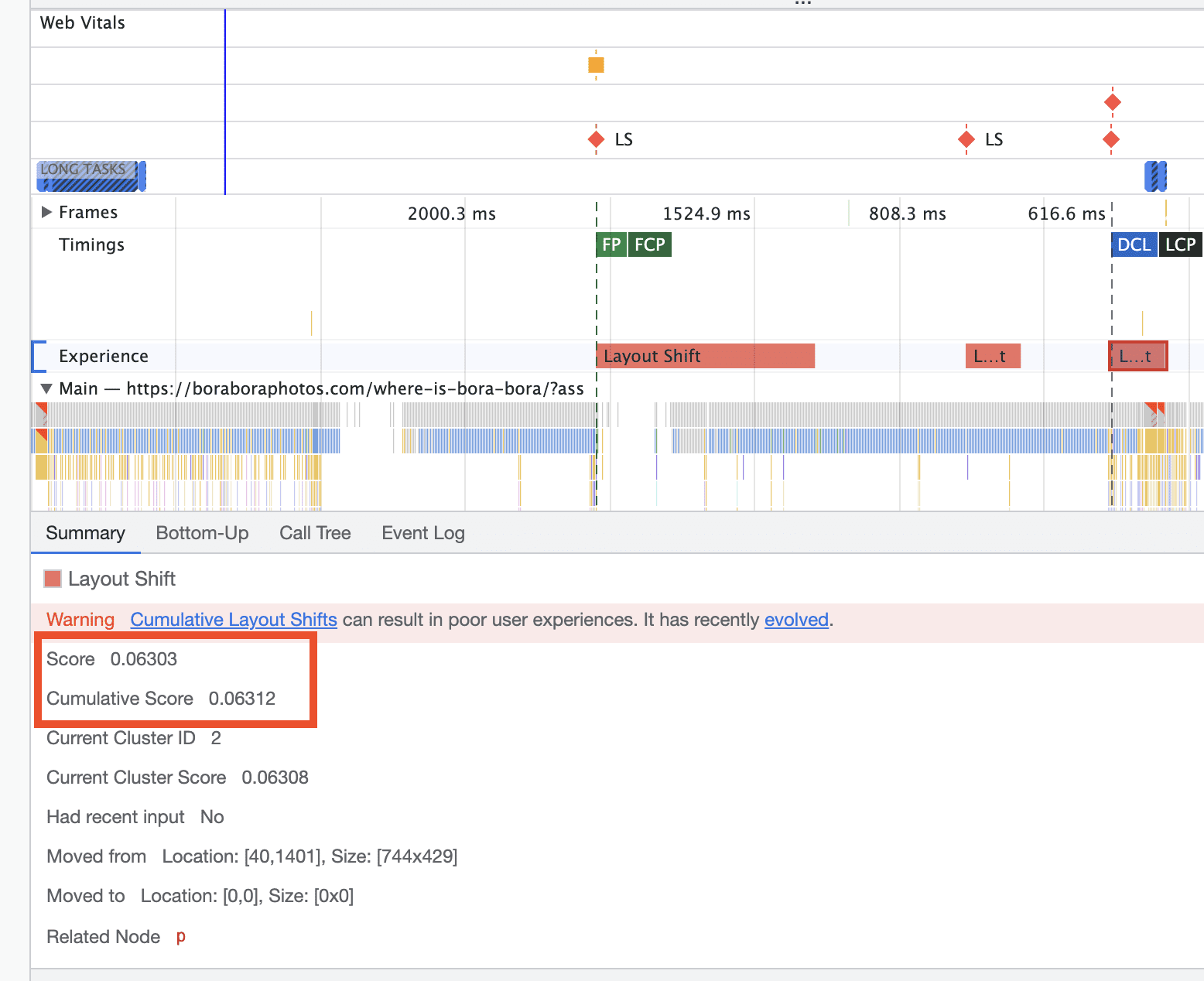
They said once I take care of that, I will be in a great position to get passing CLS scores. The question is, how do I go about doing this??
thanks
Anamaria Hello,
Seems that SiteGround have some options https://onlinemediamasters.com/siteground-optimizer-settings/
Thank you!
Anamaria Hello,
I just did a test and for me the takes the heading -> https://i.imgur.com/XrmpoOk.png
I saw you have LiteSpeed and maybe some settings to optimize the CSS, which can be the cause of this problem, so please remove the CSS generate. https://i.imgur.com/ZEvXTwX.png
Thank you!
Anamaria Hello,
Please let me know if you have used a plugin to optimize the CSS.
If yes, please remove it.
Thank you!
Anamaria Hello,
I saw you have autoptimize plugin.
We can take a look at this and investigate why it is not working for you. Contact us via email at contact@tagdiv.com and provide the following:
– wp-admin url and credentials for staging
– a link to this topic in order to identify you
Also, during the investigation know that we will disable the other non tagDiv plugins.
Thank you!
Bettina Hello!
I recommend you to set a homepage and do not let the blog page created by WordPress: https://i.imgur.com/mwjp18K.png
Any other page seems to be displayed well.
We have 3 options for mobile versions that you can use:
1. Responsive version: A responsive version of your website looks similar to the desktop version. Edit the page with TagDiv Composer. Click on the mobile viewport: https://www.screencast.com/t/XDQJedlggSB; there you can see your mobile version and edit or adjust the elements to look better.
2. Mobile pages: https://tagdiv.com/newspaper-10-3-7-update-brings-customizable-and-fast-mobile-pages
3. Mobile theme plugin: The Mobile Theme is a performance-optimized theme included in the main Newspaper theme that only loads on mobile devices. It comes with its own templates and design for pages, posts, categories, etc., so your current templates from the desktop theme will get converted to the mobile theme layout. Please see https://forum.tagdiv.com/the-mobile-theme/ and https://forum.tagdiv.com/mobile-theme-introduction/ for more information.
A full explanation you can find here: https://www.youtube.com/watch?v=SpGkOnJeNZY
You can choose to use whichever one is more affordable and useful for you.
For the option 1 and 2, you need to deactivate the Mobile Theme plugin.
Thank you!
Bettina Hello!
I’m sorry to hear about this. Please note that every page speed needs some improvement, and it is not enough to install a plugin alone because there are many factors which can affect your page speed quality.
Some factors which you need to take into account are:
External factors: server speed, if you are using CDN or not, the external resources loaded by your website like ads, fonts, tracking scripts like Facebook Pixel, Google Analytics, Twitter analytics, Hotjar and so on.
Internal factors: the number of elements on the page, image size, image formats, if you are using mobile optimized layouts, console errors, if you are using the Standard Pack plugin or not, if you are using the PRO demo or a standard one.
https://forum.tagdiv.com/topic/optimize-script-to-improve-site-speed/
– https://forum.tagdiv.com/topic/a-few-tips-for-newspaper-x-speed-high-cpu-usage-issues/
– https://tagdiv.com/how-to-increase-page-loading-speed/
– https://forum.tagdiv.com/how-to-make-the-site-faster/
– https://forum.tagdiv.com/topic/score-100100-pagespeed-with-newspaper-wordpress-theme/
– https://www.infophilic.com/get-almost-100-pagespeed-newspaper-theme/
– https://developers.google.com/speed/docs/insights/v5/about
– https://www.youtube.com/watch?v=tnkVapqhIHc
Please check the tutorials from those platforms gt metrix and Google Pagespeed Insights and I’m sure you can increase the page speed.
Please note that page speed is not covered by the support team: https://forum.tagdiv.com/newspaper-theme-support/
Thank you for understanding!
Calin Hello canopi_life,
If the problem is usually when you are not logged in, then it can be caused by a cache plugin. If is possible, please do some tests without the cache and optimize plugins to see if the problem persist.
Another situation can be related to the browsers that are used.
Please check those and let us know the results!
 ilmetu
Hi there,
with gtmetrix i was checking how fast is the loading of the website. (https://elettronauti.it)
three days ago when i was on the newsmag theme the rating of the website was B with a score near 90% (awesome)
but now, after i install newspaper the website slow down a lot, redoing the gtmetrix test now the website have F score.
i do not change the server or the cdn or caching things, i use memcache, siteground advanced cache system and everything i can use, minify js, css ecc …
Can you help me inspecting why ? and maybe can you help me to achive better response time ? i would like to get back to the B score i have before…
ps. i’m using also a plugin to optimize my images.
Thanks



