
- NewspaperDesign your Post Pages using the Cloud Library Templates
- NewspaperDesign your post pages using the Default Templates
- NewspaperPage templates
- NewspaperCreate a form contact page
- NewspaperCloud Library Templates
- NewspaperCloud Library – Category Templates
- NewspaperHomepage – How to build and set it
- NewspaperPost templates
- NewspaperDefault post templates
- NewspaperCategory templates
- NewspaperPost template ads
- NewspaperSingle External Shortcode and External Shortcode
- NewspaperWP Rocket and Newspaper Theme: Optimization Guide
- NewspaperSearch setup for custom post type
- NewspapertagDiv Composer – Website Manager
- NewspaperBookmark – Save For Later
- NewspaperFlex Block Builder and Flex Loop Builder
- NewspaperModules Builder in Newspaper Theme
- NewspaperIntroduction to CPT and ACF with Newspaper Theme
- NewspaperCreate a frontend submission form
 FrancescoStati
While testing the shop for my website (https://prismag.it) the cart page is stuck on loading (https://imgur.com/dw9GRgk); going to the Status page for WooCommerce the following error appears:
/home/customer/www/prismag.it/public_html/wp-content/plugins/td-woo/templates/woocommerce/cart/cart.php versione 3.8.0 è obsoleta. La versione attuale è 7.9.0
(translating: Version 3.8.0 is obsolete. The current version is 7.9.0)
The link provided mentions the relationship with the theme.
Is it an issue with the Newspaper theme?
Thanks
 RPECAdmin
I used the page template to create a forum index page, along with the shortcode, for my forums – http://2024.rpecwa.org/member-forums/.
However, the individual forums use the bbpress.php file and the forum title is partially covered by the header – http://2024.rpecwa.org/rpecforums/forum/rpec-open-forum/. Is there a means to increase padding above the title in custom css to rectify this?
 vallartamirror
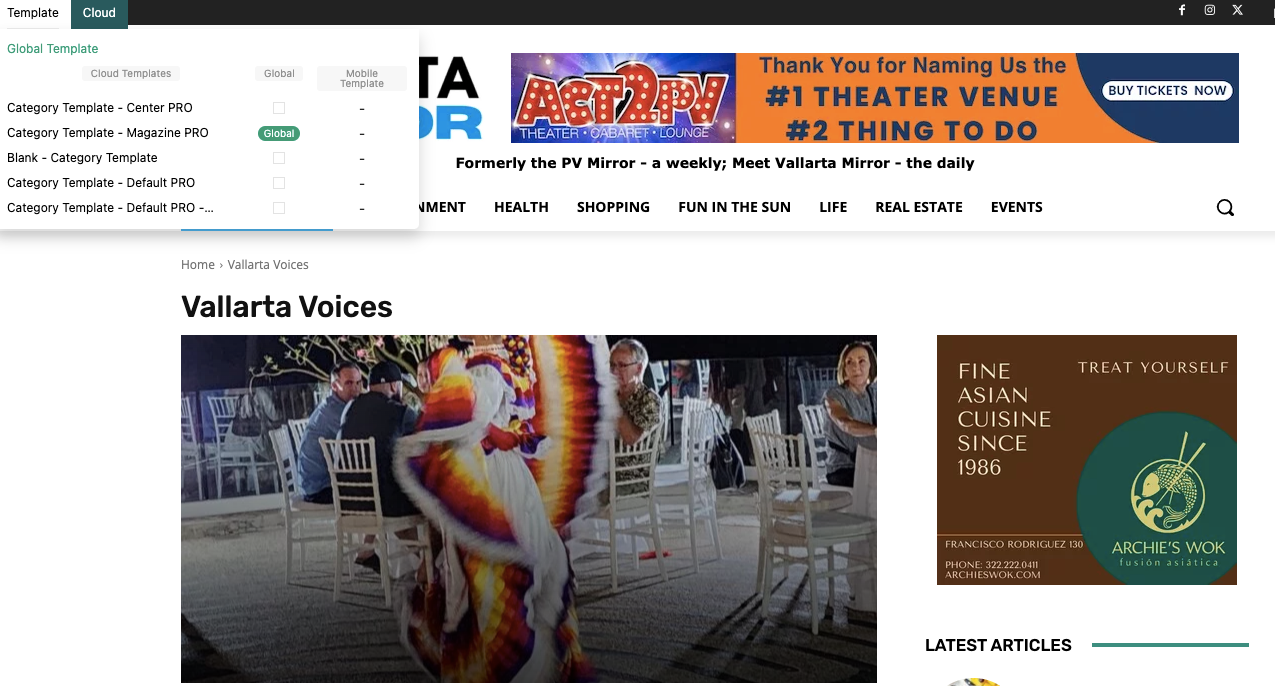
My homepage template is set to “Homepage – Magazine PRO” (globally). My category template is set to “Category Template – Magazine PRO” (globally). Everything is displayed correctly for my home. However, my category pages do not always display correctly outside of edit mode.
Sometimes the page displays correct and other times I receive an old layout. Could this be a cache issue? I have cleared my browser cache, and it does not fix the problem. Is there a cache setting that I need to look at in WordPress?
I have double checked each individual category, and they are all correctly marked as “Category Template – Magazine PRO”
 info@simonebarbone.net
To change typography for page title and page content (paragraph text, H1, H2, H3, etc.) without cloud template, should I set it in theme panel?
 Anamaria
 Hi,
Yes, you need to install another template and overwrite it if you really want to have the template in the cloud templates-> homepage or page template; if you don’t want to have them there, then you can create a new page and after edit it with tagdiv Composer. -> https://forum.tagdiv.com/homepage-how-to-build-and-set-it/
Thank you!
Anamaria Hello,
Please let me know what version you use the mobile theme or mobile page.
Using our theme, you can choose from 3 mobile versions
-> mobile responsive => https://www.screencast.com/t/oJ2ShOp47
-> mobile theme plugin => https://forum.tagdiv.com/the-mobile-theme/
-> mobile page => https://tagdiv.com/newspaper-10-3-7-update-brings-customizable-and-fast-mobile-pages/
If you created the mobile pages with tagDiv Composer, then when you install the Mobile Theme plugin, your pages will be overwritten by the plugin (the mobile theme comes with its templates for page, post, category, etc so your current templates from the desktop theme will get converted to the mobile theme layout, the page content is made without builders in mobile editor => https://www.screencast.com/t/xbgZG8kH also, the options that are provided to edit the mobile theme version are limited (this keeps the things simple)).
This is a video about Responsive Newspaper Theme, AMP & Mobile Theme, Mobile Pages & Templates -> https://www.youtube.com/watch?v=SpGkOnJeNZY
So, the mobile responsive is what you see when that you select the viewport on phone => https://www.screencast.com/t/matV17hH, so some settings may apply for each viewport(where is the border blue), and others are not(where the border is black).
The mobile page has the mobile templates from Cloud Library => https://www.screencast.com/t/YCcZ8rL8
The Mobile responsive version of the theme and the mobile page editor can be edit with tagDiv Composer, the mobile theme plugin cannot.
For example, you can have the mobile theme plugin activated and use the mobile page/mobile responsive version for the homepage/pages, but for the categories pages/404 page, you can’t use the mobile page/mobile responsive version if you have the mobile theme plugin activated.
So, if you want to design the pages with tagDiv Composer, you can use the mobile page or mobile responsive version.
Thank you!
Anamaria Hello,
You can remove the Single Post Author Box using Edit with tagDiv Composer with a right-click you can delete => https://i.imgur.com/BnhhxVh.png , or selecting the element and with drag & drop place into the deleting red zone from the bottom right of the page => https://i.imgur.com/vkQVCjn.jpg the same for date.
this change will be applied to all posts that use that template and you can delete any element like this.
Also, you can hide the author using the option on the blocks, edit the page and select the block you want to edit and in the tab called “Layout” you can hide the author => https://www.screencast.com/t/fjrVaQm5IX
Thank you!
 lacim.eth
Hello there I am need of assistance. I cant use the composer. When i want to edit a page or cloud template i am left with a blank page.
 mukesh24932
Flex Loop Builder The Cloud Library Module Template set for this block is not valid or it no longer exists. Please select another Module Template. When try to change Categories Template Always I face Issue Anything Do it tough to understands All Tutorial Old When Watching Youtube try Then option in theme Video Document all old Your video never show Categories Page How to change One video see then try get above mention error
 Twisted Pear
 Thank you for your response.
When you say ‘add a page’ do you mean add a Cloud Template?
As I mentioned there is no ‘Blank’ Cloud Template option for Homepage or Page to install and replace. Do I need to install another template (with assets and styles) and then overwrite it?
mukesh24932Dear Support Team,
I am reaching out for assistance with setting up a Custom Post Type (CPT) on my website using the Newspaper theme. Despite following the documentation, I am encountering issues in displaying the CPT on the frontend.
Here’s a summary of the steps I’ve taken and the problems I’m facing:
Custom Post Type Creation: I successfully created a type of post.
Taxonomy Addition: I added taxonomy to the CPT.
Custom Fields: I set up custom fields for the CPT.
Frontend Display Issue: When attempting to import the cloud CPT template on the frontend, nothing is displayed.
Confusion Over Single Page vs. Archive: I am unsure how to properly configure the single page for the CPT. There seems to be confusion between setting up a single page and an archive for the CPT.
I would greatly appreciate detailed guidance or troubleshooting steps to resolve these issues. Specifically, I need help in correctly displaying the CPT on the frontend and understanding how to set up a single page for the CPT.
Anamaria Hi,
You need to use different names for pages and categories.
Also, if the same template for all categories, then the changes will be globally done.
Thank you!
Anamaria Hi,
Please tell me where it only appears on one page or the entire site. Did you add any code or elements from another plugin?
Please follow the steps from this topic https://forum.tagdiv.com/topic/error-at-zones-6models-1dom-the-model-does-not-match-the-content-currene/ if you have a child theme; please use the main theme.
You can try to revert an old revision on a page/template -> https://www.wpbeginner.com/beginners-guide/complete-guide-to-wordpress-post-revisions/
Thank you!
 renovaweb
Hello !
I really like this theme, thanks !
But the mobile version doesn’t work (critical error)
Homepage seems fine
I tried with AMP, AMP + Mobile, Mobile
I tried with AMP plugin not activated too
Website: https://dev.magazine3rve.cc/
PHP 8 with php ini ressources boosted to max
WordPress 6.4.1 with Newspaper Child theme Version : 9.0c
NewspaperVersion : 12.6.1
PHP errors on inner pages or articles
Warning: require_once(/home/mag3rve/dev.magazine3rve.cc/wp-content/themes/Newspaper/legacy/common/wp_booster/td_css_res_compiler.php): Failed to open stream: No such file or directory in /home/mag3rve/dev.magazine3rve.cc/wp-includes/template.php on line 790
Fatal error: Uncaught Error: Failed opening required ‘/home/mag3rve/dev.magazine3rve.cc/wp-content/themes/Newspaper/legacy/common/wp_booster/td_css_res_compiler.php’ (include_path=’.:/opt/cpanel/ea-php80/root/usr/share/pear’) in /home/mag3rve/dev.magazine3rve.cc/wp-includes/template.php:790 Stack trace: #0 /home/mag3rve/dev.magazine3rve.cc/wp-content/plugins/td-composer/legacy/common/wp_booster/td_autoload_classes.php(42): load_template(‘/home/mag3rve/d…’, true) #1 [internal function]: td_autoload_classes->loading_classes(‘td_css_res_comp…’) #2 /home/mag3rve/dev.magazine3rve.cc/wp-content/plugins/td-composer/legacy/common/wp_booster/td_global.php(780): class_exists(‘td_css_res_comp…’, true) #3 /home/mag3rve/dev.magazine3rve.cc/wp-content/plugins/td-composer/legacy/common/wp_booster/td_wp_booster_functions.php(1184): td_global::reset_theme_settings() #4 /home/mag3rve/dev.magazine3rve.cc/wp-includes/class-wp-hook.php(324): hook_wp_head(”) #5 /home/mag3rve/dev.magazine3rve.cc/wp-includes/class-wp-hook.php(348): WP_Hook->apply_filters(NULL, Array) #6 /home/mag3rve/dev.magazine3rve.cc/wp-includes/plugin.php(517): WP_Hook->do_action(Array) #7 /home/mag3rve/dev.magazine3rve.cc/wp-includes/general-template.php(3052): do_action(‘wp_head’) #8 /home/mag3rve/dev.magazine3rve.cc/wp-content/plugins/td-standard-pack/Newspaper/header.php(11): wp_head() #9 /home/mag3rve/dev.magazine3rve.cc/wp-content/plugins/td-composer/td-composer.php(259): require_once(‘/home/mag3rve/d…’) #10 /home/mag3rve/dev.magazine3rve.cc/wp-includes/class-wp-hook.php(324): {closure}(”) #11 /home/mag3rve/dev.magazine3rve.cc/wp-includes/class-wp-hook.php(348): WP_Hook->apply_filters(”, Array) #12 /home/mag3rve/dev.magazine3rve.cc/wp-includes/plugin.php(517): WP_Hook->do_action(Array) #13 /home/mag3rve/dev.magazine3rve.cc/wp-content/themes/Newspaper/header.php(2): do_action(‘tdc_header’) #14 /home/mag3rve/dev.magazine3rve.cc/wp-includes/template.php(790): require_once(‘/home/mag3rve/d…’) #15 /home/mag3rve/dev.magazine3rve.cc/wp-includes/template.php(725): load_template(‘/home/mag3rve/d…’, true, Array) #16 /home/mag3rve/dev.magazine3rve.cc/wp-includes/general-template.php(48): locate_template(Array, true, true, Array) #17 /home/mag3rve/dev.magazine3rve.cc/wp-content/plugins/td-standard-pack/Newspaper/page.php(7): get_header() #18 /home/mag3rve/dev.magazine3rve.cc/wp-includes/template-loader.php(106): include(‘/home/mag3rve/d…’) #19 /home/mag3rve/dev.magazine3rve.cc/wp-blog-header.php(19): require_once(‘/home/mag3rve/d…’) #20 /home/mag3rve/dev.magazine3rve.cc/index.php(17): require(‘/home/mag3rve/d…’) #21 {main} thrown in /home/mag3rve/dev.magazine3rve.cc/wp-includes/template.php on line 790
Thank you very much !
Twisted PearHi,
I need to migrate Cloud Templates from dev to live without disturbing existing posts on live.
I have been able to migrate the Cloud Templates by using WordPress’s export/import, however, the Page Templates (Homepage & Page) have not come across?
I can recreate the pages by using Gutenberg, but how do I make them Cloud Templates? There is no ‘Blank’ Cloud Template option for Homepage or Page to install and replace. Do I need to install another template (with assets and styles) and then overwrite it?
 syned
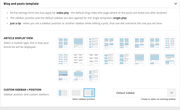
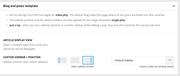
synedToday I updated the Newspaper theme and all the different modules/templates disappeared from Template Settings.
Is there any way to bring them back and make my site look as it did before the update?
For example it now shows full post content on the homepage instead of showing only excerpt.
Template settings before and after update:
 stefanegirard
 I was working on categories too, in order to reorganize my posts. The issue comes from here. I have just changed the slug of the category Mode to mode1 annd the page is OK.
I did the same with the second page.
But I do not understand why when I change a category, a page takes the category default template. As explained previously I never use categories to create a page, I duplicate an existing pages.
-
This reply was modified 2 years by
stefanegirard.
stefanegirardHi
As I was working on 2 different pages, they changed into default category pages.
Moreover I never use category default template or category page because I do not understand how the work.
https://www.stefanegirard.fr/mode/ and https://www.stefanegirard.fr/montres/ I created a long time ago are now categories pages and I lost my work.
I tried to create a new page.
Before creation I changed the title of the wrong page from https://www.stefanegirard.fr/mode/ to https://www.stefanegirard.fr/mode2/
1-Duplicate a page, this time: https://www.stefanegirard.fr/autos/
2- I edit with QUICK EDIT: Title, Author, and I change status to Published
It works ok when I don’t use https://www.stefanegirard.fr/mode/
But if I do I have the issue.
Please help
 Ruteris
Hello. I am trying to add a template, but after clicking Import section, nothing is added. See image https://app.screencast.com/Jda6RH97sgA7e . And this is what I am getting see image https://app.screencast.com/N88qET4SckBST- you can see that there is a pop up that asks to confirm at the background see image https://app.screencast.com/SR6z2nRGptfNh, but once I close the top pop up, it takes me back to my page and no template is added. Please help.
 vickyjacko
 We have updated the theme a few times and the issues seem to be with the cloud library and losing the templates. I could just do with a few old versions to try updating in a few steps rather than a big jump.
If that doesn’t work I will have to rebuild the pages.
 BatmanUnleashed
hi,
i have set a new global template for when people make a search on my website… i used one of the pre-made ones but then edited it to how i needed it.
i am now trying to set it so that my tag template is the same as my search template, because fundamentally clicking a tag and typing in a search phrase are similar actions.
however i dont seem to be able to load my search template in the tag template section. i have imported the same pre made layout however it does not have the modifications that i made when i set it to the search template, and i dont want to have to do all the changes again, manually.
am i missing something? surely there is a way to save a new page layout to your library and then import that somewhere else if needed? i only seem to be able to import the pre made layout in their original forms.
thanks
Anamaria Hi,
Please tell me where it only appears on one page or the entire site. Did you add any code or elements from another plugin?
Please follow the steps from this topic https://forum.tagdiv.com/topic/error-at-zones-6models-1dom-the-model-does-not-match-the-content-currene/ if you have a child theme; please use the main theme.
You can try to revert an old revision on a page/template -> https://www.wpbeginner.com/beginners-guide/complete-guide-to-wordpress-post-revisions/
Thank you!
Anamaria Hi,
The tagDiv Composer is our page builder and it can be used for building pages and cloud templates, but not for creating posts. For this, you’ll need to use Gutenberg or a classic editor.
Using tagDiv Composer, you can build/edit the single post template (the layout of the posts).
Here is a video that will show you how to use the builder to create a website from scratch https://www.youtube.com/watch?v=SoGQ0d5kIBg to do this you’ll need to already have the posts.
Also, on our channel https://www.youtube.com/channel/UCOT1RiNysIPCTPSnVZskwtQ, you can find more videos that can help you and documentation https://forum.tagdiv.com/newspaper-theme-documentation/ and you can ask us here on the forum or email if you have any questions.
Thank you!
 zodiacreadstd
hi when we try to edit single page post Template we get error content Mismatch
Please check the below screenshot
https://drive.google.com/file/d/1vjMhumVbduhwbkZyCrNGeWp6WrL9QrKl/view?usp=sharing
Please provide the solution
 upmy-life
 Ok, I understand my use of “Single – Related from taxonomies:” was wrong because I work on a Category template and this filter is just for single page.
So, is there a solution (with this block or whatever else) to do what I want : got all the post of the current category but only from a specific taxonomy ?


