- NewspaperDesign your Post Pages using the Cloud Library Templates
- NewspaperDesign your post pages using the Default Templates
- NewsmagPage templates
- NewspaperPage templates
- NewspaperCreate a form contact page
- NewspaperCloud Library Templates
- NewspaperCloud Library – Category Templates
- NewsmagCategory templates
- NewsmagFooter templates
- NewsmagDefault post templates
- NewsmagPost templates
- NewsmagHomepage – How to build and set it
- NewspaperHomepage – How to build and set it
- NewspaperPost templates
- NewspaperDefault post templates
- NewspaperCategory templates
- NewspaperPost template ads
- Apitd_api_single_template::update_key
- Apitd_api_single_template::update
- Apitd_api_single_template::add
 dirkdirkdirk
 Hi Bettina,
I’ve added an extensive explanation covering:
– how we added the custom post type including an excerpt of the functions.php customization
– short explanation on the cloud template being used
– 1 example of custom post type & category page, their URLs are:
a) category page: https://aktiennews24.de/thema/einzelaktien/nordex-aktie/
b) custom post: https://aktiennews24.de/news/kurs/nordex-aktie-30052022/
– the configs that we have in the theme panel
We appreciate you looking at the video recorded:
https://www.screencast.com/t/ico9Q8ue
-> I checked the audio quality and it should be good
 PetrSycha
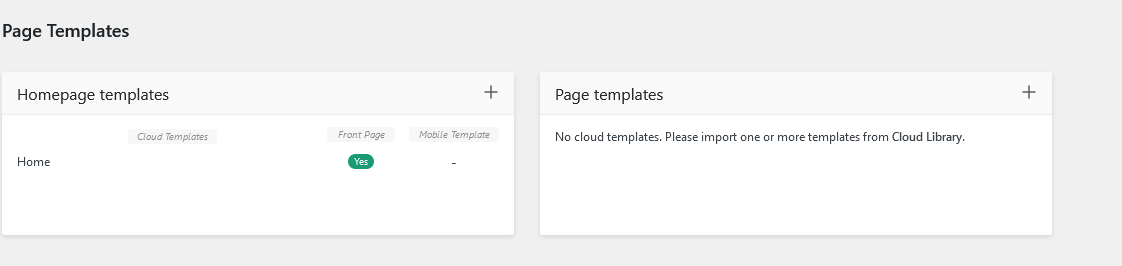
 Hello, thank you. I think the problem is that there is no Cloud library button in the top (for pages):
https://www.rozumimepenezum.cz/wp-content/uploads/2022/06/Screenshot-2022-06-01-at-09-23-58-Dokazu-to-Rozumime-penezum.png
So I can´t download the template…
 Anamaria
 Hello,
I notice that you don’t use the Single Post Template Black pro, but another template.
Please make sure you have set the Single Post template assigned global -> https://i.imgur.com/r4qaMgW.png -> https://i.imgur.com/PGCNsCS.png
Thank you!
 MAG
MAGHello,
I have a problem with your theme: in the megamenu and in the post loops of the categories I do not correctly display the name of the category. In some posts we read, in others not. I tried to reload the browser page, to create a new category template, to deactivate the plugins and the theme, but the problem remains. Please help me! Thank you
Images
https://drive.google.com/file/d/1PAYEpZOi7dqKnCuOmAsIZokmtvFgr9EQ/view?usp=sharing
https://drive.google.com/file/d/1igkwql-oPOJZauE9TpeuMNDqXEYg_eIT/view?usp=sharing
https://drive.google.com/file/d/1bnMR9X_obWMsP0udEfiSHYaYWEQiAywH/view?usp=sharing
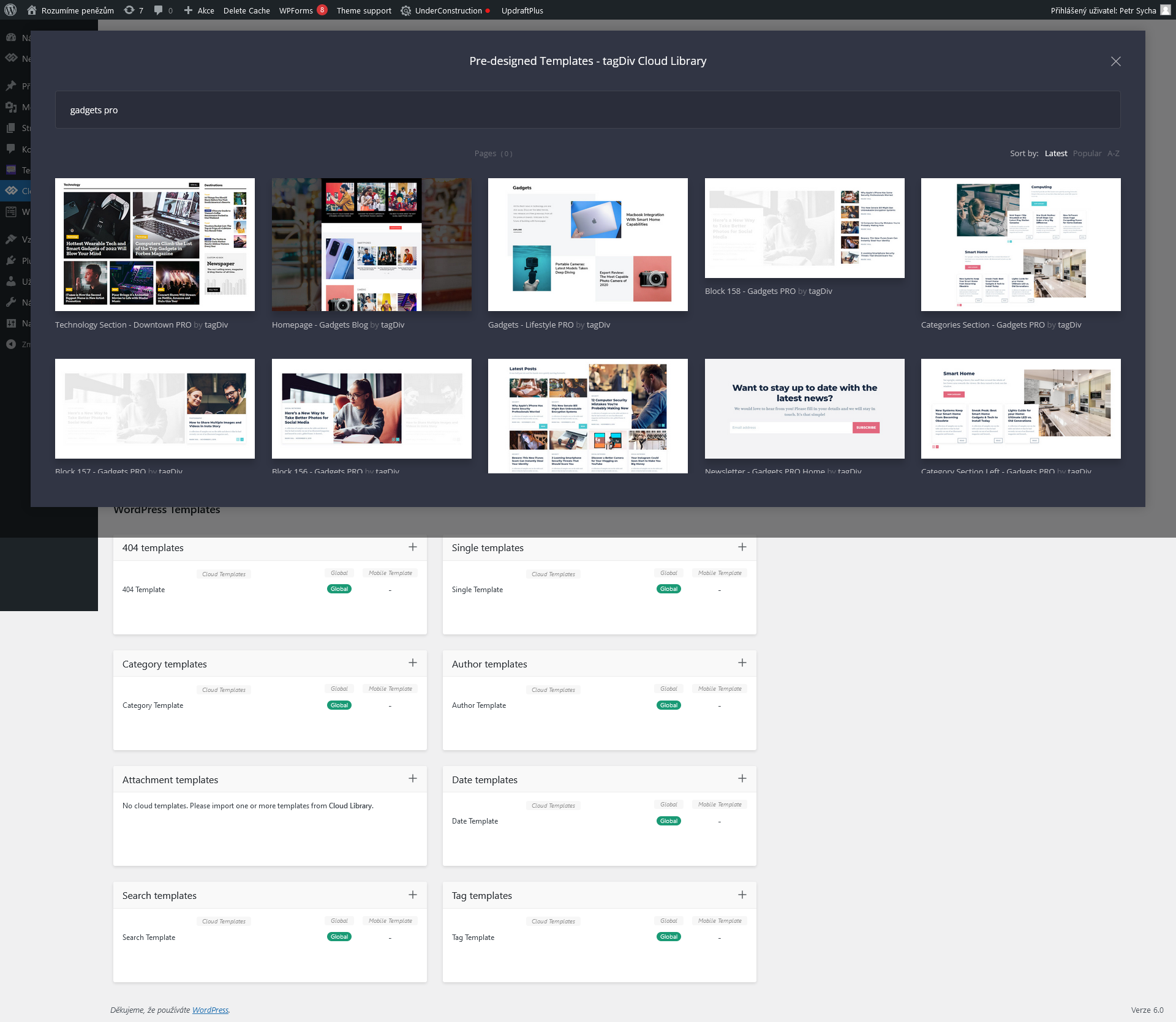
PetrSycha I have the access to the Cloud Templates but when I try import new one:
https://www.rozumimepenezum.cz/wp-content/uploads/2022/05/Screenshot-2022-05-31-at-15-14-01-tagDiv-Cloud-templates-‹-Rozumime-penezum-—-WordPress.png
there are some Gadgets Pro templates but not for the single page:
https://www.rozumimepenezum.cz/wp-content/uploads/2022/05/Screenshot-2022-05-31-at-15-12-28-tagDiv-Cloud-templates-‹-Rozumime-penezum-—-WordPress.png
Please help,
thank you.
 Bettina
 Hello!
What you use on that page is the Single Post Template 61 – Gadgets PRO.
If you will access Cloud Templates, you can make it global in the Single templates section, so you can assign this template for all your posts/articles.
Documentation here: https://forum.tagdiv.com/design-post-pages-using-cloud-library-templates/
Thank you!
PetrSychaHi, I have a new gadgets template. The template was prepared for the contributions and it looks perfect in posts, for instance: https://www.rozumimepenezum.cz/minimalni-dustojna-mzda/
However, no template is assigned for articles:
https://www.rozumimepenezum.cz/standardy-fg/co-je-fg/
How can I assign the same template to the articles? There is no template for posts/articles (in Gadgets-style) prepared in the cloud library.
Thank you, Petr
dirkdirkdirkHi everyone,
I am using the newspaper theme 11.5.1 where cloud templates start supporting CPT/Taxonomies.
The custom post type, called ‘kurs’, has ‘has_archive’ enabled and is added to the ‘pre_get_posts’ hook, see for reference:
function custom_post_type_cat_filter($query) {

  if ( !is_admin() && $query->is_main_query() ) {

    if ($query->is_category()) {

      $query->set( 'post_type', array( 'post', 'kurs' ) );

    }

  }

}
add_action('pre_get_posts','custom_post_type_cat_filter');
I am not sure which extra steps are needed when cloud templates are in play and whether the theme itself selects fitting posts for category pages based on the template file taxonomy…any advice here?
Bettina Hello!
If you access the Cloud Templates, then you can see the new page templates section is considered for other pages then the WordPress Templates: https://prnt.sc/7siRoZK57q7v
The types of templates are different, so you can not use the category template for the single or for other any section.
Thank you!
 ljubisa
Hi support, I want to create a template only for Pages, but when I import some template from cloud library, it affect category page, and I cant create template only for pages.
For example, if I upload some template from cloud library, and set page title, separator, and I want to display single page content bellow separator (like it was with single post content on single post template), but i cant find this option.
How to create template only for pages? Is this possible?
Anamaria Hello,
I just checked your website and now seems the text is not displayed -> https://i.imgur.com/z5NaKp8.jpg
Also, I recommend you to use Single Post Template from tagDiv Cloud Library
Thank you!
Anamaria Hello,
Unfortunately, the screenshot is not displayed -> https://i.imgur.com/pInRS76.png
Also, to change the font size for post title from Theme Panel -> Mobile Theme -> Theme Fonts => https://i.imgur.com/tI6yfzm.png
You have only some settings for this layout, which you can find in Theme panel -> Mobile Theme. It is the same thing for the AMP plugin too.
Also, you can check our documentation here:
-> https://forum.tagdiv.com/tagdiv-amp-plugin-tutorial/ please set the AMP like in our guide.
-> https://forum.tagdiv.com/the-mobile-theme/
This is a video about Responsive Newspaper Theme, AMP & Mobile Theme, Mobile Pages & Templates -> https://www.youtube.com/watch?v=SpGkOnJeNZY
Thank you!
Bettina Hello!
Please make sure you assigned the same cloud template for that page.
Documentation here:
– https://forum.tagdiv.com/cloud-library-templates/
– https://forum.tagdiv.com/design-post-pages-using-cloud-library-templates/
– https://forum.tagdiv.com/cloud-library-category-templates/
Check also our video tutorials here: https://www.youtube.com/c/tagdivThemes/videos
Thank you!
Bettina Hello!
If you want to use the single cloud template from “The Rimont” demo or any one, then you can assign manually this template for your video posts only(access the posts in the frontend and change the template from the dropdown near the green button ” Edit with the TagDiv Composer”). You can duplicate the template and make only some changes for your special posts or you can import a new one from the Cloud Templates -> Single templates. Documentation here: https://forum.tagdiv.com/design-post-pages-using-cloud-library-templates/
Thank you!
 metacoach
Hi,
I have installed a Directories plugin called “Directories Pro”. It uses custom post types. I can view all associated custom post types in the Newspaper theme panel.
I want to be able to serve ads based on the various directory categories, and to do that I understand I need to add it so the tagDiv composer recognises each template in order to place ad code on the pages.
Looking at your documentation https://forum.tagdiv.com/custom-post-type-support/ it seems possible but I’m not sure what do do next. I also asked this as a pre-sales question and was told it was doable.
So here is basically what I need to know.
The plugin has pages that are already built, so how am I able to integrate them into the composer so I can use the ‘insert ad code’ function?
Again, the only reason I need this is to be able to serve ads on pages. Not modify or add to what the plugin already provides.
Thanks
Bettina Hello!
This is a simple menu created in the Appearance -> Menus, then add the Header Main Menu element. You can see a lot of settings for it: there is a hover color on the items: https://prnt.sc/7X9XBCZMfphH
Or you can import a homepage/header template from Cloud Templates and assign it to your website: https://prnt.sc/VhI0W-Mmz6M2
Thank you!
Bettina Hello!
If you use a cloud homepage template, then you need to access the homepage in your frontend and edit it with the TagDiv Composer by clicking on the green button.
Else, the page can’t be edited with the TagDiv Composer.
Please check our tutorial here: https://forum.tagdiv.com/tagdiv-composer-tutorial/
Documentation here:
– https://forum.tagdiv.com/cloud-library-templates/
– https://forum.tagdiv.com/design-post-pages-using-cloud-library-templates/
– https://forum.tagdiv.com/cloud-library-category-templates/
Check also our video tutorials here: https://www.youtube.com/c/tagdivThemes/videos
Thank you!
 PuckWuck
Hello, I’d posted previously about this and now here I am again. Still trying to wrap my head around this.
Let me approach this from a different angle.
I’ve added a blank cpt template from your cloud. okay.
Now I go to a published custom post type page and click on the green ‘Edit the CPT Template’ at the top.
I then edit that template and save.
Okay, now what?
Any changes I make are not reflected anywhere. I’ve tried going about this many different ways but I get nowhere.
Even after making changes to that template and going back to any published cpt page, I click on that green button again and it’ll show me the changes I made previously. Plus, any changes I make going forward will always be reflected in what’s shown to me going into the future.
But ONLY within the supposed template and not the actual published CPT pages. Follow?
What am I missing here?
Please, I would love to be able to solve this. Thanks.
Bettina Hello!
We have 3 options of mobile versions that you can use:
1. Responsive version: A responsive version of your website is looking similar like on desktop, edit the page with TagDiv Composer, click on the mobile viewport: https://www.screencast.com/t/XDQJedlggSB ; there you can see your mobile version and you can edit the elements there or adjust them to look better.
2. Mobile pages: https://tagdiv.com/newspaper-10-3-7-update-brings-customizable-and-fast-mobile-pages/
3. Mobile theme plugin: The Mobile Theme is a performance optimized theme included in the Newspaper main theme and it loads only for mobile devices. It comes with its own templates/design for page, post, category, etc so your current templates from the desktop theme will get converted to the mobile theme layout. For more details, please take a look here: https://forum.tagdiv.com/the-mobile-theme/ and https://forum.tagdiv.com/mobile-theme-introduction/
A full explanation you can find here: https://www.youtube.com/watch?v=SpGkOnJeNZY
You can choose to use which one is more affordable and useful for you.
If anyone doesn’t fit as you created, then make a test and deactivate ALL plugins except tagDiv ones, also if you are using a cache plugin, deactivate it, clear all cache and try again.
Note: If you want to use version 1 or 2, then you need to deactivate the Mobile theme plugin and see the results.
Thank you!
 hellodaviddavis
Why does installing AMP remove the theme template from mobile? Also how can I edit the homepage on my iPad?
 lormar98
Like the title, i can’t understand the problem, really.
YOU CAN SEE IT HERE: https://imgur.com/a/VBEg4HE
I made some specific template for each content of my website.
In mobile version, i don’t know WHY there is an alert that say “go to mobile version” at the top of the page, under the copyright.
I never see it before because i use newspaper since 1 year…
does someone can help me to REMOVE the alert? Thank you
 karlinex
 Thank you for your response, but I noted here after moving it to the then content as see here – https://paste.pics/H3AXD
This is what I got – https://paste.pics/H3AY2
As you can see it still overflows on the contents.
I would like you to show me how to get about with it for all my pages(categories) so I don’t have to do it manually all the time for all my templates, thank you!
 drvarun5179
Hi,
I went through the forum to look for answers but could not.
I was previously running a very old (maybe Newspaper 8) and updated few weeks back. However, after update, the major concern which I am not able to fix is:
Not able to show Mobile theme plugin template on mobile devices. I have removed all cache plugins, purged cache from cloudfare, deleted any mobile page available (while editing home page with tag div composer). Despite that, I am unable to render mobile theme on mobile devices. I am attaching the screenshots as below: (I also tested the results on mobile devices simultaneously)
I simply seek clean and sleek design of mobile theme plugin which was previously working fine. I am not aiming at any customized home pages or those bulky designs, a simple mobile page granted by mobile theme plugin.
Thanks
 jonny555
Hi,
How are you? I have been using the newspaper theme and all going well thanks.
Question:
On the mobile menu / desktop view – it opens up a mega menu drop down page with categories, newsletter and social media pages, it displays the template logo, how to I change the white logo section to my own logo ?
I cant seem to be able to find that area to change to my logo.
Thanks
Jonny
 Robert Turner
 Anamaria, is there another way to add shortcodes to the template pages instead of using the column text?