
- NewspaperDesign your Post Pages using the Cloud Library Templates
- NewspaperDesign your post pages using the Default Templates
- NewsmagPage templates
- NewspaperPage templates
- NewspaperCreate a form contact page
- NewspaperCloud Library Templates
- NewspaperCloud Library – Category Templates
- NewsmagCategory templates
- NewsmagFooter templates
- NewsmagDefault post templates
- NewsmagPost templates
- NewsmagHomepage – How to build and set it
- NewspaperHomepage – How to build and set it
- NewspaperPost templates
- NewspaperDefault post templates
- NewspaperCategory templates
- NewspaperPost template ads
- Apitd_api_single_template::update_key
- Apitd_api_single_template::update
- Apitd_api_single_template::add
 petsavas
Thanks for your support so far.
My new question. I have a sidebar item at the single post page, (with the default template) that has the title in english.
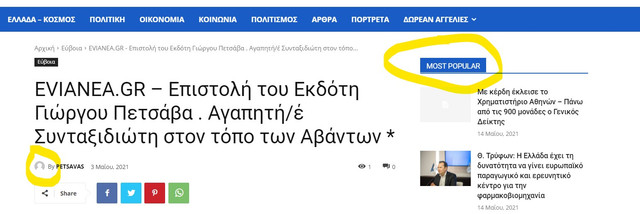
I looked at the translations settings and the “most popular” string appears to be already translated in greek.
By the way I would also like to have the “by” author string translated.
Thanks in advance
 Bettina
 Hello!
Please check in Website Manager if the template is set up global when you edit the homepage with TagDiv Composer.
If the problem persist, then :
1. disable TagDiv Composer
2. uninstall(delete) TagDiv Composer
3. clear cache (if cache plugin exists)
4. install TagDiv Composer
5. activate TagDiv Composer
6. clear cache (if cache plugin exists)
Also, make sure your WordPress and plugins are up to date(specially Standard Pack installed and active if you use default templates).
Sometimes, the issue can be from a plugin conflict, that’s why, please deactivate ALL plugins except tagDiv ones, also if you are using a cache plugin, deactivate it, clear all cache(also from your browser) and try again.
Let me know the results!
Thank you!
 Anamaria
 Hi,
Using our theme you can choose from 3 mobile versions
-> mobile responsive => https://www.screencast.com/t/oJ2ShOp47
-> mobile theme plugin => https://forum.tagdiv.com/the-mobile-theme/
-> mobile page => https://tagdiv.com/newspaper-10-3-7-update-brings-customizable-and-fast-mobile-pages/
If you created the mobile pages with tagDiv Composer, then when you install the Mobile Theme plugin, your pages will be overwritten by the plugin (the mobile theme comes with its templates for page, post, category, etc so your current templates from the desktop theme will get converted to the mobile theme layout, the page content is made without builders in mobile editor => https://www.screencast.com/t/xbgZG8kH also, the options that are provided to edit the mobile theme version are limited (this keeps the things simple)).
This is a video about Responsive Newspaper Theme, AMP & Mobile Theme, Mobile Pages & Templates -> https://www.youtube.com/watch?v=SpGkOnJeNZY
So, the mobile responsive is what you see then that you select the viewport on phone => https://www.screencast.com/t/matV17hH, so some settings may apply for each viewport(where is the border blue), and others are not(where the border is black).
The mobile page has the mobile templates from Cloud Library => https://www.screencast.com/t/YCcZ8rL8
Mobile responsive version of the theme and the mobile page editor can be edit with tagDiv Composer, the mobile theme plugin not.
For example, you can have the mobile theme plugin activate and use the mobile page/mobile responsive version for the homepage/pages, but for the categories pages/404 page you can’t use the mobile page/mobile responsive version if you have the mobile theme plugin activate.
So, if you want to design the pages with tagDiv Composer, you can use the mobile page or mobile responsive version.
I hope this information helps you!
Thank you!
Bettina Hello!
If you use a cloud header template, then edit the page with TagDiv Composer, click on the mobile viewport: https://www.screencast.com/t/XDQJedlggSB ; there you can see your mobile version and you can edit/add the elements there.
Thank you!
 yasemin
Hi,
I am trying to build my site on a temporary domain name. I created a cloud template for header and made it global. However, it looks differently on homepage: http://edentist.depro15.fcomet.com/ It kind of “shrinks” on all the other pages..
How can I resolve this issue?
 libraeditrice
 Thank you for your reply.
I had the same site on different servers (OVH, Contabo and Aruba) but it has always been slow (from 10 to 20 seconds to load the homepage) and the problem occurs just on the homepage, while the posts templates are faster (from 3 to 6 seconds loading), so I think the problem mostly occurs when the homepage is loaded, even if I’d like to speed up the posts loading as well.
I’m not using CDN.
My website loads external resources like ads (Google Adsense), fonts, and tracking scripts (Google Analytics).
The homepage contain several blocks (55 Td Flex blocks 1, 1 Post Slider, 2 Single Image, 2 Team Member, 1 Icon Box, 12 Title, 8 Separators, 7 Rows, 14 Inner Rows).
About image size or formats, I will check it out even if the homepage loading is slow even if it loads images from the memory cache.
I’m not using mobile optimized layouts.
I have no console error.
I am using using the Standard Pack plugin.
I will follow your tips to increase page speed and I will tell you if it works, then I will chech the factors you refer to, then I will add some more info on this topic.
Thank you.
Anamaria Hello,
The footer template does not have the button to be edited with tagDiv Composer in the backend. Please check this guide:https://forum.tagdiv.com/footer-templates/
If you a Pro Prebuilt Website you can edit with tagDiv Composer the footer template can be edited only from the frontend if it is assigned, edit a page/post template with tagDiv Composer and go down to the footer. => https://www.screencast.com/t/rpfNhfyrF
Also, if you have a standard footer template https://www.screencast.com/t/ND7OiqEpPFK ->https://www.screencast.com/t/Z5ZdVYY4wAuP then you need to make changes in Theme Panel -> Footer.
Thank you!
Anamaria Hello,
What version do you use for mobile? mobile responsive version, mobile page or mobile theme?
So, the mobile responsive is what you see then that you select the viewport on phone => https://www.screencast.com/t/matV17hH, so some settings may apply for each viewport(where is the border blue), and others are not(where the border is black).
The mobile page has the mobile templates from Cloud Library => https://www.screencast.com/t/YCcZ8rL8
Mobile responsive version of the theme and the mobile page editor can be edit with tagDiv Composer, so you can change the logo with tagDiv Composer, for the mobile theme plugin you can not edit with tagDiv Composer, you need to upload the logo in Theme Panel -> Mobile theme -> Header => https://www.screencast.com/t/cEh4lPyC
Hope this helps you!
Thank you!
 luke-tt
Hi,
the homepage I’ve assigned with the mobile site: https://www.screencast.com/t/TZ3kCENfjR
But I cannot see the mobile site (https://www.screencast.com/t/rWo8T0gn), always only the responsive design is visible.
Alle cache I’va cleared.
Could you help me, please?
Thank you in advance and best regards,
Luke
 Barcelona2021
Hello !
Hope you are doing well!
A/ How to find the template product page ? Cloud template or Pages , i havent find any except shop page
I cannot re design shop page btw
On my actual product page , images arent visibles . Is there something to see to enable all tumbl image from newspaper > theme panel. If yes which sizes i should enable , and where to go ?
B/ If a post doesnt have image, how to automatically set the title of the post on the image . Image automatically created lets say
thanks
 elvisfrog
Long shot, but I am working on making a custom page that loads a post by id and curious if there is a way to apply a cloud template to it? Is there a way I can call via PHP some function to render a cloud template or load it? I know I can create a custom page using the standard newspaper template, but it doesn’t have all the customizations that I have applied to the current cloud template so it would not look the same. I know all cloud template resides in the database, not as a file, but thought there might be a way to get_post and then load the template and render properly? It basically boils down to loading a template file with a post ID already loaded and rendered. The reason behind this is I need to add some custom PHP if logic on when to display this.
Bettina Hi Kristof!
You can only modify the footer with TagDiv Composer if you go to a page where it is assigned and edit that page with TagDiv Composer, and then you will have access to the footer also. You should modify once the footer and that footer template will be automatically modified on the other pages where it is assigned.
Thank you!
Anamaria Hello,
Seems you have the Mobile theme plugin activate, when you install and activate the Mobile Theme plugin, your pages will be overwritten by the plugin (the mobile theme comes with its own templates for page, post, category, etc so your current templates from the desktop theme will get converted to the mobile theme layout, the page content is made without builders in mobile editor => https://www.screencast.com/t/xbgZG8kH also, the options that are provided to edit the mobile theme version are limited (this keeps the things simple)).
Better deactivate the plugin and see the results.
This issue can be from the plugin cache you use, when the mobile responsive version is displaying on the desktop, then you have a cache conflict, the plugin for the cache that you are using do not recognize the mobile and desktop cache. We recommend using WP Super Cache plugin https://forum.tagdiv.com/cache-plugin-install-and-configure/
Also, if you use other plugins for cache, those can interfere with the theme and causes this problem.
Hope this helps you!
Thank you!
 vikris
 Found out that this was only happening for the Homepage and not when editing other cloud templates. Decided not to use more time on it and restored from a backup. Everything working fine again.
 IvanPsy
I’d like to create a template for the page where the posts of a category are shown.
How do I accomplish it?
 Krimiwa
 Hi Bettina,
thanks for the answer.
Unfortunately that did not help me.
As I tried to describe:
– I am using Cloud/PRO templates
– I edit them right after downloading
– I hit the save button, close the template
– I want to edit them again, but there´s no way to open them in Tagdiv composer 8teh button does not show)
– the problem occurs only with footers. I can re-edit headers and any other template type.
I would like to use three different footers, each of them on up to 5-10 pages.
To edit each footer individually on page can not be the solution.
Thanks
Anamaria Hi,
Using our theme you can choose from 3 mobile versions
-> mobile responsive => https://www.screencast.com/t/oJ2ShOp47
-> mobile theme plugin => https://forum.tagdiv.com/the-mobile-theme/
-> mobile page => https://tagdiv.com/newspaper-10-3-7-update-brings-customizable-and-fast-mobile-pages/
If you created the mobile pages with tagDiv Composer, then when you install the Mobile Theme plugin, your pages will be overwritten by the plugin (the mobile theme comes with its templates for page, post, category, etc so your current templates from the desktop theme will get converted to the mobile theme layout, the page content is made without builders in mobile editor => https://www.screencast.com/t/xbgZG8kH also, the options that are provided to edit the mobile theme version are limited (this keeps the things simple)), as I said above.
This is a video about Responsive Newspaper Theme, AMP & Mobile Theme, Mobile Pages & Templates -> https://www.youtube.com/watch?v=SpGkOnJeNZY
So, the mobile responsive is what you see then that you select the viewport on phone => https://www.screencast.com/t/matV17hH, so some settings may apply for each viewport(where is the border blue), and others are not(where the border is black).
The mobile page has the mobile templates from Cloud Library => https://www.screencast.com/t/YCcZ8rL8
Mobile responsive version of the theme and the mobile page editor can be edit with tagDiv Composer, the mobile theme plugin not.
For example, you can have the mobile theme plugin activate and use the mobile page/mobile responsive version for the homepage/pages, but for the categories pages/404 page you can’t use the mobile page/mobile responsive version if you have the mobile theme plugin activate.
So, if you want to design the pages with tagDiv Composer, you can use the mobile page or mobile responsive version.
I hope this information helps you!
Thank you!
 Umut
Umut Hi would you pls look at my page from desktop and than from mobile. no screenshot needed.
http://www.gurmecenter.com
I did every thing you said. but my mobile template can not be set…..
Anamaria Hello,
In most cases when you get a similar message “ Error at zones: 2(models): 3(dom). The model does not match the content Current state has involved an issue. You could try an UNDO operation (CTRL+Z / CTRL+SHIFT+Z)” then indeed it is a problem, most of the time the problem is from a shortcode that is not compatible with our theme, therefore after you set it with tagDiv Composer and save the page/cloud template, the next time when you try to edit it, you’ll get that error.
For this error, you can check our guide from here at point 5 -> https://forum.tagdiv.com/tagdiv-composer-not-working/ also after trying the steps from our guide you do not get any good results, You can send us an email at contact@tagdiv.com and provide wp-admin login, as well as cPanel and credentials. We will take a look. Include a link to this topic in the email.
Let me know the results!
Thank you!
Bettina Hello!
In order to edit a page with TagDiv Composer you need to use a PRO/cloud template and not a default one. If you have a cloud/PRO template, but you can’t edit the footer, then edit your homepage with TagDiv Composer, scroll till footer, click on footer zone and you can edit/delete the elements there.
Thank you!
 Brain916
Hello, I have created a new header which you can see here: https://www.sneakerfiles.com/tdb_templates/header-template-city-pro/
However, when it goes live on the homepage, it displays like this:
https://ibb.co/sHN3hSg
https://ibb.co/tx7Mv3n
Anamaria Hello,
In most cases when you get a similar message “ Error at zones: 6(models): 0(dom). T.. The model does not match the content Current state has involved an issue. You could try an UNDO operation (CTRL+Z / CTRL+SHIFT+Z)” then indeed it is a problem, most of the time the problem is from a shortcode that is not compatible with our theme, therefore after you set it with tagDiv Composer and save the page/cloud template, the next time when you try to edit it, you’ll get that error.
For this error, you can check our guide from here at point 5 -> https://forum.tagdiv.com/tagdiv-composer-not-working/ also after trying the steps from our guide you do not get any good results, You can send us an email at contact@tagdiv.com and provide wp-admin login, as well as cPanel and credentials. We will take a look. Include a link to this topic in the email.
Let me know the results!
Thank you!
Anamaria Hello,
The mobile theme comes with its own templates for page, post, category, etc so your current templates from the desktop theme will get converted to the mobile theme layout, the page content is made without builders in mobile editor => https://www.screencast.com/t/xbgZG8kH so you can only add the elements that are present in the toolbar, without shortcodes(blocks).
Thank you!
Anamaria Hello,
Can you provide some screenshots of your problem?
You can edit the mobile page with tagDiv Composer https://www.youtube.com/watch?v=SpGkOnJeNZY (03:11 – Mobile Templates & Pages)
Thank you!
Anamaria Hello,
I understand you have created a mobile page, please make sure you set it => https://www.screencast.com/t/bYroSq7x8T9, also, the header and footer are taken from the standard ones. All you have to do is edit the mobile page, and in Manager (Website Manager) you need to import or the easy way is to convert the existent footer like this => https://www.screencast.com/t/HrjOBNayd -> https://www.youtube.com/watch?v=SpGkOnJeNZY (03:11 – Mobile Templates & Pages)
Hope this helps you!
Thank you!
