- NewspaperDesign your Post Pages using the Cloud Library Templates
- NewspaperDesign your post pages using the Default Templates
- NewspaperPage templates
- NewspaperCreate a form contact page
- NewspaperCloud Library Templates
- NewspaperCloud Library – Category Templates
- NewspaperHomepage – How to build and set it
- NewspaperPost templates
- NewspaperDefault post templates
- NewspaperCategory templates
- NewspaperPost template ads
- NewspaperSingle External Shortcode and External Shortcode
- NewspaperWP Rocket and Newspaper Theme: Optimization Guide
- NewspaperSearch setup for custom post type
- NewspapertagDiv Composer – Website Manager
- NewspaperBookmark – Save For Later
- NewspaperFlex Block Builder and Flex Loop Builder
- NewspaperModules Builder in Newspaper Theme
- NewspaperIntroduction to CPT and ACF with Newspaper Theme
- NewspaperCreate a frontend submission form
 imbob
imbobHi I’ve successfully hidden page views on template 13 with this code .td-post-template-13 .td-post-header .td-post-title .td-post-views {
display: none;
}
However, I went to set up the tag AMP plugin earlier and I noticed that on AMP the page views still show, is there something I can add so that it hides views on AMP as well?
 NickDeBaerdemaeker
Hello.
I have spent the past days trying to find a way to be able to filter my posts based upon category and custom taxonomy.
Since tagdiv sadly doesn’t support custom taxonomy filtering, I was hoping that adjusting a block might do the trick.
is it possible to perhaps make 26 copies of block 10 and module 10 (doable with the api plugin example on your site https://forum.tagdiv.com/practical-example-how-to-add-a-new-block-and-module/)
for instance block 10 A, block 10 B,.. to make an alphabetical index ?
I’d then adjust the post loop to only include posts from that taxonomy, whereas the filter in the tagdiv composer could then be set to the different categories (movies, music etc).
could you tell me if this is doable and where this query can be adjusted ?
I’ve followed literally all links you post in the replies stating have a look here, but they are always outdated or incomplete as an answer.
this is the loop argument that I’d like to include in the blocks:
$args = array(
'post_type' => 'post',
'posts_per_page'         => '-1',
'meta_key'			=> 'keyword',
'orderby'			=> 'meta_value',
'order'				=> 'ASC',
'tax_query' => array(
    'relation' => 'AND',
    array(
        'taxonomy' => 'alphabetical_letter',
        'field'    => 'term_id',
        'terms'    => array( '441' ), //this is by slug
    ),
    array(
        'taxonomy' => 'category',
        'field'    => 'slug',
        'terms'    => array( 'muziek-recensies' ), //this is by id
    ),
),

);

// The Query
query_posts( $args );

// The Loop

if (have_posts()) {
    while ( have_posts() ) : the_post();
        echo $td_template_layout->layout_open_element();

        if (class_exists($td_module_class)) {
            $td_mod = new $td_module_class($post);
            echo $td_mod->render();
        } else {
            td_util::error(__FILE__, 'Missing module: ' . $td_module_class);
        }

        echo $td_template_layout->layout_close_element();
        $td_template_layout->layout_next();
    endwhile; //end loop
    echo $td_template_layout->close_all_tags();
 Mike_D
 I have the same problem
These are the guidelines for breadcrumbs schema
https://developers.google.com/search/docs/data-types/breadcrumb
The correct html should look like this
<div itemscope itemtype="http://schema.org/BreadcrumbList">

  <span itemprop="itemListElement" itemscope itemtype="http://schema.org/ListItem">


      <span itemprop="name">Home</span>


  </span>

  <span itemprop="itemListElement" itemscope itemtype="http://schema.org/ListItem">


      <span itemprop="name">Category</span>


  </span>

  <span itemprop="itemListElement" itemscope itemtype="http://schema.org/ListItem">


      <span itemprop="name">This page</span>


  </span>

</div>
This is an important signal for SEO. It was implemented last year. To fix it in Newspaper theme means creating a custom post template to replace the td breadcrumbs div.
Forget trying a child theme. That doesn’t work.
 Bonder93
Good afternoon,
I’ve purchased this theme 3 days ago and i want to use a custom author page template.
I’ve set as default one of the pre-designed templates but when i open the author pages, it always remind to the admin profile and not to the author profile selected.
How can i solve this?
Thanks.
 ale
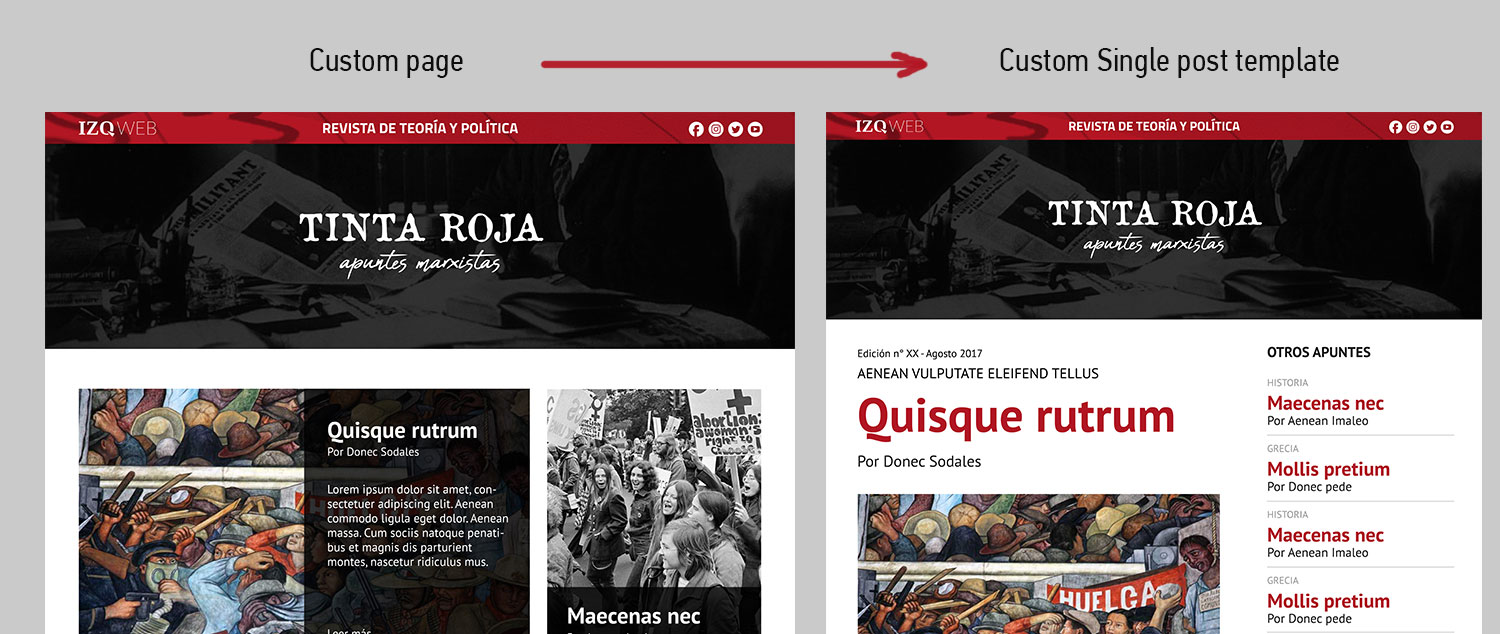
ale This is a preview of what we need. I´ve customized the page but I can´t do the same with de post template.
I create a loop-single-14.php but I dont know how to use it in my new posts. Any idea is welcome.
Thanks again
 Antonio Palacios
Good afternoon,
I have a problem. I can’t see the Author page…If you go to any Author Card and click on the name takes me to the homepage. What it could be happening?
I’d like to use a template from your Cloud Templates…but firstable I must find a solution for my problem.
Do you have any tutorial about how to set up an author page from your library?
Thanks!
 k2point0
Hello,
Understand this:
I first Installed newspaper theme and then under Template Settings > blog and post template I select M6 style. Now after that I installed the News Magazine demo. The homepage view as mentioned in the News Magazine demo isn’t coming up. How can I get that?
 Catalin
 Hello Newspaper,
There is an option for it in panel, like the empty page template as you can see here -> https://www.screencast.com/t/PIe16Dn3y
Thanks.
 trungnx
Hi ,
I use Author Template Cloud to Author page, it very nice. But can we make a custom for difference Author? Like Author have a different design, I only see the opt that make default for all Author
 abhayamohanty
Dear Team,
I am trying to change categories in Latest Articles block which is not available in widgets or pages. I have gone through Pagebuilder+Latest Articles+Pagination template code. But not found any solution. Please suggest…
Thanks,
ABhaya
NickDeBaerdemaeker Also, the need to implement the api is still there.
We have painstakingly created a custom “alphabetical letter” taxonomy to display all posts on one page using a keyword, all posts that have keyword A on page A etc etc.
However since we can not select a custom taxonomy on the tagdiv composer when filtering posts (only categories are allowed) we are stuck.
We have implemented this text into the plugin, which gets us the ARTICLE DISPLAY VIEW icons on the theme panel. however when we select them the page reverts back to the default. could you point us in the right direction please ?
<?php
/*
Plugin Name: td-api-plugin
Plugin URI: http://tagdiv.com
Description: tagDiv API plugin
Author: tagDiv
Version: 1.0
Author URI: http://tagdiv.com
*/
class td_api_plugin {
    var $plugin_url = '';
    var $plugin_path = '';
    var $root = '';
    function __construct()
    {
        $this->root = get_site_url();
        $this->plugin_url = plugins_url('', __FILE__); // path used for elements like images, css, etc which are available on end user
        $this->plugin_path = dirname(__FILE__); // used for internal (server side) files

        add_action('td_global_after', array($this, 'hook_td_global_after')); // hook used to add or modify items via Api
    }
    function hook_td_global_after() {

//Add new modules

td_api_module::add('td_module_20',
            array(
                'file' => $this->root . "/wp-content/themes/newspaper-child/includes/modules/td_module_20.php",
                'text' => 'Module 20',
                'img' =>  $this->root . '/wp-content/themes/newspaper-child/images/panel/modules/td_module_20.png',
                'used_on_blocks' => array('td_block_25'),
                'excerpt_title' => 30,
                'excerpt_content' => 50,
                'enabled_on_more_articles_box' => false,
                'enabled_on_loops' => true,
                'uses_columns' => true,                      // if the module uses columns on the page template + loop
                'category_label' => true,
                'class' => 'td_module_wrap td-animation-stack',
                'group' => '' // '' - main theme, 'mob' - mobile theme, 'woo' - woo theme
            )
        );

        td_api_module::add('td_module_21',
            array(
                'file' => $this->root . "/wp-content/themes/newspaper-child/includes/modules/td_module_21.php",
                'text' => 'Module 21',
                'img' => $this->root . '/wp-content/themes/newspaper-child/images/panel/modules/td_module_21.png',
                'used_on_blocks' => array('td_block_21'),
                'excerpt_title' => 15,
                'excerpt_content' => '',
                'enabled_on_more_articles_box' => true,
                'enabled_on_loops' => true,
                'uses_columns' => true,                      // if the module uses columns on the page template + loop
                'category_label' => true,
                'class' => 'td_module_wrap',
                'group' => '' // '' - main theme, 'mob' - mobile theme, 'woo' - woo theme
            )
        );

    }
}

new td_api_plugin();
the text in module 20 for instance looks like this:
<?php

class td_module_20 extends td_module {

    function __construct($post, $module_atts = array()) {
        //run the parrent constructor
        parent::__construct($post, $module_atts);
    }

    function render() {
        ob_start();
        $title_length = $this->get_shortcode_att('m20_tl');
        ?>

        <div class="<?php echo $this->get_module_classes();?>">
            <div class="td-module-image">
                <?php echo $this->get_image('td_150x150');?>
                <?php if (td_util::get_option('tds_category_module_20') == 'yes') { echo $this->get_category(); }?>
            </div>
            <?php echo $this->get_title($title_length);?>

            <div class="td-module-meta-info">
                <?php echo $this->get_author();?>
                <?php echo $this->get_date();?>
                <?php echo $this->get_comments();?>
            </div>

            <?php echo $this->get_quotes_on_blocks();?>

        </div>

        <?php return ob_get_clean();
    }
}
We have created pages for each letter which each run their specific post template, which looks like this:
<?php

/*

Template Name: archief albumrecensie a

*/
get_header();
//set the template id, used to get the template specific settings
$template_id = 'archive';
//prepare the loop variables
global $loop_module_id, $loop_sidebar_position, $part_cur_auth_obj;
$loop_module_id = td_util::get_option('tds_' . $template_id . '_page_layout', 1); //module 1 is default
$loop_sidebar_position = td_util::get_option('tds_' . $template_id . '_sidebar_pos'); //sidebar right is default (empty)
// sidebar position used to align the breadcrumb on sidebar left + sidebar first on mobile issue
$td_sidebar_position = '';
if($loop_sidebar_position == 'sidebar_left') {
$td_sidebar_position = 'td-sidebar-left';
}
//read the current author object - used by here in title and by /parts/author-header.php
$part_cur_auth_obj = (get_query_var('author_name')) ? get_user_by('slug', get_query_var('author_name')) : get_userdata(get_query_var('author'));
//prepare the archives page title
{
$td_archive_title = get_the_title();
}
?>
<div class="td-main-content-wrap td-container-wrap">
<div class="td-container <?php echo $td_sidebar_position; ?>">
<div class="td-crumb-container">
<?php echo td_page_generator::get_archive_breadcrumbs(); // get the breadcrumbs - /includes/wp_booster/td_page_generator.php ?>
</div>
<div class="td-pb-row">
<?php
switch ($loop_sidebar_position) {
default:
?>
<div class="td-pb-span8 td-main-content">
<div class="td-ss-main-content">
<div class="td-page-header">
<h1 class="entry-title td-page-title">
<span><?php echo $td_archive_title; ?></span>
</h1>
</div>
<?php locate_template('loop-albumrecensies-a.php', true);?>
<?php echo td_page_generator::get_pagination(); // get the pagination - /includes/wp_booster/td_page_generator.php ?>
</div>
</div>
<div class="td-pb-span4 td-main-sidebar">
<div class="td-ss-main-sidebar">
<?php get_sidebar(); ?>
</div>
</div>
<?php
break;
case 'sidebar_left':
?>
<div class="td-pb-span8 td-main-content <?php echo $td_sidebar_position; ?>-content">
<div class="td-ss-main-content">
<div class="td-page-header">
<h1 class="entry-title td-page-title">
<span><?php echo $td_archive_title; ?></span>
</h1>
</div>
<?php locate_template('loop-albumrecensies-a.php', true);?>
<?php echo td_page_generator::get_pagination(); // get the pagination - /includes/wp_booster/td_page_generator.php ?>
</div>
</div>
<div class="td-pb-span4 td-main-sidebar">
<div class="td-ss-main-sidebar">
<?php get_sidebar(); ?>
</div>
</div>
<?php
break;
case 'no_sidebar':
?>
<div class="td-pb-span12 td-main-content">
<div class="td-ss-main-content">
<div class="td-page-header">
<h1 class="entry-title td-page-title">
<span><?php echo $td_archive_title; ?></span>
</h1>
</div>
<?php locate_template('loop-albumrecensies-a.php', true);?>
<?php echo td_page_generator::get_pagination(); // get the pagination - /includes/wp_booster/td_page_generator.php ?>
</div>
</div>
<?php
break;
}
?>
</div> <!-- /.td-pb-row -->
<div class="archiefmenutitel"></br></br><h1 class="entry-title td-page-title">ARCHIEF</h1></div>
<div class="albumrecensiesabc">
<?php wp_nav_menu( array( 'theme_location' => 'albumrecensiesabc' ) ); ?>
</div>
</div> <!-- /.td-container -->
</div> <!-- /.td-main-content-wrap -->
<?php
get_footer();
and finally the loop it uses
<?php

/**

 * If you are looking for the loop that's handling the single post page (single.php), check out loop-single.php

 **/
// $global_flag_to_hide_no_post_to_display - comes from page-category-big-grid.php and is a flag to hide the 'No posts to display' message if on category page there are between 1 and 5 posts
global $loop_module_id, $loop_sidebar_position, $global_flag_to_hide_no_post_to_display;
///if we are in wordpress loop; used by quotes in blocks to check if the blocks are displayed in blocks or in loop
td_global::$is_wordpress_loop = true;
$td_template_layout = new td_template_layout($loop_sidebar_position);
if (empty($loop_module_id)) { //not sure if we need a default here
$loop_module_id = 1;
}
$td_module_class = td_api_module::_helper_get_module_class_from_loop_id($loop_module_id);
//disable the grid for some of the modules
$td_module = td_api_module::get_by_id($td_module_class);
if ($td_module['uses_columns'] === false) {
$td_template_layout->disable_output();
}
$args = array(
'post_type' => 'post',
'posts_per_page' => '-1',
'meta_key' => 'keyword',
'orderby' => 'meta_value',
'order' => 'ASC',
'tax_query' => array(
'relation' => 'AND',
array(
'taxonomy' => 'alphabetical_letter',
'field' => 'term_id',
'terms' => array( '441' ), //this is by slug
),
array(
'taxonomy' => 'category',
'field' => 'slug',
'terms' => array( 'muziek-recensies' ), //this is by id
),
),
);
// The Query
query_posts( $args );
// The Loop
if (have_posts()) {
while ( have_posts() ) : the_post();
echo $td_template_layout->layout_open_element();
if (class_exists($td_module_class)) {
$td_mod = new $td_module_class($post);
echo $td_mod->render();
} else {
td_util::error(__FILE__, 'Missing module: ' . $td_module_class);
}
echo $td_template_layout->layout_close_element();
$td_template_layout->layout_next();
endwhile; //end loop
echo $td_template_layout->close_all_tags();
} else {
/**
* no posts to display. This function generates the __td('No posts to display').
* the text can be overwritten by the themplate using the global @see td_global::$custom_no_posts_message
*/
echo td_page_generator::no_posts();
}
all of this was working fine since all of the code was directly implemented in the td config php file, which gets overwritten when you update the theme. all I thought I would have to do is implement the said code in the plugin api but clearly this isn’t how it should be done. I’m fearful that weeks of work on this alphabetical archive have been for nought…
-
This reply was modified 8 years by
NickDeBaerdemaeker.
 Simion C.
 Hi,
The latest articles section is added when you use the required page template
– https://www.screencast.com/t/w0OevVt2XL
The section will display a numbered pagination style.
If you select a different page template the section will be removed. Then the page will not have pagination.
Now I don’t exactly now what you want to do, having this in mind. You could place a block at the bottom of the page instead, blocks also have pagination (not numbered however).
Simion C. The predefined content does not appear there, by predefined I mean in the actual footer template PHP file.
If you use a predefined template and also add widgets to those footer columns, they will be displayed below the predefined content
– https://www.screencast.com/t/qc0TOzluHQw
– https://www.screencast.com/t/KJbxmHNOVR
If you choose an empty template, there will be no predefined content, only you widgets will be displayed
– https://www.screencast.com/t/rFt15ZC1b1
– https://www.screencast.com/t/rcG5zzIxaAG
You can also create a page with the tagDiv composer and display that in the footer if you want to, instead of a footer template
– https://www.screencast.com/t/xmve6Fi7Mvbv
The cloud library plugin provides some footer pages that can be imported and set. You can import and then modify these if needed, or create your own page
– https://www.screencast.com/t/ot5bVXTz
– https://forum.tagdiv.com/tagdiv-cloud-library-plugin/
Hope this helps. Let me know if you have more questions and I will try to help you.
Thanks
Catalin Hello miguel_dimase,
I suppose that you want to change the position of your Category Tag from your modules on pages and for your single posts, right? If you want to affect the modules, you should edit the module files like this -> https://www.screencast.com/t/v53mtUjVC1QS (from here you can change the position of the category tag) and if you want to make some changes over that section on your posts, notice that you need to choose or create your single post template from Cloud Library and then, edit it with TD Composer and change the position of the Category Tag, like this -> https://www.screencast.com/t/0q5T8CIenOdM
For more information about our Cloud Library Template, please check here -> https://forum.tagdiv.com/tagdiv-cloud-library-plugin/
Thanks for your understanding!
Simion C. Hi,
The overlay menu template can be selected per page, that will make the header transparent and over the page content, just for that page. The other pages of the website will display the default header style chosen in the theme panel.
There is only one website header option, on a menu overlay template page it will have additional design but the functionality is the same.
Thanks
 great1212
Dear, I have experience this problem for more than 6,7 times in my website. The sidebar stretched in woocommerce page and the only solution that worked for me is to re-upload the theme files. I am not using the stretch container and I have already disabled the sidebar in the woocommerce template. Please provide me the official support to sort out this problem. It so sad.
Take a look at:
https://www.pakdefense.com/shop/
waiting for your solution…
 miguel_dimase
 Thanks.
I have installed the Cloud Plugin, but how does it help me to change the category tag in MY loop template from my wordpress installation (or MY single template, for that matter, if I wanted to change my single post template)?
Aside from the fact that my homepage is not an static page, as far as I can see the plugin does not allow me to pick templates (neither the loop nor the single one) from my installation to be edited through the tagDiv Composer, or does it?
Thanks again
NickDeBaerdemaekerHello,
I had made two custom modules, editing the td config file directly. Upon updating the theme I quickly found out I should have used the theme api plugin to avoid having everything erased. However I can’t get it to work.
I followed the tutorial offered on the site, creating the td-api-plugin folder and php file.
The php file includes following text, do I need to alter the $this->plugin_url and $this->plugin_path ?
If so how would I need to do this.
I am working with a newspaper-child theme and the address of the site is currently v2.enola.be,
which will change in the future to http://www.enola.be so I want to be prepared for that too.
thanks for your kind assistance
Nick
<?php

/*

Plugin Name: td-api-plugin

Plugin URI: http://tagdiv.com

Description: tagDiv API plugin

Author: tagDiv

Version: 1.0

Author URI: http://tagdiv.com

*/

class td_api_plugin {

    var $plugin_url = '';

    var $plugin_path = '';

    function __construct()

    {

        $this->plugin_url = plugins_url('', __FILE__); // path used for elements like images, css, etc which are available on end user

        $this->plugin_path = dirname(__FILE__); // used for internal (server side) files
add_action('td_global_after', array($this, 'hook_td_global_after')); // hook used to add or modify items via Api
}
function hook_td_global_after() {
//Add new modules
td_api_module::add('td_module_20',
array(
'file' => $this->plugin_path . "/includes/modules/td_module_20.php",
'text' => 'Module 20',
'img' => $this->plugin_url . '/images/panel/modules/td_module_20.png',
'used_on_blocks' => array('td_block_25'),
'excerpt_title' => 30,
'excerpt_content' => 50,
'enabled_on_more_articles_box' => false,
'enabled_on_loops' => true,
'uses_columns' => true, // if the module uses columns on the page template + loop
'category_label' => true,
'class' => 'td_module_wrap td-animation-stack',
'group' => '' // '' - main theme, 'mob' - mobile theme, 'woo' - woo theme
)
);
td_api_module::add('td_module_21',
array(
'file' => $this->plugin_path . "/includes/modules/td_module_21.php",
'text' => 'Module 21',
'img' => $this->plugin_url . '/images/panel/modules/td_module_21.png',
'used_on_blocks' => array('td_block_21'),
'excerpt_title' => 15,
'excerpt_content' => '',
'enabled_on_more_articles_box' => true,
'enabled_on_loops' => true,
'uses_columns' => true, // if the module uses columns on the page template + loop
'category_label' => true,
'class' => 'td_module_wrap',
'group' => '' // '' - main theme, 'mob' - mobile theme, 'woo' - woo theme
)
);
}
}
new td_api_plugin();
 SiuSang
Hello
I would like to place an Ads under the main menu in single post pages, the size is 970×250 px, which php file can I edit to do this? thank you.
P.S the Style 3 is my default post template
Simion C. Hi,
You can ask as many questions as needed, we and other users will try to help you as best we can.
For that post template in order to achieve a quality result, the image should be bigger. For example the demo uses a featured image of this size
– https://demo.tagdiv.com/newspaper/wp-content/uploads/2015/04/snow.jpg
– https://demo.tagdiv.com/newspaper/td-post-the-new-screen-savers-the-show-that-launched-video-into-the-stratosphere/
If there is a background color or image set, the website will be boxed, so the post template would look like this
– http://prntscr.com/kaq0or
You could try some thumbnail cleaner plugins, make some tests with them. Maybe these one
– https://ro.wordpress.org/plugins/thumbnail-cleaner/
– https://ro.wordpress.org/plugins/force-regenerate-thumbnails/
Consider making a back-up before, in case something doesn’t work as intended, better to be safe.
You could try a third party pages widget, the default widget allows only to exclude. I believe there are also solutions online to modify WordPress files to make the pages widget include instead of exclude.
Note that our blocks can display pages as well
– https://www.screencast.com/t/CPaAjXzV8xNp
You can filter the pages by ID, adding specific IDs will only display those pages.
Thanks
 stuartmasson
Hi guys, hope you’re all well.
We created a footer page using your most excellent cloud templates, and we’re perfectly happy with it. The problem is that it doesn’t seem to play happily with bbPress pages.
If we insert bbPress shortcodes into a page created with TD Composer, it works fine (see link, for our draft forum homepage):
http://compareallvans.co.uk/forum
However, when bbPress creates its own pages for individual topics and threads, the formatting goes a bit crazy and the footer page simply displays a lot of code:
http://compareallvans.co.uk/forums/forum/new-and-news/
Have tried deactivating everything but problem remains. Only happens with a cloud template footer page – if we use a normal widgeted footer, it works fine.
Any suggestions?
stuart
PS: If you could add bbPress templates to your future cloud template plans, that would be fabulous 😉
Simion C. Hi,
Maybe they could be removed with CSS only for the homepage. The same footer and it’s content will be displayed in the whole website, a setting to specify exceptions does not exist.
There is an empty page template that can be used for pages, this will not display the footer for the page where it is used, but that will not show the header as well.
A code like this will hide the whole footer only on the homepage for example
– https://www.screencast.com/t/4s1avfKH6v
.home .td-footer-wrapper {

display: none;

}
Simion C. The search functionality of the theme is the same as default WordPress. The theme lets you choose a module to display post for the search results page
– https://www.screencast.com/t/nDjmNpKZVkmv
You can also use the cloud library plugin to design your own search results page, or import predefined beautiful templates (more to come)
– https://www.screencast.com/t/cP7VYNX3ogSS
But if you use instead of the default search a plugin or other implementation, this cannot be made to use the theme modules and other settings. You probably will have to configure the plugin instead, if it has any settings or design for the search results page.
 nevrion
Hello, I’m really excited about Composer and would love to use it in a Custom Page plugin. In my case the plugin would be: https://wordpress.org/plugins/cherry-team-members/
I have created a separate page with the composer and would like to use this as a template for the single pages of the team members.
Unfortunately, I am completely new to the world of PHP. I would certainly make entries in files but do not understand what I’m doing.
Please excuse my bad english.
 extraordinarynicci
Can I ask three questions at the same time please.
I cannot seem to locate the size of image for Style 6 of the post template. What is it?
Do you have a plugin to remove thumbnails from an old theme?
I have a menu with a group of pages. I want to run a sidebar of “pages in this section”. The pages widget is not ideal because by default it includes all pages and allows for excluding pages. Do you have something that does the reverse i.e. specify the IDs of the pages I want listed?
Thanks