
No search results were found in Documentation!
 Bettina
 Hello!
Please check the theme requirements: https://forum.tagdiv.com/requirements-for-newspaper/
I hope that helps you!
Thank you!
Bettina Hello!
You shouldn’t lose anything when you update the theme. Please make sure that everything is up-to-date and active, as well as the tagdiv plugins.
For every update, we always recommend the following:
-> First of all, please make sure you have a backup.
-> Please deactivate all the non-tested plugins with our theme before updating.
-> Update WordPress, PHP, the theme, and plugins to the latest version: https://forum.tagdiv.com/how-to-update-the-theme-2/.
-> Check all these requirements for the theme: https://forum.tagdiv.com/requirements-for-newspaper/
Thank you!
 passion-for-ocean
Hi,
I am using one of the pre-designed templates. Trying to set up one free membership, and one that costs money. For the free one, I would like it to be super easy for the user. At the moment, the registration requires everything from name, e-mail, adress to phone number. Where do I edit this? I only want people to register with name, country and e-mail for free use…
I added the plans button in the meny. And when I hit it, I end up on a billing page called “checkout-publication_pro/?plan_id=1” But I can’t edit it…
 Anamaria
 Hi,
Please check if this code is missing from your .htaccess: https://www.screencast.com/t/iN0R93dD3p from our requirements https://forum.tagdiv.com/requirements-for-newspaper/ this requirement is not displayed in System Status.
Thank you!
Bettina Hello!
Please set it as sticky also in the mobile viewport(select the inner column settings). Update the theme to the latest version.
For every update, we always recommend the following:
-> First of all, please make sure you have a backup.
-> Please deactivate all the non-tested plugins with our theme before updating.
-> Update WordPress, PHP, the theme, and plugins to the latest version: https://forum.tagdiv.com/how-to-update-the-theme-2/.
-> Check all these requirements for the theme: https://forum.tagdiv.com/requirements-for-newspaper/
Thank you!
Anamaria Hello,
Did you have a fresh install on the staging website? Did you delete the images from the media, or do you have some restrictions?
Please check if you have the requirements configured https://forum.tagdiv.com/requirements-for-newspaper/
We can take a look at this and investigate the issue. Please contact us via email at contact@tagdiv.com and provide the following:
– wp-admin URL and credentials
– cPanel URL and credentials
– a link to this topic in order to identify you
Also, during the investigation know that we will disable the other non tagDiv plugins.
Thank you!
Anamaria Hi,
Please check if this code is missing from your .htaccess: https://www.screencast.com/t/iN0R93dD3p from our requirements https://forum.tagdiv.com/requirements-for-newspaper/ this requirement is not displayed in System Status.
Thank you!
Anamaria Hello,
Please check this guide https://forum.tagdiv.com/requirements-for-newspaper/ to set the PHP requirements.
Thank you!
Bettina Hello Danish!
Check all these requirements for the theme: https://forum.tagdiv.com/requirements-for-newspaper/
Check this thread: https://forum.tagdiv.com/topic/excessive-dom-size/
Thank you!
Bettina Hello!
It’s alright if there is no issue on this backup.
For every update, we always recommend the following:
-> First of all, please make sure you have a backup.
-> Please deactivate all the non-tested plugins with our theme before updating.
-> Update WordPress, PHP, the theme, and plugins to the latest version: https://forum.tagdiv.com/how-to-update-the-theme-2/.
-> Check all these requirements for the theme: https://forum.tagdiv.com/requirements-for-newspaper/
Thank you!
Anamaria Hello,
Please provide more details about your issue with screenshots and video.
Also, please check if this code is missing from your .htaccess: https://www.screencast.com/t/iN0R93dD3p from our requirements https://forum.tagdiv.com/requirements-for-newspaper/ this requirement is not displayed in System Status.
Thank you!
Anamaria Hello,
We’re sorry you encountered problems, our support hours are from 8 a.m. to 4 p.m., from Monday to Friday. Usually the “Invalid reply from server endpoint error” is caused by insufficient WP_Memory_limit, if you’ll set it to 256M, and is still not working, please double it and check the rest of the settings from our guide -> https://forum.tagdiv.com/requirements-for-newspaper/ also make sure that you are using SSL and you have a good bandwidth, the one from our server is 1GB/s and the one that I use at home is 500MB/s, if you have low bandwidth, then you can access parts of the cloud, this can be done from the frontend, for example, if you are on a post -> https://i.imgur.com/4G74M7F.jpg or from tagDiv Composer -> https://i.imgur.com/2F6MhfI.png or from backend -> https://www.screencast.com/t/wekHmc7kJ8J
Thank you!
Bettina Bettina Hello!
Check the theme requirements here: https://forum.tagdiv.com/requirements-for-newspaper/
Thank you!
 petar777
Hey there,
Can you list the perfect recommendations for server configuration for the latest version of the theme?
https://tagdiv.com/newspaper-theme-requirements/ <– I see PHP 7 or greater. In some topics across the forum I see recommendations of 7.4, 8.0 and 8.1, what should be the best option?
Anamaria Hi,
You are probably uploading the whole theme package. You have to upload only the theme zip file, not the whole package which contains other items
– https://help.market.envato.com/hc/en-us/articles/202821510-Theme-is-missing-the-style-css-stylesheet-error
How to update the theme https://forum.tagdiv.com/how-to-update-the-theme-2/
Requirements for Newspaper => https://forum.tagdiv.com/requirements-for-newspaper/
Thank you!
 bmonkee
Hi the WP editor wont load within Text with Title module on my site. I have disabled all plugins apart from tagdiv, and it still wont load. Tried checking system settings for the theme and all requirements are met. Could you please advise?
Thank you in advance
Rachael
Anamaria Hello,
1. Please let me know what theme and PHP version you have.
2. For wp-memory please check this guide to set it https://forum.tagdiv.com/requirements-for-newspaper/
Thank you!
Anamaria Hello,
Usually this issue is caused by insufficient WP_Memory_limit, if you’ll set it to 256M, and is still not working, please double it and check the rest of the settings from our guide -> https://forum.tagdiv.com/requirements-for-newspaper/ also make sure that you are using SSL and you have a good bandwidth, the one from our server is 1GB/s and the one that I use at home is 500MB/s, if you have low bandwidth, then you can access parts of the cloud, this can be done from the frontend, for example, if you are on a post -> https://i.imgur.com/4G74M7F.jpg or from tagDiv Composer -> https://i.imgur.com/2F6MhfI.png or from backend -> https://www.screencast.com/t/wekHmc7kJ8J
Thank you!
Anamaria Hi Dave,
To change the width, you can set it here, but you need to set the width on each column-> https://i.imgur.com/MVh7p5G.png or you can use the css code, but please make sure that you have set also, the positions and margin.
The advantages are that you can create your design as you wish, plus most options can be added from the composer. You can create a unique design for each email or for categories.
Some key features of the TagDiv Cloud Library templates include:
Customization: Users can customize the templates according to their preferences and branding requirements. This includes changing colors, fonts, layout structures, and more.
Responsive Design: The templates are designed to be responsive, ensuring that they look great and function well on devices of all sizes, including desktops, tablets, and smartphones.
Easy Integration: Templates can be easily integrated into WordPress websites using the TagDiv Composer, a drag-and-drop page builder tool offered by TagDiv.
Diverse Selection: The library offers a diverse selection of templates catering to various industries such as blogs, magazines, e-commerce, portfolios, and more.
Regular Updates: Templates are regularly updated to ensure compatibility with the latest WordPress versions and to incorporate new features and improvements.
Thank you!
Bettina Hello!
Follow this guide to clean your WordPress and theme of malware: https://askwpgirl.com/10-steps-remove-malware-wordpress-site/
After that, you can update the theme to the latest update.
For every update, we always recommend the following:
-> First of all, please make sure you have a backup.
-> Please deactivate all the non-tested plugins with our theme before updating.
-> Update WordPress, PHP, the theme, and plugins to the latest version: https://forum.tagdiv.com/how-to-update-the-theme-2/.
-> Check all these requirements for the theme: https://forum.tagdiv.com/requirements-for-newspaper/
Thank you!
Anamaria Hello,
Please check this topic https://support.google.com/webmasters/thread/247936417/how-to-fix-video-is-not-the-main-content-of-the-page?hl=en and this article https://searchengineland.com/google-expands-video-requirements-for-video-mode-where-video-must-be-main-content-of-the-page-435382
Thank you!
Anamaria Hello,
Please provide more details about your issue when installing the theme.
Please make sure that you don’t have mixed content errors; you can check the console. You have to use an SSL plugin to fix it and then try to activate it again -> https://www.hostinger.com/tutorials/fix-mixed-content-wordpress/ -> https://wordpress.org/plugins/really-simple-ssl/
Also, make sure that all the settings are like in our requirements, please follow the guide carefully: https://forum.tagdiv.com/requirements-for-newspaper/
and please increase all requirements that are lower, and follow all steps.
We can take a look so, please contact us via email at contact@tagdiv.com and provide the wp-admin and cPanel login and the license certificate and purchase code.
Thank you!
 newspulpaper
Hello TagDiv support team,
I’ve encountered an issue while editing any page layout on my WordPress site using the Newspaper theme with the “News Hub Pro” plugin. Every time I attempt to save changes on TagDiv Composer, the process fails, and through the browser’s DevTools, I observe a “Canceled” response from the server exactly 10 seconds after the request is made. This behavior is consistent and prevents me from making any further modifications to my site’s layout.
I have followed all the recommended steps outlined in the “Requirements for Newspaper” tutorial on your website, ensuring that my server and WordPress environment meet the necessary specifications. Despite these adjustments, the problem persists.
I am seeking guidance on how to resolve this issue as it’s crucial for me to be able to update and modify the layout of my website. Below is a screenshot from DevTools highlighting the error:
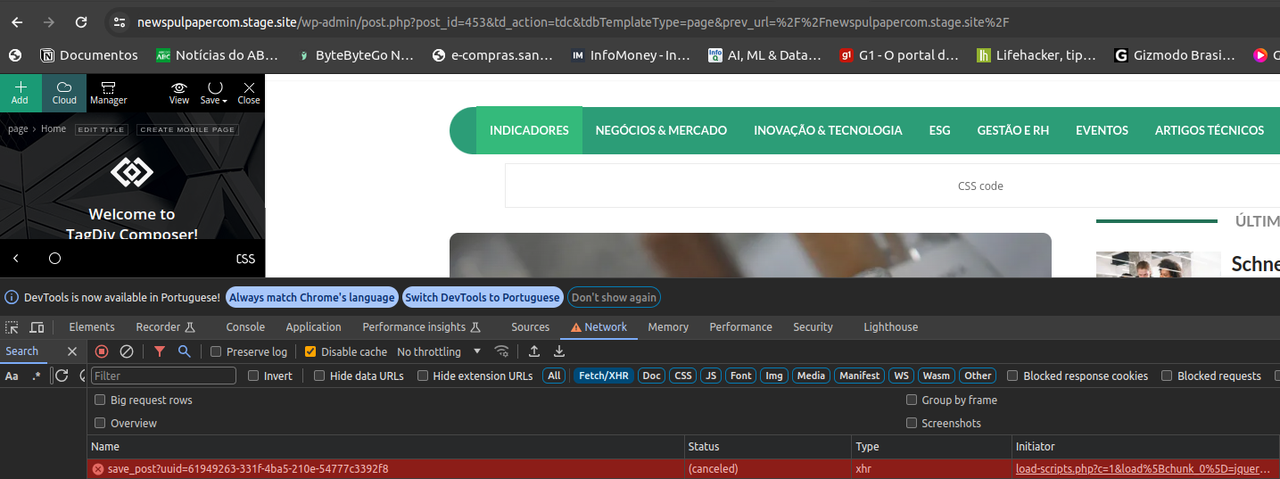
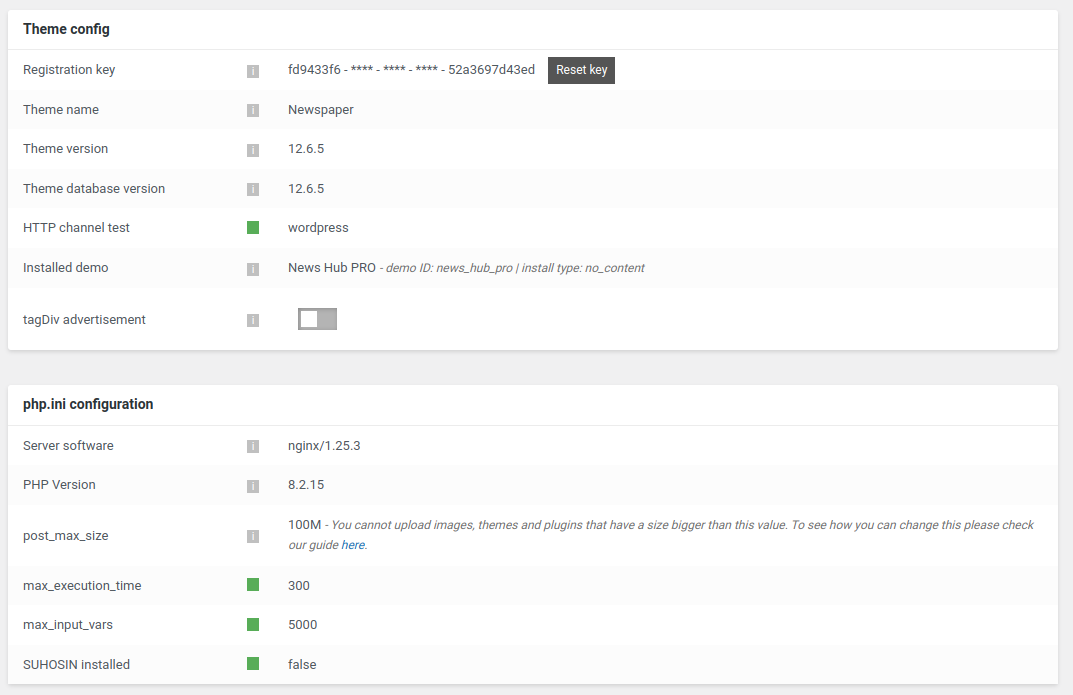
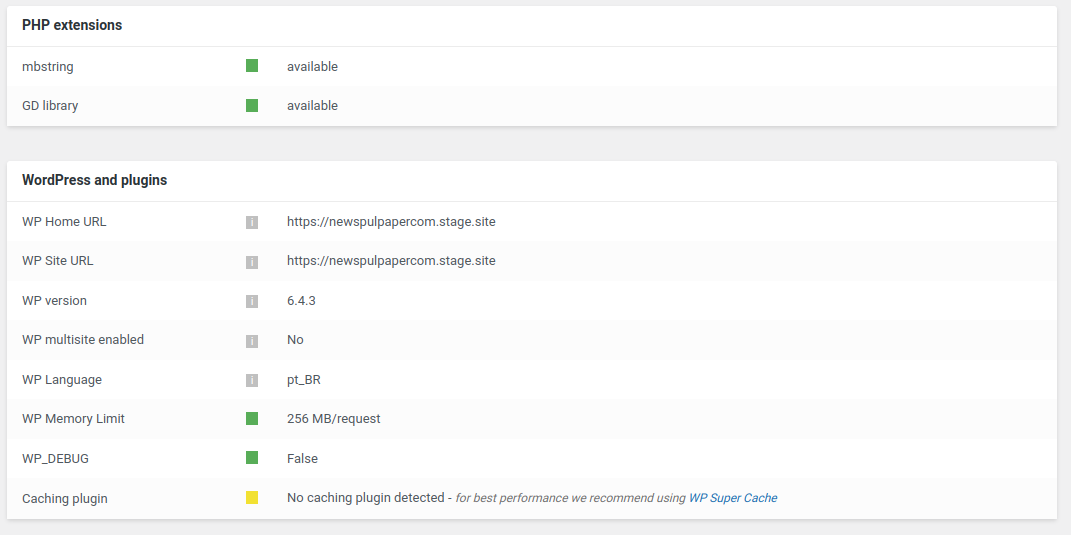
Could anyone provide insights or solutions to overcome this server response issue? Any help or suggestions would be greatly appreciated.
Thank you in advance for your assistance.
 saidsin
 I did everything you told me but still with the same error, activate debug mode so you can help me review the error. The requirements are the corrects:
PHP Version 8.0.30
WP Memory Limit 256 MB
PHP Execution Time 0
PHP Max Input Vars 2000
The error shows the mode debug is the following:
Fatal error: Uncaught Error: Call to undefined function iconv() in /home/rubenguajardo/public_html/wp-content/plugins/td-composer/legacy/common/wp_booster/td_util.php:5186 Stack trace: #0 /home/rubenguajardo/public_html/wp-content/plugins/td-composer/legacy/common/wp_booster/td_css_res_compiler.php(58): mb_detect_encoding(‘{“all”:”55″,”po…’) #1 /home/rubenguajardo/public_html/wp-content/plugins/td-composer/legacy/Newspaper/includes/shortcodes/td_block_slide.php(937): td_css_res_compiler->load_settings(‘td_block_slide:…’, Array) #2 /home/rubenguajardo/public_html/wp-content/plugins/td-composer/legacy/common/wp_booster/td_block.php(1630): td_block_slide->get_custom_css() #3 /home/rubenguajardo/public_html/wp-content/plugins/td-composer/legacy/Newspaper/includes/shortcodes/td_block_slide.php(957): td_block->get_block_css() #4 /home/rubenguajardo/public_html/wp-content/plugins/td-composer/legacy/common/wp_booster/td_global_blocks.php(27): td_block_slide->render(Array, ”) #5 /home/rubenguajardo/public_html/wp-includes/shortcodes.php(433): td_global_blocks::proxy_function(Array, ”, ‘td_block_slide’) #6 [internal function]: do_shortcode_tag(Array) #7 /home/rubenguajardo/public_html/wp-includes/shortcodes.php(273): preg_replace_callback(‘/\\[(\\[?)(td_blo…’, ‘do_shortcode_ta…’, ‘[td_block_slide…’) #8 /home/rubenguajardo/public_html/wp-content/plugins/td-composer/includes/tdc_composer_block.php(220): do_shortcode(‘[td_block_slide…’) #9 /home/rubenguajardo/public_html/wp-content/plugins/td-composer/includes/shortcodes/vc_column.php(407): tdc_composer_block->do_shortcode(‘[td_block_slide…’) #10 /home/rubenguajardo/public_html/wp-content/plugins/td-composer/legacy/common/wp_booster/td_global_blocks.php(27): vc_column->render(Array, ‘[td_block_slide…’) #11 /home/rubenguajardo/public_html/wp-includes/shortcodes.php(433): td_global_blocks::proxy_function(”, ‘[td_block_slide…’, ‘vc_column’) #12 [internal function]: do_shortcode_tag(Array) #13 /home/rubenguajardo/public_html/wp-includes/shortcodes.php(273): preg_replace_callback(‘/\\[(\\[?)(vc_col…’, ‘do_shortcode_ta…’, ‘[vc_column][td_…’) #14 /home/rubenguajardo/public_html/wp-content/plugins/td-composer/includes/tdc_composer_block.php(220): do_shortcode(‘[vc_column][td_…’) #15 /home/rubenguajardo/public_html/wp-content/plugins/td-composer/includes/shortcodes/vc_row.php(1177): tdc_composer_block->do_shortcode(‘[vc_column][td_…’) #16 /home/rubenguajardo/public_html/wp-content/plugins/td-composer/legacy/common/wp_booster/td_global_blocks.php(27): vc_row->render(Array, ‘[vc_column][td_…’) #17 /home/rubenguajardo/public_html/wp-includes/shortcodes.php(433): td_global_blocks::proxy_function(Array, ‘[vc_column][td_…’, ‘vc_row’) #18 [internal function]: do_shortcode_tag(Array) #19 /home/rubenguajardo/public_html/wp-includes/shortcodes.php(273): preg_replace_callback(‘/\\[(\\[?)(vc_row…’, ‘do_shortcode_ta…’, ‘[vc_row full_wi…’) #20 /home/rubenguajardo/public_html/wp-content/plugins/td-composer/includes/tdc_composer_block.php(220): do_shortcode(‘[vc_row full_wi…’) #21 /home/rubenguajardo/public_html/wp-content/plugins/td-composer/includes/shortcodes/tdc_zone.php(771): tdc_composer_block->do_shortcode(‘[vc_row full_wi…’) #22 /home/rubenguajardo/public_html/wp-content/plugins/td-composer/legacy/common/wp_booster/td_global_blocks.php(27): tdc_zone->render(Array, ‘[vc_row full_wi…’) #23 /home/rubenguajardo/public_html/wp-includes/shortcodes.php(433): td_global_blocks::proxy_function(Array, ‘[vc_row full_wi…’, ‘tdc_zone’) #24 [internal function]: do_shortcode_tag(Array) #25 /home/rubenguajardo/public_html/wp-includes/shortcodes.php(273): preg_replace_callback(‘/\\[(\\[?)(tdc_zo…’, ‘do_shortcode_ta…’, ‘[tdc_zone type=…’) #26 /home/rubenguajardo/public_html/wp-includes/class-wp-hook.php(324): do_shortcode(‘[tdc_zone type=…’) #27 /home/rubenguajardo/public_html/wp-includes/plugin.php(205): WP_Hook->apply_filters(‘[tdc_zone type=…’, Array) #28 /home/rubenguajardo/public_html/wp-includes/post-template.php(256): apply_filters(‘the_content’, ‘[tdc_zone type=…’) #29 /home/rubenguajardo/public_html/wp-content/plugins/td-standard-pack/Newspaper/page.php(51): the_content() #30 /home/rubenguajardo/public_html/wp-includes/template-loader.php(106): include(‘/home/rubenguaj…’) #31 /home/rubenguajardo/public_html/wp-blog-header.php(19): require_once(‘/home/rubenguaj…’) #32 /home/rubenguajardo/public_html/index.php(22): require(‘/home/rubenguaj…’) #33 {main} thrown in /home/rubenguajardo/public_html/wp-content/plugins/td-composer/legacy/common/wp_booster/td_util.php on line 5186



