
- NewsmagCustom Post Type Support
 Anamaria
 Hi,
That’s strange! Please send an email at contact@tagdiv.com and provide wp-admin so we can investigate this issue. Also, paste a link to this topic so we can easily identify you.
Thanks!
 Bettina
 Hi,
That’s strange! Please send an email at contact@tagdiv.com and provide wp-admin and Cpanel access, so we can investigate this issue. Also paste a link to this topic so we can easily identify you.
Thanks!
 pijag
pijagHeader live search sometimes shows live results as thumbnails with titles and sometimes only thumbnails…
I don’t know where this strange behavior comes from…
Any idea how to solve this and show full metadata next to thumbnails in live search results? (not only thumbnails).
Bettina Hello!
I’ve checked your website and it seems that one element is disappearing. This is strange because we do not have such a setting in our theme to appear and disappear while you are login or not.
The issue can be from a plugin conflict, that’s why, please deactivate ALL plugins except tagDiv ones, also if you are using child theme or cache plugin, deactivate them, clear all cache(also from your browser) and try again.
Thank you!
Bettina Hello!
That’s strange because some of our clients were so thankful with the latest update because for them the page speed was increase.
Our developers are working a lot to improve the page speed in every update and also to add more settings and more possibilities to change the design or the structure of the websites based on the client’s requirements.
Let me know the results after update!
I recommend you to make a full backup and update plugins and the theme via file transfer, so that you don’t face any error: https://forum.tagdiv.com/how-to-update-the-theme-2/
Thank you!
 robink
Hello Support,
There is this strange bug on mobile only, when you click on a main Category on header menu, on desktop, all is ok, articles showing on the Flex Bloc 2 and 1 are loading the correct current Category articles.
Desktop Beauty Cat :
http://prnt.sc/16m55ua
but on mobile, i’m getting articles from “AUTOMOBILE” categroy, in these Flex Blocs 1 and 2 instead of current cat articles.
Mobile Beauty Cat :
https://prnt.sc/16m5bpp
Look at this page for example :
https://www.trendsinriviera.com/category/beaute/
and look at it on Desktop and also on mobile, you will see that on mobile, it loads ATOMOBILE articles instead of BEAUTE articles in the top flex blocs.
Theme version 10.4, WP 5.7.2
Any clues ?
MAny thanks
Robin
Bettina Hello!
That’s strange! Please check all fields where you put this link or in TagDiv Composer if you use a cloud template. Sometimes, the issue can be from a plugin conflict, that’s why, please deactivate ALL plugins except tagDiv ones, also if you are using child theme or cache plugin, deactivate them, clear all cache and try again.
If this problem is not solved after that, then we need to take a look and see what happened there.
Please contact us via email at contact@tagdiv.com and provide the following:
– admin url and credentials
– a link to this topic in order to identify you
Our team will take a look!
Thank you!
 nhowarth
 Thanks Bettina
I have looked through the Greek translation for the word “Like” in Newspaper -> Theme panel -> Translations -> .
It shows “Κάντε Like”, which is a bit strange ??
An alternative would be to hide the text on the “Like” button so it only shows the ‘Thumbs Up’ icon. (I’ve seen this on several websites.)
Any thoughts on how I can do this?
TIA
Nigel
 Vlad S
 Hello!
I have, tested on 1 iOS device and 3 androids, only one time I was able to capture the issue. Indeed this seems to be a strange one, This should be able to fix by editing your post content in tagDiv Composer for the mobile viewport: https://www.screencast.com/t/D0kcbdk0eq
Thank you!
 EUCMH
EUCMH I can see all of them under your post (the first one)
The other posts look a little strange … and have no SN button at the bottom
-
This reply was modified 5 years by
EUCMH.
Bettina Hello!
That’s strange because some of our clients were so thankful with the latest update because for them the page speed was increase. Our developers are working a lot to improve the page speed in every update and also to add more settings and more possibilities to change the design or the structure of the websites based on the client’s requirements.
Try to increase your page speed too. If you follow the steps which are presented in this tutorial here: https://tagdiv.com/how-to-increase-page-loading-speed/ you’ll be able to increase the speed of your website.
Also, to increase the page speed you can check these similar topics for more solutions:
– https://forum.tagdiv.com/topic/optimize-script-to-improve-site-speed/
– https://forum.tagdiv.com/topic/a-few-tips-for-newspaper-x-speed-high-cpu-usage-issues/
– https://tagdiv.com/how-to-increase-page-loading-speed/
Please note that page speed is not covered by the support team: https://forum.tagdiv.com/newspaper-theme-support/
Thank you!
 jcakyuz
Hello,
Theme version: 10.3.9.1. I’ve using this theme for years. Having a strange issue. Added a custom site post template which is great. It works for a while, let’s say 15-20 hours. But then, somehow, it reverts to default. I don’t know what is wrong. Any suggestions or maybe known issue?
 lyon
lyonHello, We are using Newspaper Theme version 10.4 on our multisite network, with WordPress 5.7.2. Ever since updating to 10.4, we’ve had an issue that affects just two of our sites on the network, one of which is the main site. All the other sites have no issue.
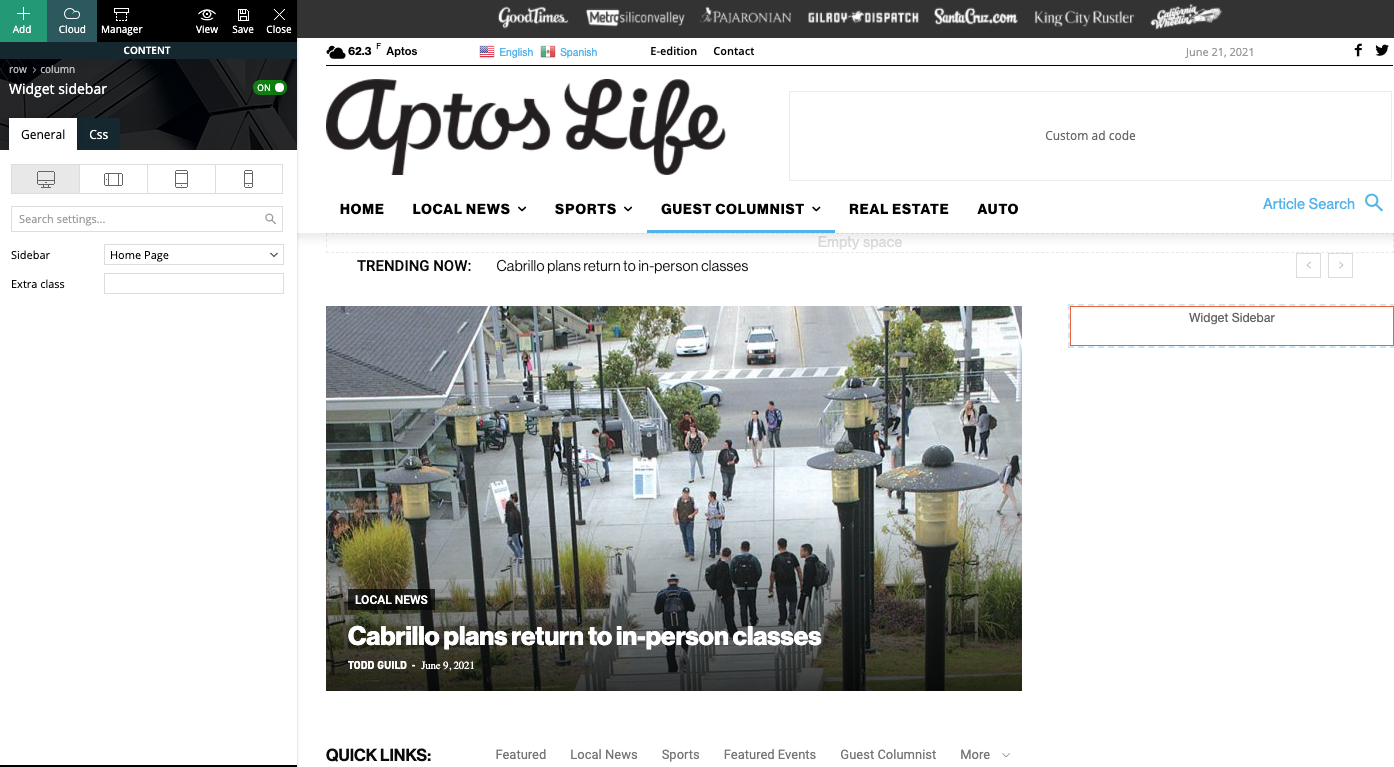
What happens is when we build a page with a sidebar in TD Composer, and leave the page template set to default, we are seeing a strange overlapping sidebar:
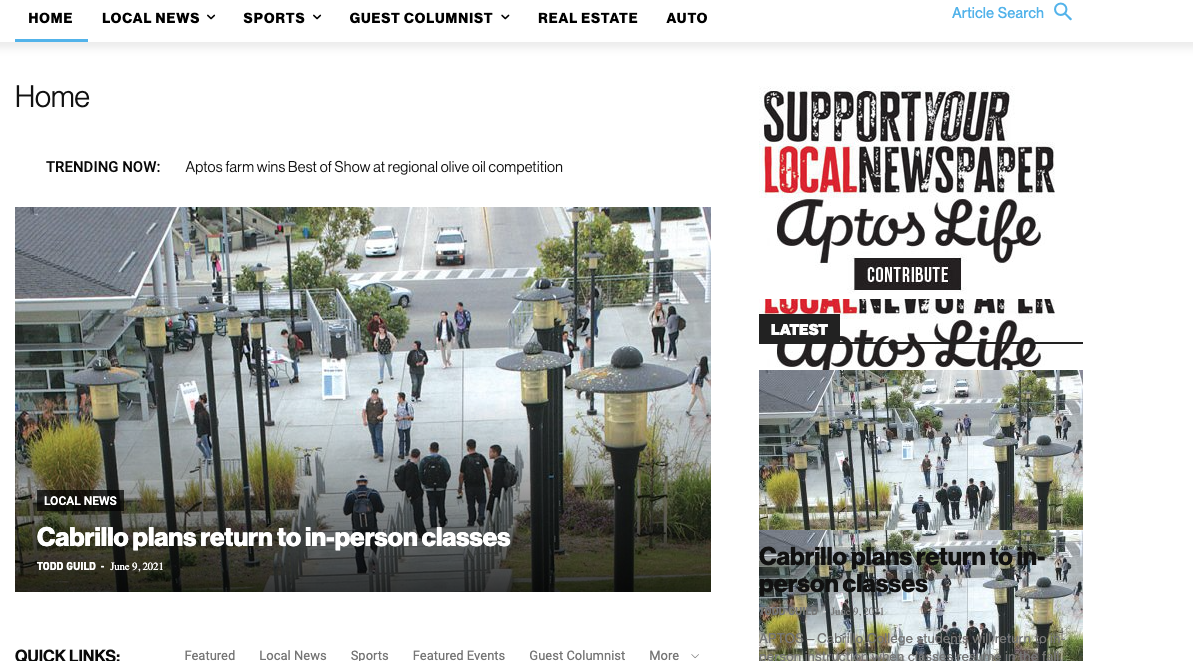
This is how we have the sidebar set in TD Composer:
As a temporary workaround we can set the page template to Pagebuilder + latest articles + pagination, but this opens up a whole new set of problems. For example, if we try to change or hide the sidebar in the “Homepage latest articles” settings, no changes occur. Even something such as changing the title on the post loop won’t take affect.
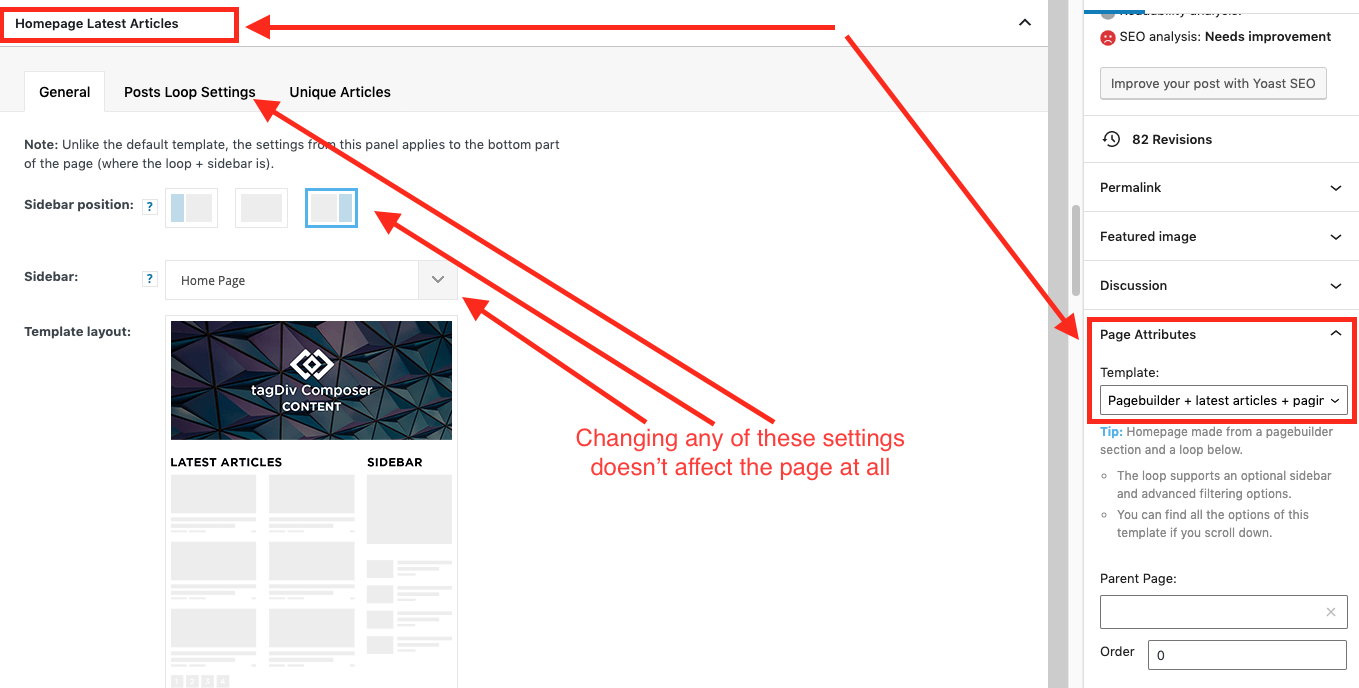
As a result, instead of two overlapping sidebars, we now have two duplicate sidebars stacked on top of each other:
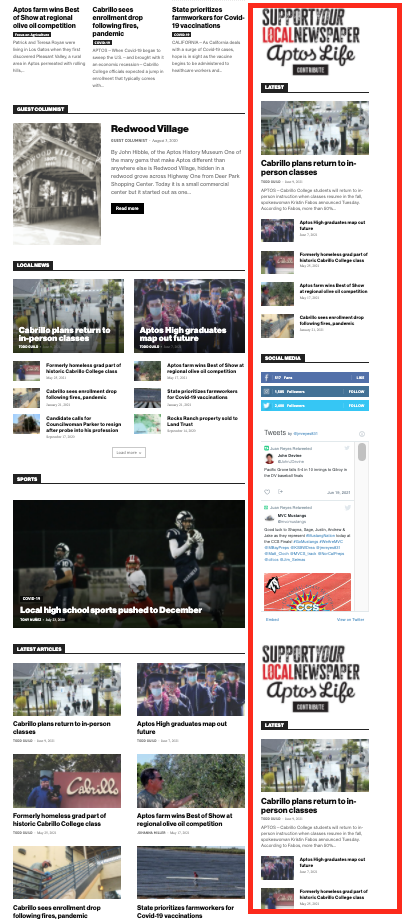
Is there any way to fix these issues? Ideally we would like to leave the page template set to default, with the overlapping sidebars eliminated.
We’ve already tried disabling all our plugins to check for conflicts. Here is some more info from the System Status panel:
Theme name Newspaper
Theme version 10.4
Theme database version 10.4
HTTP channel test wordpress
Installed demo Default – demo ID: default | install type: full
Theme Mobile Newspaper mobile version
php.ini configuration
Server software Apache/2.4.38 (Debian)
PHP Version 7.3.19-1~deb10u1
post_max_size 32M – You cannot upload images, themes and plugins that have a size bigger than this value. To see how you can change this please check our guide here.
max_execution_time 120
max_input_vars 3000
SUHOSIN installed false
PHP extensions
mbstring available
GD library available
WordPress and plugins
WP Home URL https://aptoslife.com
WP Site URL https://aptoslife.com
WP version 5.7.2
WP multisite enabled Yes
WP Language en_US
WP Memory Limit 1 GB/request
WP_DEBUG False
Caching plugin No caching plugin detected – for best performance we recommend using WP Super Cache
 hindisection
facing an issue one of site uvaclick.com is opening in a strange way on desktop
 Anonymous
 Hi, Vlad!
Sadly, it is not fully fixed, yet…
I removed the CSS codes, but some captions were behaving strangely.
Even more strange that some captions were ok, only some of them were wrong.
If you can make a note for the developers to look a little bit further on this issue, we’d be glad.
 Socratease2640!
 Hey Harefamilia,
My understanding is that for the footer template only, you have to first assign it to a page (any page, I chose the homepage) . This can be done in the theme panel footer area or in the website manager. Strangely, setting it on one single page seems to make the footer appear globally on every page. Then you go back to THAT page to edit the footer. The “edit with TagDiv Composer” does NOT appear if you try to edit the footer template directly. Personally, I find it very inconsistent and confusing that they have done it this way. The footer template should be editable in the same way the header template is, that is, with the “edit with TagDiv composer”.
Hope this helps,
Anamaria Hello,
This is strange. The issue can be from a plugin conflict, that’s why, please deactivate ALL plugins except tagDiv ones, also if you are using child theme or cache plugin, deactivate them, clear all cache(also from your browser) and try again.
Also, if you don’t have the red zone, please try with right-click menu to delete it https://www.screencast.com/t/9nWg97KsS.
Thank you!
Bettina Hello!
This is strange. The issue can be from a plugin conflict, that’s why, please deactivate ALL plugins except tagDiv ones, also if you are using child theme or cache plugin, deactivate them, clear all cache(also from your browser) and try again.
If this problem is not solved after that, then we need to take a look and see what happened there.
Please contact us via email at contact@tagdiv.com and provide the following:
– admin url and credentials
– a link to this topic in order to identify you
Our team will take a look!
Thank you!
 flyingfinn
Hello and thank you for your support.
We try to use UK demo. We set up the page in desktop and we just want the responsive version for mobile view.
Though for a strange reason in mobile the header and footer are different.
Different background colours and different menu in footer.
Cab you help us understand why is this happening? Mobile theme is disabled. Thank you in advance
Mobile header:
Responsive header
Mobile footer
Responsive footer
 sergioshrek
Dears,
I cannot use Big Grid Flex anymore, or I get this issue
I found that I have and incompatibility with this plugin: “XYZ SMAP” that is used to publish the posts in Facebook and Twitter… Sounds strange.
Can you help me to fix this issue?
Thanks
 Calin
Calin Hi,
This is a strange situation.
To bring back the theme panel settings you can use the theme panel backup -> https://forum.tagdiv.com/import-export-theme-settings/ (but please make sure that you still have the cloud template sin cloud library).
Please check this and let us know the results!
Bettina Hello!
That’s strange. Please make sure you have the same settings and templates.
Let us know the results!
Thank you!
Bettina Hello!
That’s a bit strange. Please send an email at contact@tagdiv.com and provide wp-admin, so we can investigate this issue. Also paste a link to this topic so we can easily identify you.
Thanks!
Calin Hi, this seems to be quite strange, I see that the website became boxed and seems to be some extra headers for blocks.
If you want, we can take a look at this, make sure that you have a full backup and contact us at contact@tagdiv.com provide wp-admin access and include the link of this topic in email.
We’ll take a look as soon as we get your email.
Thank you!
Calin Hi,
Unfortunately, the like button becomes deprecated and that is way it is looking like that.
Indeed, when the website looks like this -> https://imgur.com/zZf9QyG the css stile is not loaded on that page, but this is a strange behavior, this problem appears only recent?
If you want we can take a look to your website, for this please make sure that you have a full backup and contact us at contact@tagdiv.com, provide wp-admin and cPanel access and we’ll check to see if the theme is set correctly and if there can be something interfering with it. Also include the link of this topic in email.
Thank you!
