
- NewspaperHow to update a plugin
- NewspaperHow to update the WPBakery Page Builder plugin
- NewspaperHow to Update the Newspaper Theme
- NewspaperSingle Post Excerpt
- NewspaperWP Rocket and Newspaper Theme: Optimization Guide
- NewspaperCredit System
- NewspaperHow to use the Bing Maps API
- NewspaperModules Builder in Newspaper Theme
- NewspaperCreate a frontend submission form
- NewspaperCustom Fields Support
- NewspaperFlex Block Settings Guide
- NewspapertagDiv Opt-In Builder
- NewspaperHow to use the YouTube API
- NewspaperDefault Category Settings
- NewspapertagDiv Composer Tutorial
- NewspaperHow to Set the Image Avatar
- NewspaperUnique Articles
- NewspaperFacebook Share
- NewspaperCache plugin – install and configure
- NewspaperFeatured Image, Video or Audio
 delfinista
Hi,
I updated the theme from 4 to 6.
I have problems with updating pages. After clicking on public or updates you get blank page here
http://www.sito.ext/wp-admin/post.php
help me
 julingn
Hi,
I just updated to theme version 6.2 – now the meta tags (titles, meta description) from yoast wordpress seo plugin are no longer woring on posts and pages.
Example Page: http://www.brettspiele-magazin.de (page title should be: Brettspiele-Magazin.de – Wir testen Gesellschaftsspiele!)
Example post: http://www.brettspiele-magazin.de/qwixx/ (page title should be: Qwixx – Anleitung, Testbericht und Bilder zum Würfelspiel )
I already deactivated / activated the plugin, updated the plugin to newest version.
Could you please check if there is an incompatibility with the plugin and your latest version.
regards,
Julingn
 Thomas
 I just update to 6.2.1 on http://www.virtualmagie.org/ and I have the title problem.
I appears (name of the page + name of the site) :
<title>AccueilVirtual Magie – l'actualité des magiciens</title>
but with WordPress SEO plugin the correct title should be:
Virtual Magie – magie pour magiciens : forums, vidéos, secrets, petites annonces, articles…
Any idea?
 wagner
I tried updating via the auto-update Envato plugin from 4.6.3, but it ended up wrecking my site and had to do a complete site restore. Looking at the documentation, the script seems to be what I want as I keep my content and theme settings among other things. However the documentation screenshot 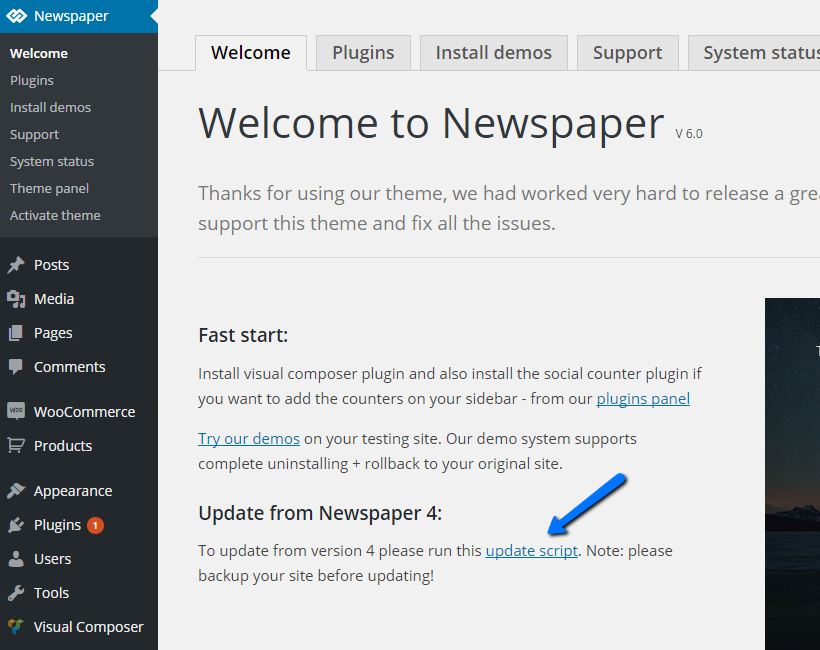 shows Newspaper v6 running with a link to the script in a text box that’s part of a Newspaper sidebar menu. I don’t have that with v4.6.3 and it’s not clear where/how I would run it from the documentation as this link in the Newspaper submenu seems to be the only way to run the script…

 nf_prt
 Hi,
I don’t see a logo in your site and I’m using desktop. The theme seems to be printing the image URL “http://www.planestrainsautomobiles.co.uk/wp-content/uploads/2015/06/PTA-logo-web-2.png” but server says that image is not there. Try to reset the image/logo at the theme panel.
About security, it’s a big topic.
Wordpress sites get targeted a lot, I would be very surprised if it was theme related. There’s many things you can do to help fight those bots and scripts, just a few I recall:
– admin user account should not be “admin”. bots try that account 1st thing and if they see the account is active, they’ll brute force try to guess the password. admin account should not be the name of the website, they try that 2nd.
– require captcha to login (but this hurts real users experience IMO)
– use a plugin to limit login attempts
I use a combination of wordfence plugin + cloudflare CDN.
Wordfence is neat, I don’t use premium edition, free one does a lot already, including some of the work a limit login attempts plugin would do. Supposedly, websites with wordfence communicate with wordfence services and if they spot an IP sweeping websites trying to login, they spread the word and it gets blocked. cloudflare helps cause they divert IPs with bad reputation and you can set it to high security (good in case of a big attack), which checks browser integrity, javascript execution and sometimes ask human interaction almost like captcha. They allow page rules so I keep the whole site with standard security but the wp-login page gets max.
Even with all of this, I still get targeted anyways. I know cause I have a rule to block IP for 30min if it tries to log in with “admin” and it triggers from time to time. Sometimes it comes in waves, specially after a big WP update cause bots go crazy over exploits discovered and they start scanning sites that didn’t update already. Just my 2 cents/experience, hope it helps, cheers!
 bgb
bgbHello,
After i update.
Missing Dropcaps shortcodes.

 fuseuk
I used to use the fashion style, but now the ‘Import predefined styles’ is nowhere to be found.
Can someone please show me where I would be able to import the styles on the new update (preferably with screenshots too)
Thanks
 yakir105
Hi,
I have two problem with Newspaper 6.
1. Since then update the theme, I have not updated the publication date of the posts on the site. It’s stuck on 18 June.
2. the bbpress forum don’t work anymore ( I dont have the “bbpress template” when i edit the forum page).
Thank you very much for your help!
My URL: http://hayom.org.il/
 khancept
KicksOnFire.com
Updated to Newsmag Version: 1.7.2
Wordpress Version 4.2.2
Lazy Loading disabled.
All images are missing.
 Bryson T
 Static? Nah. I run multi-author so static is never an option for me. WordPress handles that aspect pretty well.
I tried FeedWordPress on your recommendation of it a while back. Just to have a page of RSS content from other sites on the same subject. The plugin was going through some rough times back then. A new update started deleting random posts from the database. I was backed up so it wasn’t a big deal once I removed it, but it led me toward curation a nice aid for authors.
Within the next 2 years I’ll be into a setup similar to yours; multiple sites feeding a main site.
Custom coding something to work with what I need isn’t a bad thing. It’s like you said, all a matter of having the time to do it.
 simchris
 Suggestions:
http://codex.wordpress.org/Hardening_WordPress
Plugin – not tested:
https://wordpress.org/plugins/protect-wp-admin/
Older article:
http://www.wpbeginner.com/wp-tutorials/11-vital-tips-and-hacks-to-protect-your-wordpress-admin-area/
(check comments for article on feedback re opposing views/out of date warnings for DOA plugins or procedures)
——–
main items:
a) create new superuser; delete admin account
b) use ‘limit login attempts’ plugin
c) avoid plugins not updated for security fixes in WP 4.2 era (check Securi for list of bad plugins, for example; feedback on the support forum for any plugin on WordPress.org)
d) avoid plugins from ThemeForest/Envato unless very well documented, updated for security issues, and check feedback comments to see if malware/abandonware/bugs
e) consider turning off the pingback and XLMRPC stuff.
-
This reply was modified 11 years by
simchris.
 scorpiock
 Hello Alin,
I have replaced in style.css. I believe this will be replaced in next update? if so, what should I do so it doesn’t get replaced in next theme updates.
 Alin [tagDiv]
 Hi,
The smart sidebar was designed to work on theme posts, page content when td-ss-row class is added to the row that you want to make sticky and also on loop(latest articles, categories…) Unfortunately it was not tested with custom post types so I cannot make any recommendations for this, sorry! We plan to improve and add better support for the custom post type in a future update.
Thanks!
 Andrei L.
 Hi
We know about that issue and will try to fix it in the next updates. That happens when you modify the browser zoom as you can see here http://screencast.com/t/CiTTf6yCl7f Try to reset the zoom do default and the site will be displayed fine.
Thanks!
Andrei L. Hi
That social bar It’s designed for top menu and footer. It needs custom work to add it elsewhere and unfortunately we cannot offer any at the moment. We would have gladly made it for you but we are a small team and we are working very hard on the development, updates, fixes and support. But, you can always get a freelancer from sites like: http://studio.envato.com/
Thanks for the massage.
Alin [tagDiv] Hi,
You can try to make this change directly in style.css file and see if still the default color is being applied. This issue appears because of the cascading property of css and change it directly in the stylesheet file you should not have this delay. Try to change the color here – http://screencast.com/t/XhfSg0Ij6
Also we will try to add some options for mobile menu in a future update as it is on our list.
Thanks for the message and for suggestions!
 Marius
 Hi Bryson T
The issue is not the CSS of the block,please remove the modification you have done to fix it. The issue is about the order of the theme style.css vs js_composer.css and VC that overwrite the grid padding. http://screencast.com/t/RQvAuITOEaN
Please update the Child theme from the latest theme version.
Alin [tagDiv] Hi,
1. Please check Translations – http://screencast.com/t/3DiSr6ZV1
2. Unfortunately at this moment theme doesn’t have this option, but thanks for your suggestion, I have added this on our feature requests list and we will try to find a solution to implement percentages for More Articles Box in a future update.
Thanks!
 Lucian
 Hi,
That like button uses the link of the current pots and it increments like for it so it should show the total likes you have for that post. The fb like plugin is implemented using this iframe: http://screencast.com/t/25jcgYa0 and the counter is handled by facebook.
Like Alin suggest you should give it some time and check after a few days it might take a while to update and this be a temporary issue due to facebook.
Sorry for the inconvenience!
Thanks for the message!
Lucian Hi,
I’ll add this on our list for further testing and fix it in the next update if its a theme issue.
Thanks for the message!
Alin [tagDiv] Hi,
Please update the theme to version 6.2 and also update the child theme, you can find it in /code folder as this issue with child theme was fixed in this version.
Thanks!
Alin [tagDiv] Hi,
I have checked your site and unfortunately the plugin affects theme’s html for share button. I have added this on our list and we will try to find a solution in a future update.
Thanks!
 wpdiv
wpdiv 1. I am very keen to update your latest version theme to replace existing 4.6.3 version. Your old version child theme customization supports https://forum.tagdiv.com/child-theme-documentation/ hierarchy. How long does it takes to apply for newspaper 6.3 version?
You can remove the default google fonts from the config file here: http://screencast.com/t/wmxKL4rF which can’t be edited using the child theme. Sorry!
Then give an option to disable google fonts via theme options panel. That does make sense. Every time when i update the theme i have do replace the file manually which is very painful.
 yasirhashmi15
Hello,
This is my test site: http://43c.81d.myftpupload.com my background used to work but its not coming up anymore and i think something changed in the update that’s why its not showing anymore. Could you please have a look?
Thanks.
Lucian Hi,
That widget title is generated by WordPress and it’s difficult from technical point of view to change the title when updated and add it there. Sorry for the inconvenience, we will see what we can do!
Thanks for the message!

