
 gorka
gorkaHi, I’ve tried to update the theme to the latest version. Everything is configured, and the license ok, appears as REGISTERED, but when I try to update from 12.1.1 to 12.2 from the ‘Install update’ button the following screen is an error one, showing the message ‘Sorry, you don’t have enough permissions to access to this page’ (I’m admin, of course)
May you help me to update it?
 Ozgurunlu
 Hi Bettina,
Thank you for the reply. I’ll try doing that and will update.
Btw, do you have a recommended full image size to upload? (so that it will be big enough and it will be a versatile size for auto cropping/resizing).
In your screenshot I see that the full size image is 1068×712. Will that be the ideal size for uploading an image or e.g. 1920×1080 would be better.
Thanks in advance!
 travelopia123
 the update is not proper installing .
? Plugin could not be activated because it triggered a fatal error.
Warning: require_once(/home/841767.cloudwaysapps.com/jbcqeewryw/public_html/wp-content/themes/Newspaper/includes/wp_booster/td_api.php): failed to open stream: No such file or directory in /home/841767.cloudwaysapps.com/jbcqeewryw/public_html/wp-content/plugins/td-multi-purpose/styles/tds_api.php on line 33
 Bettina
 Hello @travelopia123!
You do not need to delete anything from version 11 in order to update to version 12.
Thank you!
travelopia123hello dear friends
after te update from version 11 to 12 , the mobile version dont working right , also the website does not working properly , remains of the version 11 blocking the theme.
how do i remove any traces of the old version so to start a fresh istallation?
thank you very much.
 sushmasmaurya@gmail.com
 It’s now updated on mobile theme too. Thank you for your support.
Bettina Hello @kantauganda!
From what I can see, you use a cloud demo. So, you should access the homepage on your frontend and create a mobile page from here: https://prnt.sc/zRRCL6C3lm5l
We have 3 options for mobile versions that you can use:
1. Responsive version: A responsive version of your website looks similar to the desktop version. TagDiv Composer is used to edit the page.Click on the mobile viewport: https://www.screencast.com/t/XDQJedlggSB. There, you can see your mobile version and edit or adjust the elements to look better.
2. Mobile pages: https://tagdiv.com/newspaper-10-3-7-update-brings-customizable-and-fast-mobile-pages
3. Mobile theme plugin: The Mobile Theme is a performance-optimized theme included in the main Newspaper theme that only loads on mobile devices. It comes with its own templates and designs for pages, posts, categories, etc., so your current templates from the desktop theme will get converted to the mobile theme layout. Please see https://forum.tagdiv.com/the-mobile-theme/ and https://forum.tagdiv.com/mobile-theme-introduction/ for more information.
A full explanation is here: https://www.youtube.com/watch?v=SpGkOnJeNZY
If you need to use the mobile version 1 or 2, then you need to uninstall the Mobile Theme plugin.
Thank you!
 sebpre0805
 Hello,
No, I use Firefox and Chrome. both look the same. I just deactivated all plugins except for all of TagDiv. Looks exactly the same, nothing has changed.
The live search is of course switched on. Do you want to take a look at the site? Then I would send you a temporary admin account.
updated:
I got this solved with the live search. There was a custom css from the old theme version, which I apparently overlooked. I apologize for my mistake.
But what is still not solved is the issue with the Composer menu on the left, which could not be fixed despite deactivating the plugins. I really have no more ideas. The right edge stays cropped no matter what I do.
Another question about a CSS solution?
-
This reply was modified 3 years by
sebpre0805.
 affnads
 any update
 giriraj
 Hello Team,
It seems the above issue has been finally fixed in the Version: 12.2 update. I didn’t face any problems while editing.
Hope it’s fixed by your development team.
Thank you for your follow-up and solve the issue.
Giri
 Korik12
My site is using Newspaper theme but wont update the ads i’ve added to the site. THe information is there and saved and I can see the ads while logged in. However when I log out the ads disappear and the old ads show up.
I have cleared the cache several times. I have updated my Adsense. I have tried multiple things to fix or get the site to update correctly, but to no affect.
Please advise as soon as possible…
I have also updated to Newspaper 12.2
 thecitylane
Hi
Since updating my website to the newest version of the Newspaper theme, I’ve noticed that the tagdiv gallery isn’t showing on my AMP pages. For example https://thecitylane.com/clover-richmond/?amp=1.
I’ve also noticed that when I try to update a plugin, flush my cache, or save a post, when using PHP 8 and 8.1, I get fatal errors. I’ve had to revert back to PHP 7.4.
Could you please look into this.
Thanks,
Paul
 viscott
 Any updates on the FEED Problem in Newspaper 12.2 and WP 6.1.1?
Instagram GalleryBlock Render Failed – Unsupported request – method type: get
 srzeyamlon
 I just update my PHP and everything works 🙂
 mark-dev
 Bettina, hi!
1) we don’t use jetpack
2) we don’t use buddypress
3) our yoast seo settings https://prnt.sc/a9VfjtTDu-1N
4) .htaccess – there are no prohibitive directives
5) wp-content – we don’t have object-cache.php file
6) we don’t use mod security
List of all our plugins https://prnt.sc/wCDjsQjQ1wNc
Also, we found that all our problems started after the theme was updated to version 12.2
mark-dev I have the same problems (with JS) after update to 12.2
https://forum.tagdiv.com/topic/load-more-button-dont-work-and-others-errors/
 Calin
Calin Hi arvindk,
We will like to investigate this situation, if you agree, please contact us via email, be sure that you have a full backup, and let us know when we can update the theme to see what can cause the problem. Also, include the link to this topic to can identify you!
Thank you!
 philbo375
We are unable to create a new page via tag div composer but we are able to update the old pages. Can you please help us with this issue?
Calin Hi ilouie,
Indeed, for the moment the list menu element does not have the option for dropdown, this should be added in the coming theme update. Right now the list menu can be only like on this demo https://demo.tagdiv.com/newspaper_chained_news_pro/
Thank you for your understanding!
Calin Adding multiple authors to your articles
Content
In this tutorial we will show you how to implement multiple authors to your posts using the Co-Authors Plus plugin.
We will make the implementation in the child theme so it will be easier to manage on theme updates. You will need to install and activate the Co-Authors Plus plugin first.
Adding the multiple authors is a three step process.
- Step 1 – Adding the required functions in your child theme functions.php file.
We created 2 custom functions for the author and for the author box which we can then call on the post styles and not have to use the entire functions each time.
Add these functions in your Child theme functions.php file: https://pastebin.com/ciYrSZvQ These will create the custom implementation to add the co-author and the author box for each co-author in particular.
- Step 2 – Adding the single post templates to your child theme.
In your main child theme folder, you will need to create the following folder structure:
Newspaper-child/parts/single
Then, under the “single” folder add both the single-template and the loop-single files for each of the post styles you use on your articles.
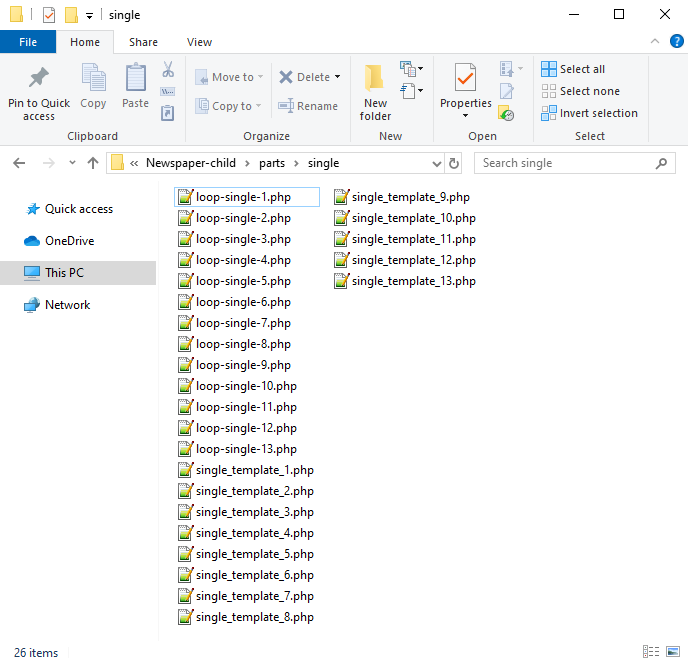
Now you will have to identify where the author is being called in each post style.
For styles 1, 5, 9 and 10 you will find the author code in the loop-single files while for styles 2, 3, 4, 6, 7, 8, 11, 12 and 13 the code is fount under the single_template files.
Edit the files corresponding to the style you want to apply the co-authors to and then call the functions added at step 1. Replace the default author and author box codes:
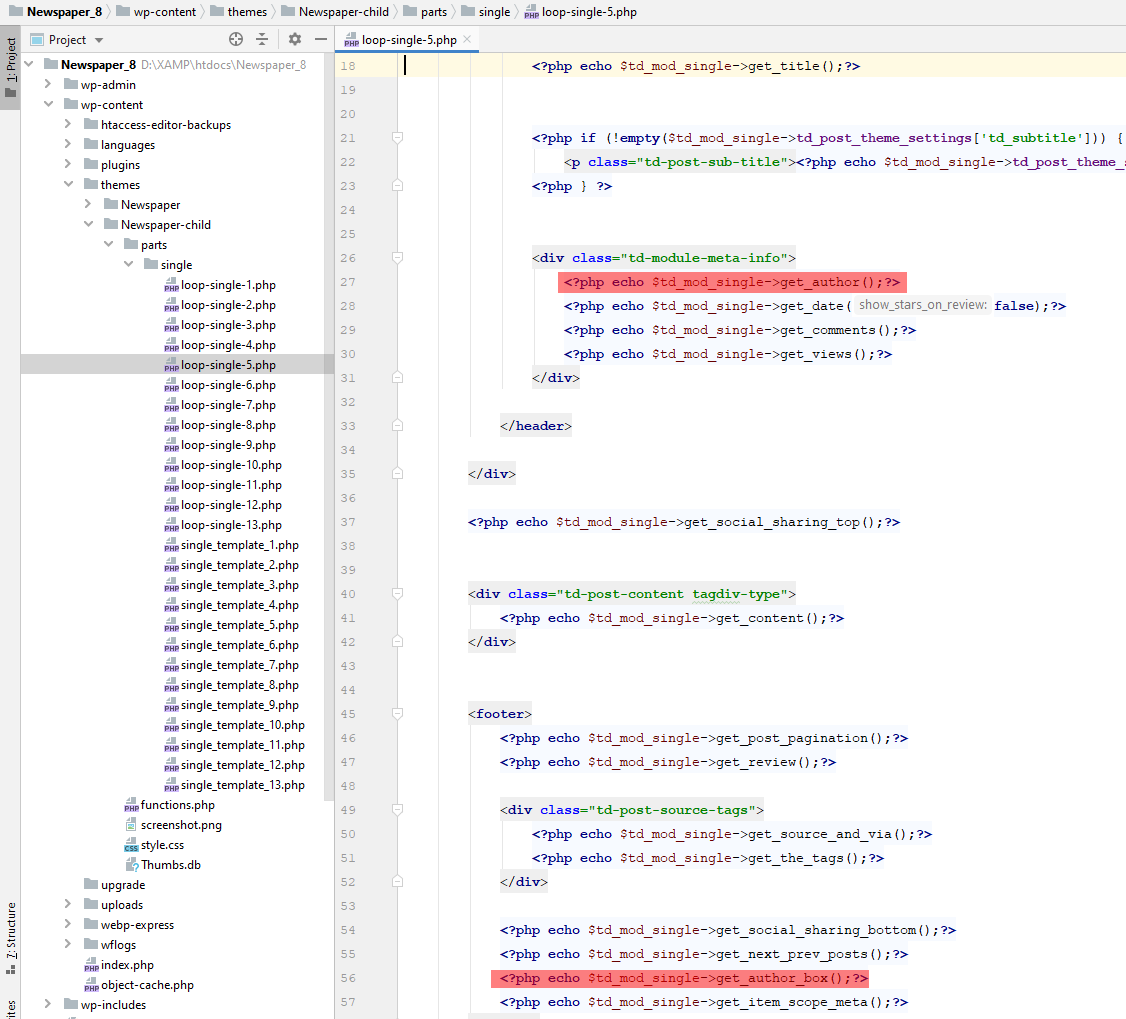
Replace the highlighted code with the following codes:
<?php echo td_get_post_coauthors();?>
and
<?php echo td_get_post_coauthors_box();?>
Maintain the codes position in the .php file though for proper results. \
- Step 3 – CSS styling
In order for the co-authors to position properly we also need a bit of CSS code to ensure proper styling so please add the following CSS code in the the theme panel under custom code-> custom CSS:
https://pastebin.com/dRaStewQ
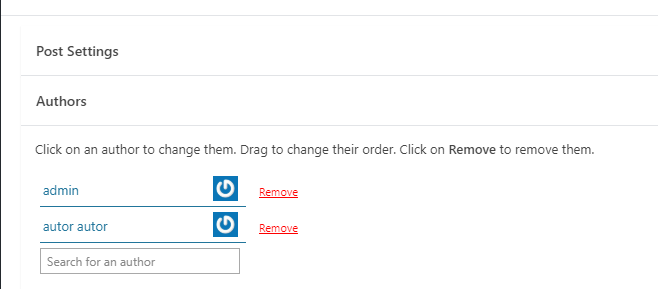
Now you simply need to edit your post and add multiple authors using the plugin author field:
 arvindk
 I was able to get it up after falling back to 12.1 version and resetting Theme settings from Newspaper theme panel. I had same issue last time and I had to reset everything, (all page designs) to default before I could make it working. No conflict with any plugin was encountered then. So I am scared to do an update now since it has occurred twice.
 Antonio Palacios
 Yes, but it still doesn’t work. I tried deactivating all plugins (except the TagDiv ones), reinstalling Cloud Library and Tagdiv Composer and clearing the cache.
It was as of the last update.
Thanks
Calin Hi transcontinentaltimes,
Our developer implemented an option that will be added in the coming theme update and should fix/improve the theme requests to the database.
Thank you!
 dc1
dc1Hi,
This is related to this ticket: https://forum.tagdiv.com/topic/the-events-calendar-filters-break-when-tagdiv-cloud-library-is-active/. It’s about a compatbility issue between The Events Calendar and Newspaper, the filters do not appear. Earlier this month you released an update fixing the issue, however… the issue isn’t fully fixed.
The filters now appear, however the Event Category and Tag filters have no content. See screenshot (it also shows the data in the DOM). This issue only occurs when tagDiv Cloud Libary is active.
I trust this issue will be solved soon, as it is part of an existing issue.
Thanks.
 discovermh
 Hello, @Bettina
any update?
