- NewsmagHow to update a plugin
- NewspaperHow to update a plugin
- NewsmagHow to update the theme
- NewsmagHow to update the WPBakery plugin
- NewspaperHow to update the WPBakery Page Builder plugin
- NewspaperHow to Update the Newspaper Theme
- Apitd_api_top_bar_template::update_key
- Apitd_api_top_bar_template::update
- Apitd_api_single_template::update_key
- Apitd_api_single_template::update
- Apitd_api_footer_template::update_key
- Apitd_api_footer_template::update
- Apitd_api_smart_list::update_key
- Apitd_api_smart_list::update
- Apitd_api_thumb::update_key
- Apitd_api_thumb::update
- Apitd_api_category_top_posts_style::update_key
- Apitd_api_category_top_posts_style::update
- Apitd_api_category_template::update_key
- Apitd_api_category_template::update
 Catalin
 Hi primonews,
Please make sure when you update the theme to the latest version of it. First of all, you need to make a full backup to your database and then, you have to remove
your old theme and then add the new theme folder which contains the latest version of the theme. Also, you have not to overwrite because then you will encounter some problems. Check here -> https://forum.tagdiv.com/install-via-ftp/
Hope this helps and let us know how it goes!
Thank you!
 epitets
Hi!
After your last update I`m having problems. First of all, my website crashed. It looked like this:
Only after enabling you TagDiv composer everything started to work. But I dont need your composer. And I dont have any other composer. They just make my website to load slower.
I would like to disable / delete tagdiv composer without crashing my website. Can you fix it please?
Thanks!
Valts
Catalin Hi,
Please make sure when you update the theme to the latest version of it. First of all, you need to make a full backup to your database and then, you have to remove
your old theme and then add the new theme folder which contains the latest version of the theme. Also, you have not to overwrite because then you will encounter some problems. Check here -> https://forum.tagdiv.com/install-via-ftp/
Hope this helps and let us know how it goes!
Thank you!
Catalin Hi,
Please update the theme to the latest version of it which is 9.7.1 because that problem was fixed.
Thank you!
 Calin
Calin Hi,
You can make a test of this update using a copy of your live website on a sub-domain or localhost, in this way if something is going wrong you’ll not crash the live site.
Thank you!
Catalin Hi,
Please notice that api-plugin.php is no longer available with our theme and you need to use the creative-plugin.php if you want to create your own blocks. Please check here -> https://forum.tagdiv.com/developer-info/ Also, ensure that you have correctly made the theme update.
First of all, you need to make a full backup to your database and then, you have to remove your old theme and then add the new theme folder which contains the latest version of the theme. Also, you have not to overwrite because then you will encounter some problems. Check here -> https://forum.tagdiv.com/install-via-ftp/
Hope this helps and let us know how it goes!
Thank you!
 cdavies
Hello :
when i download the new theme, the name i see is:
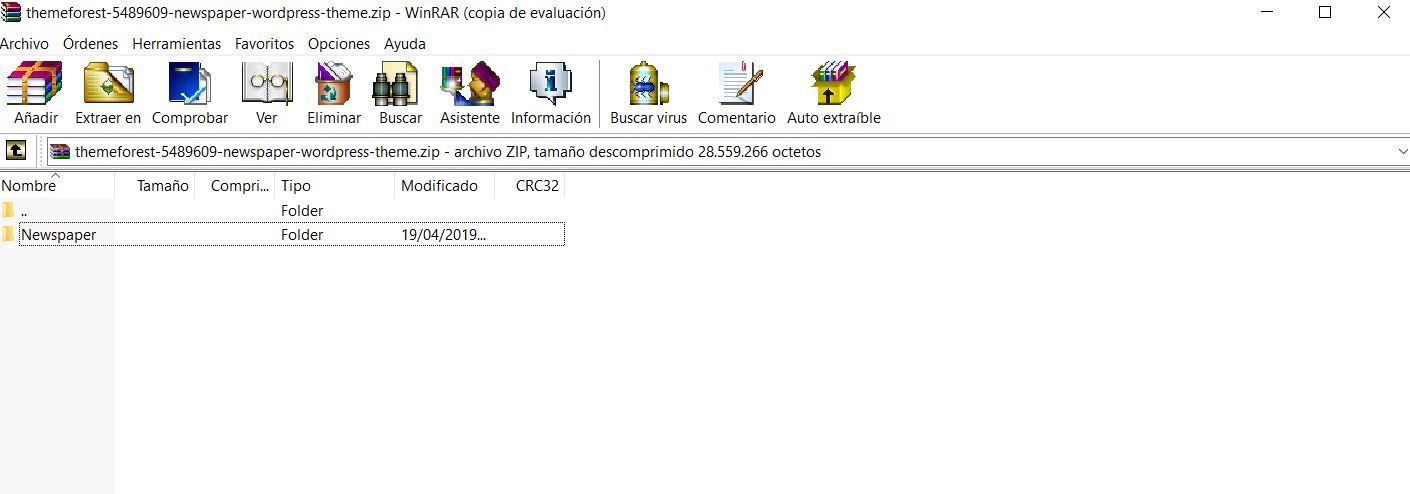
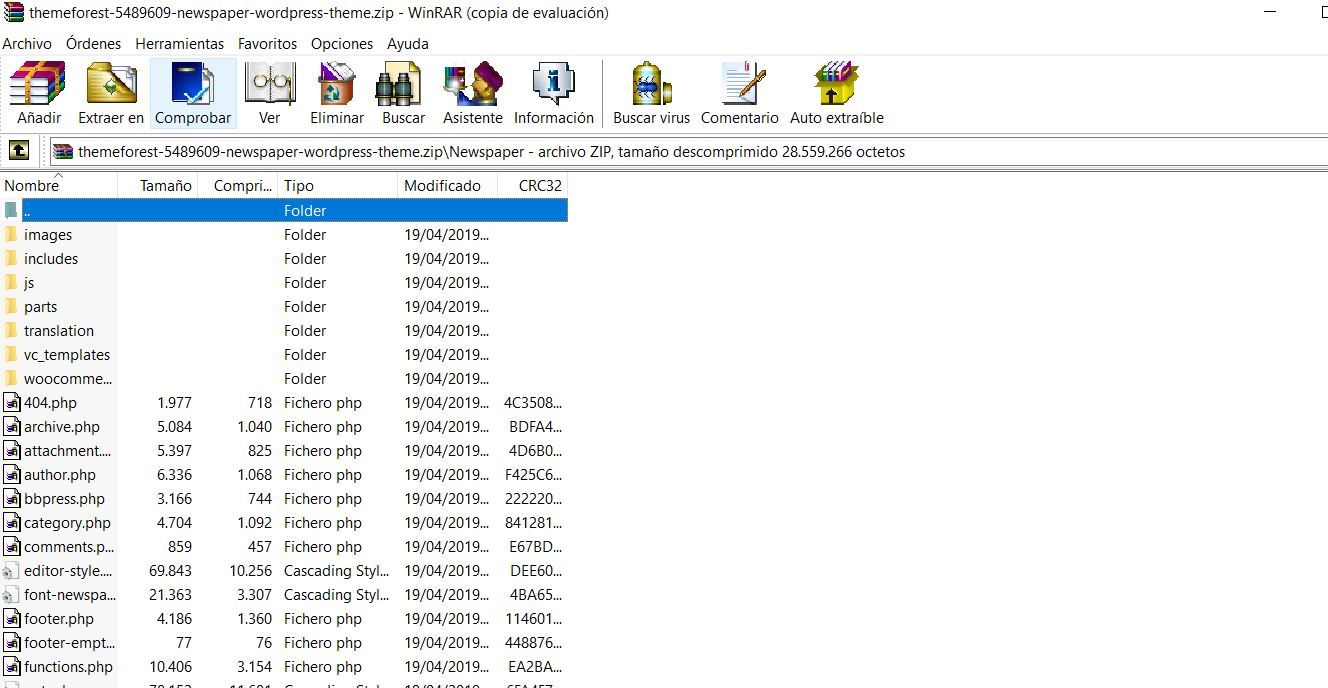
themeforest-5489609-newspaper-wordpress-theme.zip, and inside i don’t have newspaper.zip, what i see are all the archives of the theme.
Screenshots:
https://www.revistamision.com/zip1.JPG
https://www.revistamision.com/zip2.JPG
How I should proceed?
THANKS
C Davies
YOUR INSTRUCTIONS: Unzip the “Newspaper-tf” archive file and the “Newspaper.zip” file.
Calin Hi,
We are making some investigation to find out what can provide these problems with wp-admin to fix it.
In theme update v9.7.1 was make some fixes, please make a them update, and let us know if the problem persist.
Thank you for your understanding!
Catalin Hi,
Please make sure when you update the theme to the latest version of it. First of all, you need to make a full backup to your database and then, you have to remove
your old theme and then add the new theme folder which contains the latest version of the theme. Also, you have not to overwrite because then you will encounter some problems. Check here -> https://forum.tagdiv.com/install-via-ftp/
Hope this helps and let us know how it goes!
Thank you!
Catalin Hi,
Please make sure when you update the theme to the latest version of it. First of all, you need to make a full backup to your database and then, you have to remove
your old theme and then add the new theme folder which contains the latest version of the theme. Also, you have not to overwrite because then you will encounter some problems. Check here -> https://forum.tagdiv.com/install-via-ftp/
Hope this helps and let us know how it goes!
Thank you!
Catalin Hi,
Also, please make sure when you update the theme to the latest version of it. First of all, you need to make a full backup to your database and then, you have to remove your old theme and then add the new theme folder which contains the latest version of the theme. Also, you have not to overwrite because then you will encounter some problems. Check here -> https://forum.tagdiv.com/install-via-ftp/
Hope this helps and let us know how it goes!
Thank you!
Catalin Hi Antoon,
Sorry about that but please notice that we cannot re-create this error, sorry! Also, I check your website and your theme used it seems to be 9.2.2. Give me some screenshots with your errors so we can identify them. Also, please make sure when you update the theme to the latest version of it. First of all, you need to make a full backup to your database and then, you have to remove your old theme and then add the new theme folder which contains the latest version of the theme. Also, you have not to overwrite because then you will encounter some problems. I request you to make a new install to a new sub-domain and check how it works and also, you can provide it here for more inspections.
Hope this helps and let us know how it goes!
Thank you!
 Simion C.
 Hi,
Please check if the plugins have been updated – https://tagdiv.com/updating-the-core-of-tagdiv-themes/
After you update the theme to the latest version there should be an update button for the theme plugins in the welcome screen. The mobile theme plugin will be updated as well.
Or try the other update method, check if there is an update button for the mobile theme in the theme plugins panel – http://prntscr.com/nfme97
Ultimately if there is a problem, deactivate and delete it then reinstall it from the same plugins panel. Let us know.
Thanks
Catalin Hi Page52,
On the new update, all of the theme core was moved in our page builder plugin and that’s why you need to re-add those. Sorry for the inconvenience, but please notice that we had to make this change imposed by Envato.
Thank you!
Simion C. Hi,
Due to changes made in the theme in the 9.7 update the file where the thumbnails are made is now part of the composer plugin – http://prntscr.com/nfm73c
More about it here – https://tagdiv.com/updating-the-core-of-tagdiv-themes/
You could modify the cropping there if this is required, but the modifications will be lost after a theme update when the plugin is updated.
However maybe there is a different way of achieving the results you want. For example if you want to have more control over how a thumb looks in a module, you could use a flex block or flex grid – http://prntscr.com/nfmaaj – http://prntscr.com/nfmaer these have some settings for customizing how the image looks. Let me know if you have more questions.
Thanks
Calin Hi,
Usually this is happen when you make the update via FTP and you do not delete the previews version of theme, and you only override it, please make sure that you make the theme update correctly -> https://tagdiv.com/update-newspaper-theme/
If there are still a problem, please remove/delete the theme and reinstall it via FTP.
Thank you for your understanding!
Simion C. Hi,
A list of the files that were affected by the 9.7 update can be seen here
– https://tagdiv.com/td_deploy/Newspaper/changed_files_9.6.1_9.7.html
Due to many theme files being moved in the composer plugin, a child theme now has limited functionality when it comes to making modifications to theme files. Prior to 9.7 there were many files that could be modified in a child theme – https://forum.tagdiv.com/the-child-theme-support-tutorial/
But now most files are in the composer plugin, so they cannot be used in a child theme.
Thanks
 tmaghrebt
Hi,
my website is broken after latest upgrade.
https://themaghrebtimes.com
have a look before I downgrade !
thx
 mclanfranconi
 Wooooow… interesting. I think i was the only crazy guy to detect the same.
My Adsense start to get down when i update to versión 9.6. From U$D 1.000 to (NOW) U$D 400!!!
I think was the theme, but you confirm this.
 Ingrid
Hello.
I upgraded to 9.7.1 following all your instructions and I got just blank pages on http://www.dringrid.ca and anything I click on wp dashboard or menu is just blank page…
Please advise,
Ingrid
 bpotter
Hello,
I’ve searched the forum for an answer to this, but cannot find.
I like the layout of the Youtube video playlist element. But can instead of having to manually update the playlist with new videos, can it be set to video posts and update with latest video posts?
Thanks
 sarah-2
 Update – I restored my site so as not to have broken images.
I actually don’t think I need the thumbnail regeneration … I think there’s a lazy loading issue. See this page: https://offmetro.com/world/category/destinations/
The first load everything looks great, then anything under the fold shows a broken thumbnail.
I tried:
uninstall/reinstall theme
deactivating all plugins
purging the cache
Turning off newspaper lazy loading
 Peter
PeterThe update of the theme and all plugins went well until The update of the TagDiv Mobile Theme which returns this message: This version of the tagDiv Mobile Theme plugin is not supported by the current activated theme!
Please make sure you’ve updated the theme properly! Follow this guide.
This is currently deactivated and the theme is loading and working normally. Caches cleared with no cache plugin active at present.
Regards
 malibuzz
 I have also the following notification :
This version of the tagDiv Mobile Theme plugin is not supported by the current activated theme!
Please make sure you’ve updated the theme properly! Follow this guide.
CAN YOU SETUP THIS FOR ME ?
malibuzzHello,
Since the last update of the Newspaper theme to version 9.7.1, my website http://www.sotrama.info no longer appears correctly.
The part of the site where the featured articles appear (featured) is no longer displayed.
I come to ask for your help to see what is preventing the correct display.
It is to be able to profit from your intervention on the site that I just renewed my subscription to the technical support.
While waiting for your reply
receive my best regards