
- Apitd_api_top_bar_template::update_key
- Apitd_api_top_bar_template::update
- Apitd_api_single_template::update_key
- Apitd_api_single_template::update
- Apitd_api_footer_template::update_key
- Apitd_api_footer_template::update
- Apitd_api_smart_list::update_key
- Apitd_api_smart_list::update
- Apitd_api_thumb::update_key
- Apitd_api_thumb::update
- Apitd_api_category_top_posts_style::update_key
- Apitd_api_category_top_posts_style::update
- Apitd_api_category_template::update_key
- Apitd_api_category_template::update
- Apitd_api_module::update_key
- Apitd_api_module::update
- Apitd_api_block::update_key
- Apitd_api_block::update
- Apitd_api_header_style::update_key
- Apitd_api_header_style::update
 Calin
Calin Hi,
Please make sure that you have the last theme version and the theme system status is configured as mentioned in the requirements guide. Please follow the guide carefully
– https://forum.tagdiv.com/requirements-for-newspaper/
and please increase all requirements that are lower, and follow all steps.
WP_MEMORY_LIMIT try to increase it to a value of double you already have if possible.
Please add this code in the .htaccess file:
<IfModule mod_substitute.c>
SubstituteMaxLineLength 10M
</IfModule>
Also make sure that all theme plugins are updated and activated, clear all cache and try again.
Thank you for your understanding.
Calin Hi,
Please make sure that the theme system status is configured as mentioned in the requirements guide. Please follow the guide carefully
– https://forum.tagdiv.com/requirements-for-newspaper/
and please increase all requirements that are lower, and follow all steps.
WP_MEMORY_LIMIT try to increase it to a value of double you already have if possible.
Please add this code in the .htaccess file:
<IfModule mod_substitute.c>
SubstituteMaxLineLength 10M
</IfModule>
Also make sure that all theme plugins are updated and activated, clear all cache and try again.
Thank you for your understanding.
-
This reply was modified 7 years by
 Calin.
 TechieBraj
I am working on a website https://themacrotrend.com/
The first post of the first grid image is not showing. Even when I update new post then that place post replaced by new post but images never show. Please have a look.
Here is the screenshot- https://prntscr.com/m2v7fe
 rakeshbarwar
Does the updated flies like functions.php will lose the modification after the theme update?
 Graphic Oracle
Hello,
I was wanting to put a notice at the top of my updated posts that read, “This post was updated on Jan 1, 2109” (the date being whenever the update was made). The purpose being that a post may be months old as indicated by the original published date, but a viewer would be alerted by a notice that the post has been updated/modified more recently. Does this feature exist in the Newspaper Theme? I have looked through the documentation but have not found anything.
Thank you.
 dnf67
dnf67 I updated to 9.2.2 last week thinking the week between Christmas and New Years was a good time to do this sort of work. Upon installing 9.2.2 all of the feature images disappeared on the front page. They were of course where they were when you opened the individual post, but not under any category index or on the front page layout. I commented on someone else’s post about having the same issue they were but noticed you folks were taking a well deserved holiday, so I reverted to the backup from the night before as I didn’t want to have a broken looking site for a week. I tried turning off plugins to no avail. I also cleared the SiteGround cache to no avail. How do we correct this issue and will it be better addressed in the next release, or???
Thank you!
Two sites (two licenses… only one was changed and changed back)
https://opticalvisionresources.com/ (changed)
https://theopticalvisionsite.com/
Thanks again
Calin Hi,
Please make sure that you have the last version of theme, and all theme plugins are updated.
If the problem is still there please provide a link were I can inspect the problem.
Thank you.
-
This reply was modified 7 years by Calin.
 Hamza Khan
hi i checked and install the demo for my food blog but there is no structured-data for recipe like pic, rating, time, nutrition, video., etc here is test https://search.google.com/structured-data/testing-tool#url=https%3A%2F%2Fdemo.tagdiv.com%2Fnewspaper_recipes%2Ftd-post-frozen-blood-and-sand-cocktail%2F
can you tell me is there update available for recipe or there is compatible plugin available for this ?? thanks
 Catalin
 Hi,
So you receive that error when trying to update the theme? That message is usually displayed when updating/installing a theme
– https://wordpress.org/support/topic/the-link-you-followed-has-expired/
– https://docs.presscustomizr.com/article/333-how-to-fix-the-link-you-followed-has-expired-in-wordpress
– https://www.godaddy.com/community/Using-WordPress/Wordpress-theme-upload-error-quot-The-link-you-followed-has/td-p/101292
In most cases this is related to insufficient resources, please check the theme requirements guide carefully
– https://forum.tagdiv.com/requirements-for-newspaper/
Also make sure that you are installing the actual theme zip file, not the whole theme package
– https://forum.tagdiv.com/whats-included/
Thanks
Catalin Hi,
Unfortunately, the theme does not have any such an option that allows you to strip out unneeded code from style.css. Indeed, this file is pretty big but please notice that we tried to diminish it in the future update.
Thanks for your understanding!
Calin Hi,
Please make sure you install the theme properly: https://forum.tagdiv.com/install-via-ftp/
Please make sure that the theme system status is configured as mentioned in the requirements guide. Please follow the guide carefully
– https://forum.tagdiv.com/requirements-for-newspaper/
and please increase all requirements that are lower, and follow all steps.
WP_MEMORY_LIMIT try to increase it to a value of double you already have if possible.
The issue was solved by adding this code in the .htaccess file:
<IfModule mod_substitute.c>

SubstituteMaxLineLength 10M

</IfModule>
Also make sure that all theme plugins are updated and activated, clear all cache and try again.
Thank you for your understanding.
Calin Hi,
This can be done by using a template from Cloud templates > Single > Reviews ( https://www.screencast.com/t/K5zsQZ1RfWC5 ) after you get your template will auto open like this ( https://www.screencast.com/t/z82JcRoali ) hover the “Simple post content” and drag it after Review overview, when you see a green row drop it (https://www.screencast.com/t/kblkhN0TNty), save and go back wp dashboard in your post select your post you will like to put your reviews after future image scrool down at Post Settings > General and select at Post template as in our case “Reviews Template 1” and click update ( https://www.screencast.com/t/L17p30mZsA ) ; I hope this will solve your problem.
Thank you.
 Simion C.
 Hi,
We are aware of this issue, it is almost fixed and will be included in the next theme update along other various other fixes. Currently selecting the latest articles template does not function correctly, the settings that should appear do not. Sorry for this inconvenience.
Thanks
Calin Hi,
The issue was solved by adding this code in the htaccess file:
<IfModule mod_substitute.c>

SubstituteMaxLineLength 10M

</IfModule>
Also please be sure to check the updated theme requirements guide
– https://forum.tagdiv.com/requirements-for-newspaper/
Increase all the parameters if it’s the case.
Thank you!
Simion C. Hi,
I see you use an older theme version (9.0.1) and latest WordPress. When WordPress is updated we also update the theme and fix various issues if some are found
– https://www.screencast.com/t/soUmv4sPCjP
You should consider to update the theme as well, not just WordPress. The latest theme version is 9.2.2. Here is a guide
– https://forum.tagdiv.com/how-to-update-the-theme-2/
After the update clear all caching and check if there is still a problem with the text elements. If it is, you could investigate plugins as a first step.
Thanks
Calin Hi,
Please make sure that the theme system status is configured as mentioned in the requirements guide. Please follow the guide carefully
– https://forum.tagdiv.com/requirements-for-newspaper/
and please increase all requirements that are lower, and follow all steps.
WP_MEMORY_LIMIT try to increase it to a value of double you already have if possible.
Also make sure that all theme plugins are updated and activated, clear all cache and try again.
Thank you for your understanding.
 tanteidee
 Just a quick update. It seems that with the code line change the problem go away!
 Alin [tagDiv]
 Replied via email.
The option doesn’t work well if you use Classic Editor plugin. You’ll need to set Homepage Latest Articles template, update the page and then you will be able to see the settings.
Or you can disable Classic Editor plugin until you set the page settings.
We will better support Classic Editor plugin in the next update.
Thanks!
Simion C. Hi,
So the mobile theme plugin was to blame, sorry again for this inconvenience. Shouldn’t be long before a theme update will be released, containing various fixes including the one for this issue.
Thanks
Calin Simion C. Hi,
We are aware of this issue you are describing, it is almost fixed and will be included in the next theme update. Currently when using the page template with latest articles, in some cases the settings for the latest articles do not appear
– https://www.screencast.com/t/zdNNUdwt5hr
What you could try for the moment if you use the Gutenberg editor, is to (while the latest articles template is selected) click a few times on these tabs
– https://www.screencast.com/t/uokjR19n9
We are sorry for this inconvenience, it will be taken care of as quickly as possible.
The unique articles setting should work, I made some tests with it using the same grids you use.
Without unique articles – http://prntscr.com/m2giwc
With unique articles – http://prntscr.com/m2gj3r
If you enabled it and it is not working, could be a plugin conflict maybe or the cache needs to be cleared.
Thanks
 pavel@earnware.com
This is what I got after updating to 9.2.2: 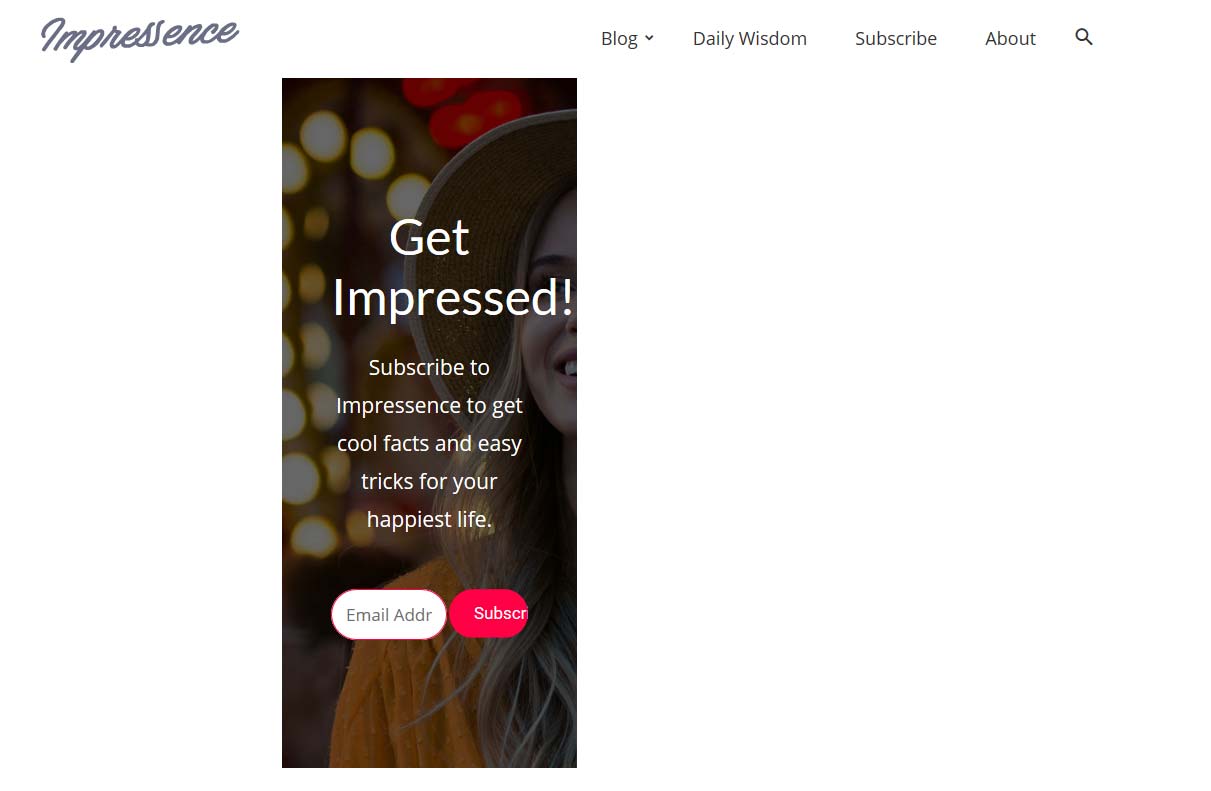
It works, only if using this setting: 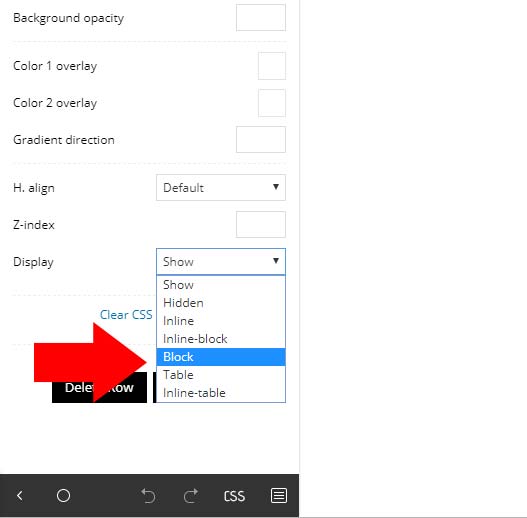 , if using just “Show” option – then in Firefox and Edge, it doesn’t work.
Any fixes for this in the next update?
 unit45host
Hi,
What the exact tables are necessary to use with newspaper theme?
eg.: tdc_dirty_content tdc_icon_fonts tdc_google_fonts
-does not contain any usable information for me, I guess…
tdc_dirty_content, tdc_icon_fonts, tdc_google_fonts
1|1|1|1|1|1|1|1, a:0:{}, a:0:{}
Also with the same tables what is it changed through the time of development?
27/01/2018 1|1|1|1|1|1|1|1 a:0:{}|a:0:{} a:0:{}|a:0:{}
29/01/2018 1|1|1|1|1|1 a:0:{} a:0:{}
31/01/2018 1|1|1|1|1|1 a:0:{} a:0:{}
30/01/2018 1|1|1|1|1|1 a:0:{} a:0:{}
02/02/2018 1|1 a:0:{} a:0:{}
and since just 1 the other 2 tables empty…
Probably was theme update in those dates, but what was changed to less data input made, and what is those data…
What other important (if..) tables have the Newspaper theme?
The reason for this investigation is, because in December with the WordPress 5th version, and the Newspaper 9.0.1 ( not the latest 9.0.2 ) installed/upgraded/updated – all the POST theme settings have gone fishing…
I mean it not appears in the post edit screen. I believed before it is because I migrated from shared hosting to another vps. But I re-created several times the process with a number of migration software, and not that was the case – but the WordPress and/or the newspaper theme upgrade.
td_post_theme_settings
sample (
a:7:{s:14:”td_primary_cat”;s:4:”XXXX”;s:11:”td_subtitle”;s:19:”1000 Words Magazine”;s:18:”td_quote_on_blocks”;s19:”1000 Words Magazine”;s:9:”td_source”;s:19:”1000 Words Magazine”;s:13:”td_source_url”;s:19:”1000 Words Magazine”;s:6:”td_via”;s:19:”1000 Words Magazine”;s:10:”td_via_url”;s:59:”https://www.1000wordsmagazine.com/author/florian-gabriella/”;}
)
the data disappeared at date 02/02/2018 exactly where it shows some theme update (tdc_dirty_content 02/02/2018 1|1)
I would like to understand, which tables doing what to prevent these accidents in the future.
Thank you,
 kelleygreg
Hello, Been using the NewsMag theme for almost 1 year and no problems. WP 5.0 came out, I updated and been having issues since. Almost all Plugins are turned off and the site, PopVinylWorld.com, will load fast at times and won’t load at all others. Please help.
 Rikk
RikkHello,
I have updated the php.ini file according to the guide however the status panel does not detect the change.
According to the panel it is set as below. But i’ve checked several times this is not the case.
max_execution_time = 30
max_input_vars = 1000
Everything else is in the green
Please advise.
