
- NewspaperHow to update a plugin
- NewspaperHow to update the WPBakery Page Builder plugin
- NewspaperHow to Update the Newspaper Theme
- NewspaperSingle Post Excerpt
- NewspaperWP Rocket and Newspaper Theme: Optimization Guide
- NewspaperCredit System
- NewspaperHow to use the Bing Maps API
- NewspaperModules Builder in Newspaper Theme
- NewspaperCreate a frontend submission form
- NewspaperCustom Fields Support
- NewspaperFlex Block Settings Guide
- NewspapertagDiv Opt-In Builder
- NewspaperHow to use the YouTube API
- NewspaperDefault Category Settings
- NewspapertagDiv Composer Tutorial
- NewspaperHow to Set the Image Avatar
- NewspaperUnique Articles
- NewspaperFacebook Share
- NewspaperCache plugin – install and configure
- NewspaperFeatured Image, Video or Audio
 vincent
This is my site. The article that should be on the right, next to the single article entry isn’t appearing. Also, I’m not able to change my “blog & Posts” template style. I change it, then save; and nothing changes. I’m trying to restore a backup, the dead space started when I updated to the newest version of newspaper.
Can I get some help, please?
 InstallationComplete
 Hi,
Thanks for the update.
Much appreciated!
 HumBot
Hello. I just did the update to 8.8 and everything is running well. However, when I visit the site on mobile, the text is cut off on the bottom inside the slides. Do you know why this is? Thank you in advance for your help.
 Allshethings
 Hi, I updated my theme and the plugins as well. Still, the ‘publish’ or ‘update’ buttons on the post are not working. When I deactivate the tagdiv composer plugin, they work fine though.
Allshethings Would I lose all my site’s settings in the upgrade? Is there a document I can read to know how to update the theme? Thanks for your response.
 henryyefele
Hi Please help as I am struggling to update the colour and not able to replace existing logo.It keeps rolling without updating.
Thanks,
 delivite
 Please, mark this thread as resolved. I updated the tagdiv composer plugin from the theme setup options and it works now.
Thanks again.
deliviteHi, I recently updated my Newspaper theme and found that my blog had lost all the settings I made to the homepage. I tried to redesign the page but TagDiv Composer would not work. I have tried to activate the plugin and redo my homepage but this has not been possible. I need your help pls, ASAP.
Thank you.
 ThePure
 Hi,
thanks for fast reply. I inserted this code to custom CSS settings. It hasn’t worked but after I deleted “a” before parenthesis in the code it changed the colour of “contact us”. I would like to change the colour of “info@puretravelers.com”.
You can see what changed on the website as it is already updated.
 Simion C.
 Hi,
We did not make any modifications to the post editing section, so it would be the same as before. Maybe the theme has not been updated properly, please try it again by FTP if possible
– https://forum.tagdiv.com/how-to-update-the-theme-2/
Also review the theme requirements and system status
– https://forum.tagdiv.com/requirements-for-newspaper/
If needed increase the parameters mentioned in the guide. After you install the theme again update the theme plugins. Do not make any modifications to it’s files, if you have a child theme deactivate it temporarily, check custom code if used as well. Also deactivate as a quick test all your plugins, leave only theme plugins active.
Let us know what you find out after trying these suggestions.
Thanks
 n3moy
n3moyHi.
My newspaper theme was updated to the latest version 8.8
But after that i lost some functions in the editor window: no panel for text editing and all the input text is white, so i can see it only if i select it (screenshot – http://prntscr.com/jw9k0d)
Also, i can’t enter the widget panel..when i go for Appearance -> Widgets ..nothing is happened (screen – http://prntscr.com/jw9nbi)
Any suggestions?
Thanks for your help!
Simion C. Hi,
1. That image is set in the demo stylesheet, I believe at the moment the demo was created there was no theme panel setting. So the image was set there
– https://www.screencast.com/t/qT46uj028x
In order to set your own, please remove that highlighted code from the demo stylesheet. Then the background you set in the theme panel will apply
– https://www.screencast.com/t/jZmgeqTRfFw
Sorry for any inconvenience created by this.
2. Twitter will probably not work if you are not using he latest theme version, there were changes made by them. Try installing this social counter plugin
– http://cdn.tagdiv.com/wp-content/uploads/2018/06/td-social-counter.zip
If it still not works, download the latest theme package 8.8.1 and update the theme and social counter (they should be automatically updated when the theme is updated however)
– https://forum.tagdiv.com/how-to-update-the-theme-2/
Thanks
 Catalin
 Hello nirv1,
Ensure that you have installed the theme via FTP way, all the plugins have been updated, clear all the caches and browser caches and check the results.
Hope this helps and let us know how it goes!
Thanks for your understanding!
 Adaras
Hi,
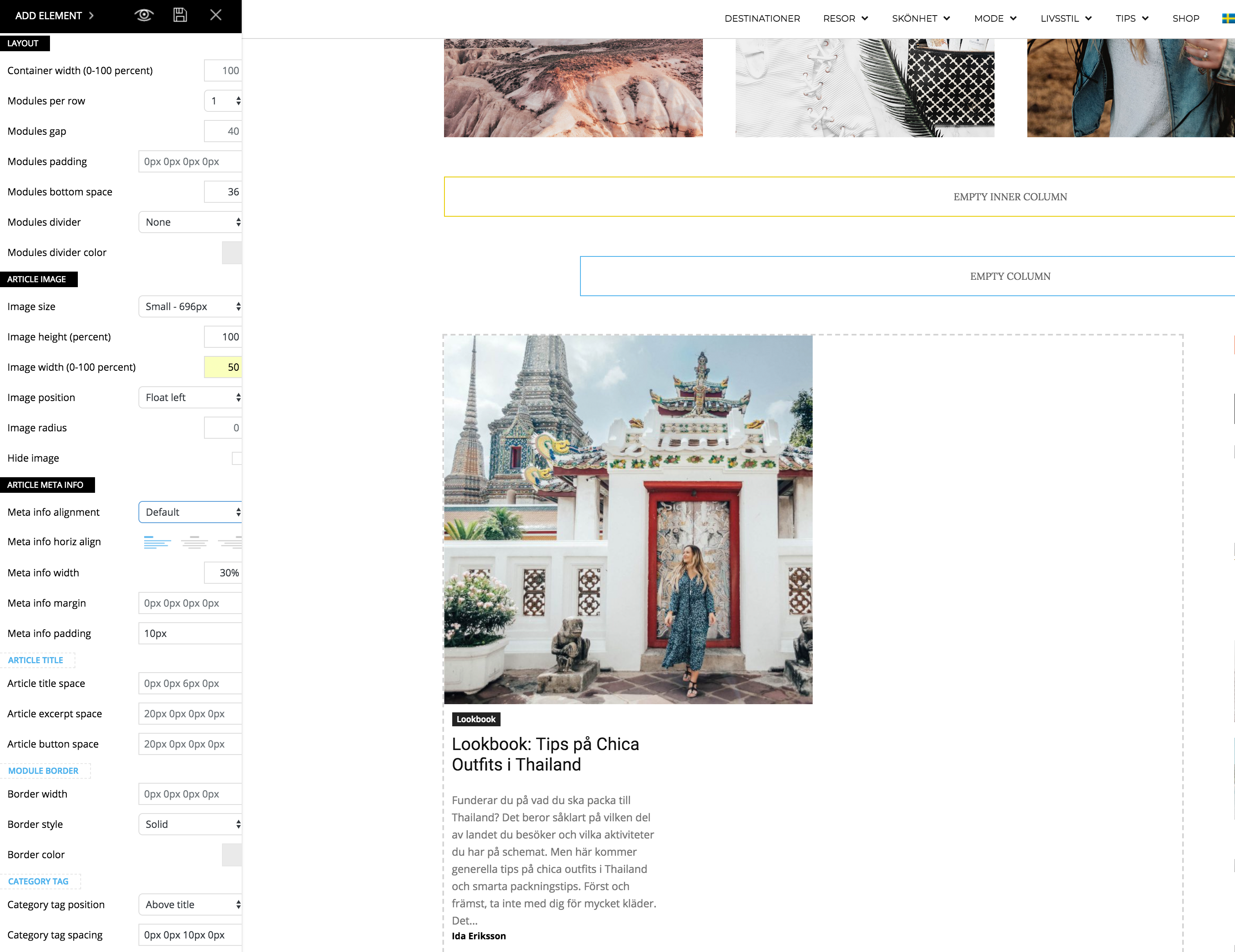
I just updated to the newest version of the theme and noticed a problem when I’m trying to make my flex block as the example for “2 modules per Row here”: https://demo.tagdiv.com/newspaper/flex-block/
I can’t get my meta description to show next to the photo. It’s position below or above the photo, no matter what I do.
When I inspected the elements I see that the difference is that my .td_module_flex_1 .td-module-container has flex-direction: column. And if I change it to “row” like in the example it works. But how do I get it right with only the TD composer?
Catalin Hello Allshethings,
Please update the theme to the latest version of it which is 8.8.1, update all of the required plugins and check the results.
Thanks for the message!
Catalin Hi all,
Make sure that you are using the latest version of the theme installed via FTP way and all of the plugins are updated.
Thanks for the message!
Simion C. Hi,
Seems there is no theme stylesheet loaded, try to reinstall the theme. Use FTP if possible, this is the most reliable and recommended method to update a theme
– https://forum.tagdiv.com/how-to-update-the-theme-2/
Be sure to check if the composer has been updated automatically, update it manually if it is not. Also update the other theme plugins.
Thanks
Catalin Hello m22,
First of all, please make sure that you are using the latest version of the theme installed via FTP way, clear all the caches and check the results. So, if you are using some untested plugins, try to disable all of these and try using only our required and tested plugins if you want to achieve best theme results. Use only the FTP method for theme installing because this is the perfect way in this case. Check here -> https://forum.tagdiv.com/how-to-update-the-theme-2/
Thanks for your understanding!
 Bogdan B.
 Hi,
I have tested this and indeed it seems that the multi-purpose menus will overlap the logo on smaller devices. I will add this to our bug list and fix it in the next theme update.
In the meantime, please try to use another header style.
Sorry for the inconvenience.
Thank you!
Simion C. Hi,
From what I find online Google Chrome made changes to auto-playing videos
– https://developers.google.com/web/updates/2017/09/autoplay-policy-changes
Themepunch seem to say they provided a workaround
– https://codecanyon.net/item/slider-revolution-responsive-wordpress-plugin/2751380#item-description__update-history
That is the version provided in the theme package (5.4.7.3).
Maybe try as suggested – https://www.screencast.com/t/yjzcQVtCTk
Thanks
 emmalabbe
Hi, I use a lot the arrow lists and bullet points and I’d like to add more space between each paragraph. Could you help me to do that?
If you could also tell me how to change the color of H4 and H5 titles, it would be great.
I’m not familiar with CSS, please let me know where to add the code. Also, will this kind of changes disappear when I will update the theme?
Thank you so much!
 ctoweett
 If you modified the main theme files, then you will lose your modifications when you update. If you placed any CSS in the custom CSS section, then it will not be lost. For the first option, it is better you backup your site and theme files and then check which files have been modified in the new update and add back your code https://forum.tagdiv.com/how-to-update-the-theme-2/
 gdgtsinfo
https://www.gdgtsinfo.com/wp-content/themes/Newspaper
My this page show error. So with this error Google Crawl not update for my website. Please solve this problem
 rezaandrian
Hola.
Now Im using Newspaper version 8.7.2 and I wanna update the theme in to the new version 8.8. Can I update the theme without losing any modification code that I placing inside the theme?
AllshethingsHi, I am still using Newspaper V.8.7.2 and since yesterday haven’t been able to publish post or update a post. If I disable the tagDiv Composer plugin, everything works fine but when I enable the plugin the PUBLISH post button stops working.
