- NewspaperWP Rocket and Newspaper Theme: Optimization Guide
- NewspaperNewspaper Theme Support
- NewspaperNewspaper theme documentation
- NewspaperWeather Shortcode
- NewspaperCloudflare (CDN)
- NewspaperBest Of Forums
- Thumbnails vs. Featured image size
- NewspaperThumbnails – Fix strange looking images on blocks
- NewspaperRequirements for Newspaper
- NewspaperHow to Make the Site Faster
 Simion C.
 Hi,
Optimizing a wordpress website for the best possible score can take a lot of time. Especially for mobile, where it’s more strict.
I believe you are using mod pagespeed, I very rarely see it anymore. These days the best possible combo for performance is considered Cloudflare and WP Rocket. However, you current results aren’t bad at all. I tested the website now and it’s 82 on mobile -> https://pagespeed.web.dev/analysis/https-actugeekgaming-com/c9aa1kj7cl?form_factor=mobile
What the theme offers for mobile is mobile pages. This means using a mobile version of the desktop page, same as on this demo -> https://demo.tagdiv.com/newspaper_pro/
A mobile page has it’s own content, header, footer. Usually there is a difference from using the responsive desktop page versus using a mobile page, favoring the mobile page. You could test it, create a mobile page -> https://prnt.sc/R8zzwvtFsb50 and create the header and footer -> https://prnt.sc/Lj7X4dZfzP9v Also reduce or simplify the elements in the page as much as possible. Then clear the cache and repeat the test.
Thank you!
 Atyllo
Hi,
First of all, thank you for your previous reply regarding Flex Blocks and background images.
I’m trying to optimize my website as much as possible for Google’s Core Web Vitals, especially on mobile, and I’d like to make sure I’m using Newspaper in the best possible way.
My website is:
https://actugeekgaming.com/
My latest PageSpeed report:
https://pagespeed.web.dev/analysis/https-actugeekgaming-com/aomr1s8vst?form_factor=mobile
At the moment my mobile score is around 50–60, and I’d like to improve it significantly while keeping Newspaper if possible.
Here is what I’ve already done:
Removed the homepage video background.
Replaced the hero section with a normal image.
Optimized all featured images.
Enabled WP Super Cache.
Enabled Jetpack CDN.
Upgraded to PHP 8.2.
Removed unnecessary plugins.
Added preload for the LCP image.
Contacted support regarding Flex Blocks using CSS background images.
I understand that Flex Blocks use background images by design, and you’ve suggested creating a custom Module Builder template using an element instead.
Before rebuilding my homepage, I would like to ask a few questions:
1) What are the official Newspaper recommendations for achieving the best possible Mobile PageSpeed score?
2) Which homepage modules or blocks are the most performance-friendly?
Are Flex Blocks still recommended for the first visible section, or would you recommend using a Module Builder layout instead?
3) Are there any Newspaper or TagDiv Composer settings that should be disabled to improve Core Web Vitals?
4) Do you have a performance optimization guide specifically for Newspaper?
5) Do you know of any websites using Newspaper that consistently achieve 85–90+ Mobile PageSpeed scores?
If so, could you share a demo or explain what makes them different?
6) Apart from replacing Flex Blocks, is there anything else inside Newspaper that commonly hurts LCP or overall mobile performance?
My goal isn’t simply to increase the PageSpeed score, but to build a fast, modern news website while continuing to use Newspaper.
Thank you very much for your advice!
AtylloHello,
I’m using Newspaper 12.7.7 with the latest tagDiv Composer.
My homepage scores around 60 on Google PageSpeed Insights (mobile).
Lighthouse identifies the homepage LCP element as:
<span class=”entry-thumb td-thumb-css”
style=”background-image:url(…)”>
The image is rendered as a CSS background instead of an element.
Lighthouse reports:
fetchpriority=high should be applied
render-blocking CSS, especially:
td_legacy_main.css
style.css
tds-front.css
I already tested:
latest Newspaper and tagDiv Composer versions
Jetpack Image Accelerator enabled
cache enabled
manually adding a preload for the LCP image
My questions are:
Is there any supported setting or Flex Block that renders the featured image as a real instead of a CSS background?
Is there an official hook/filter to customize the thumbnail markup?
Is there a recommended way to improve LCP for Newspaper homepages?
Can td_legacy_main.css or other legacy CSS resources be safely disabled on Newspaper 12.7.7?
Website:
https://actugeekgaming.com
PageSpeed test :
https://pagespeed.web.dev/analysis/https-actugeekgaming-com/hodhlqczsz?form_factor=mobile
Thank you!
Simion C. Hi,
I see you are using the latest theme version. You can also use the latest wordpress version, the theme works fine with it. Most of our users use wordpress 7, the latest version.
I’ll need more details about the issues. As a website visitor I see just one error in the browser console, in the homepage -> https://prnt.sc/AjeHSUfIvrZd which seems to be related to an ad code used in the page. There are no other errors where I checked.
And the loading speed that I’m seeing is very good, on average it’s between half a second to a second -> https://prnt.sc/0UL4HsZBKNUZ
Please let me know how I can see the issues that you are reporting. In case I need to log in to see the issues, then I suggest to send us an email at contact@tagdiv.com and provide admin login.
Thank you!
Simion C. Hi,
That’s the perfect result. Litespeed is indeed a very good, and most importantly free alternative, to WP Rocket. For website owners who wants to optimize the website and achieve the best result, every tip and small detail matters.
Thank you!
 Danny
DannyHope this is ok to post here if not admin can delete it if prefered. My site scores 100 in the performance section using LiteSpeed Cache (wich is free) now i have a smal personal site so i also use the QUICKCloud CDN service wich is not too expensive (i put in 10 euros over a year a go and still have 3 euro left) this by itself already will boost your site speed by alot) but i wont dive into all the LiteSpeed Cache options and settings but it is a great free alternative.
So for those not using a expensive cache program like WPRocket that has a setting to preload your fonts but still would likle the benefits you can add a function to the theme’s functions.php file its best adviced to set up and do this on the Newsmag Child theme. This will also remove the font from ther Network dependency tree.
My site scored 100 already before i preloaded the font but it just adds up with all other optimizations so the Newsmag websites can really be blazing fast! DRiFT MAFIA Website
Just open the functions.php file in your prefered texteditor and ad this code at the bottom:
I could nott post the code for some reason probly safety


Simion C. Hi,
Normally that isn’t a wordpress file. This is what the wordpress thickbox folder contains by default -> https://prnt.sc/CkuhzGWRM5mz So there is a thickbox.css file, not a thickbox.min.css file.
If maybe you use any optimization plugins on the website, such plugins can create minified files of actual wordpress files, to speed up the website. So an optimization plugin could take this file thickbox.css and create thickbox.min.css. Since this isn’t a file normally found in wordpress, security plugins may flag it, as they don’t know what it is.
That’s probably what’s happening. I still suggest checking what that file contains exactly. If it’s just minified CSS code, like this -> https://prnt.sc/-oKT6kxcaKnU then it’s fine.
Thank you!
Simion C. Hi,
That isn’t a known issue. But I do have a pretty good idea about what’s happening.
Does the page maybe look like this when it happens? -> https://prnt.sc/hyCp9Ek6hrrs
That’s the mobile theme version, meaning the mobile theme plugin is active on the website. The mobile theme doesn’t load composer or cloud library resources and classes.
Normally the mobile theme is displayed on mobile. But sometimes due to the caching used on the website or provided by the hosting, it can get displayed on desktop as well. It usually depends on how the homepage is visited after the cache is cleared. If someone visits it with a mobile, then the mobile version is cached and server to everyone. By updating the page in the composer you are basically clearing the cache, and if you check with a desktop next then the problem is solved. Until by coincidence it will happen again.
I see you use litespeed, if this is the only caching used on the website, I suggest activating this option -> https://prnt.sc/gSi7feVctFPh If it’s already active and it’s still happening, then it means there is another cache active.
Or, you could deactivate the mobile theme plugin. It’s an optional plugin.
I believe that this is what’s happening, because it fits the description of the problem. I could be wrong however.
Let me know.
Thank you!
Simion C. Hi,
From what I see only the homepage is indexed https://prnt.sc/20wGw_TYFNur
The theme has no capability to use noindex, or index, or anything else. All the theme does is to display your content.
Perhaps the nature of the issue is more related to how the website looks.
I see broken and missing images everywhere and a very large ad at the top, also the sticky header has no background and it looks a bit bad. For example this is what I’m seeing when arriving on the homepage of your website -> https://prnt.sc/wwnagCba-OA_
Please check the website in incognito mode to see how it looks for a regular visitor. That’s how it looks to Google as well.
Here are some more broken things I’m seeing
https://prnt.sc/UKT_uotknb1n
https://prnt.sc/5SvO1ew1QN_M
https://prnt.sc/Ztmcn9qE6mh8
https://prnt.sc/oMhe6g8lG5uq
These could be a reason for not indexing the website’s content. If the website has visual problems Google may not index it. I suggest looking into these issues, maybe the visual issues are related to the litespeed optimization. And maybe the missing images https://prnt.sc/V56A1nVfHgWj are related to the Jetpack site accelerator, I see you use it.
Once those issues are fixed, the website should look better and it can’t hurt the indexing either. Let me know if you need help with it.
Thank you!
Simion C. Most of the things I suggested apply to that website as well.
I checked the posts you mentioned. While they are pretty long posts, the caching does the job very nicely. You are getting loading times of half a second on all the posts from the website that I checked -> https://prnt.sc/FwCdgaVmQZUX That’s a great job. Or do they load differently for you? Maybe after clearing the cache the first visit will be slower, but once the cache is created there is a consistent loading time of half a second.
What I could add to the above, if you are using popups to load other pages or custom content, those can also be delayed from loading -> https://prnt.sc/9hVlEidCHOFD This can matter a lot. So delaying the mega-menus, delaying the popups, delaying the footer. This provides a faster initial loading speed. But please test after using those options, to see if there are any problems.
Thank you!
 kunal
kunal And here are a few example blog pages you can review for reference. Of course, you can inspect any page on the website, but my primary concern is specifically the loading speed and performance of the blog pages.
Examples:
https://product-wiki.com/12-tips-how-to-stop-doomscrolling-on-social-media-easiest-way/
https://product-wiki.com/what-is-google-gemini-omni-ai-how-to-use-it/
I’m mainly trying to make the blog pages load as fast as possible because that is where the majority of the traffic lands from search engines. Even if the homepage or some other sections are slightly heavy, that is still manageable for me. But the blog pages should ideally be lightweight and extremely fast.
So if possible, could you please suggest some practical changes or optimizations that might genuinely help improve the speed? If required, I can also share the list of plugins, cache settings, optimization setup, or anything else that may help in debugging the issue.
Please do let me know if you need anything from my side.
kunal Hey, first of all, thank you so much for reaching out. I really appreciate your help.
But this concern is not regarding my older website, Product Strategies. It is actually regarding my new live website, Product-Wiki.com. Here’s the website URL: https://product-wiki.com/
The main issue is specifically with the blog pages. Honestly, the homepage performance is not a major concern because most traffic directly lands on blogs through search. So my focus is mainly on improving the loading speed and performance of the blog pages.
I have already tried multiple optimizations from my end, including image compression, reducing the first-load image size, lazy loading, caching tools, and several other performance tweaks. But somehow the pages still feel slow and heavy.
So if possible, could you please have a look and suggest some improvements? Maybe there are theme-level issues, unnecessary scripts, CSS/JS loading problems, or other optimizations that I might be missing. Any help in reducing the overall page weight and improving loading speed would genuinely help me a lot.
Thanks again.
Simion C. Hi,
Sure, I’ll take a look and try to provide suggestions. I believe this is your website https://product-strategist.com/
I checked a few post pages and for me the loading speed is usually below 1 second https://prnt.sc/k0jMr6tL1b_Z That’s certainly not very slow. I see you are using Litespeed which is a very good plugin. You could try the option to delay the JS https://docs.litespeedtech.com/lscache/lscwp/pageopt/#js-settings-tab this one here https://prnt.sc/-qSiTgI_hUMf which would make it faster, but it could also cause problems with how the page looks or works, please test it carefully.
The images are optimized and they are lazyloaded, which is very good.
One suggestion I would make is to delete the standard pack plugin -> https://prnt.sc/ARUZDej2rw2C this is not required for the theme demo you installed. Deleting it it stops resources from it from being loaded unnecessarily.
Maybe also try delaying the loading of the mega-menu, there is an option for that -> https://prnt.sc/y0F9L98R-gEf
Also try delaying the loading of the footer -> https://prnt.sc/hGvAdiY8wm3I
If you try a few of these there should be improvements. But there could also be issues, so please test carefully.
Thank you!
Simion C. Hi,
Some of those are resources loaded by the theme, which is normal. I see you are using litespeed, the settings that help with reducing render blocking and improving the LCP score, are these:
1. https://docs.litespeedtech.com/lscache/lscwp/pageopt/#load-js-deferred
2. https://docs.litespeedtech.com/lscache/lscwp/pageopt/#load-css-asynchronously
Please note that some optimization settings can cause problems with how the website looks or works. Be sure to check the website after activating such options.
I believe you are using mobile pages and templates from the theme, is this correct? If so, please make sure this setting is also active https://prnt.sc/jG610I0zDd7m Clear all caches if you activate that setting.
Thank you!
 Calin
Calin Hello,
“Performance Optimization
Among the most anticipated features are options to minify and aggregate inline CSS of blocks, accessible directly from the Theme Panel. Additionally, you can now hide the mobile menu and mobile search functions, offering a cleaner user experience on mobile devices.” – here is how you can enable those options:
-> Footer delayed load https://prnt.sc/FS34hBno40sx (under the theme panel > footer > footer delayed load)
-> MINIFY INLINE CSS and AGGREGATE INLINE CSS – https://prnt.sc/en14t6CQChM- (under the theme panel > block settings> inline css)
-> Don’t load on mobile/desktop, this option is only on the cloud header for HEADER MENU https://prnt.sc/udlAW4icvSPP on HEADER MENU STICKY https://prnt.sc/9pKnilQdWyex on MOBILE MENU https://prnt.sc/ff7fRQvTnaXt and on MOBILE MENU STICKY https://prnt.sc/Mm-4mbC4WB68
-> Flex Blocks cache – https://forum.tagdiv.com/use-flex-blocks-cache-option/
“The Newspaper Theme has leveled up its performance by optimizing the Theme Panel’s color settings through CSS variables. Moreover, JavaScript files will only be loaded when they are needed, which should noticeably improve the website’s speed.” – yest this is apply as long you are using cloud tenmplates, so if you do not have the tagDiv STandard pack plugin in used (this is loading all css and js even if is not need), then it will load only the js and css that will be used on that page/template.
Also, it is recommended to use a good cache plugin and even Cloudflare (CDN)
Thank you!
 nycinsider
My site is abysmally slow – but I’d like to work on the actual issues before I add a caching plugin. I’ve come across many speed articles and supposed Newspaper Optimization – but I can’t figure out what is current, or where any of things mentioned are.
https://tagdiv.com/newspaper-theme-unveils-comprehensive-update-v-12-6-what-you-need-to-know/
Performance Optimization
Among the most anticipated features are options to minify and aggregate inline CSS of blocks, accessible directly from the Theme Panel. Additionally, you can now hide the mobile menu and mobile search functions, offering a cleaner user experience on mobile devices.
The Newspaper Theme has leveled up its performance by optimizing the Theme Panel’s color settings through CSS variables. Moreover, JavaScript files will only be loaded when they are needed, which should noticeably improve the website’s speed.
What are the instructions for this? I have no clue where to click or what to do – AI lies constantly and makes things up. What is a step by step guide to gain the advantages claimed above?
https://tagdiv.com/how-to-increase-page-loading-speed/ – is this still accurate?
I’d love an updated step by step list on how to speed up newspaper before I add a plugin to do so.
 seiperi
My website, news360.info, is currently experiencing significant speed issues. After upgrading to a new server, I carried out a full malware scan and removed detected threats, which initially improved performance. However, the site has since become slow again despite further optimisation efforts on my end.
I would appreciate your expert review and guidance to help identify and resolve the underlying problem.
Thank you for your continued support.
 Santy
SantyHello, I’m having a serious issue inserting code into the <head> of my website using the Newspaper theme. I’ve tried multiple methods and none of them are working.
I need to insert the Google AdSense script (adsbygoogle.js) into the <head> to verify my domain, but the code does NOT appear in the page source using any method.
I am always checking using “View Page Source” (not inspector).
I have also tried using external plugins, completely disabling LiteSpeed Cache and Wordfence, and manually integrating the code directly into the theme files (functions.php and header.php). However, the script still does NOT appear in the page source under any circumstances.
I would appreciate guidance on:
the correct method to insert code into <head> in Newspaper
or if there are any known limitations with AdSense or external scripts
Thank you in advance.
Calin Hi,
I just checked your website using https://pagespeed.web.dev/ and on the desktop version, everything is on green https://prnt.sc/bHSSt9ZvxV2A on mobile, there indeed is a situation with the LCP but CLS is 0 https://prnt.sc/pQ9Pqd4C4n0F on the homepage but checking on an article, the cls and lcp are on green on both mobile and desktop – https://prnt.sc/WxF1R04-ffEL – https://prnt.sc/kCygD_uSxhHY
Calin Hi marcnyc,
Your problem is not even related to the theme is related to the cache settings you have (you are using lietspeed check the css and js settings).
Your website with cache, is looking like this https://prnt.sc/CrX2H9yjpeMv. Without the cache is looking correct – https://prnt.sc/QtYw86mm4q99
Calin Hi Scott,
I understand. The issue is that the update from Nesaper 12.7.4 to 12.7.5 does not include any changes that should affect the website’s speed.
What I recommend is addressing the problem with the image that has been set as a background on the site but cannot be found: https://i.imgur.com/xWXB1KQ.png
It appears this image may be used as a background for the header menu—likely on the main header, sticky header, and possibly the mobile header as well.
 Atithya
Hi Support Team,
Hope you’re doing well.
I’m reaching out regarding an accessibility issue identified on our website. According to Google PageSpeed Insights, our pages are currently showing the error: “Document does not have a main landmark.”
It appears that the theme does not include a <main> HTML landmark wrapping the primary content.
This is important for:
Accessibility (screen readers and semantic structure)
Improved PageSpeed / Lighthouse scores
Better overall HTML structure
We request your help in implementing this correctly across the theme.
What needs to be done:
Add a <main> tag wrapping the primary content area (typically where the article/page content is rendered)
Ensure only one <main> tag exists per page
Keep <header>, <nav>, and <footer> outside the <main> section
It would be ideal if this fix is applied at the theme level (e.g., in single.php, page.php, or relevant template files) so it reflects across all pages.
Please let me know if you need access or any additional details from our end.
Looking forward to your support on this.
My newspaper theme version is 12.7.4
Calin Hi Marc,
I just checked the website, and this seems to be working ok for visitors. Also, I see that you are now using the LiteSpeed Cache plugin.
Now, related to the page speed results, this depends on factors like page dimensions, images, external resources, and cache…
UNfortubatley becouse the latespeed is not a tested pluginwe can not say for sure what option to enable and what option to disable to get a better performance, but let’s start with general pagespeed settings:
– convert images in webp format (there are cache plugins that can do this, but if the Litespeed is not doing this, the EWWW Image Optimizer can be used https://prnt.sc/DzMY6YynebbI). Make sure that only a lazyload option is enabled (the theme has an option https://prnt.sc/4pqTwHya8Awa and most likely other plugins that optimize the image to have the option)
– enable this theme option – https://prnt.sc/Ir7qNRhstgSA – https://prnt.sc/k2M5pc8odE1D (AGGREGATE INLINE CSS option needs to be tested with teh cache plugin)
– disable the mobile header on desktop and desktop header on mobile (this can be done for the sticky headers, but make sure that the mobile cache option is enabled – https://prnt.sc/r3QB7-vZ4UzH https://prnt.sc/KBdRK8nc90UW
– on mobile simply disable the mobile sticky menu https://prnt.sc/IFe6OfBzige7 and select the regular menu and set it to be sticky, also make sure that you have set a background color for it – https://prnt.sc/I6G0kypEakOM
– use an object cache (Redis or Memcached)
– use a CDN like Cloudflare
I hope those first steps to help you to get a better speed.
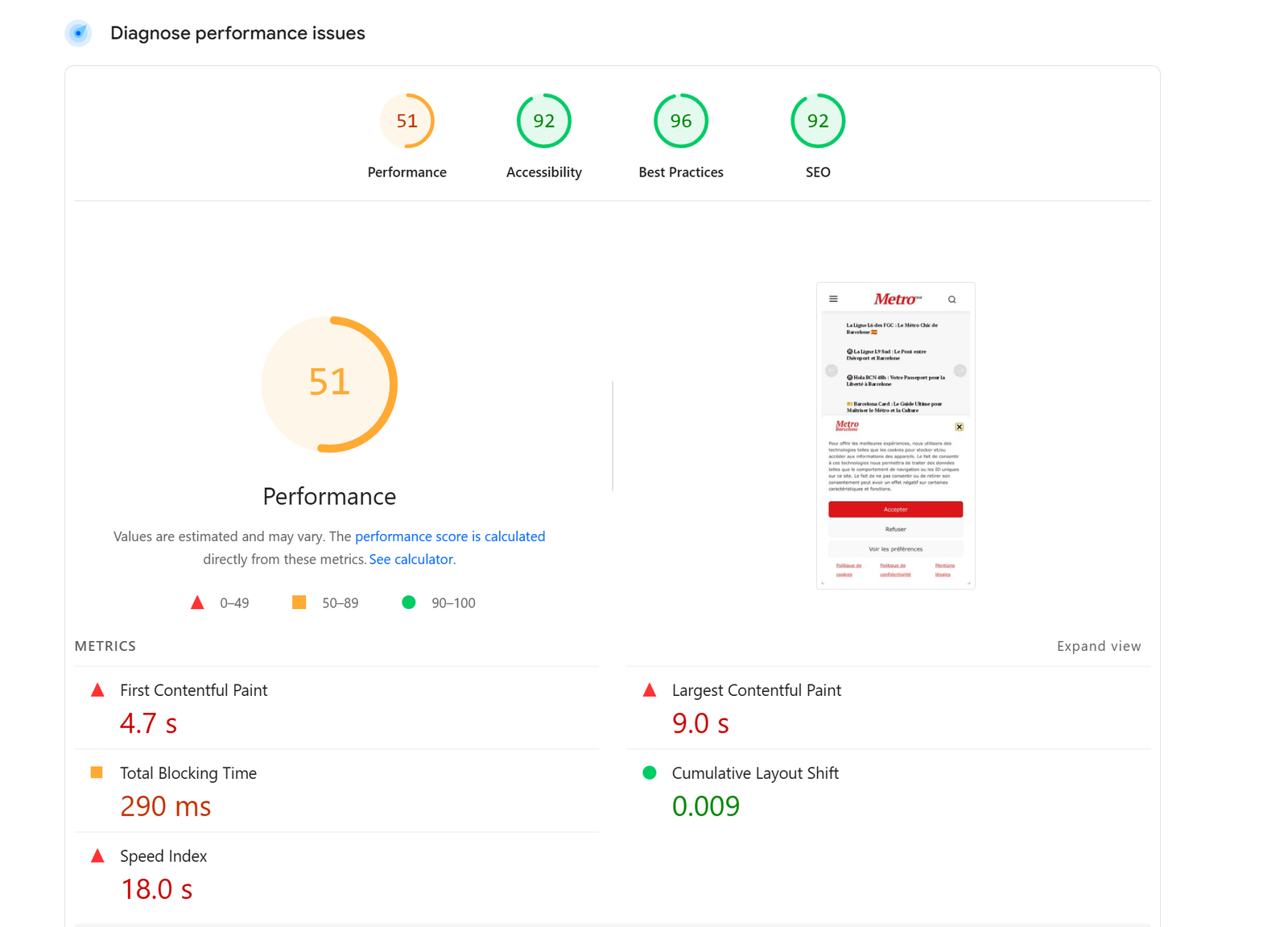
 Metro Barcelone
Hi, I took the newspaper demo Newsweek!
Very slow loading page speed. Homepage sometimes not even loading!
It is the first time it happens to me after purchasing around 20 licenses (from newspaper) for different websites.
Is it the theme or the demo?
I am using w3 total cache. I have cleared the cache several times.
Nothing changes even if using airlift plugin.
I also cleared the cache on server side.
Here a screenshot: http://metrobarcelone.fr/wp-content/uploads/2026/02/Screenshot-2026-02-26-044549.png
Can you please let me know where the problem is?
How can I improve page speed – this is very slow
Thanks
Marc
 nuevo116
Hi,
Since installing LiteSpeed Cache, my website has been very slow when clicking on any page or post.
I tried going back to WP Rocket, but the problem persists. Interestingly, when I disable the tagDiv Cloud Library plugin, the site responds normally again.
Has anyone experienced this conflict between LiteSpeed Cache and tagDiv Cloud Library?
Is there a way to use both without causing such slow performance?
Thanks for any suggestions!