
- NewspaperWP Rocket and Newspaper Theme: Optimization Guide
- TutorialsFrom WPBakery to tagDiv Composer
- TutorialsSystem status parameters guide
 First Friend
 After theme optimization & wp super cache plugin setup with cloudflare my website speed is very slow. Perforfance scorte is 20. So how to increase newspaper theme speed.
 Youngman
It looks like the theme for responsive or broken when using the create mobile page feature.
Before mobile only page not created it’s normal, but when I create mobile page/mobile theme/amp then desktop and tablet view will follow mobile view.
I have to turn off the cache for each page or turn off the cache completely so that the appearance of the website matches the original.
Or I have to clear the cache every time, so that the display looks normal.
or I or visitors have to log in so they can see the original appearance of the website.
Desktop error display:
https://freeimage.host/i/H31m9af
This is what the actual website looks like:
https://freeimage.host/i/H3dM28N
*In addition, I use the paid litespeedcache plugin and have mobile caching enabled.
Here is my site you can check: https://animenewsplus.net/
 NAGARAJBV5
 Website speed is good but the issue with GT Matrix & Google speed page Performance, We extremally request you to check with the issue, or let us know what need to be do in the website for performance upgrade.
 damir78
 this file is totally unnecessary.
td-composer/legacy/Newsmag/assets/css/td_legacy_main.css
It loads over 600Kb unnecessarily.
Most of that CSS is in the upper part of the site, which should be critical css.
The template knows a lot of problems for users who do not maintain pagespeed…
In the google search console, the website can get a rating of poor instead of good.
And then the ranking and the number of visits start to drop.
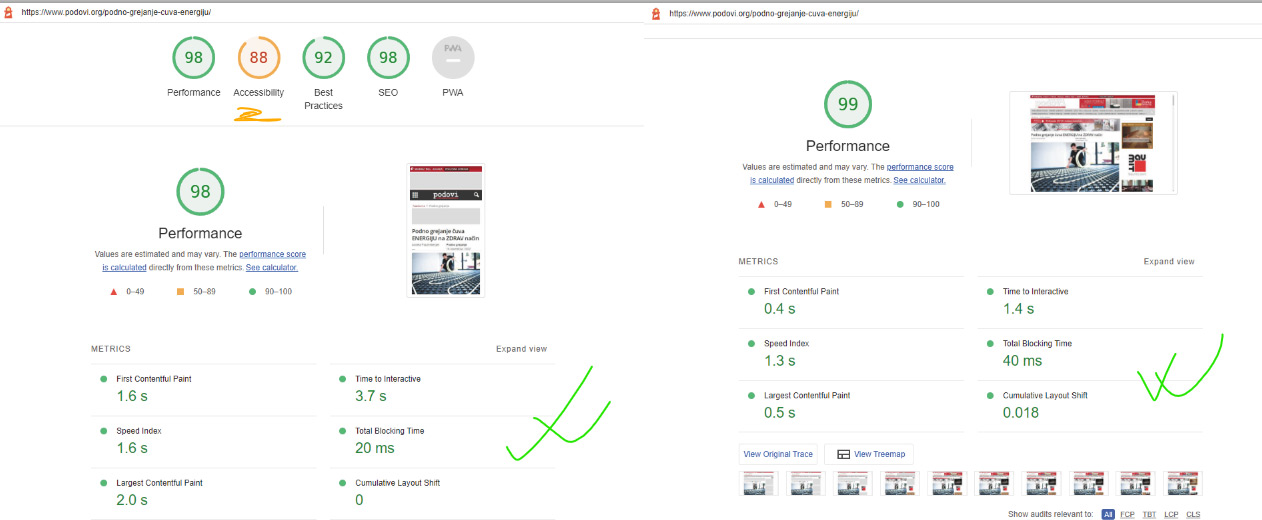
my new pagespeed result:

 Anamaria
 Hi,
For Edit Content, please check the console, maybe you have 403 or 404 error -> https://forum.tagdiv.com/topic/column-text-edit-content-doesnt-show-or-save/
There are many optimization guides provided by our users here in the forum, some made by us; you could check some of them
– https://forum.tagdiv.com/cache-plugin-install-and-configure/
– https://forum.tagdiv.com/how-to-make-the-site-faster/
– https://forum.tagdiv.com/topic/high-number-of-ajax-request/
– https://www.infophilic.com/get-almost-100-pagespeed-newspaper-theme/
– https://forum.tagdiv.com/topic/score-100100-pagespeed-with-newspaper-wordpress-theme/
– https://www.andraware.com/wp-rocket-for-newspaper-theme/
– https://spraythemes.com/newspaper-theme/how-to-speed-up-the-newspaper-wordpress-theme-using-wp-rocket/
– https://forum.tagdiv.com/topic/newspaper-theme-speedify-your-website/
– https://forum.tagdiv.com/topic/tutorial-chriss-custom-optimizations-for-functions-php-etc/
– https://forum.tagdiv.com/cloudflare-cdn/
– https://forum.tagdiv.com/topic/theme-causing-high-cpu-usage-2/
– https://forum.tagdiv.com/topic/sql-querys-high-cpu/
– https://forum.tagdiv.com/topic/newspaper-theme-slow-to-respond/
– https://premium.wpmudev.org/blog/optimizing-your-wordpress-database-a-complete-guide/
– https://underconstructionpage.com/optimize-wordpress-database/
– https://crunchify.com/better-optimize-wordpress-database-all-in-one-guide/
Maybe your hosting provider can provide some advice as well.
Thank you!
 Calin
Calin Hello,
I just checked your website and I see that the mobile speed is not bad -> https://i.imgur.com/uMhOlLp.png what I can recommend and could help you is to disable google fonts. Also, make sure you use a lazy-loading option -> https://i.imgur.com/eQD7YWI.png And the last recommended would be a cache object that could help you.
Thank you!
YoungmanMy site can’t be indexed by bing because the HTML file is too big past their standard 125kb
https://freeimage.host/i/bXDSa9
I’ve been using webp images on the site and even my plugin isn’t so much of a support only as a news website.
My plugins outside of this theme are:
Akismet Anti-Spam
CHP Ads Block Detector
Content Control
FS Poster
Jetpack
LiteSpeed Cache
Whisper link
SEOPress
SimpleTOC – Table of Contents Block
Even I have applied the image with webp format.
So is it possible for HTML to grow because of this theme?
 EmilianoB2T
Hello, we have built a website and hosted on a space provided by default with a system of high speed cache, that cannot be deactivated. We also cannot change hosting.
We saw that some other users issued the same problem: cache always, for every single page, returns the first display mode (mobile/desktop) used. We have just applied ALL of your suggestion: our provider has an hight speed cache and he cannot deactivate it.
So, if the first device after a cache clearing is a mobile, than all the users, including desktop users, will see the mobile version of that single page, until the next clearing procedure.
In this way we cannot offer a professional website to our visitors and also a service to our advertisers.
This is the website: https://www.rottadeitrasporti.it/
Please, help us with a corrective update because we never seen this kind of behaviour before with a WordPress theme, and we used to set up hundreds of them.
Thank you in advance for your kind help.
damir78 ok, thanks for the answer.
1. do you mean newspaper?
2. ok, maybe do some action for the New Year holidays 🙂
I managed to expand the width of the template to 1200px and on the first P+V website, I got 90 for mobile / 95 desktop on the google page speed test
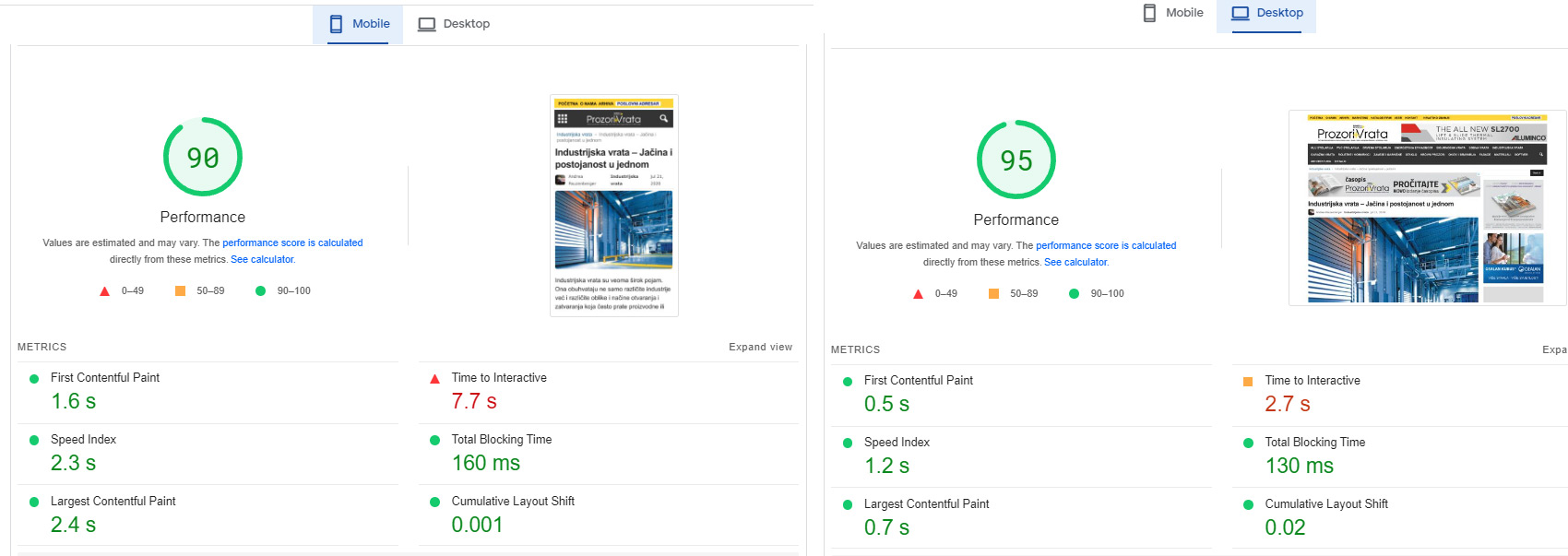
Although it is a huge website with over 20 google dfp banner positions.
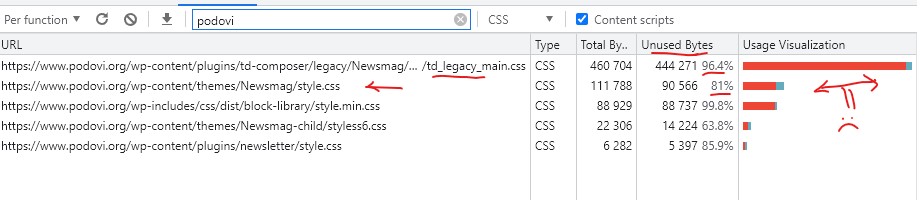
I had to modify your Newsmag/style.css and td-composer/legacy/Newsmag/assets/css/td_legacy_main.css a lot
there is still space for reduction and a better rating.
On the other Podovi website, I didn’t change those two files, so far.
I just minified them, I get 83 mobile / 93 desktop
Basically, these two files must definitely be reduced, they are too big and too unused.
Basically, I am satisfied with the template. I will probably try the newspaper as well, because I am planning to upgrade one of those two web portals soon.
 Shubham Patel
I’m using only 1 font in my website and it’s roboto font. How can I disable Google fonts loading from the theme correctly so I can improve speed?
Note :
I’m using cloud templates
I’m not using standard pack plugin
I have seen font error(roboto font is not loading) by disabling Google fonts option in theme panel.
 mgiannelis
 Hello
I have done all of this
Now, If I turn of “Guest Mode” in litespeed plugin. or try to move to different cache plugin. My website is screwed.
If you click on it from a google search. It will come out all broken
I know that you were going to give the answer you gave, And once again provide ZERO help and just say do something with google.
IT IS THE THEME AND THE CSS
I want someone to fix this once and for all
The tagdiv css analyser also wont work! It does nothing when clicking on it.
Its the theme, theme, theme
Please dont blame this on google cache, plugins or other things. Its the theme. Its broken
Also attached image. It does not work. It does nothing when trying to generate or use it
-
This reply was modified 3 years by
mgiannelis.
 Redlemon
Hi TagDiv team,
We have a website which uses different templates for desktop, and mobile devices. After migrating from a Litespeed Web Server where we used the LSCWP caching plugin – the caching worked flawlessly there but there were other resources issues – to a new server with Nginx, WP Rocket, and Redis object cache (deactivated and removed the LSCWP plugin too), we started off with the site working surprisingly fantastically. Then after a few hours had passed we discovered that the desktop version was squeezed in to the mobile viewports. We tried all different configuration options in WP Rocket, to no avail.
A couple of years ago, before hosting the site to the former server with Litespeed, we had had it in a different host with Apache, and we had experienced the same behavior there also. The only thing that had worked then, was the W3 Total Cache plugin, which we tried to install in this case as well. However, it appeared like shortly after flushing all caches in that, there would be a conflict between that, and WP Rocket’s files inside of /wp-content/cache directory, where apparently both plugins saved (most or all of) their configuration settings individually.
Kindly note that no two caching plugins were enabled at one time while testing everything. There were no conflicts like that. All conflicts appeared to have some relation to WP Rocket’s configuration files. We made sure to also delete advanced-cache.php from /wp-content/.
What puzzled us most, was that even with WP Rocket deactivated (and all other plugins also, including Cloudflare being in Developer Mode), appending the URL parameter ?nowprocket to the URL had a positive effect, allowing the site to load properly, and work flawlessly in both formats (desktop & mobile). It was time to completely remove WP Rocket from our site.
Even after completely removing WP Rocket from the site it would still not function properly. It was clear it was a WP Rocket left-over thing, because even with it being deactivated, and then deleted, we tested further, and we were still experiencing this issue; applying the ?nowprocket url parameter would allow the site to work correctly still. We made sure to delete all left-overs from the file system; at least all we could discover.
Then we noticed in the Newspaper pages that WP Super Cache was the recommended plugin for the Newspaper theme. We installed that and deactivated everything else, but still, after a couple of minutes, we experienced the same behavior once more.
Digging in the WPSC plugin we discovered that there was an option to explicitly set the caching files directory. We set that to /wp-content/super-cache instead of the default /wp-content/cache one, since at first it did not want to work correctly and ?nowprocket was still doing its thing. Additionally we disabled the Developer Mode in Cloudflare again (effectively enabling CF), and purged all caches there. After a half an hour we have not experienced the unwanted behavior yet.
Kindly note that all tests were performed in a new incognito session every time, to rule out the plausibility of a browser cache conflict also.
Anyway, we would like to kindly request you assist us with the correct configuration settings for WP Super Cache for the Newspaper theme. Please share any warning flags we should keep an eye out for, and point us towards possible other culprits we might have overlooked, which would disallow for the unwanted behavior experience we have described.
Thank you.
 dpernar
Hi all,
I am sorry to be annoying as I already asked this question. However it seems I can not fix Cumulative Layout Shift on my mobile version.
I am using Newspaper theme together with tagdiv Mobile theme on my website.
However when testing pagespeed and layout problems with Google Pagespeed I get several warnings.
Biggest warning (in google search console and pagespeed) comes from Cumulative Layout Shift (CLS) stating: “CLS issue: more than 0.25 (mobile)”.
CLS is actually around 0.88 now.
Is there any way to fix that?
My site is: http://curiousmatrix.com/
 Bettina
 Hello @dpernar!
Some starting points to improve your website page speed are here:
– https://forum.tagdiv.com/topic/optimize-script-to-improve-site-speed/
– https://forum.tagdiv.com/topic/a-few-tips-for-newspaper-x-speed-high-cpu-usage-issues/
– https://www.xtechkr.com/optimize-newspaper-theme/
– https://forum.tagdiv.com/how-to-make-the-site-faster/
– https://forum.tagdiv.com/topic/score-100100-pagespeed-with-newspaper-wordpress-theme/
– https://www.infophilic.com/get-almost-100-pagespeed-newspaper-theme/
– https://developers.google.com/speed/docs/insights/v5/about
– https://www.youtube.com/watch?v=tnkVapqhIHc
Please check the tutorials from those platforms, GT metrix and Google Pagespeed Insights, and I’m sure you can increase the page speed.
Please note that page speed is not covered by the support team: https://forum.tagdiv.com/newspaper-theme-support/
Thank you for understanding!
dpernarHi,
I am using Newspaper theme together with tagdiv Mobile theme on my website.
However when testing pagespeed and layout problems with Google Pagespeed I get several warnings.
Biggest warning (in google search console and pagespeed) comes from Cumulative Layout Shift (CLS) stating: “CLS issue: more than 0.25 (mobile)”.
Is there any way to fix that?
My site is: http://curiousmatrix.com/
Anamaria Hi,
There are many optimization guides provided by our users here in the forum, some made by us; you could check some of them
– https://forum.tagdiv.com/cache-plugin-install-and-configure/
– https://forum.tagdiv.com/how-to-make-the-site-faster/
– https://forum.tagdiv.com/topic/high-number-of-ajax-request/
– https://www.infophilic.com/get-almost-100-pagespeed-newspaper-theme/
– https://forum.tagdiv.com/topic/score-100100-pagespeed-with-newspaper-wordpress-theme/
– https://www.andraware.com/wp-rocket-for-newspaper-theme/
– https://spraythemes.com/newspaper-theme/how-to-speed-up-the-newspaper-wordpress-theme-using-wp-rocket/
– https://forum.tagdiv.com/topic/newspaper-theme-speedify-your-website/
– https://forum.tagdiv.com/topic/tutorial-chriss-custom-optimizations-for-functions-php-etc/
– https://forum.tagdiv.com/cloudflare-cdn/
– https://forum.tagdiv.com/topic/theme-causing-high-cpu-usage-2/
– https://forum.tagdiv.com/topic/sql-querys-high-cpu/
– https://forum.tagdiv.com/topic/newspaper-theme-slow-to-respond/
– https://premium.wpmudev.org/blog/optimizing-your-wordpress-database-a-complete-guide/
– https://underconstructionpage.com/optimize-wordpress-database/
– https://crunchify.com/better-optimize-wordpress-database-all-in-one-guide/
Maybe your hosting provider can provide some advice as well.
Anyway, this issue has been discussed already here, please check:
https://forum.tagdiv.com/topic/excessive-css/
Thank you!
 engrwaseemraja
Dear Tagdiv Team
I need your little support regarding my Newspaper theme (website) optimization using WP rocket and imagify plugin could you please setup these plugins as per your theme (newspaper) requirements I have tried already but i am confused I also got help through my developer but he also failed to applied 90+ mobile speed on this theme so please setup these plugins as per your theme requirements because you know very well that which criteria is required for these plugins to getting the maximum score of optimization I also got some help using this link (https://youtu.be/nNA-fdr7amg) but I afraid to apply these settings. I will give you my wordpress dashboard username and password after you can setup these plugins as per your requirements. thanks
My Website: The Civil Engineering
Current Optimization Speed: On Mobile (69%) on Desktop (99%)
 Mir Bhai
I am Using the Newspaper theme free version for the last 8 months, before 7 days i buy this theme. so, now I saw my website load speed increased.. it takes more time to fully load…its impact on my AdSense earning…I got just 5 clicks on 3000+ impressions.
Anamaria Hello,
Please provide the link to your website to see the problem and provide screenshots.
There are many optimization guides provided by our users here in the forum, some made by us; you could check some of them
– https://forum.tagdiv.com/cache-plugin-install-and-configure/
– https://forum.tagdiv.com/how-to-make-the-site-faster/
– https://forum.tagdiv.com/topic/high-number-of-ajax-request/
– https://www.infophilic.com/get-almost-100-pagespeed-newspaper-theme/
– https://forum.tagdiv.com/topic/score-100100-pagespeed-with-newspaper-wordpress-theme/
– https://www.andraware.com/wp-rocket-for-newspaper-theme/
– https://spraythemes.com/newspaper-theme/how-to-speed-up-the-newspaper-wordpress-theme-using-wp-rocket/
– https://forum.tagdiv.com/topic/newspaper-theme-speedify-your-website/
– https://forum.tagdiv.com/topic/tutorial-chriss-custom-optimizations-for-functions-php-etc/
– https://forum.tagdiv.com/cloudflare-cdn/
– https://forum.tagdiv.com/topic/theme-causing-high-cpu-usage-2/
– https://forum.tagdiv.com/topic/sql-querys-high-cpu/
– https://forum.tagdiv.com/topic/newspaper-theme-slow-to-respond/
– https://premium.wpmudev.org/blog/optimizing-your-wordpress-database-a-complete-guide/
– https://underconstructionpage.com/optimize-wordpress-database/
– https://crunchify.com/better-optimize-wordpress-database-all-in-one-guide/
Maybe your hosting provider can provide some advice as well.
Anyway, this issue has been discussed already here, please check:
https://forum.tagdiv.com/topic/excessive-css/
Thank you!
Bettina Hello @primeirojornal!
The tagdiv Composer plugin is a bigger one with a lot of functions and settings. Our developers tried to improve it more and more and optimize it as much as they could in every update.
There are a lot of factors which can make your site slow. Make sure you use only some templates and fewer functionalities and options.
Some factors which you need to take into account are:
External factors: server speed, if you are using CDN or not, the external resources loaded by your website like ads, fonts, tracking scripts like Facebook Pixel, Google Analytics, Twitter analytics, Hotjar and so on.
Internal factors: the number of elements on the page, image size, image formats, if you are using mobile optimized layouts, console errors, if you are using the Standard Pack plugin or not, if you are using the PRO demo or a standard one.
Some starting points to improve your website page speed are here:
– https://forum.tagdiv.com/topic/optimize-script-to-improve-site-speed/
– https://forum.tagdiv.com/topic/a-few-tips-for-newspaper-x-speed-high-cpu-usage-issues/
– https://www.xtechkr.com/optimize-newspaper-theme/
– https://forum.tagdiv.com/how-to-make-the-site-faster/
– https://forum.tagdiv.com/topic/score-100100-pagespeed-with-newspaper-wordpress-theme/
– https://www.infophilic.com/get-almost-100-pagespeed-newspaper-theme/
– https://developers.google.com/speed/docs/insights/v5/about
– https://www.youtube.com/watch?v=tnkVapqhIHc
Please check the tutorials from those platforms, GT metrix and Google Pagespeed Insights, and I’m sure you can increase the page speed.
Please note that page speed is not covered by the support team: https://forum.tagdiv.com/newspaper-theme-support/
Thank you for understanding!
 luigiboschi
Hi there.
I have installed your theme but the website speed is very slow.
Idk even know where to optimize it or which is the cause of this speed.
YoungmanFirst congratulations on version 12.
However, there is a critical input, namely a user review system, especially the current one that is very much needed for a news website/blog, namely a “user review system”.
With this user review system, Mobile & AMP plugins are increasingly being abandoned by developers. This feature is only available for regular tagdiv composer customizations and not available for Mobile & AMP plugins.
The idea of the Mobile & AMP Plugin is great enough for me, by just installing it without setting the speed of the mobile website it can be like instant and the page score can reach 100 easily.
But the appearance and feature development for Mobile & AMP Plugins is not continued and the AMP mobile theme is now looking classic now and boring. When viewed by theme developers who are younger than their tagdiv their AMP appearance is more luxurious, feature-rich, and elegant. It doesn’t look boring to the reader.
Besides, it’s quite strange for me, this theme already has comment shortcodes in a single post but you guys made it again 1 for review? even though you can join it because it’s similar.
And I’m also a bit confused why the more important features for this news/blog theme such as table content, inline related, like post/reaction post don’t exist? why even make something creative that in my opinion is not very important for blogs/writers/writers.
That’s my impression for this version 12. Overall disappointing.
But I hope version 13 releases quickly and the standard features that should be in a news/blog theme will soon be available and then there will be other creative features that don’t bore visitors with a too classic look.
Calin Hi,
Are you using the litespeed server or litespeed cache plugin.
If you agree we can take a look at the website. For this you can contact us via email at contact@tagdiv.com, provide wp-admin access to one of the website where the problem is happening and we’ll try to see what can be interfering.
Thank you!
Calin Hi,
Do you use the litespeed cache plugin? If yes, then please do a test without this plugin to see if the problem is still happening. For a few users the problem was with some settings from this plugin, once that the did the test without it, the tagdiv composer was no longer disabled.
Also, if you want you can contact us via email at contact@tagdiv.com, provide wp-admin access to one of the website where the problem is happening and we’ll try to see what can be interfering.
Thank you!
 youthost
I have done a website with one page style no header no footer but 9 big images (1920 x 1080)
I just use 9 rows with 9 Single Image elements
When page is load both desktop and mobile Images are show with delay when scrolling down page even if stay longer on first image at top of the page, some time also scrolling is more longer.
This is not related with site speed for sure.
I have done a test with a page and images set in html divs with simple code like following
and everything was fine, open web site and all images there scrolling.
Is there some effect or delay for Single Image Element ? Must use a different element ? How to remove effect delay than ?
Thanks
Francesco




