
- NewspaperWP Rocket and Newspaper Theme: Optimization Guide
- TutorialsFrom WPBakery to tagDiv Composer
- NewspaperNewspaper Theme Support
- NewspaperNewspaper theme documentation
- NewspaperWeather Shortcode
- NewspaperCloudflare (CDN)
- NewspaperBest Of Forums
- TutorialsSystem status parameters guide
- NewsmagWhat’s included in Newsmag theme package
- NewsmagRequirements for Newsmag
- NewsmagNewsmag documentation
- Thumbnails vs. Featured image size
- NewspaperThumbnails – Fix strange looking images on blocks
- NewspaperRequirements for Newspaper
- NewspaperHow to Make the Site Faster
 Calin
Calin Hi,
That is because without tagDiv Composer all you’ll have will be static text and some images, without any functions and style/design.
As I said before, the page speed of your website depends on how well your site is optimized.
Please note that page speed is not covered by the support team: https://forum.tagdiv.com/newspaper-theme-support/
For page speed and other services you can contact our custom work team here: https://tagdiv.com/premium-customization-services/
Thank you for your understanding!
Calin Hi,
The page speed of your website depends on how well your site is optimized, if you follow the steps which are presented in this tutorial here -> https://tagdiv.com/how-to-increase-page-loading-speed/ you’ll be able to increase the speed of your website.
Also you can check this similar topic for more solutions: -> https://forum.tagdiv.com/topic/optimize-script-to-improve-site-speed/ -> https://www.infophilic.com/get-almost-100-pagespeed-newspaper-theme/
– https://forum.tagdiv.com/topic/a-few-tips-for-newspaper-x-speed-high-cpu-usage-issues/
– https://tagdiv.com/how-to-increase-page-loading-speed/
Hope this will help you!
Thank you!
Calin Hi,
Unfortunately, the Autoptimize plugin has not been tested with our theme and therefore, we cannot say for sure if it will work or not as expected with the theme, sorry! Also, we cannot provide support for untested plugins.
This is our list with tested plugins with our theme -> https://www.screencast.com/t/cmPkh9jba4sZ
I think that in Autoptimize there are some specific settings that need to be made in order to work properly, we see a lots of users using this plugin without problems.
These depend on that settings you are using on you cache plugin, here is an similar case with Autoptimize cache size quickly get over 100% -> https://wordpress.org/support/topic/autoptimize-cache-size-quickly-get-over-100/page/2/
Topic for page speed -> https://forum.tagdiv.com/topic/how-to-speed-up-the-website-2/
Thank you!
Calin Hi,
Please make sure that all the settings are like in our requirements, please follow the guide carefully
– https://forum.tagdiv.com/requirements-for-newspaper/
and please increase all requirements that are lower, and follow all steps.
Also you can try to optimize your websites -> if you follow the steps which are presented in this tutorial here -> https://tagdiv.com/how-to-increase-page-loading-speed/ you’ll be able to increase the speed of your website.
Also you can check this similar topic for more solutions: -> https://forum.tagdiv.com/topic/optimize-script-to-improve-site-speed/ -> https://www.infophilic.com/get-almost-100-pagespeed-newspaper-theme/
– https://forum.tagdiv.com/topic/a-few-tips-for-newspaper-x-speed-high-cpu-usage-issues/
Let me know the results!
Thank you!
 Vlad S
 Hello !
A lighter page, means faster website. Also host has a big role here. As you can see here for example. First elements that slow down are those: https://www.screencast.com/t/Zw2btB4gdQYy
Indeed Newspaper theme can be a “harder” theme to achieve higher speeds. But it all comes down to how well you manage your assets ( Photos ; content ; fonts ; colors ; plugins ; etc.. )
I hope this was helpful !
Thank you !
 DerekBaggett
Hello,
I’ve been trying to optimizing my page speeds to align with Google’s Page Insight score, and I’ve been running into a few issues. I only use WP Super Cache, as recommended, but by doing this, my Page Insight score was only 84. After installing Autoptimize and Asset Cleanup, my Insights score improved from 84 to 97.
However,it now seems like many functions on my website are broken. For example, on mobile, the header now shows as the “Baby Pro” template header that I’m using for desktop view, instead of the correct mobile header. Also, when clicking on different pages (such as the About or Contact page) it will briefly show a broken login page before showing the correct version of the page.
It seems a bit ridiculous that I have to sacrifice page speed scores in order for this theme to function properly. Is there any workaround for this, besides disabling the Autoptimize and asset cleanup plugin? How can I optimize my page speed scores without these plugins?
Website: NaturalistLiving.com
 xavilv
Hi,
According to the Google tool “Pagespeed”, my website is too slow.
The theme is updated to the last version.
Could you please advise me any plugin or actions to speed up the website?
Thanks
 Arnaud
Hi there,
It’s the first time we use the Newspaper theme to create a website. However, what is negatively surprising is the speed we obtain with the theme. We are still trying to improve it since we have bad results.
The website is located here: https://letzbehealthy.com and is configured for two “languages/regions” with WPML.
We followed the different recommendations given here: https://tagdiv.com/how-to-increase-page-loading-speed/ and in other topics on the forum. The only thing is that we did not set up any CDN: our target population is in France, Belgium, and Luxembourg, and the server is localized in France (Gravelines, OVH). Also, to start, we are on a shared server since we don’t have much traffic, but we will consider switching to a dedicated server when it will grow. The website is, however, slow while never reaching limits of the CPU usage.
Regarding the Plugins, we have:
– Advanced Ads Pro;
– Autoptimize to minify CSS;
– Contact Form 7;
– Duplicator Pro (running during the night);
– Insert Pages;
– Newsletter;
– Really Simple SSL;
– ShortPixel Image Optimizer;
– Slide Anything;
– The Events Calendar;
– Wordfence Security;
– TagDiv suite (except Mobile Theme & Standard Pack since we only use Cloud Templates);
– WP Super Cache;
– WP-Optimize to clean the database episodically;
– WPML suite, and;
– Yoast.
We, therefore, use well-known plugins that are quite standard…
The score is “OK” when looking at the desktop version (PageSpeed Google), with a score starting around 80 when the cache of the server is cleaned and slightly improves after reload. Still, the page loading speed could sincerely be enhanced.
On the mobile side, the score is horrible. We don’t use the mobile theme because our mobile display is supposed to be a simpler version of the desktop version with the same design & functions. We use lighten versions of our desktop version thanks to CSS hidden functions (which is the recommendation from TD team)…
Anyway, Lazyload is activated, images are optimized & sized correctly (normally), etc. What’s wrong?
Thank you in advance for your input
 SIMON everly.eu
 Thank you Vlad again, though i have spent many hours researching this so iv already read that many times.
I have problem with this part. Page builder elements – The “Mobile theme” is designed for users who want to optimize the page content for mobile devices or they want to display fewer / different elements on mobiles.
—
For optimal performance we removed the page builder dependency; this means you cannot use the page builder elements for the “Mobile theme” pages. If you want to display the same elements on both mobile and desktop, don’t use the mobile theme, the main theme is already capable of this with it’s responsive design for mobiles.
—
because not, the main theme is not capable.. In my opinion. The speed performance without the plugin on is really bad and the website looks bad as the sidebar interferes with the flow of the website..
Therefore i am looking for a way how to replicate my already existing pages to the mobile theme without knowing HTML and CSS..
IS there a way??
Calin Hi,
I just checked your page speed and you website is very fast on mobile and desktop too -> https://i.imgur.com/X3XEkv0.png -> https://i.imgur.com/zuYntIp.png on GTmetrix -> https://i.imgur.com/FLycgs6.png
Also the images are lading on browsers-> https://i.imgur.com/8qkFfc4.jpg -> https://i.imgur.com/OcuzIX6.png aslso if the images do not appear on mobile theme plugin, please try on with theme plugin and check if the problem persists.
Thank you for your understanding!
 techwikimedia
I have enabled mobile theme on my site but when i am opening my site in incognito mode in mobile sometimes it’s showing Desktop theme with different logo(Default city news logo). I have enabled mobile+AMP in setting.Please help me….I am getting frusteted now…
Website: http://www.techwikimedia.com
My theme name: City news
CachePlugin: Litespeed Cache
 Topfgartenwelt
Is there a way in the Newspaper-Theme to LazyLoad-AdSense Ads? I have found several plugins that support this function to optimize the loading speed of the website. Unfortunately AdSense slows down every website…
Greetings Kathrin
Calin Hi,
You can import any cloud header you want from tagDiv Cloud Library, edit it with tagDiv Composer and add the elements you want.
Also you can use the website manager for cloud header and footer -> https://i.imgur.com/OQ3zMSU.png
The ad can be added using the ad box element from tagDiv Composer and set it where you want -> https://i.imgur.com/rlpkm0H.png
Also you can try to optimize your websites -> if you follow the steps which are presented in this tutorial here -> https://tagdiv.com/how-to-increase-page-loading-speed/ you’ll be able to increase the speed of your website.
Also you can check this similar topic for more solutions: -> https://forum.tagdiv.com/topic/optimize-script-to-improve-site-speed/ -> https://www.infophilic.com/get-almost-100-pagespeed-newspaper-theme/
– https://forum.tagdiv.com/topic/a-few-tips-for-newspaper-x-speed-high-cpu-usage-issues/
Thank you!
Calin For High GTmatrix Rating you can use any theme, because the page speed of your website depends on how well your site is optimized, if you follow the steps which are presented in this tutorial here -> https://tagdiv.com/how-to-increase-page-loading-speed/ you’ll be able to increase the speed of your website.
Also you can check this similar topic for more solutions: -> https://forum.tagdiv.com/topic/optimize-script-to-improve-site-speed/ -> https://www.infophilic.com/get-almost-100-pagespeed-newspaper-theme/
– https://forum.tagdiv.com/topic/a-few-tips-for-newspaper-x-speed-high-cpu-usage-issues/
– https://tagdiv.com/how-to-increase-page-loading-speed/
Hope this will help you!
Thank you!
Calin Hi,
Make sure that you do not have a plugin conflict, please deactivate ALL plugins except tagDiv plugins, also if you are using child theme or cache plugin, deactivate them, clear all cache and try again.
If you are using the mobile theme plugin, you’ll gain a better speed then responsive version of theme, but in order to achieve that speed you’ll need to create a new content for pages because in the most of cases those were made with builders ( tagDiv Composer, WPBakery ) and you need to use only the mobile editor ( you need to set the content for pages in mobile editor and this content will be display on mobile theme)
-> https://i.imgur.com/9d0UWLT.png
Also you can show the responsive version on mobile theme -> https://i.imgur.com/m0bVB5T.png you can check more details about mobile theme in our documentation -> https://forum.tagdiv.com/the-mobile-theme/ or if you want to have the responsive version only, you can use the amp option from mobile theme -> https://i.imgur.com/oofST3D.png (to use the mobile theme template on amp) or you can disable the plugin.
If there is still a problem, please provide me a link to your website to can inspect them.
Let me know the results!
xavilvHi,
I don’t have the AMP enabled because Google notified me a lot of problems with the post and pages, so I decided not to use it. Consequently, the mobile version of my website is too slow.
Could you please tell me any plugin to speed up the mobile version or any other alternative solution?
Thanks
Calin Hi,
I just checked your website and now you are no longer using the mobile theme plugin.
If you still want to use the mobile theme plugin make sure that you have enabled the mobile theme thumbs -> https://i.imgur.com/xvwyMQx.png also make sure that you do not have a plugin conflict.
The logo and mobile menu can be set from here -> https://i.imgur.com/xkSQysk.png also the about us section can be set from here -> https://i.imgur.com/e2hkXRO.png or remove with custom css.
If you are using the mobile theme plugin, you’ll gain a better speed then responsive version of theme, but in order to achieve that speed you’ll need to create a new content for pages because in the most of cases those were made with builders ( tagDiv Composer, WPBakery ) and you need to use only the mobile editor ( you need to set the content for pages in mobile editor and this content will be display on mobile theme)
-> https://i.imgur.com/9d0UWLT.png
Also you can show the responsive version on mobile theme -> https://i.imgur.com/m0bVB5T.png you can check more details about mobile theme in our documentation -> https://forum.tagdiv.com/the-mobile-theme/ or if you want to have the responsive version only, you can use the amp option from mobile theme -> https://i.imgur.com/oofST3D.png (to use the mobile theme template on amp) or you can disable the plugin.
Thank you!
Calin Hi,
Please make sure that all the settings are like in our requirements, please follow the guide carefully
– https://forum.tagdiv.com/requirements-for-newspaper/
and please increase all requirements that are lower, and follow all steps.
Also you can try to optimize your websites -> if you follow the steps which are presented in this tutorial here -> https://tagdiv.com/how-to-increase-page-loading-speed/ you’ll be able to increase the speed of your website.
Also you can check this similar topic for more solutions: -> https://forum.tagdiv.com/topic/optimize-script-to-improve-site-speed/ -> https://www.infophilic.com/get-almost-100-pagespeed-newspaper-theme/
– https://forum.tagdiv.com/topic/a-few-tips-for-newspaper-x-speed-high-cpu-usage-issues/
Let me know the results!
Thank you!
 demcrumblies
Hi there, I have a strange problem with the Newspaper Theme. I bought it on April 26th and and it worked pretty quickly for the first two days.
However, when I try to edit any page using the default WordPress editor, it takes many minutes to load (sometimes over 5 minutes, and sometimes just a blank screen appears). However, if I click to edit the page using the Edit with TD Composer, it works right away. I still need to use the default editor sometimes to make other edits such as adding tags, dates, etc., but the theme loading speed makes it unusable now. Here is what I mean when I say when I click the edit link or the Edit with TD Composer: 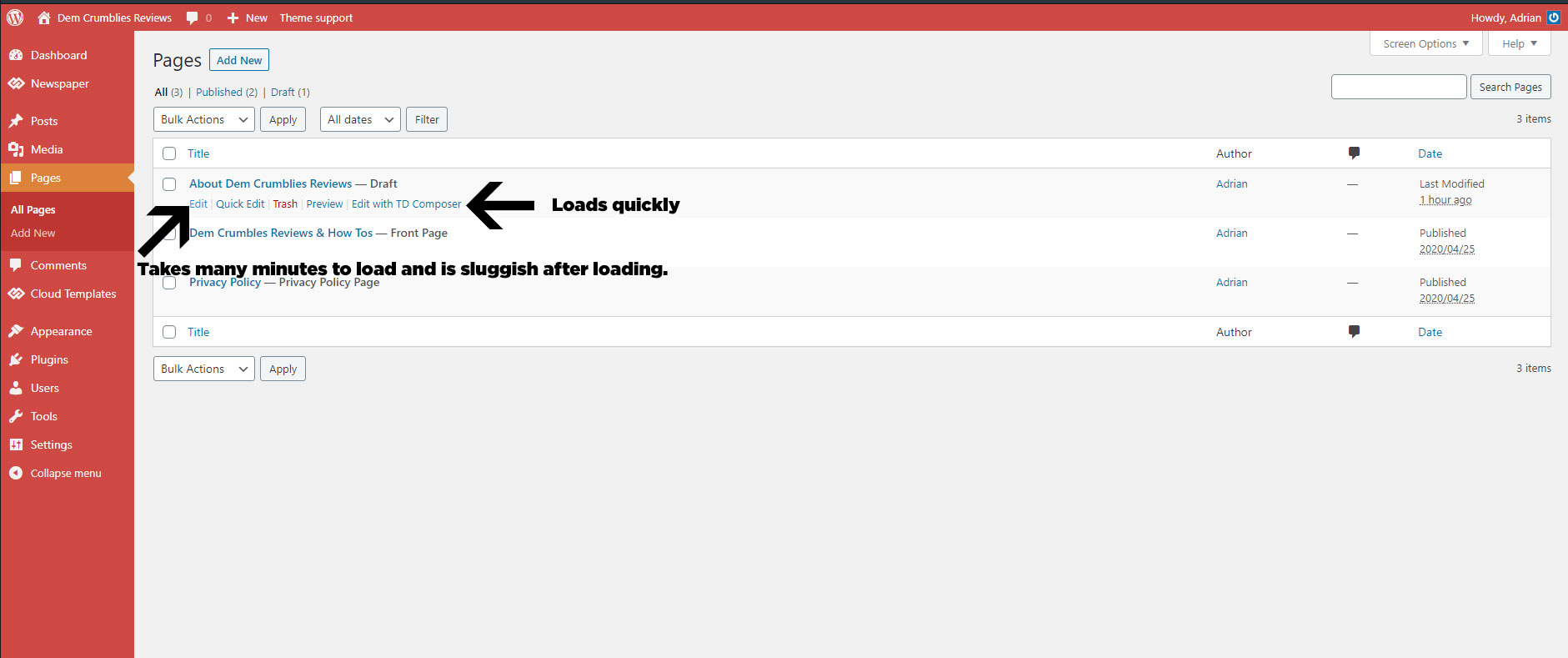
I have met all the server requirements or exceeded them, proof here: 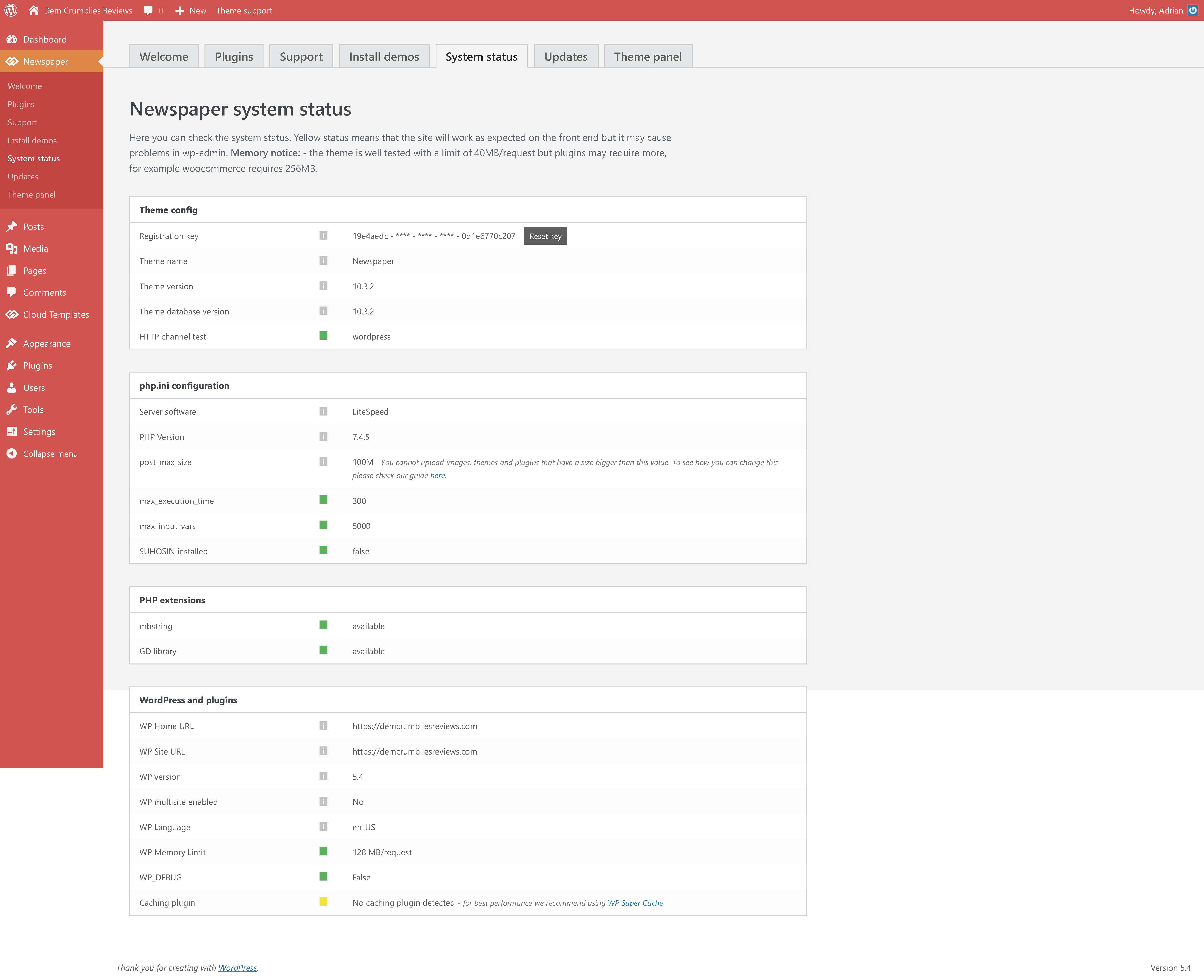
I had set my PHP version to 7.2 as recommended, but changed it to 7.4.5 today after everything loaded slowly, but it still did not help.
Viewing the website is not slow. Accessing the plugins screen, theme settings, tool settings, menu settings is fast. The ONLY issue is when I choose to click “Edit” using the default WordPress editor shown in the image above.
I have disabled all plugins, so that only the the tagDIV ones are active, but still no help. Proof here: 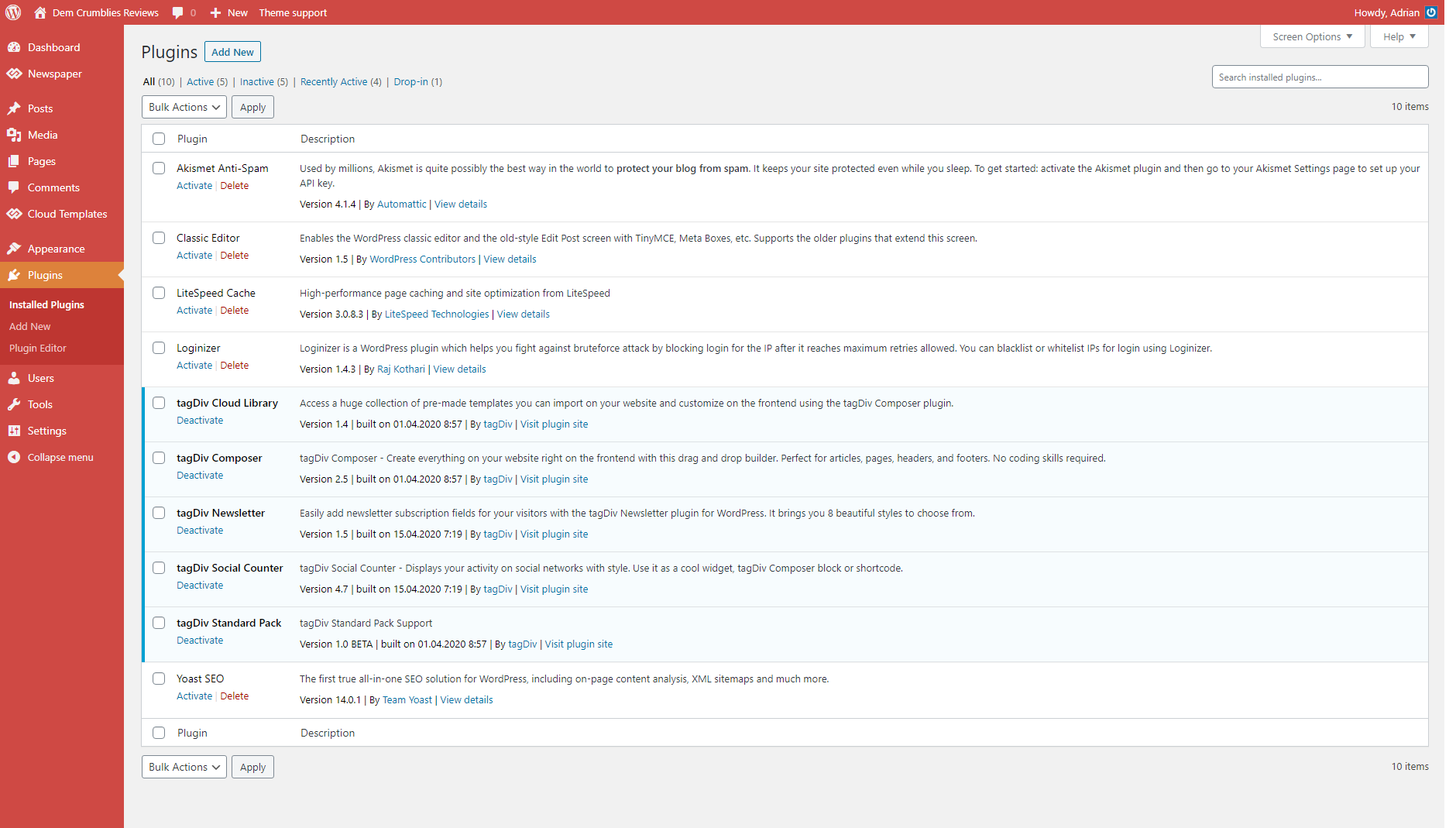
I have recorded a clip to show what I mean. (fast when using TD Composer and very very very slow and sluggish when clicking to edit using the default editor).
Vlad S Hi,
We recommend to use only tagDiv Composer with tagDiv cloud Library and replace the elements from Standard pack to can deactivate it, in this way you gain some performance.
The speed of your website depends on how well your site is optimized, if you follow the steps which are presented in this tutorial here -> https://tagdiv.com/how-to-increase-page-loading-speed/ you’ll be able to increase the speed of your website.
Also you can check this similar topic for more solutions: -> https://forum.tagdiv.com/topic/optimize-script-to-improve-site-speed/ -> https://www.infophilic.com/get-almost-100-pagespeed-newspaper-theme/
– https://forum.tagdiv.com/topic/a-few-tips-for-newspaper-x-speed-high-cpu-usage-issues/
Also if you want our custom services, you can contact our custom work team here: https://tagdiv.com/premium-customization-services/
Thank you!
Calin Hi,
The second code is set by default in our theme, also if you want to set some code in the theme header you can do it here -> https://i.imgur.com/WlUj7oG.png is possible to take some time until the ads will appear.
If there is still a problem, please provide me a link to your website.
The speed of your website depends on how well your site is optimized, if you follow the steps which are presented in this tutorial here -> https://tagdiv.com/how-to-increase-page-loading-speed/ you’ll be able to increase the speed of your website.
Also you can check this similar topic for more solutions: -> https://forum.tagdiv.com/topic/optimize-script-to-improve-site-speed/ -> https://www.infophilic.com/get-almost-100-pagespeed-newspaper-theme/
– https://forum.tagdiv.com/topic/a-few-tips-for-newspaper-x-speed-high-cpu-usage-issues/
Thank you!
Vlad S Hi,
We recommend to use only tagDiv Composer with tagDiv cloud Library and replace the elements from Standard pack to can deactivate it, in this way you gain some performance.
The speed of your website depends on how well your site is optimized, if you follow the steps which are presented in this tutorial here -> https://tagdiv.com/how-to-increase-page-loading-speed/ you’ll be able to increase the speed of your website.
Also you can check this similar topic for more solutions: -> https://forum.tagdiv.com/topic/optimize-script-to-improve-site-speed/ -> https://www.infophilic.com/get-almost-100-pagespeed-newspaper-theme/
– https://forum.tagdiv.com/topic/a-few-tips-for-newspaper-x-speed-high-cpu-usage-issues/
Also if you want our custom services, you can contact our custom work team here: https://tagdiv.com/premium-customization-services/
Thank you!
Calin Hi,
We recommend to use only tagDiv Composer with tagDiv cloud Library and replace the elements from Standard pack to can deactivate it, in this way you gain some performance.
The speed of your website depends on how well your site is optimized, if you follow the steps which are presented in this tutorial here -> https://tagdiv.com/how-to-increase-page-loading-speed/ you’ll be able to increase the speed of your website.
Also you can check this similar topic for more solutions: -> https://forum.tagdiv.com/topic/optimize-script-to-improve-site-speed/ -> https://www.infophilic.com/get-almost-100-pagespeed-newspaper-theme/
– https://forum.tagdiv.com/topic/a-few-tips-for-newspaper-x-speed-high-cpu-usage-issues/
Also if you want our custom services, you can contact our custom work team here: https://tagdiv.com/premium-customization-services/
Thank you!
Calin Hi,
The speed of your website depends on how well your site is optimized, if you follow the steps which are presented in this tutorial here -> https://tagdiv.com/how-to-increase-page-loading-speed/ you’ll be able to increase the speed of your website.
Also you can check this similar topic for more solutions: -> https://forum.tagdiv.com/topic/optimize-script-to-improve-site-speed/ -> https://www.infophilic.com/get-almost-100-pagespeed-newspaper-theme/
– https://forum.tagdiv.com/topic/a-few-tips-for-newspaper-x-speed-high-cpu-usage-issues/
You can use the mobile theme plugin, this will increase the mobile speed, but the layout will be different from desktop, also you need to display the responsive pages or make new ones using mobile editor, please check our documentation from here -> https://forum.tagdiv.com/the-mobile-theme/
Please note that page speed is not covered by the support team: https://forum.tagdiv.com/newspaper-theme-support/
For page speed and other services you can contact our custom work team here: https://tagdiv.com/premium-customization-services/
Thank you for your understanding!
Calin Hi,
The speed of your website depends on how well your site is optimized, if you follow the steps which are presented in this tutorial here -> https://tagdiv.com/how-to-increase-page-loading-speed/ you’ll be able to increase the speed of your website.
Also you can check this similar topic for more solutions: -> https://forum.tagdiv.com/topic/optimize-script-to-improve-site-speed/ -> https://www.infophilic.com/get-almost-100-pagespeed-newspaper-theme/
– https://forum.tagdiv.com/topic/a-few-tips-for-newspaper-x-speed-high-cpu-usage-issues/
Please note that page speed is not covered by the support team: https://forum.tagdiv.com/newspaper-theme-support/
For page speed and other services you can contact our custom work team here: https://tagdiv.com/premium-customization-services/
Thank you for your understanding!



