
- NewspaperWP Rocket and Newspaper Theme: Optimization Guide
- TutorialsFrom WPBakery to tagDiv Composer
- NewspaperNewspaper Theme Support
- NewspaperNewspaper theme documentation
- NewspaperWeather Shortcode
- NewspaperCloudflare (CDN)
- NewspaperBest Of Forums
- TutorialsSystem status parameters guide
- NewsmagWhat’s included in Newsmag theme package
- NewsmagRequirements for Newsmag
- NewsmagNewsmag documentation
- Thumbnails vs. Featured image size
- NewspaperThumbnails – Fix strange looking images on blocks
- NewspaperRequirements for Newspaper
- NewspaperHow to Make the Site Faster
 Revive the Netherlands
 Hi,
I did some of this post:
https://tagdiv.com/how-to-increase-page-loading-speed/
90% of our website visitors our mobile users.
Our mobile website gets a very bad score on google speed tester: https://imgur.com/1xiE9gz
Desktop better:https://imgur.com/zF5rXnL
Do you have some specific tips to get the website load faster on mobile?
I am considering buying plugins like WP Rocked and perfmatters.
There are also plugins that you can manage the plugins that they will not load on all pages of the websites.
The domain of our website is: revive.nl
Regards Sam
 Calin
Calin Hi,
1. For you in order to let a comment, you need to log in -> https://i.imgur.com/sk7fZq4.png if you do not want the visitor to log for comments, you can check these settings -> https://i.imgur.com/pQyWzMd.png
2. For High GTmatrix Rating you can use any theme, because the page speed of your website depends on how well your site is optimized, if you follow the steps which are presented in this tutorial here -> https://tagdiv.com/how-to-increase-page-loading-speed/ you’ll be able to increase the speed of your website.
Also you can check this similar topic for more solutions: -> https://forum.tagdiv.com/topic/optimize-script-to-improve-site-speed/ -> https://www.infophilic.com/get-almost-100-pagespeed-newspaper-theme/
– https://forum.tagdiv.com/topic/a-few-tips-for-newspaper-x-speed-high-cpu-usage-issues/
– https://tagdiv.com/how-to-increase-page-loading-speed/
Hope this will help you!
Thank you!
Calin Hi,
The speed of your website depends on how well your site is optimized, if you follow the steps which are presented in this tutorial here -> https://tagdiv.com/how-to-increase-page-loading-speed/ you’ll be able to increase the speed of your website.
Also you can check this similar topic for more solutions: -> https://forum.tagdiv.com/topic/optimize-script-to-improve-site-speed/ -> https://www.infophilic.com/get-almost-100-pagespeed-newspaper-theme/
– https://forum.tagdiv.com/topic/a-few-tips-for-newspaper-x-speed-high-cpu-usage-issues/
– https://tagdiv.com/how-to-increase-page-loading-speed/
– https://forum.tagdiv.com/cache-plugin-install-and-configure/
– https://forum.tagdiv.com/how-to-make-the-site-faster/
– https://www.infophilic.com/get-almost-100-pagespeed-newspaper-theme/
– https://forum.tagdiv.com/topic/score-100100-pagespeed-with-newspaper-wordpress-theme/
– https://forum.tagdiv.com/topic/newspaper-theme-speedify-your-website/
– https://forum.tagdiv.com/topic/tutorial-chriss-custom-optimizations-for-functions-php-etc/
– https://forum.tagdiv.com/cloudflare-cdn/
– https://forum.tagdiv.com/topic/theme-causing-high-cpu-usage-2/
– https://forum.tagdiv.com/topic/sql-querys-high-cpu/
– https://forum.tagdiv.com/topic/newspaper-theme-slow-to-respond/
– https://premium.wpmudev.org/blog/optimizing-your-wordpress-database-a-complete-guide/
– https://underconstructionpage.com/optimize-wordpress-database/
– https://crunchify.com/better-optimize-wordpress-database-all-in-one-guide/
Let me know the results!
Thank you!
 boyonly
Hi
Could you suggest me another way to optimize page loading speed?
I already do optimize thee of this link below as your last suggestion
https://tagdiv.com/wp-super-cache-plugin-install-and-configure/ and maybe the autoptimize plugin – https://authoritywebsiteincome.com/autoptimize-wordpress-setup-2020/ also a plugin for images such as this one for example https://harnessyourwebsite.com/wordpress/optimizing-with-ewww-image-optimizer/ the score should improve.
However, the loading speed on mobile site remains the same.
Page speed score on mobile site = 17
Do you have another suggestion?
Thank you for your suggestion
Calin Hi,
We just made some checked and for everything seems to be god, may you have an isolate case, if you want, we can investigate it.
The theme actuation can be target when you uninstall a demo, this will remove all the settings from theme panel, including the licence key, but when you restore the backup, this should be set back.
Yes, the page speed depend on the page design and what it contain, also the most important part is the optimization of website.
Thank you for your understanding and sorry for the inconvenient!
 Jose
JoseHi guys,
I’d like to leave some suggestions for new updates, and also some serious bugs I’m seeing in the theme (latest version).
ERRORS
1. If we’re not using a custom header: The logo is set by default as H1. This is a very serious error, most posts and pages now have several H1s, due to this error. In addition, the H1 in the logo is image based, it doesn’t make sense, it’s absurd.
2. Cloud templates, the cloud templates for categories, are not resposives. If we use the tagdiv mobile plugin, the cloud templates do not work. This doesn’t make sense either, at present, 90% of web traffic is from mobile sources. It is useless to have a perfect design in PC, if then in Mobile we cannot use it.
3. Header cloud , when editing with tagdiv composer the header cloud, in many occasions the changes are not saved properly, it hangs while saving.
4. The H2 / H3 tag in the “Flex Blok 1” block with a div composer tag cannot be removed. You need to add another option, it doesn’t make sense that this content is H2 or H3, it’s a SEO error.
https://fotos.subefotos.com/c5e5d672262afcb73b576fb2e5a813c1o.jpg
5. In “Flex Blok 1” and in all other blocks, of tag div composer, the links to the content are duplicated. For example, if I show my articles, each article has 2/3 links to the same site. A link in the image (error) and a link in the title (this if ok). So there are a lot of meaningless, useless links that are stealing link juice.
https://fotos.subefotos.com/132a5be412f0d095455330c044aa22c6o.jpg
6. All templates created with the cloud are indexed by default. This is a serious SEO error, they should be NOINDEX by default.
https://fotos.subefotos.com/52265f8e40dc242cb9fb1b871afa21b0o.jpg
SUGGESTIONS
1. It is very important to improve the rendering speed. This will make the total load faster, much faster. The render is one of the most important parts of the load, analyzed by google.
2. Many templates have been added lately (e.g. Coronavirus). But it has been a long time since anything seo has been worked on. It would be great to have one or two templates for SEO (SEO Agencies / SEO Services).
I hope all this serves to improve the theme. The errors mentioned may not be serious at a structural level, but they are very serious at the SEO level of a website.
Cheers, Jose
 kamruzaman
No doubt! Newspaper is a great theme. I am using shared hosting, so I need perfect optimization.
But I am unable to optimize the website speed with this theme.
I need to disable
– live search
– ajax loads
I need to add Facebook messenger on the share button.
website: modapkmod.com
Calin Hi Filly96 and Hardknoxwire,
@Hardknoxwire I just checked your website and you are using the mobile theme plugin -> https://i.imgur.com/YRp5ijs.png ->https://i.imgur.com/0wp4rOa.png
@Hardknoxwire and @Filly96
If you are using the mobile theme plugin, you’ll gain a better speed then responsive version of theme, but in order to achieve that speed you’ll need to create a new content for pages because in the most of cases those were made with builders ( tagDiv Composer, WPBakery ) and you need to use only the mobile editor ( you need to set the content for pages in mobile editor and this content will be display on mobile theme)
-> https://i.imgur.com/9d0UWLT.png
Also you can show the responsive version on mobile theme -> https://i.imgur.com/m0bVB5T.png you can check more details about mobile theme in our documentation -> https://forum.tagdiv.com/the-mobile-theme/ or if you want to have the responsive version only, you can use the amp option from mobile theme -> https://i.imgur.com/oofST3D.png (to use the mobile theme template on amp) or you can disable the plugin.
Hope this will help you!
Thank you!
Calin Hi,
If you are referring to page speed, I just checked your website and there are still optimization that can be done -> https://developers.google.com/speed/pagespeed/insights/?url=https%3A%2F%2Fwww.naijahomebased.com%2F&tab=desktop the speed of your website depends on how well your site is optimized, if you follow the steps which are presented in this tutorial here -> https://tagdiv.com/how-to-increase-page-loading-speed/ you’ll be able to increase the speed of your website.
Also you can check this similar topic for more solutions: -> https://forum.tagdiv.com/topic/optimize-script-to-improve-site-speed/ -> https://www.infophilic.com/get-almost-100-pagespeed-newspaper-theme/
– https://forum.tagdiv.com/topic/a-few-tips-for-newspaper-x-speed-high-cpu-usage-issues/
Let me know the results!
Happy Easter!
 Mattsteve20
Hello, tagDiv forum,
Our Website is hosted on Google Cloud Platform. We’ve carried out all the optimizations necessary and followed all the recommendations stated in the documentation. Yet, our site is still slow. Even AMP that’s supposed to be lightweight has a First Contentful Paint (FCP) of 4.5 s and First Input Delay (FID) of 477 ms for mobile.
Google Search Console says all URLs are slow: https://www.naijahomebased.com/wp-content/uploads/2020/04/Movavi-ScreenShot-323-Speed-experimental-search.google.com_.jpg
How do we fix this?
Thanks.
Calin Hi,
If you are referring to page speed, the speed of your website depends on how well your site is optimized, if you follow the steps which are presented in this tutorial here -> https://tagdiv.com/how-to-increase-page-loading-speed/ you’ll be able to increase the speed of your website.
Also you can check this similar topic for more solutions: -> https://forum.tagdiv.com/topic/optimize-script-to-improve-site-speed/ -> https://www.infophilic.com/get-almost-100-pagespeed-newspaper-theme/
– https://forum.tagdiv.com/topic/a-few-tips-for-newspaper-x-speed-high-cpu-usage-issues/
Let me know the results!
Thank you!
 Ludwig Arcache
Hello,
I added the website to Cloudflare in order to speed up the page speed. Do you have a documentation or recommendation on whats the best configuration for the theme ?
Thanks
Calin Hi,
If you are referring to page speed, the speed of your website depends on how well your site is optimized, if you follow the steps which are presented in this tutorial here -> https://tagdiv.com/how-to-increase-page-loading-speed/ you’ll be able to increase the speed of your website.
Also you can check this similar topic for more solutions: -> https://forum.tagdiv.com/topic/optimize-script-to-improve-site-speed/ -> https://www.infophilic.com/get-almost-100-pagespeed-newspaper-theme/
– https://forum.tagdiv.com/topic/a-few-tips-for-newspaper-x-speed-high-cpu-usage-issues/
Let me know the results!
Thank you!
 urbandigital
Hey
I did Googles pagespeed insights test (https://developers.google.com/speed/pagespeed/insights/). The result is that I need to remove unnecessary resources as you can see here: https://ibb.co/KmNVjZP
Can you tell me how I can remove them?
tested website: https://urban-digital.de/category/digitale-mobilitaet/
Thanks.
Calin Hi,
If you are referring to page speed, the speed of your website depends on how well your site is optimized, if you follow the steps which are presented in this tutorial here -> https://tagdiv.com/how-to-increase-page-loading-speed/ you’ll be able to increase the speed of your website.
Also you can check this similar topic for more solutions: -> https://forum.tagdiv.com/topic/optimize-script-to-improve-site-speed/ -> https://www.infophilic.com/get-almost-100-pagespeed-newspaper-theme/
– https://forum.tagdiv.com/topic/a-few-tips-for-newspaper-x-speed-high-cpu-usage-issues/
Let me know the results!
Thank you!
Calin Hi,
Yes, this can be achieve, but this depend on the layout and page dimension you have, plugins you are using and how well the website is optimize.
If you follow the steps which are presented in this tutorial here -> https://tagdiv.com/how-to-increase-page-loading-speed/ you’ll be able to increase the speed of your website, but indeed you need to use cache plugins, maybe a CDN.
Also you can check this similar topic for more solutions: -> https://forum.tagdiv.com/topic/optimize-script-to-improve-site-speed/ -> https://www.infophilic.com/get-almost-100-pagespeed-newspaper-theme/
– https://forum.tagdiv.com/topic/a-few-tips-for-newspaper-x-speed-high-cpu-usage-issues/
Thank you!
 Vlad S
 Hello !
That is a suggestion from gtmetrix and google to use the perfect sizes but that will affect your website in other ways. Because using another thumb for mobile will create additional images on your website which will lead to more space occupied on your server.
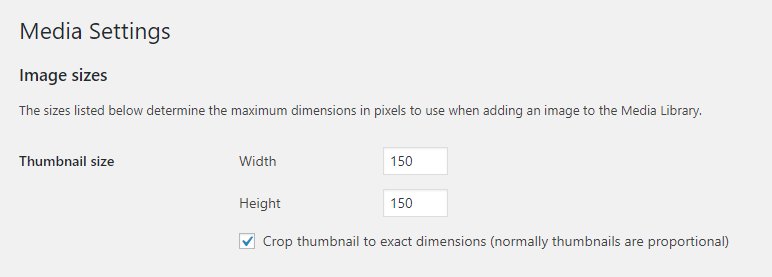
Most of the results from gtmetrix and google page speed are suggestions. You can add another size for your thumbs in wordpress here:
Go to your WordPress dashboard.
Navigate to the Settings > Media tab.
Look for the Image sizes > Thumbnail size section.
Change the default width and height of your thumbnails in pixels.
Thank you !
 tareqjhe1
Well, I really become so much when I saw my website speed is 100. I never expected to have this. Because I just use shared hosting. Also, don’t use any CDN. Even I didn’t use the minify plugin also. So how is this possible?
Although I checked again but also 99 and for mobile also 94/95.

 EgorYupatov
 Hi! Sorry, I just activate another theme for testing, when you come to my site. Actually it looks like this http://prntscr.com/rwqskv
So as I understood, you recommend me to disable Google fonts? But what if I want to use Google fonts? And how they even connect with an unused CSS cache file?
As I said before I used WP Rocket for caching (best premium cache plugin) and Imagify to compress my images and convert it in WebP format, which is really lightweight, and also I use minification plugin to minify my CSS and Java. So it’s almost all that you can do to improve your website speed, except using CDN.
But as you can see, problem not here. In another free theme, I have a less 1-sec result with the same set of plugins and content.
Calin Hi,
Thank you for your kind words!
1. If you want to reset or set a number for post view counter on all post you can do it using this functions.
For example using this function – https://pastebin.com/pKcWYFUt
The value can be changed, I set it to 1000. Enter it in the theme functions file. Refresh a post page and check if the views were updated. Then remove the function and the view should increase from the set value.
Or if you want do do it only for few post you can do it manually, go in posts and enable the custom fields -> https://i.imgur.com/NavHTFn.png after that down in post will appear the the custom field options -> https://i.imgur.com/waKZBHe.png chnage it -> https://i.imgur.com/NAFEi9p.png and check the results.
2. You can try to use with our theme the Contact Form 7 plugin to create a contact forum, you can check the tutorial from here -> https://themeisle.com/blog/how-to-set-up-contact-form-7/ hope this will help you!
Also you can use one of our cloud page from here -> https://i.imgur.com/WqHsTcz.png -> https://i.imgur.com/AkUy7qB.png with contact 7 plugin.
3. If you follow the steps which are presented in this tutorial here -> https://tagdiv.com/how-to-increase-page-loading-speed/ you’ll be able to increase the speed of your website.
Also you can check this similar topic for more solutions: -> https://forum.tagdiv.com/topic/optimize-script-to-improve-site-speed/ -> https://www.infophilic.com/get-almost-100-pagespeed-newspaper-theme/
– https://forum.tagdiv.com/topic/a-few-tips-for-newspaper-x-speed-high-cpu-usage-issues/
Last question: I’m assuming that this problem appear on posts that have set infinite loading, you’ll need to edit the single post template with tagDiv Composer and disable the infinite loading.
-> https://tagdiv.com/infinite-loading-for-single-posts/ from post -> https://i.imgur.com/yIf6fA3.jpg -> https://i.imgur.com/KeclHLS.jpg -> https://i.imgur.com/4jHIHFY.png
Have a nice weekend!
Calin Hi,
This is a cache file -> https://prnt.sc/rwltyx this is made by the cache plugin you are using.
You can disable the style from here -> https://i.imgur.com/HQHC2or.png
Also I checked your website and the theme plugins are not activate -> https://i.imgur.com/EcYmL26.png please activate tagDiv Composer -> https://i.imgur.com/mFmwmp8.png
If you are referring to page speed, the speed of your website depends on how well your site is optimized, if you follow the steps which are presented in this tutorial here -> https://tagdiv.com/how-to-increase-page-loading-speed/ you’ll be able to increase the speed of your website.
Also you can check this similar topic for more solutions: -> https://forum.tagdiv.com/topic/optimize-script-to-improve-site-speed/ -> https://www.infophilic.com/get-almost-100-pagespeed-newspaper-theme/
– https://forum.tagdiv.com/topic/a-few-tips-for-newspaper-x-speed-high-cpu-usage-issues/
Let me know the results!
Thank you!
EgorYupatovHello, I have some strange problem with unused CSS file – http://prntscr.com/rwltyx
When I manually delete this file, it’s recreating. As I understood, most of the heavy CSS files come from theme plugins – http://prntscr.com/rwlvbb
What I can do to delete this file? Also, I use WP Rocket, and Imagify and minify plugins, so I can’t do anything more to improve loading speed. The only way – to delete this strange CSS file, which is even not in use.
My site URL – https://websiteneophyte.com/
Calin Hi,
The video problem that you have are from website optimization, please make a test with our theme, for me everything is normal, I do not have this problem -> https://demo.tagdiv.com/newspaper_covid19_news_pro/ if you follow the steps which are presented in this tutorial here -> https://tagdiv.com/how-to-increase-page-loading-speed/ you’ll be able to increase the speed of your website.
Also you can check this similar topic for more solutions: -> https://forum.tagdiv.com/topic/optimize-script-to-improve-site-speed/ -> https://www.infophilic.com/get-almost-100-pagespeed-newspaper-theme/
– https://forum.tagdiv.com/topic/a-few-tips-for-newspaper-x-speed-high-cpu-usage-issues/
Also I checked the website to see where is this character ( ^ ) and I can not find it.
If you are using this option -> https://prnt.sc/rw4uj2 the theme will load on mobile an image instead of the video and the video will be load only after you tap on that image (you’ll need to tap twice, the first time to activate the video and the second time to play it).
Also I checked your amp version and this is displaying correct -> https://i.imgur.com/51NXvfr.png
Thank you!
Calin Hi,
The above documentation was to increase your page speed on your website is possible to take to long until the css is loading and that is way it’s say is not mobile friendly also it can be a plugin conflict.
Also here is one of our live demo that have the mobile theme plugin -> https://demo.tagdiv.com/newspaper_local_news/ and this is mobile friendly -> https://i.imgur.com/uOMZXJk.png -> https://search.google.com/test/mobile-friendly?utm_source=gws&utm_medium=onebox&utm_campaign=suit&id=AfR8pAiIUesXegRjru3UnA
Thank you!
Calin Hi,
If you are referring to page speed, the speed of your website depends on how well your site is optimized, if you follow the steps which are presented in this tutorial here -> https://tagdiv.com/how-to-increase-page-loading-speed/ you’ll be able to increase the speed of your website.
Also you can check this similar topic for more solutions: -> https://forum.tagdiv.com/topic/optimize-script-to-improve-site-speed/ -> https://www.infophilic.com/get-almost-100-pagespeed-newspaper-theme/
– https://forum.tagdiv.com/topic/a-few-tips-for-newspaper-x-speed-high-cpu-usage-issues/
Let me know the results!
Thank you!



