- NewspaperWP Rocket and Newspaper Theme: Optimization Guide
- TutorialsFrom WPBakery to tagDiv Composer
- NewspaperNewspaper Theme Support
- NewspaperNewspaper theme documentation
- NewspaperWeather Shortcode
- NewspaperCloudflare (CDN)
- NewspaperBest Of Forums
- TutorialsSystem status parameters guide
- NewsmagWhat’s included in Newsmag theme package
- NewsmagRequirements for Newsmag
- NewsmagNewsmag documentation
- Thumbnails vs. Featured image size
- NewspaperThumbnails – Fix strange looking images on blocks
- NewspaperRequirements for Newspaper
- NewspaperHow to Make the Site Faster
 ashubais
Help me, How to optimize my AMP pages, my normal speed is 88 in PageSpeed Insights but the AMP pages are too slow. How to fix it. here is my website please check it out – https://www.ytechb.com/amazing-whatsapp-tricks-2018/amp/
 brian7454
As a buyer and still currently a user, I have a couple of observations.
Plugins in one place please
There should be a file or page in your docs listing the contents of the plugins folder and saying what they’re for, and plugins should be kept in one directory, not two.
As all these plugins need to be updated manually, users need to remember that although they’ve updated all the plugins in the plugins folder, there are still two more plugins stored in the code directory. That’s not intuitive.
Speed booster?
I’m lost as to the point of the ‘speed booster’ plugin, which seems to get disabled by everything except sunshine.
I won’t list all the basic plugins I’ve found that disable the speed booster plugin, but it is a massive list including many of the default plugins I use on the majority of my sites (50+). However, I’m sure you’ll agree that website security is important. I have yet to find a security plugin that doesn’t disable your speed booster. Even ninjafirewall turns it off.
Author pages
Google have a list of strict requirements which sites must comply with before they can be included in Google’s news listings. One of those requirements is proper author attribution.
In this theme, as far as I can see, each post can show a user bio box, which contains the text copied from the author’s wp user page. The theme copies whatever is in the wp user box and pastes it into the bio field as unformatted text.
Okay, you can write your own plugin to force the bio field to accept basic html like line breaks and <p>, but this should be a basic theme feature, given the context.
If the author’s name in the bio box is clicked, the visitor is taken to an archive page which is topped by the same unformatted text field (yes, with social links below) and then a post listing below.
There should be an option to provide a condensed ‘bio’ for bio boxes below posts, with the option to show a proper, or full, author bio on the author’s archive page. The options might include not just social links/icons but things like address, phone number as well as bio. Not all sites need or want these, but some will.
Also, many articles are written by more than one author, so there should be a way of showing co-authors. And so on.
Given the importance of author bios and attribution to Google (this is important if you want your news website to get listed in google’s news listings) the author’s section needs to be considerably better thought out.
Just my observations.
 Simion C.
 I don’t understand the problem you are mentioning with a code. If you could provide more details about it it would be helpful.
Note that speed optimization is affected by many factors as I mentioned above. Test only with theme plugins active, test without ads.
There is also a theme tutorial you can follow
– https://forum.tagdiv.com/how-to-make-the-site-faster/
Or follow other online or forum tutorials. Website and speed optimization has to be made by you, or professional services. We do not offer such services unfortunately.
 TheFreshQuotes
 The link is about Optimization and not Speed.
My website page speed insight score is
Optimization – Good – 97 / 100
Speed – Slow – 5.3s FCP8.0s DCL
“PSI estimates this page requires 1 additional round trips to load render blocking resources and 4.3 MB to fully render. The median page requires 4 round trips and 2.7 MB. Fewer round trips and bytes results in faster pages.”
Simion C. Reverting back is not possible, unless you revert to an older version of the theme. The new implementation if the theme affects many theme files, that would be the only way. You could maybe enable only the bottom sharing. Or try to further optimize the website loading speed.
Simion C. There are many speed optimization guides and tutorials here on the forum, you could read them and further optimize the website
– https://forum.tagdiv.com/topic/score-100100-pagespeed-with-newspaper-wordpress-theme/
– https://forum.tagdiv.com/topic/newspaper-theme-speedify-your-website/
– https://forum.tagdiv.com/topic/tutorial-chriss-custom-optimizations-for-functions-php-etc/
A note is that the speed of the website is influenced by plugins and ads as well. Also teh hosting is decisive.
Simion C. Hi,
That would be how the CSS rules apply, it works in cascade. First the default color is loaded, then the custom color is. It also depends on the website loading speed, if it loads slower the flash would be visible. A solution for this problem wold be to remove the initial default color set as background for the menu, from the theme stylesheet
– https://www.screencast.com/t/Cy7kSQqGSq
Then the color you set will be the first one to load.
Thanks
TheFreshQuotesHello,
I have recently bought the newspaper theme and it is not doing any good. The mobile speed of my website is slower than before.
The mobile speed, as well as desktop speed, is very slow.
5.1s FCP7.7s DCL
It also shows that “PSI estimates this page requires 1 additional round trips to load render blocking resources and 2.4 MB to fully render. The median page requires 4 round trips and 2.7 MB. Fewer round trips and bytes results in faster pages.”
How to remove the additional round trip and improve page speed?
Thank You
 SamK
SamKHi,
I’ve installed the Fitness blog plugin and would like to know how to change the background color of the sidebar columns? It’s currently gray, but I’d like to change it to plain white.
Also, I’ve installed the WP Super cache plugin as you guys suggested it, but the site is still running slow; is there any way to specifically set the plugin to see some improvements?
Do you recommend resizing pictures before uploading them to the site, or will it be fine to upload them directly from your camera. Will doing so affect the speed of the site?
Lastly, after setting my permalink to custom structure, when I directly click on a category name in the Main Menu, the browser displays the link as follows: the website address, the word “category” follows, then actual category name. I don’t want the word “category” between the site’s address and the category’s name. I checked the demo, I noticed the same display format. Is there any suggestions to help me fix the issue?
I was also wondering if the use of tags is necessary? Do I have to use tags along my categories?
Thank you.
Simion C. The new theme version (8.7.2) and tagDiv composer version 2.1 have received many speed improvements in the latest update. So there should be no problem in the matter, as long as you are using this version and the system status is set according to the recommendations.
You could try with all plugins deactivated, leave only theme plugins active. Then test to see if there is still a problem.
We could take a look, please send an email at contact@tagdiv.com and provide admin login, FTP access and cPanel access if possible. Make a backup of the website before. Mention what exactly we should test if the issue is specific to particular actions.
 Catalin
 Hello YTGAW,
Please notice that the speed of your website depends on how well your site is optimized. Notice that is not a simple task and if you do not have any experience in this regard you will do not bring good results for the theme. Also, notice that we have a speed optimization tutorial but this is addressed only to advanced users. So, if you follow the steps which are presented in this tutorial here -> https://forum.tagdiv.com/how-to-make-the-site-faster/ you can increase the page speed loading and if you are not aware of the steps in this regard, please consider hiring a freelancer/developer to help you because the speed optimization services are not covered by our support policy, as you can read here -> https://forum.tagdiv.com/support-policy-2/ Check our documentation here -> https://forum.tagdiv.com/requirements-for-newspaper/ regarding on dedicated server to fit our requirements.
Unfortunately, our theme does not have such an option to minify the style.css file and we cannot recommend any plugins with this functionality because is not tested with our theme. For minifying this file, we are using CloudFlare for our demo and works fine. If you want to read other views from our users, please check this topic -> https://forum.tagdiv.com/topic/tip-how-to-easily-minify-your-css-without-breaking-your-site/
One of our top members here on the forum wrote his own optimization tutorial here:
https://forum.tagdiv.com/topic/tutorial-chriss-custom-optimizations-for-functions-php-etc/ and here -> https://www.infophilic.com/get-almost-100-pagespeed-newspaper-theme/
Basically, these are the theme requirements
– https://forum.tagdiv.com/requirements-for-newspaper/
Thanks for your understanding!
Catalin Hello Olya,
Please notice that the speed of your website depends on how well your site is optimized. Notice that is not a simple task and if you do not have any experience in this regard you will do not bring good results for the theme. Also, notice that we have a speed optimization tutorial but this is addressed only to advanced users. So, if you follow the steps which are presented in this tutorial here -> https://forum.tagdiv.com/how-to-make-the-site-faster/ you can increase the page speed loading and if you are not aware of the steps in this regard, please consider hiring a freelancer/developer to help you because the speed optimization services are not covered by our support policy, as you can read here -> https://forum.tagdiv.com/support-policy-2/ Check our documentation here -> https://forum.tagdiv.com/requirements-for-newspaper/ regarding on dedicated server to fit our requirements.
Unfortunately, our theme does not have such an option to minify the style.css file and we cannot recommend any plugins with this functionality because is not tested with our theme. For minifying this file, we are using CloudFlare for our demo and works fine. If you want to read other views from our users, please check this topic -> https://forum.tagdiv.com/topic/tip-how-to-easily-minify-your-css-without-breaking-your-site/
One of our top members here on the forum wrote his own optimization tutorial here:
https://forum.tagdiv.com/topic/tutorial-chriss-custom-optimizations-for-functions-php-etc/ and here -> https://www.infophilic.com/get-almost-100-pagespeed-newspaper-theme/
Basically, these are the theme requirements
– https://forum.tagdiv.com/requirements-for-newspaper/
Thanks for your understanding!
Simion C. Also test with no other plugins active if possible, plugins are the main source of delay when loading a website. Leave only theme plugins active and check the speed. Ads loading on the page can have an impact as well.
 Olya
OlyaHello, team! Don’t know how to Express yourself, whether that comment, or suggestion. But after the last 2 updates with the same settings, the website download speed increased by 1.5 seconds.
At the same time noticed that very long over the panel with social networks to share.
Simion C. For me the website on mobile is very fast regardless of the page speed score, under 2 seconds even
– https://www.screencast.com/t/J1JWRgFLJA
Testing the website in Google tool provides mixed results from what I can see
– https://www.screencast.com/t/yaFJWB76ZyP
– https://www.screencast.com/t/zNZYijNwiKI
 Anujsharma768
Hello sir my Page Score for mobile is 75 out of 100 in Google Page Speed Tool But after using Mobile Theme it goes down to 45 please help me I want high page score for mobile. My website URL is https://www.tricksbykabir.com
Simion C. Hi,
I have browsed your website for a while and for me the website is loading fast
– https://www.screencast.com/t/fh6Zo1CLqOPT
There are no errors on the pages, the website is loading fast. I see you using the latest theme version, which contains many improvements over the previous version. You can try to optimize the website further if you want to, there are many guides in the matter here on the forum, such as these
– https://forum.tagdiv.com/topic/score-100100-pagespeed-with-newspaper-wordpress-theme/
– https://forum.tagdiv.com/topic/newspaper-theme-speedify-your-website/
– https://forum.tagdiv.com/topic/tutorial-chriss-custom-optimizations-for-functions-php-etc/
Thanks
Simion C. Hi,
Indeed pages built with any composer will not be displayed on AMP pages. Amp pages are supposed to be fast loading pages which present the content quickly, not containing blocks and grids. Pages built with the default WordPress editor will be displayed on AMP
– https://www.screencast.com/t/42Qq9ta9pbY
The mobile theme as well is optimized for speed. You will have to create 2 versions for each page, one with the composer for desktop, and one with the mobile editor for mobile
– https://forum.tagdiv.com/the-mobile-theme/
The mobile theme will not display pages built with the composer, the default responsive version already does that. There would be no point to the plugin if it would do the same thing.
Both the mobile theme and AMP can be installed at the same time if needed. The posts will be served in AMP, and the rest of the website with the mobile theme in that case. AMP content will be served to users only through Google.
Thanks
 msorap
Hi,
I have install wp super cache with all setting even i did speed booster plugin setting still it not optimizing properly ???????????????? Please help me out
Catalin Hello jmedina0107,
Speed Booster is an optional plugin and it works only with tested plugins. You can read more here and also a solution – https://forum.tagdiv.com/topic/speed-booster-not-compatible-with-vaultpress/
Also, please notice that if you need more website optimizations, notice that you should do it yourself and if you are not aware of the steps which are needed to take in this case, please consider hiring a freelancer/developer to help you because we cannot provide this type of services, sorry! Usually, we recommend the developers from studio.envato.com
Thanks!
Catalin Hello jubeljoy,
Speed Booster is an optional plugin and it works only with tested plugins. You can read more here and also a solution – https://forum.tagdiv.com/topic/speed-booster-not-compatible-with-vaultpress/
Also, please notice that if you need more website optimizations, notice that you should do it yourself and if you are not aware of the steps which are needed to take in this case, please consider hiring a freelancer/developer to help you because we cannot provide this type of services, sorry! Usually, we recommend the developers from studio.envato.com
Thanks!
 nomoretechno
Hi, I regenerated thumbnails and have optimised all images to lossy. I have cleared caches. However, I am failing PSI and GTMETRIX speed tests for optimises images. On closer inspection, the website is not showing the optimised image thumbnail but a larger image.
Any suggestions why my theme is still pushing unoptimised images?
thanks
Simion C. Hi,
@notageek4u From what I can see at first glance, you could try and optimize the website more. For example the homepage has 10mb in size, that would be high. Regenerate the thumbnails because it seems some of the thumbnails are not created properly and the full image size is served
– https://www.screencast.com/t/DcTg0vMwK
There are many speed guides and tutorials here on the forum that you can follow. Some of them here, but there are many
– https://forum.tagdiv.com/cache-plugin-install-and-configure/
– https://forum.tagdiv.com/cloudflare-cdn/
– https://forum.tagdiv.com/how-to-make-the-site-faster/
– https://forum.tagdiv.com/topic/score-100100-pagespeed-with-newspaper-wordpress-theme/
– https://forum.tagdiv.com/topic/newspaper-theme-speedify-your-website/
– https://forum.tagdiv.com/topic/tutorial-chriss-custom-optimizations-for-functions-php-etc/
Thanks
 rafael-l
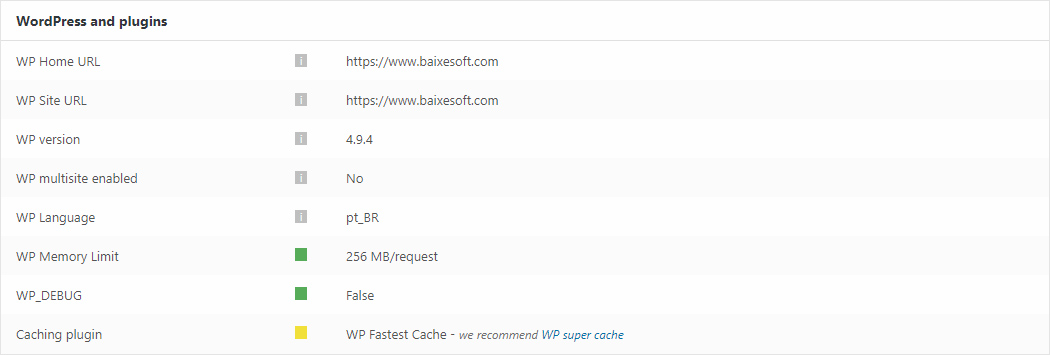
Hi there! Just two quick things about this screenshot form the system status:
https://www.baixesoft.com/wp-content/uploads/2018/02/Sem-Título-1.jpg
1) How much memory in wp memory limit will you recommend for a dedicaded server with a considerable number of access and with 4GB DDR3 RAM Memory at disposal only for this website?
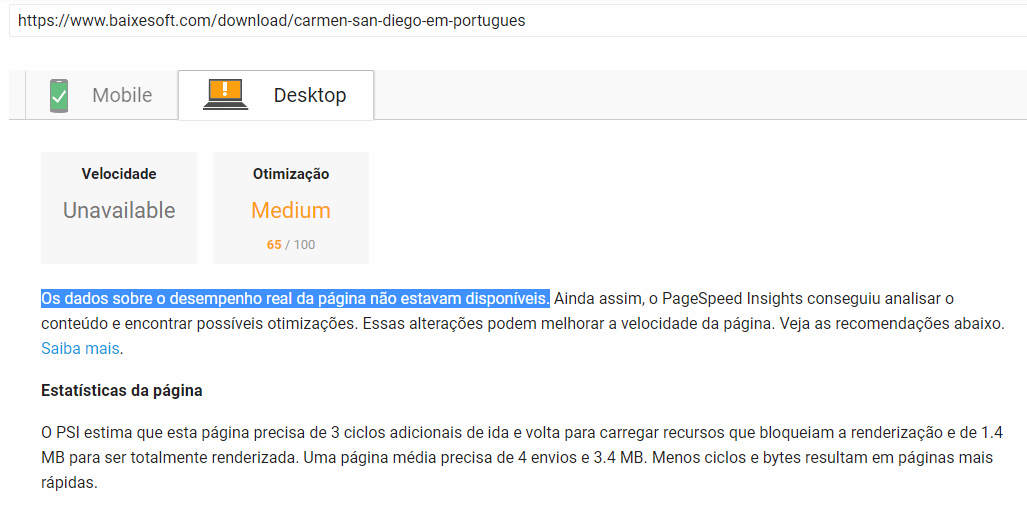
2) I have the premium version of WP Fastest Cache, cause it did way more effect than WP super cache in the previous theme, so there is any problem to use the fastest cache in newspapper? Cause i experienced this in PageSpeed Insights: “Data on actual page performance is not available” like the screenshot above (in portuguese language).
https://www.baixesoft.com/wp-content/uploads/2018/02/Page-speed.jpg
Thank’s for the support!
 pig911
 Thank you for your answer.
I preferring code because I am a little worried about the speed of my website, so I try to avoid using too many plugins on it.
As I said, I suggest you guys considering making a tutorial for this. I have seen lots of posts about this topic, and there are always some users to ask you to add new social networks to the Post Sharing list, which will be a challenge for your team to add all popular social media icon in the world. It is annoying to add new icons by patches.
Have a good day!