Bogdan B.
 Thank you!
Happy Holidays!
Bogdan B. There will be no problem at all. Visual composer does not affect your settings or customization.
It’s safe do update the plugin.
Thank you!
Bogdan B. Hello,
I tested this on my end but i could not recreate the issue. I have added 32 videos to a playlist and all of them seem to display fine. Please try to disable all your plugins except visual composer and clear cache to rule out a plugin conflict.
Let us know how it goes.
Thank you!
Bogdan B. Hello,
Unfortunately we have no quick solution to add dropcaps automatically. The dropcaps were maybe handled differently in your other theme.
Sorry for the inconvenience.
Bogdan B. Thank you Andy!
Happy holidays!
Bogdan B. Hello,
It seems the third time i tested this, the code did not work on my end as well. It worked the first 2 times i tried it like the screenshots above show. Strange.
Please try this one to see if it works now. I used a different container:
@media (max-width: 767px){

.td-header-sp-top-menu {

display: block !important;

margin-left: 14%;

margin-right: auto;

}

.td-header-top-menu-full {

display: block ;

}

}
Thank you
Bogdan B. Hello,
The problem with google news is exactly as Chris said in the above posts. The problem fixed was related to errors in the google structure data analysis. The update does not provide a fix for google news issues, nor does it cause these issues.
The visual composer plugin needs to be updated like this guide suggest: https://forum.tagdiv.com/how-to-update-visual-composer-plugin/
Thank you!
Bogdan B. Hi,
For the active menu item to retain it’s color you need to use a child selector and use the current menu item like so:
.sf-menu > .current-menu-item > a{

color:#d13030!important

}
I hope this helps.
Thanks.
Bogdan B. Hi,
I provided a method to add the +1 button in the other topic. There could also be a plugin to do this but unfortunately we have not tested any social sharing plugins so we cannot make any recommendations.
Thank you!
Bogdan B. Hello,
Please follow this tutorial to see how it can be done:
http://www.wpbeginner.com/wp-tutorials/how-to-add-the-google-1-button-to-your-wordpress/
You need to do 2 stepps to get it to work. FIrst, paste the javascript code in footer.php like so: http://screencast.com/t/CzzHinkdWnnY
Then you need to edit the loop-single files that correspond to the post template you use: http://screencast.com/t/U60dU61Mc
Result: http://screencast.com/t/Y3fFvECRkv
Thank you!
Bogdan B. Gald it worked out!
Bogdan B. Hello,
Please try to disable all other plugins except visual composer and wp super cache to rule out a plugin conflict.
WP super cache was tested to work with our theme.
Thank you!
Bogdan B. Hello,
1) Sorry about that, I have not notices the sticky menu. It also needs to be adjusted:
Use this code besides the other one from point 1:
@media (min-width: 1141px){

.td-header-style-8 .td-affix .td-header-sp-logo{

padding-top:100px

}}

@media (max-width: 1141px){

.td-header-style-8 .td-affix .td-header-sp-logo{

padding-top:75px

}}
4) Please use this code:
td_module_14 .entry-title:after {

content: none;

}
Thank you!
Bogdan B. Hi,
It can be found in wp_booster_functions.php : http://screencast.com/t/47SDJaZhuyms
Thanks.
Bogdan B. Hi,
You can use this guide to give a boost to your website: https://forum.tagdiv.com/how-to-make-the-site-faster/
Thank you!
Bogdan B. Hello,
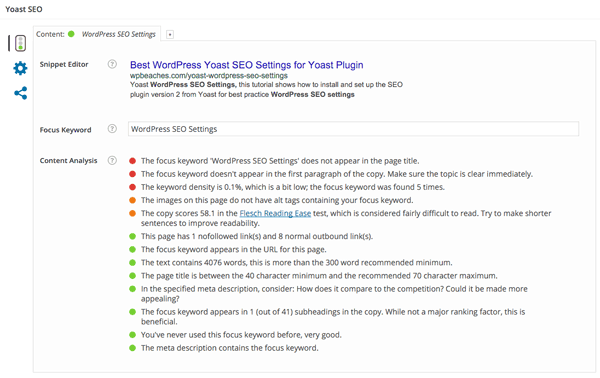
Generally the yoast plugin will analyse your page and display the seo issues: https://wpbeaches.com/yoast-wordpress-seo-settings/ – https://wpbeaches.com/wp-content/uploads/2015/03/wordpress-yoast-seo-local-post-settings.png Try both methods and see what result does the plugin provide and use the solution ‘aproved’ by the seo plugin.
Thanks.
Bogdan B. Hello,
The best thing to do when starting to use a new theme is to read the documentation. It will help you with a lot of problems: https://forum.tagdiv.com/wordpress-information/ We put time and effort into it so our users can easily have access to all the information needed.
The pagination you pointed out is actually a feature of the theme called a smartlist: https://forum.tagdiv.com/smart-lists/ The numbers pointed out is because the smartlist page was set by descending order. If you set it to ascending, then the page number from the smartlist and the page number from the url will match.
The “chart” you pointed out is a post review: https://forum.tagdiv.com/reviews-2/
I hope this helps.
Thank you
Bogdan B. Hello,
If you want to override the wp super cache plugin, maybe you could ask them about a method as they will know best how to do it. Or maybe you can find a solution online:
https://wordpress.org/support/topic/plugin-wp-super-cache-how-to-stop-caching-of-one-single-page
https://www.webhostinghero.com/recommended-settings-for-wp-super-cache-beginners/
https://wordpress.org/support/topic/plugin-wp-super-cache-exclude-specific-pages
I hope this helps.
Thanks.
Bogdan B. Hi,
Please disable all plugins except visual composer. Sometimes plugins can cause errors and conflicts which break the layout.
Thank you!
Bogdan B. Hello,
Thank you for your suggestion. You can use our official demo to see how the blocks look live: http://demo.tagdiv.com/newspaper/block-1/ simply select a block from the block menu and you will see what it will look like.
Happy Holidays!
Bogdan B. Hello,
You can hide the author name from a post or from our modules and blocks, but the theme does not control the meta data for sharing. Facebook will grab all the information from your post.
You can try to remove this code – http://screencast.com/t/Ack17APQQZdO then use fb debugger(fetch new scrape) to check you post – https://developers.facebook.com/tools/debug/og/object/
Thanks!
Bogdan B. Hello,
Our users have encountered this issue a few of times and found that it is a font related issue. The fix that worked for most people is this one: http://webmasters.stackexchange.com/questions/71630/font-blocked-from-loading-by-cross-origin-resource-sharing-policy-no-access-co
Try it out and let us know how it goes.
Thank you!
Bogdan B. Hello,
The theme excerpts offer control over the length of the title and the length of the excerpt. In words or in letters. You can read more about how to use excerpts here: https://forum.tagdiv.com/excerpts-introduction/
If by any chance you use a language that does not use spacing after a word like for example Japanese or Korean
(I could be wrong about these languages but you get the idea) then an entire post will be considered a single word as it has no spacing. In this case you need to limit your excerpts by letters.
I hope this helps.
Thank you!
Bogdan B. Hello,
I have checked your website and the sidebar seems fine. I could not find any problems with it: http://screencast.com/t/EYvX478Yk
Maybe it was a temporary glitch, or you managed to solve it in the meantime. These errors can come from conflicting plugins. Usually we recommend disabling all plugins except visual composer to rule out conflicts.
Thank you!
Bogdan B. Hello,
I tested the code again and could not recreate the issue on my end. I added it in the theme panel custom css box and it applied as expected. Please try to disable all plugins except visual composer to rule out a plugin conflict which may interfere with the css. If it still will not work, then you can edit the style.css directly in the file and set the color to transparent. http://screencast.com/t/tChaCvdyVV
Thank you!