- NewsmagUsing the theme translations together with WPML
- NewsmagHow to update a plugin
- NewsmagCustom Post Type Support
- NewsmagAbove footer ads
- NewsmagWeather Widget
- NewsmagHow to update the theme
- NewsmagIntroduction
- NewsmagLogo & Favicon
- NewsmagFooter templates
- NewsmagUsing other ads
- NewsmagCustom ad spots
- NewsmagArticle ads
- NewsmagSidebar ads
- NewsmagHeader ads
- NewsmagLoading image effects
- NewsmagCategory top post styles
- NewsmagSmart Lists
- NewsmagGeneral settings
- NewsmagTheme thumbs
- NewsmagtagDiv slider gallery
 Bettina
 Hello!
I do not know exactly which element it is, but if you edit the page with TagDiv Composer, then in the left side you will see the name of the element.
I think it is about a posts loops element.
The Posts Loops settings are divided into 4 tabs: General, Layout, Style, and CSS. The Posts loop is a special block and doesn’t have filtering options.
Also, one of the options for pagination of the Posts Loop has the option for normal numbered and the flex blocks do not have this option.
The Posts Loop is automatically filtering the posts depending on the cloud template you set (for example on the category page there will be posted posts from that category).
Thank you!
Bettina Hello!
There is actually a recycle bin basket for every element if you just look carefully: https://www.screencast.com/t/wFYdqgpo6pT ; the second way to delete something is that you can drag & drop the element at the bottom of the page where will be a red area, and the third way is to click on the element and hit the button DELETE from your keyboard.
Try to do these steps:
1. disable TagDiv Composer
2. uninstall(delete) TagDiv Composer
3. clear cache (if cache plugin exists)
4. install TagDiv Composer
5. activate TagDiv Composer
6. clear cache (if cache plugin exists)
Let me know the results!
 Calin
Calin Hi Checcolin80, I just checked your website, but it looks that now you no longer have set the amp version on your website, therefore I can not inspect the reported problem.
Thank you for your understanding!
 soltanamir1
When debugging I get the following errors:
[01-Jul-2021 03:52:46 UTC] PHP Notice: amp_has_paired_endpoint was called incorrectly. Function called while AMP is disabled via amp_is_enabled filter. The service ID "paired_routing" is not recognized and cannot be retrieved. Please see Debugging in WordPress for more information. (This message was added in version 2.1.1.) in /home1/foundthe/public_html/wp-includes/functions.php on line 5313
[01-Jul-2021 03:52:46 UTC] PHP Notice: amp_remove_paired_endpoint was called incorrectly. Function called while AMP is disabled via amp_is_enabled filter. The service ID "paired_routing" is not recognized and cannot be retrieved. Please see Debugging in WordPress for more information. (This message was added in version 2.1.1.) in /home1/foundthe/public_html/wp-includes/functions.php on line 5313
[01-Jul-2021 03:53:06 UTC] PHP Notice: amp_has_paired_endpoint was called incorrectly. Function called while AMP is disabled via amp_is_enabled filter. The service ID "paired_routing" is not recognized and cannot be retrieved. Please see Debugging in WordPress for more information. (This message was added in version 2.1.1.) in /home1/foundthe/public_html/wp-includes/functions.php on line 5313
[01-Jul-2021 03:53:06 UTC] PHP Notice: amp_remove_paired_endpoint was called incorrectly. Function called while AMP is disabled via amp_is_enabled filter. The service ID "paired_routing" is not recognized and cannot be retrieved. Please see Debugging in WordPress for more information. (This message was added in version 2.1.1.) in /home1/foundthe/public_html/wp-includes/functions.php on line 5313
WordPress version 5.7.2
Current theme: Newspaper (version 11)
Current plugin: tagDiv Cloud Library (version 1.5 | built on 06.05.2020 14:38)
PHP version 7.4.20
 britb24
It am getting annoyed. Why is my site shows different layout in different times. Sometimes it shows like three month old layout(but content is updated) also sometimes shows mobile version(I disable the mobile theme and amp plugin).
I am getting confused and frustrated. Everyday its happening and i have to login to wp admin then edit page, them it becomes normal but after few hours its goes back to random old layout.
What is the solution?
my site: britbangla24.com
 jmbren
Hello,
I DO NOT want visitors to my site to be able to leave comments or post reviews. Tired of dealing with spam.
I disabled both everywhere I can think of in the Theme Panel as well as unchecking comments on the Posts page for each one individually with no result.
I’m using default Newspaper 10.4.
Use Custom CSS code?
Thanks,
Mike
 cmcnews
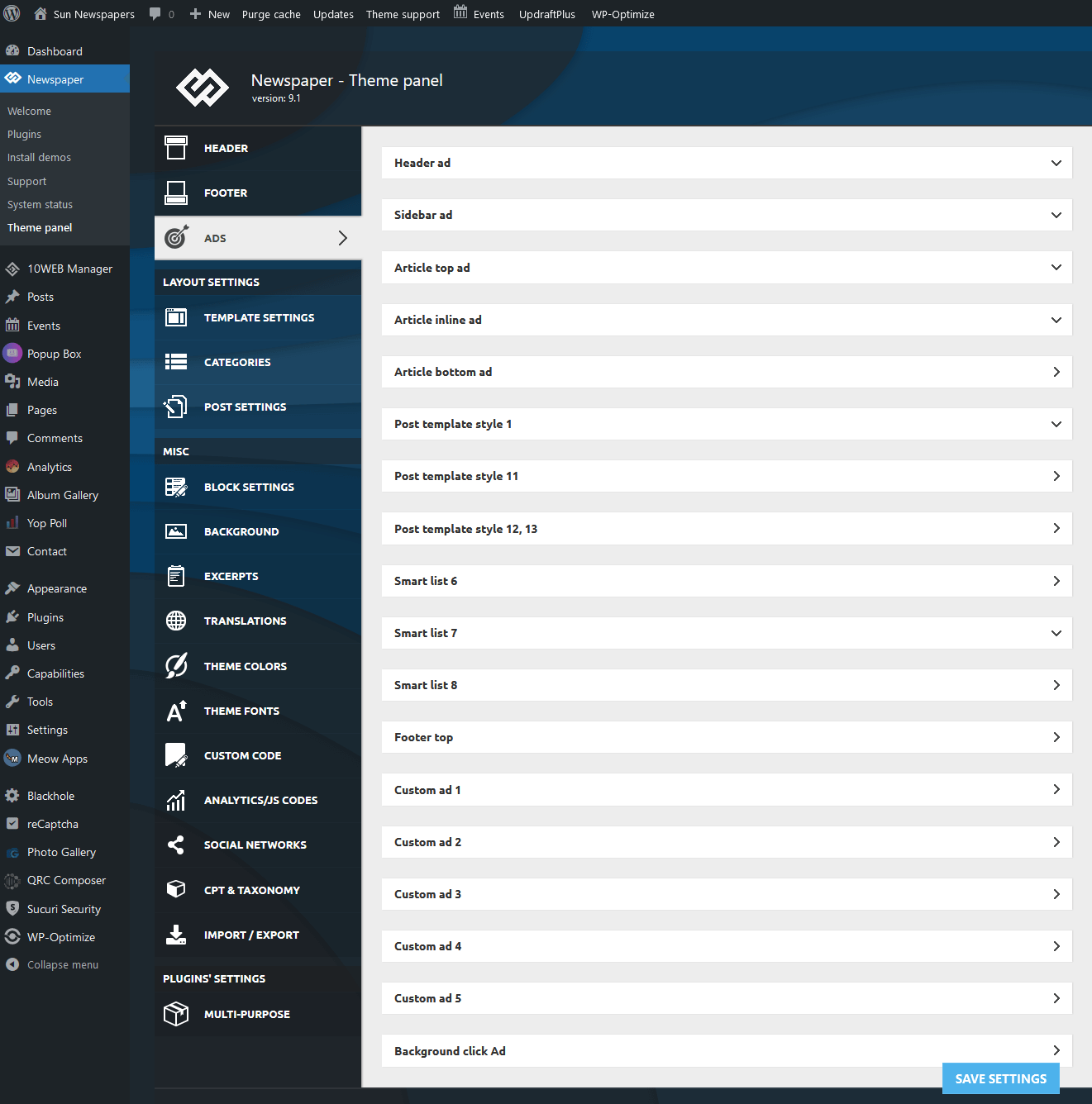
When in the backend and going to Newspaper – Theme Panel – Ads (for example, seems all are affected), the drop down menus refuse to open when clicked, though the arrow points down.
Any ideas?
Site affected https://sunnews.org
screenshot
 ArtRights
Hello I am having some problems with the AMP Layout… it is breaking completely the website… this is an example:
https://www.artuu.it/2021/06/25/grow-lopera-di-daan-roosegaarde-che-omaggia-lagricoltura/arte/art-millennials/amp/
What shall I do?
 Checcolin80
Good evening, I am having some problems with the display in AMP of the site http://www.biteyourconsole.net, if visited from mobile it shows old and dated articles, while from desktop it is able to display the site correctly
 Pixel Cities
Hi Guys,
I trust you are all keeping well.
Please fix an issue I have with the position of sub menu box?
When navigate to ‘MEMORIAL HALL’ then drop down to ‘What’s on’ the sub menu box is positioned to far at the top of page?… it needs to be the same as position as ‘COMMUNITY CENTRE’ sub menu box ‘What’s on’
Please see the example link
https://www.ircatoday.com/broadditch-farm-shop/
If you need a temporary login to the site please let me know?
Kind Regards
Mark Fraser
 Anamaria
 Hello,
At the moment our theme we do not have any tool for a paywall, but we are working on this implementation.
Until then you can try a plugin, for example, The Leaky Paywall plugin, users who use it say that it is compatible with the theme.
Thank you for your understanding!
 shan-2
 Hello,
we don’t have any security plugin & I have already cleared the cache also.
if you need our site credentials? please let me know.
Thanks
 huma1985
 review: https://snipboard.io/9s1r6W.jpg
AMP on/off option is not showing after update. please guide me what i do ? before in every post on/off for AMP button was showing.
thanks
 frullino2
 Hi Annamaria thanks for the support. I use the tagdv plugins and the recommended amp plugin.
If I activate the mobile theme plugin, the amp plugin no longer works. If you want, I’ll let you in as admin and see. All this was born after the update to version 11 of the theme.
Anamaria Hello,
What type of prebuilt website did you install, pro or standard?
These changes apply for example only when you use the standard header/footer templates (and other standard templates) from Theme Panel (not a cloud template) => https://www.screencast.com/t/4gApdblBu8 -> https://www.screencast.com/t/m1vrJsvHM
You need to edit the page with tagDiv Composer to make changes, like in this is a video https://www.youtube.com/watch?v=HXQQygkCCJ
Also, please let me know what settings did not apply, and provide some screenshots with the settings.
Hope this helps you!
Thank you!
 priyank
 Your Official Link:
https://demo.tagdiv.com/newspaper_artist_pro/
If I install same theme in my server So It is not working category wise
For Example:
If I click Any of menu like – Arts, Graffiti, Pop Art – Its rendering same page of Art only So not filter properly category wise
——————————– Update————————————
You can see – https://demo.tagdiv.com/newspaper_artist_pro/ in this demo there are some menu options right?
like –
HOME / ARTS / GRAFFITI / POP ART / ARTISTS
So In your Demo working fine If I clieck Arts Menu then It will open Arts category – If I click on Graffitti menu then it will open graffitti category section
But In my server after installing your theme Menu function not working properly
If I click any menu like ARTS / GRAFFITTI/ POP ART / – SO it shows only Arts sections
so not filter properly
Now I think you understood my question what exaclty i am facing issue with your theme
Can you please suggest that why menu filter not working.
I have also checked with other themes of your newspaper 11 but all theme has same issue which above mentioned.. so its really tough to create website with your theme..
if possible can you please call on any desk so i can share my screen that what i exacly facing the issue because in message its diificult to message and sort out this problem
please help.. thanks
Anamaria Hello,
If I understood correctly, you made a mobile page for the homepage, so please make sure you set it => https://www.screencast.com/t/bYroSq7x8T9, also, the header and footer are taken from the standard ones. All you have to do is edit the mobile page, and in Manager (Website Manager) you need to import or the easy way is to convert the existent header/footer like this => https://www.screencast.com/t/HrjOBNayd -> https://www.youtube.com/watch?v=SpGkOnJeNZY (03:11 – Mobile Templates & Pages)
If you don’t mean this please give me more details, screenshots.
Thank you!
Anamaria Hello,
Using our theme you can choose from 3 mobile versions
-> mobile responsive => https://www.screencast.com/t/oJ2ShOp47
-> mobile theme plugin => https://forum.tagdiv.com/the-mobile-theme/
-> mobile page => https://tagdiv.com/newspaper-10-3-7-update-brings-customizable-and-fast-mobile-pages/
This is a video about Responsive Newspaper Theme, AMP & Mobile Theme, Mobile Pages & Templates -> https://www.youtube.com/watch?v=SpGkOnJeNZY
So, the mobile responsive is what you see then that you select the viewport on phone => https://www.screencast.com/t/matV17hH, so some settings may apply for each viewport(where is the border blue), and others are not(where the border is black).
The mobile page has the mobile templates from Cloud Library => https://www.screencast.com/t/YCcZ8rL8
Mobile responsive version of the theme and the mobile page editor can be edit with tagDiv Composer, the mobile theme plugin not.
So, please let me know what version do you use and also if you extra plugins.
Also, I am not sure I fully understand what you mean by ” it becomes stationary.” please provide more details.
Thank you!
Anamaria Hello,
I made a test using Mobile+AMP and for me works well => https://www.screencast.com/t/x28jDLknuSg
Please let me know the settings made, also what AMP plugin you use.
Also, please use only the tagDiv plugins and AMP, clear all cache and see if the problem persists.
Thank you!
priyank Hello,
In your Newspaper 11 There is one theme name
Your Official Link:
https://demo.tagdiv.com/newspaper_artist_pro/
If I install same theme in my server So It is not working category wise
For Example:
If I click Any of menu like – Arts, Graffiti, Pop Art – Its rendering same page of Art only So not filter properly category wise
How can I do that?
This same thing happen in all your other templates too?
Can you please suggest why it is not working in installation and its working on your demo server
 yy
yy When I access example.com/wp-json/wp/v2/posts?tags=idForSomething (GET),
the response contains newest articles. So I guess WP side works fine.
-
This reply was modified 5 years by
yy.
 Vlad S
 Hello!
Depending on where do you want to insert the code in your template you could edit the files of the template that you are using. For example, in post page you can edit it here: wp-content\plugins\td-cloud-library\shortcodes\single
I hope this is helpful!
Thank you!
priyank Hello,
In your Newspaper 11 There is one theme name
Your Official Link:
https://demo.tagdiv.com/newspaper_artist_pro/
If I install same theme in my server So It is not working category wise
For Example:
If I click Any of menu like – Arts, Graffiti, Pop Art – Its rendering same page of Art only So not filter properly category wise
How can I do that?
This same thing happen in all your other templates too?
Can you please suggest why it is not working in installation and its working on your demo server
Anamaria Hello,
If you want to use sticky ads you need to get this from the supplier, our theme does not have an option for sticky ads https://services.google.com/fh/files/emails/sticky_ads_guide.pdf
If you use the mobile theme you need to set the code in Theme Panel -> Mobile Theme -> Mobile Ads => https://www.screencast.com/t/mQocyijRM or if you have only AMP then in Mobile Theme ->AMP ads => https://www.screencast.com/t/qF305ryH
Thank you!
 Spontis
Hello. I am currently working on migrating my site to Newspaper 11. It has been shown that this requires some changes to my templates. For example, headers and footers are stored under “Cloud Templates” and the individual sub-pages under “Pages”.
What’s the safest way to broadcast this change to the live page?
Can I simply copy the number / letter code from the changed cloud templates into the existing cloud templates on the Livepage?
Is there a better way to bring all chagend Templates into the Live-Site?